Windows startup repair cannot repair this computer automatically

XP VM User

New member
Member
VIP
Local time
3:29 PM
Messages
279
Hi everyone!

I had a crisis when turned on computer today (See below, a i5 chip 8 GB RAM , Windows 7 Professional (x64)) and it says:

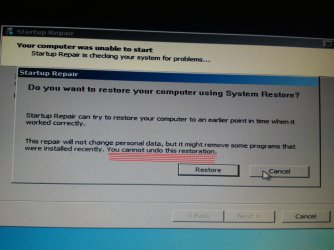
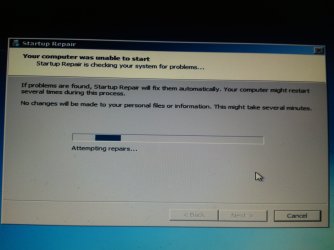
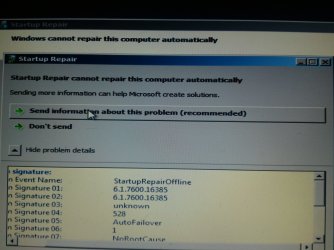
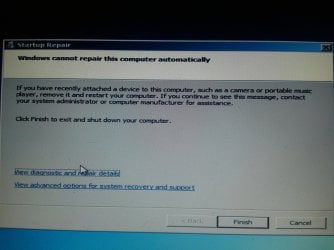
"Windows cannot repair this computer automatically"

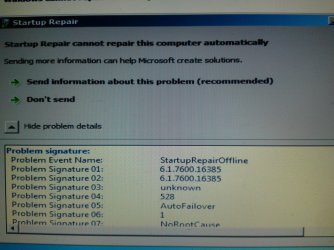
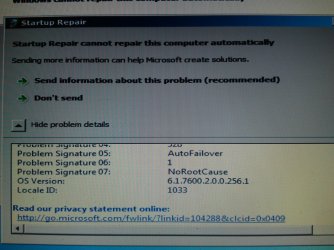
"Startup Repair cannot repair this computer automatically"

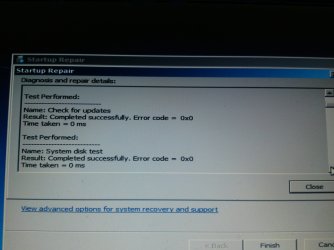
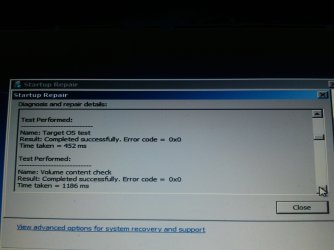
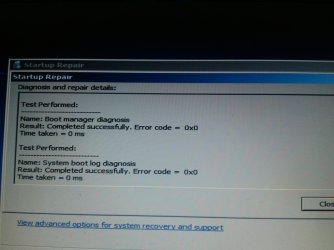
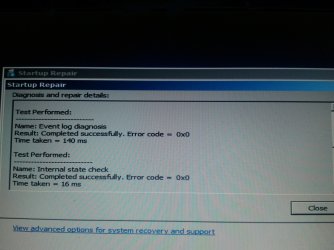
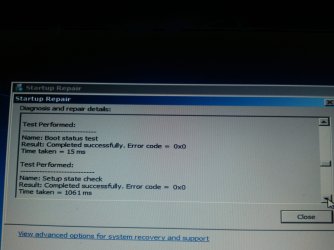
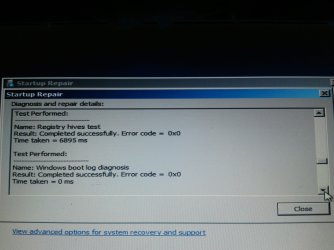
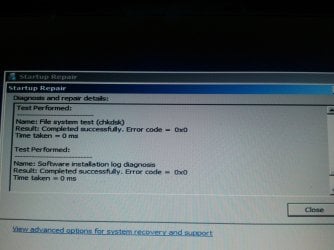
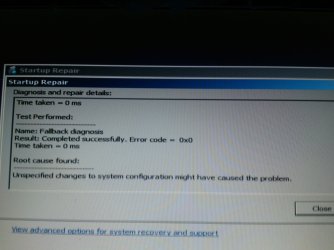
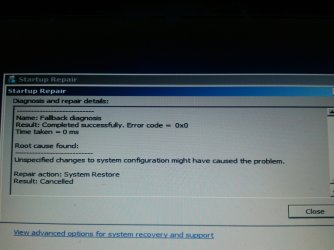
I have many screenshots to post of the details and I also checked the Event Viewer for this problem. Of course the computer was not working so I call them "Screenshots" when they are actually digital photos of the computer screen. They are on close up setting so the words and Error codes are quite visible (Most if not all error codes from the self tests read out as:

"Error Code = 0x0"

The second time I tried to start Windows today, it worked normally.

Wondering what I can do before this becomes a crisis that I can't get out of.

No Viruses or Malware, checked in past 24 each one using two different programs.
Its not the BSOD yet, so I didn't need to get the dump etc files requested, but the warning message appeared as regular GUI style with windows, so posting here to get advice so hopefully it doesn't get to a future BSOD crisis.

I'm being short here to wait for what types of data anyone wants or needs to help me investigate and see what is causing this so I can stop it.

Maybe you need to know this, otherwise skip it, A few days ago, the Hard Drive went down to 156K for a few minutes as I was copying [I should have used "move command" not copy, but now I know] some sections of the HD over to save them elsewhere.

But since I've started and closed down the computer several times since then,without incident, so I don't think its that. A different problem: I should make a separate thread for and I might if there is a solution that doesn't involve losing money is that I don't know how to get a larger than 500GB HD inside this laptop without losing program Product Keys, and using outside HD is an idea but what to move out? All files are just "many" nothing really BIG that I can move out at once to make more room.

Thanks for reading me!
XP VM USER
 

My Computer

Computer type
Laptop
Computer Manufacturer/Model Number
SONY VAIO VPCS111FM
OS
Windows7 Professional 64bit
CPU
Intel(R) Core (TM) i5 CPU M 430 @2.27 Ghz
Memory
8.0 GB
Hard Drives
Seagate 500GB Momentus
Cooling
Internal fan
Mouse
Logitech bluetooth trackball
Browser
Pale Moon Browser for x64
Check the HD for errors use SFC /scannow backup data in case you should be able to get a new bigger drive and clone the old one no problems
 

My Computer

Computer type
PC/Desktop
OS
win 8 32 bit
Hi Samuria!

Thanks for your reply!

Check the HD for errors use SFC /scannow backup data

I need more information please!

Question: Is SFC /scannow a command line on the DOS Prompt screen?

When you say "backup data" ...is that done by me before I do the scan? Unfortunately, I have not been able to do that as with Laptop HD approaching full I no longer can "fit" two slightly compressed backups on the External Backup Drive, I'd have to erase totally both backups 6 months ago and 8 months ago (I used to do it every 2 months or so until another problem occurred)

And so I cannot do the backup until I solve a "Apple" problem that is taking up valuable HD space and is taking since June to repair/restore slowly as nothing is working so far.
Not to give too many details.... Latest version (released 9-26-17 I think) of "iTunes" 12.7 does NOT work with (x64) Windows computers! And many attempts to install and test it out leave the computer "frozen" so only option was to hard restart button it. Of course the computer goes into the option of "DOS checking HD C: one of your disks needs to be checked for consistency" I think the message says that as I've seen it more than a dozen times past week. I'm working with Apple techs who seem to know the PC and Windows, but this is a Windows 7 problem so I'm writing to ask everyone here.

Question: So is SFC /scannow all I have to type after the >> DOS prompt? (only have one drive in laptop, not partitioned, so do I have to specify Drive C:? I forget DOS its been a while)
Again, is it safe to use without a current backup or should I solve the Apple and space problems first so I can make a current backup of the hugely inflated HD contents?
Thanks again for advice!
XP VM USER
 
Last edited:

My Computer

Computer type
Laptop
Computer Manufacturer/Model Number
SONY VAIO VPCS111FM
OS
Windows7 Professional 64bit
CPU
Intel(R) Core (TM) i5 CPU M 430 @2.27 Ghz
Memory
8.0 GB
Hard Drives
Seagate 500GB Momentus
Cooling
Internal fan
Mouse
Logitech bluetooth trackball
Browser
Pale Moon Browser for x64
Hi XP,,
re sfc

Run it from an elevated command prompt
sfc /scannow /r


BEFORE YOU DO ANYTHING
Now the bigger problem from what you posted space dropped to 156K
GET RID of something/anything, BUT your going to have to do it bit by bit

W7 uses free space to perform its daily operations
DID you ignore the low space warning -- NEVER go below 10%

Suspect its the reason why you cant install Apple

Roy
 

My Computer

Computer type
PC/Desktop
Computer Manufacturer/Model Number
medionl/Aspire 6930G/acer x55a
OS
W7 home premium 32bit/W7HP 64bit/w10 tp insider ring
CPU
E5300 dual core
Motherboard
medion MS7366
Memory
3gb
Graphics Card(s)
Nvidia Geforce 7100 Nforce 630i
Monitor(s) Displays
avixc
Internet Speed
n (isp resticted to 72)
Antivirus
mse/pands
Browser
palemoon
Other Info
Belkin Fd7050 n USB using Railink RT2870 drivers, more upto date
Why I went down to 156 K I did not ignore warnings

Hi XP,,
re sfc

Run it from an elevated command prompt
sfc /scannow /r


BEFORE YOU DO ANYTHING
Now the bigger problem from what you posted space dropped to 156K
GET RID of something/anything, BUT your going to have to do it bit by bit

W7 uses free space to perform its daily operations
DID you ignore the low space warning -- NEVER go below 10%

Suspect its the reason why you cant install Apple

Roy

Hi Roy!

I tend to write long sentences so I hope my response is not too much to read (others here know I do that and can't help it).

Short short answer is that I was in the process of clearing off huge "backups" of the old old original iPad1 I have that needed emergency "Restore" process back in June by phone with the Apple Tech help (after store I physically took it to gave up!)

I was erasing emergency backups I had made along the way of various versions of backups as Sync for the items on the iPad failed to "backup" like it was doing since 2010. So I lost everything ---like 24,000 photos for instance.

But the backup is ok I said.... No warning that it was not doing the job it was supposed to do! Fortunately (or bad for the Laptop's space on the HD I had saved two prior backups (20GB each) but they too had no photos AT ALL!)

So I'm smart... I went to the PC Backups and found one I had not erased yet from last year! That backup had worked so I have about 21,000 photos. But the missing 3,000 are still on the iPad so I was using a third party program to probe the iPad Device looking for them (as Data Recovery is sooooooo expensive for iPads!!)

Almost at end of story.....

So with all the saving of the extra backups and everything else I really used up my space as in May I had 70 GB Free on the 500GB HD (just think, three x 20GB backups each a different date and different attempt using older versions of iTunes (not the 12.7 version that fails to launch past the iCloud stage) and you can see how I oops ! used up everything and had no external places to put the extra savings stuff except "delete"

Yes! I had some old Large Flash Drives with 32 GB on each so unfortuantley, since you can't divide up the 20 GB backups it was "one" per Flash Drive and I used them to save them outside the computer in case iTunes started up again (as iTunes will erase automatically the oldest one as it knows the HD is getting full and that one has 24,000 photos on it and its now back in the computer and its not what I want erased.

OK .....so I was copying off the computer to outside HD some files and moving others around by the same command "copy" as I wanted to verify it was 100% copied accurately before I delete the file. You know the large files say you can't go to recycle bin its delete only so I better be sure.....and I guess I left too many on the computer when one of the copy commands were used..

.......and that is how I got down to 156K

Now its ok I'm back up to 32 GB Free... But still no working iPad and still lost the difference in photos between 2016 and 2017... BUT Apple gave me (as I kept complaining) and everyone else I guess.. in past few days 29th I think it was, a new version of the iCloud for windows and now the iTunes works perfectly without freezing up the whole computer.

I'm assuming all those emergency moves and actions did "something" to the PC that caused a problem in start up.

My goal with this Thread to to discover myself if I can, what went wrong and repair it so that nothing worse will happen later on...

Moral of my story...... Every few years we should purposely destroy or erase our current HD's or Flash Drives in the iPad, PC's etc just to "test out" if those copies we create using hours of effort are really able to come back and take over functions and make the computer or iPad function again! I really no of no other way to be certain that a copy I make today of the PC actually has everything on it or iPad actually has what it says it has on it.

[From the people here on an earlier thread I do use Macrium which allowed me to "mount" my saved backup HD of this Laptop from 1 year ago and discover a version of the iPad stored away on there that was not corrupted by the malfunctioning older version of the iTunes --that occurred before I even got the new 12.7 that froze the screen solid....of course I never once saved under the new one as I only got it to work a few days ago.]

Hi XP,,
re sfc

Run it from an elevated command prompt
sfc /scannow /r

And thank you for that instruction.... now I'll turn this off (after waiting to see if you reply to me first) and do this process and /r (report!) and report back to you and everyone what the scan result is.

Added this in for anyone else who needs it:

Elevated Command Prompt

(I pinned the C\Windows\system\32> to my start menu years ago so I can get it easy).

Was so busy typing I forgot to compliment you on the nice Dr Who Tardis image you have as your avatar there!

Have a great day everyone!
XP VM USER
 
Last edited:

My Computer

Computer type
Laptop
Computer Manufacturer/Model Number
SONY VAIO VPCS111FM
OS
Windows7 Professional 64bit
CPU
Intel(R) Core (TM) i5 CPU M 430 @2.27 Ghz
Memory
8.0 GB
Hard Drives
Seagate 500GB Momentus
Cooling
Internal fan
Mouse
Logitech bluetooth trackball
Browser
Pale Moon Browser for x64
OK I tried sfc /scannow /r

Hi Roy!

Posting quickly so I get to you before its too late across the pond over there in England.

I launched the command prompt using "Run as administrator" choice (of course).

I typed in command " sfc /scannow /r " observing the spaces and correct slash marks.

I got the following result:
Microsoft Windows [Version 6.1.7601]
Copyright (c) 2009 Microsoft Corporation. All rights reserved.

C:\Windows\system32>sfc /scannow /r

Microsoft (R) Windows (R) Resource Checker Version 6.0
Copyright (c) 2006 Microsoft Corporation. All rights reserved.

Scans the integrity of all protected system files and replaces incorrect version
s with
correct Microsoft versions.

SFC [/SCANNOW] [/VERIFYONLY] [/SCANFILE=<file>] [/VERIFYFILE=<file>]
[/OFFWINDIR=<offline windows directory> /OFFBOOTDIR=<offline boot directory>
]

/SCANNOW Scans integrity of all protected system files and repairs files
with
problems when possible.
/VERIFYONLY Scans integrity of all protected system files. No repair operati
on is
performed.
/SCANFILE Scans integrity of the referenced file, repairs file if problems
are
identified. Specify full path <file>
/VERIFYFILE Verifies the integrity of the file with full path <file>. No re
pair
operation is performed.
/OFFBOOTDIR For offline repair specify the location of the offline boot dire
ctory
/OFFWINDIR For offline repair specify the location of the offline windows d
irectory

e.g.

sfc /SCANNOW
sfc /VERIFYFILE=c:\windows\system32\kernel32.dll
sfc /SCANFILE=d:\windows\system32\kernel32.dll /OFFBOOTDIR=d:\ /OFFWINDI
R=d:\windows
sfc /VERIFYONLY

C:\Windows\system32>/scannow /r
'/scannow' is not recognized as an internal or external command,
operable program or batch file.

C:\Windows\system32>
Looks like its only instructions.... did it run? Took less than 1/10 second.

I entered /scannow /r without the sfc and see? It says:
'/scannow' is not recognized as an internal or external command,
operable program or batch file.
What do I do now?

Thanks!

XP VM USER
 

My Computer

Computer type
Laptop
Computer Manufacturer/Model Number
SONY VAIO VPCS111FM
OS
Windows7 Professional 64bit
CPU
Intel(R) Core (TM) i5 CPU M 430 @2.27 Ghz
Memory
8.0 GB
Hard Drives
Seagate 500GB Momentus
Cooling
Internal fan
Mouse
Logitech bluetooth trackball
Browser
Pale Moon Browser for x64
I don't understand why, but its working now

Hi Roy and everyone!

I turned off and turned back on computer after a few hours.

Tried same thing.... Elevated Command Prompt. "Run as administrator"

Entered after C:\Windows\system32\>sfc /scannow
Without the "/r "

and its working!

See?
Microsoft Windows [Version 6.1.7601]
Copyright (c) 2009 Microsoft Corporation. All rights reserved.

C:\Windows\system32>sfc /scannow

Beginning system scan. This process will take some time.

Beginning verification phase of system scan.
Verification 1% complete.
Will let you know after its completed 100% for all phases.

[Edit: That was fast!]
Microsoft Windows [Version 6.1.7601]
Copyright (c) 2009 Microsoft Corporation. All rights reserved.

C:\Windows\system32>sfc /scannow

Beginning system scan. This process will take some time.

Beginning verification phase of system scan.
Verification 100% complete.

Windows Resource Protection did not find any integrity violations.

C:\Windows\system32>
What do I do now?

Thanks all!
XP VM USER
 
Last edited:

My Computer

Computer type
Laptop
Computer Manufacturer/Model Number
SONY VAIO VPCS111FM
OS
Windows7 Professional 64bit
CPU
Intel(R) Core (TM) i5 CPU M 430 @2.27 Ghz
Memory
8.0 GB
Hard Drives
Seagate 500GB Momentus
Cooling
Internal fan
Mouse
Logitech bluetooth trackball
Browser
Pale Moon Browser for x64
Computer unable to start yet again! But I got photos this time!

Hi Everyone again!

Guess what still happens?

Computer does not start up!

I have these photos I took with a camera of the screen:

Computer unable to start pic 1 DSC07967.jpg

Computer unable to start pic 2 DSC07968.jpg

Computer unable to start pic 3 DSC07972.jpg

Computer unable to start pic 4 DSC07973.jpg

Computer unable to start pic 5 DSC07974.jpg

Computer unable to start pic 6 DSC07972.jpg

Computer unable to start pic 7 DSC07976.jpg

Computer unable to start pic 8 DSC07977.jpg

Computer unable to start pic 9 DSC07978.jpg

Computer unable to start pic 10 DSC07979.jpg

Computer unable to start pic 11 DSC07980.jpg

Computer unable to start pic 12 DSC07981.jpg

Computer unable to start pic 13 DSC07982.jpg

Computer unable to start pic 14 DSC07983.jpg

Computer unable to start pic 15 DSC07984.jpg

Computer unable to start pic 16 DSC07985.jpg

Computer unable to start pic 17 DSC07986.jpg

Computer unable to start pic 18 DSC07987.jpg

Computer unable to start pic 19 DSC07990.jpg

Showing all the tests were done and Errors = 0x0

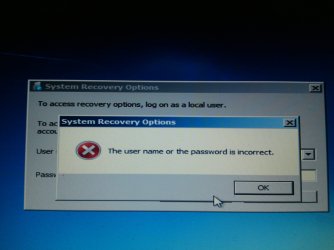
Regarding the last photo above:
I DO have the name and password written in the hand of the installer who set it up, when I got the computer in 2010!

But I never ever had to ever use it to see if it
"works" Until last time computer did not start or this time.... I know this is the master name and master password for entire computer. But I never let it out of my hands when outside and inside no one else has access to it so I never have to use the name or password.

Seems stupid now....but I'm thinking that I should have "destroyed" the newly installed Microsoft Windows 7 OS as a test while I was in the store to test out if the name and password actually "work" before leaving the store, don't you think?

Next time I'm doing that! But I know to break into this password and name protected administrative area is next to impossible (for a computer dunsel like me...impossible).

---------

And thank you for teaching/reminding me of the /scannow in DOS elevated prompt screen.

I ran the test now that I know exactly how to do it:

Here are the results:

Microsoft Windows [Version 6.1.7601]
Copyright (c) 2009 Microsoft Corporation. All rights reserved.

C:\Windows\system32> /scannow
'/scannow' is not recognized as an internal or external command,
operable program or batch file.

C:\Windows\system32> \scannow
'\scannow' is not recognized as an internal or external command,
operable program or batch file.

C:\Windows\system32> sfc/ scannow/

Microsoft (R) Windows (R) Resource Checker Version 6.0
Copyright (c) 2006 Microsoft Corporation. All rights reserved.

Scans the integrity of all protected system files and replaces incorrect version
s with
correct Microsoft versions.

SFC [/SCANNOW] [/VERIFYONLY] [/SCANFILE=<file>] [/VERIFYFILE=<file>]
[/OFFWINDIR=<offline windows directory> /OFFBOOTDIR=<offline boot directory>
]

/SCANNOW Scans integrity of all protected system files and repairs files
with
problems when possible.
/VERIFYONLY Scans integrity of all protected system files. No repair operati
on is
performed.
/SCANFILE Scans integrity of the referenced file, repairs file if problems
are
identified. Specify full path <file>
/VERIFYFILE Verifies the integrity of the file with full path <file>. No re
pair
operation is performed.
/OFFBOOTDIR For offline repair specify the location of the offline boot dire
ctory
/OFFWINDIR For offline repair specify the location of the offline windows d
irectory

e.g.

sfc /SCANNOW
sfc /VERIFYFILE=c:\windows\system32\kernel32.dll
sfc /SCANFILE=d:\windows\system32\kernel32.dll /OFFBOOTDIR=d:\ /OFFWINDI
R=d:\windows
sfc /VERIFYONLY

C:\Windows\system32> sfc /scannow

Beginning system scan. This process will take some time.

Beginning verification phase of system scan.
Verification 100% complete.

Windows Resource Protection did not find any integrity violations.

C:\Windows\system32>
See it says:
Verification 100% complete.

Windows Resource Protection did not find any integrity violations.
(Short answer is everything tests out so it is working fine!)

So why does some days I'm prevented from using the computer because it just won't "start up" when I need it?

What do I do next ?

(Other than what I read in many other sites where if there is a windows problem the solution is simple! Just throw your life away!! Delete Old Windows program. Delete and remove all programs
Reinstall Windows first again
and reinstall all programs again from the original installation discs. Oh, and if the companies won't let you because they are old.... then pay up money for a new product code (if the software is still being manufactured and sold!).
Something I just won't and can't and don't want to do.....
Other than that solution...


QUESTION
: What other information can I post here so we can try to determine a solution for an annoying, occasional total non=-start of the computer... why is it doing it?

Thanks for reading the long post and looking at all the screenshots I got for you!

(I skipped a bunch so I have more if you want)

XP VM USER
 

My Computer

Computer type
Laptop
Computer Manufacturer/Model Number
SONY VAIO VPCS111FM
OS
Windows7 Professional 64bit
CPU
Intel(R) Core (TM) i5 CPU M 430 @2.27 Ghz
Memory
8.0 GB
Hard Drives
Seagate 500GB Momentus
Cooling
Internal fan
Mouse
Logitech bluetooth trackball
Browser
Pale Moon Browser for x64
Hi XP Vm,

gonna make bits and pieces replies, while im working thro this.

your original scannow commands failed because of incorrect syntax, copy/paste any further ones:)
sfc /scannow /r

Now questions
Are you running W7 SP1 (control panel >> System)
Do you have a W7 SP1 disc
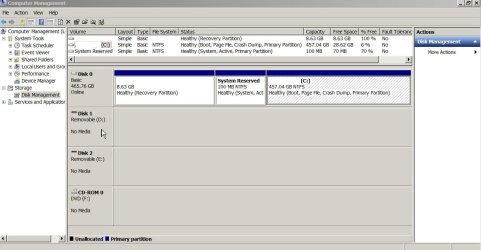
the repair appears to be running on the D drive, were is your OS located, usually C
( screenshot of Disk management would be handy )
It also only appears to be JUST a W7 repair

Passwords
Depends where they are
Bios
from within Bios settings
system
Password Reset - Windows 7 Help Forums

end of part 1


Roy
 

My Computer

Computer type
PC/Desktop
Computer Manufacturer/Model Number
medionl/Aspire 6930G/acer x55a
OS
W7 home premium 32bit/W7HP 64bit/w10 tp insider ring
CPU
E5300 dual core
Motherboard
medion MS7366
Memory
3gb
Graphics Card(s)
Nvidia Geforce 7100 Nforce 630i
Monitor(s) Displays
avixc
Internet Speed
n (isp resticted to 72)
Antivirus
mse/pands
Browser
palemoon
Other Info
Belkin Fd7050 n USB using Railink RT2870 drivers, more upto date
Part 2

Do you have any optimiser/tune-up type programs installed

What AV are you running, and have you been hit by malware or think you have.

stupid error code produced, its basically a general catch all.

what have you installed in the last couple of weeks
(including drivers and updates)

Run Belarc advisor just for your records
it will detail ALL your 3rd party progs and passwords.
 

My Computer

Computer type
PC/Desktop
Computer Manufacturer/Model Number
medionl/Aspire 6930G/acer x55a
OS
W7 home premium 32bit/W7HP 64bit/w10 tp insider ring
CPU
E5300 dual core
Motherboard
medion MS7366
Memory
3gb
Graphics Card(s)
Nvidia Geforce 7100 Nforce 630i
Monitor(s) Displays
avixc
Internet Speed
n (isp resticted to 72)
Antivirus
mse/pands
Browser
palemoon
Other Info
Belkin Fd7050 n USB using Railink RT2870 drivers, more upto date
part 3

Your comment
seems stupid now......

do you actually have 2 W7 OS's on your comp,
If so does it give the select OS screen on start up
 

My Computer

Computer type
PC/Desktop
Computer Manufacturer/Model Number
medionl/Aspire 6930G/acer x55a
OS
W7 home premium 32bit/W7HP 64bit/w10 tp insider ring
CPU
E5300 dual core
Motherboard
medion MS7366
Memory
3gb
Graphics Card(s)
Nvidia Geforce 7100 Nforce 630i
Monitor(s) Displays
avixc
Internet Speed
n (isp resticted to 72)
Antivirus
mse/pands
Browser
palemoon
Other Info
Belkin Fd7050 n USB using Railink RT2870 drivers, more upto date
Hi XP Vm,

gonna make bits and pieces replies, while im working thro this.

your original scannow commands failed because of incorrect syntax, copy/paste any further ones:)
sfc /scannow /r

Now questions
Are you running W7 SP1 (control panel >> System)
Do you have a W7 SP1 disc
the repair appears to be running on the D drive, were is your OS located, usually C
( screenshot of Disk management would be handy )
It also only appears to be JUST a W7 repair

Passwords
Depends where they are
Bios
from within Bios settings
system
Password Reset - Windows 7 Help Forums

end of part 1


Roy


Answering quickly too! so You know I read this!

More "questions" than answers I'm afraid!

your original scannow commands failed because of incorrect syntax, copy/paste any further ones:)
sfc /scannow /r
Thank you!
(but it still doesn't like the "/r" report request!)


Are you running W7 SP1 (control panel >> System)
Do you have a W7 SP1 disc
Yes to W7 SP1 (I just reverted the theme to Windows XP as don't like the "Aero" look and never changed back).

No to the W7 SP1 disc... just the original Windows Professional Disk in its package with curved edge.

I got SP1 as a download. I think I'm always saving stuff so I probabaly made a copy outside of the PC, of course where did I put it???

( screenshot of Disk management would be handy )
As requested:

Disk Management under Computer Mangement under Admiistrative Tools PS31505.jpg

Passwords
Depends where they are
Bios
from within Bios settings
system
Password Reset - Windows 7 Help Forums
warnsmall.png
Warning
Making changes to the Windows Registry has the potential to disable the PC, if you have any concerns over using the information set forth here please feel free to post a question in this same tutorial and we will be glad to help.

Be Advised: if you use this method to reset you're user account password ANY / All access to encrypted files stored in the account will be lost.

Its the "master user account" password. The one we had to decide in middle of installing Windows 7 in the store! Back in 2010! sigh........:confused:

I should read more of other people's posts here to figure out how to expresses these quotes and "question/answer" statements in a better format... Thanks for reading a difficult to read answer.

I hope I got most of the responses answered in some form...

Just
XP
(I did this as my first social media posting (August 2010) ever so username I chose was the problem I had on the first day of owning computer back in 2010!).
 
Last edited:

My Computer

Computer type
Laptop
Computer Manufacturer/Model Number
SONY VAIO VPCS111FM
OS
Windows7 Professional 64bit
CPU
Intel(R) Core (TM) i5 CPU M 430 @2.27 Ghz
Memory
8.0 GB
Hard Drives
Seagate 500GB Momentus
Cooling
Internal fan
Mouse
Logitech bluetooth trackball
Browser
Pale Moon Browser for x64
Part 2

Do you have any optimiser/tune-up type programs installed

What AV are you running, and have you been hit by malware or think you have.

stupid error code produced, its basically a general catch all.

what have you installed in the last couple of weeks
(including drivers and updates)

Run Belarc advisor just for your records
it will detail ALL your 3rd party progs and passwords.

(I see part 3 already. answer is easy... no and no)


What is "Belarc advisor"? Is it a third party to purchse somewhere? Or is it part of Windows 7 OS?

what have you installed in the last couple of weeks
(including drivers and updates)

(OK Now I'm on my "Soapbox" so don't mind my "rant".....

I always hated "auto" download and install on my XP so I demand 100% everything (third party too) tell and inform me before downloading/and/or installing. So I always knew what I'm doing!

BUT! After beginning of September, a Windows update (11 items?) forced a change to (recommended) one where its auto download and install.

NO NONO ! I said!

I fixed it right away! It says on Security window in Windows in Control Panel (I think its where its hidden) that I always want to be notified first of any downloads and upgrades before installing them (unintended downloads using up CPU also interrupts my workflow as well).

But Windows keeps on doing it automatically! NO matter what the panel says! Its broken! I just gave up and never reported it here as to describe this would take too long---its more complicated as third party ones are also doing this!)

Its not a Virus! I run Norton Internet Security fully up to date and Malwarebytes Premium also up to date. Scan every day for both at different hours!

Now for the big problem: (If you don't want to read about "APPLE" Stuff just skip down to the ===================== Line and bold faced type "SKIP TO HERE"

I own a iPad, the iPad1 in fact. Synced it up every few weeks or monthly religiously!

OK, It broke and I needed to get the sync to go back to the iPad again in "Restore" (Apple terms I can explain if you need more information but trying to respect your time here and not go into details you don't need)

Anyway... the sync file I saved was EMPTY! Lost 24,000 + photos! Lost Saved (off server) Emails, etc etc Lost Program output saved, 1000's of hours over 7 years. And I did "TWO" syncs at various intervals in case one failed.

Of course! BOTH Syncs failed to have those things on it... they were failing to record all the items on the iPad1 for some time now!

So... had to reload iTunes like 10 times over and over and delete it to see what is wrong....

Then Apple upgraded iTunes in September to 12.7 version for Windows.

IT FAILED! (never had Apple stuff fail on me before)....refused to open/launch after first 2 question screens.....

So Apple downgraded me back to older style one!

Meanwhile I got estimates on Data Recovery! I don't won't and can't have that money....but Apple says iPad1 is still working its the "sync" that failed to work... So the photos are still on the iPad!!!
24,000!

But... Need third party software... I got iExplorer software to prove its on the iPad and not in the several backups I made of the Sync back to February 2017.

Then I needed iPad-Data-Recovery to get the data back..... Refused my paid License number...
So company gave me upgrade to higher level one iPad UltData Recovery to get back the photos!

Then a problem! I got the Upgrade from Apple for iTunes (never had a question with them so always take the latest version)...that was when turning on iTunes would freeze whole computer after a while.

In and Out and In and Out in specific order I did the iTunes with Apple Tech on phone.

Still does not work with Windows 7!

(I'm getting to the good parts!)

So I was (as I mentioned earlier) downgraded to the older iTunes.... But.... that new program I got because the iPad-Data Recovery would not take my license code (unknown error)... the newer iPad UltData Recovery program must (hear this loudly MUST) use the latest version of iTunes.... the 12.7

But! I told the company! iTunes 12.7 does not work with my Windows Professional (x64)!!

Well there is no other way... turning on the iPad UltData Recovery program to get back the photos (Trial free version shows I have the photos on the iPad Device, to unlock them you needed to buy the full version which I did!) (and the license code worked for that one of course).

The program automatically checks for latest version of iTunes! And finding I have older version it automatically (no stopping it... there is an "x" don['t know why its there doesn't stop the program)
It fixes it up to the latest 12.7 version which then freezes the computer!

I was giving up!

But then my requests to Apple were "heard" and a new download for iCloud was created (that was the screen it froze on) and vola! Now in Late September iTunes 12.7 does work on Windows 7! No Freezing!

But.... by this time something else went wrong and the 24,000 photos are no longer to be found using the "non-free" paid version of the program when it was found using the free version!

I wrote to the company 2 weeks ago and no reply. I'm writing again... that was when this issue of the computer refusing to start occurred.

So the last time I installed "ANYTHING" was over 1 to 2 weeks (I was in waiting mode---did not play with iPad or computer or do anything on iTunes at all!) for 1 to 2 weeks I can get the dates...

Then on October 1st and again on October 8th the Computer refused to start! First time ever saw these screens and windows..

=========================================

SKIP TO HERE Ok i'm back again.... In case you wanted to skip all of the Apple stuff

Now I should remind or add in if I did not say so earlier that due to my Apple iPad1 requirements I copied and recopied over the Sync to use it for various third party programs without destroying the originals, and that used up a HUGE amount of the HD until I found I had just 156KB (yes not a misprint KB) left..... I quickly undid what I did... I was copying... not moving so increased disk size very fast as each copy is 20GB in size! I had 70 GB free !

Now I'm ok, I have back to 30 +- GB Free again and copies of the important Apple Sync Files to play with the data recovery programs for Apple iPads. (Not playing for past 2 weeks since near end of September as waiting for a Email response from the company that has no phone support, ever).

OK sending this mess off to you.... I will go see what Part 3 is and do that too

Best regards,
XP
 

My Computer

Computer type
Laptop
Computer Manufacturer/Model Number
SONY VAIO VPCS111FM
OS
Windows7 Professional 64bit
CPU
Intel(R) Core (TM) i5 CPU M 430 @2.27 Ghz
Memory
8.0 GB
Hard Drives
Seagate 500GB Momentus
Cooling
Internal fan
Mouse
Logitech bluetooth trackball
Browser
Pale Moon Browser for x64
Responses (and long discussion sorry) about part 3 reply

part 3

Your comment
seems stupid now......

do you actually have 2 W7 OS's on your comp,
If so does it give the select OS screen on start up

Hi torchwood!

Answers are easy...

No, I do not have two W7 OS's on this Laptop

I do not have the select OS DOS screen (I know what that is) on start up.

No password on start up goes directly to welcome screen and Desktop.

---------------------

No idea if this means anything....

If its just me talking stop me... Oh I know I keep typing and I can't hear you say please stop!
Sorry... In advance.

History...
On my XP Full Size Tower Desktop, I had 3 OS's running using third party program so I know from years of daily use what select OS screen is like.

I feel comfortable using them that way and I got Windows 7 Professional for its features including a VM XP version...which is fully operational (has one major bug else I'd use it every day with my older programs)

Going on...
I purchased an advanced VM so I can really use the XP etc.. on this Laptop.

Oracle VM. * I can post a screen shot of all 5 OS's that exist on the computer! But why do that? I've not used any of them at all in past 2 years as problems with other equipment kept me busy elsewhere.

I have: OS: Windows XP, OSX Apple: Leopard, Snow Leopard, Lion and Mountain Lion (disabled) on this computer. It opens up a separate mounted disk when I turn on the Oracle VM, but as I say, not even for "fun" programs on it did I use for about past 2 years since 2015. So doubt its presence has anything to do with start up as its never a start up program, I have to select which VM from my desktop direct access Icons.

Ok, hope that answers part 3 questions!

Thanks for staying with me to solve the mystery! (I love a good mystery in Computers and elsewhere...but not when it involves something I own and it prevents me from using it!).

Best regards,

XP (Now you know my first question here back in 2010? was about using the VM on Windows 7 ....so my user name was XP VM USER, get it?)

P.S. I tried copying and pasting this: sfc /scannow /r
and still does nothing but give me the various listings of commands that are syntax appropriate for DOS Command Prompt. Does not "do" anything at all.
 
Last edited:

My Computer

Computer type
Laptop
Computer Manufacturer/Model Number
SONY VAIO VPCS111FM
OS
Windows7 Professional 64bit
CPU
Intel(R) Core (TM) i5 CPU M 430 @2.27 Ghz
Memory
8.0 GB
Hard Drives
Seagate 500GB Momentus
Cooling
Internal fan
Mouse
Logitech bluetooth trackball
Browser
Pale Moon Browser for x64
Hi everyone still having start up problem!

Hi Everyone here and torchwood!

Just checking in for any suggestions or solutions or requests for more data dumps or general information about my system.

Computer and Microsoft Windows 7 are still acting up!

Every other time at least sometimes two in a row, and sometimes not, the power on button causes the laptop to go to "Startup repair" screen, which says it cannot repair it automatically. I send the information off to Microsoft, but I know nothing is going to happen to repair this from them.

Any suggestions?

What do I do now?

Best regards,

XP
 

My Computer

Computer type
Laptop
Computer Manufacturer/Model Number
SONY VAIO VPCS111FM
OS
Windows7 Professional 64bit
CPU
Intel(R) Core (TM) i5 CPU M 430 @2.27 Ghz
Memory
8.0 GB
Hard Drives
Seagate 500GB Momentus
Cooling
Internal fan
Mouse
Logitech bluetooth trackball
Browser
Pale Moon Browser for x64
Back
Top