Issue with Flash Player

JazzSus

Skilled
Member
Local time
10:39 PM
Messages
59
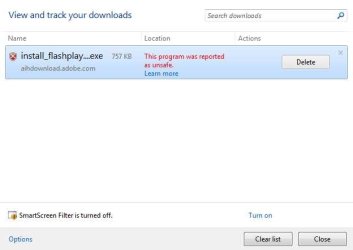
Need help with Flash Player's security certificate issue. If I try to dwnload FP 11 latest version it leave me no option in download window [just"delete"]. Even I have older versions and if I click to Install gives me....this software is not safe to install...blah blah....and I cant run some videos which depends on FP. Is there way out? Please :cry: thanks for help

Vlad
 

My Computer

OS
Windows 7 x64
Hello Vlad, kind of hard to follow. What browser are you trying to download with? See if you can download from Filehippo

IE

Download Flash Player 11.1.102.55 (IE) - FileHippo.com

IE x64

Download Flash Player 11.1.102.55 (IE) 64-bit - FileHippo.com

Nin IE

Download Flash Player 11.1.102.55 (Non-IE) - FileHippo.com

Non IE x64

Download Flash Player 11.1.102.55 (Non-IE) 64-bit - FileHippo.com

It sounds like your security software is telling you it is unsafe to install? Did you downoad it directly from Adobe? Can you post any screen shots of the download dialog or any error dialogs?

A Guy
 

My Computer

Computer type
PC/Desktop
OS
Windows 10 Home x64
CPU
INTEL Core i5-750 Quad-Core 3.37GHz
Motherboard
ASUS P7P55D
Memory
HyperX Fury Black Series 8GB (2 x 4GB) 1866Mhz
Graphics Card(s)
EVGA GeForce GTX 750 Superclocked 1GB 128-Bit GDDR5
Monitor(s) Displays
LG 32MA68HY 32" IPS
Screen Resolution
1920 x 1080
Hard Drives
Samsung 840 Evo 120GB, SEAGATE 500GB Barracuda® 7200.12, SATA 3 Gb/s, 7200 RPM, 16MB cache
PSU
ANTEC TruePower New TP-550, 80 PLUS, 550W
Case
ANTEC Three Hundred Illusion
Cooling
COOLER MASTER Hyper 212 Plus, 4 x 120mm 1 x 140mm Noctua's
Internet Speed
85 + Mbps
Antivirus
Avast
Browser
Vivaldi
Thank you for reply A Guy. However any link you gave me ends with same result. After security scan of download gives me " Delete" option. I even uninstall my MSEssential and it does the same thing. I'll pin screenshot for better understanding. There is somwhere in mu security adjustments problem. I'll try to solve it with "Restore point" options. If you have any other sugestion for me I'll gladly accepted. Othervise I'll restore my Macrium backup of C: drive to earlier date.Thanks in advance.

Vlad
 

Attachments

  • 005.jpg
    005.jpg
    13 KB · Views: 7

My Computer

OS
Windows 7 x64
I'd click the learn more link on that warning. It says smart filter is turned off, so it is an IE security setting somehow. Have a look here and see if any of these settings help you.

Installation problems | Flash Player | Windows

If not, try with a different browser like Firefox or Chrome. Downloading from the official Adobe site (or even those Filehippo downloads) is safe. A Guy
 

My Computer

Computer type
PC/Desktop
OS
Windows 10 Home x64
CPU
INTEL Core i5-750 Quad-Core 3.37GHz
Motherboard
ASUS P7P55D
Memory
HyperX Fury Black Series 8GB (2 x 4GB) 1866Mhz
Graphics Card(s)
EVGA GeForce GTX 750 Superclocked 1GB 128-Bit GDDR5
Monitor(s) Displays
LG 32MA68HY 32" IPS
Screen Resolution
1920 x 1080
Hard Drives
Samsung 840 Evo 120GB, SEAGATE 500GB Barracuda® 7200.12, SATA 3 Gb/s, 7200 RPM, 16MB cache
PSU
ANTEC TruePower New TP-550, 80 PLUS, 550W
Case
ANTEC Three Hundred Illusion
Cooling
COOLER MASTER Hyper 212 Plus, 4 x 120mm 1 x 140mm Noctua's
Internet Speed
85 + Mbps
Antivirus
Avast
Browser
Vivaldi
Back
Top