Issues cusomizing my Desktop (Windows 7 Premium)

Sullyx44

New member
Local time
1:45 PM
Messages
4
Hi,
I am new to these forums, and I have gotten some great advice so far and the tutorials have helped me quite a bit. I'm not bad with computers at all, and I just got a new HP Pavilion g6. Not the greatest computer but for $200 Brand New... It's a GREAT computer. Anyways I, like most people here would like to customize my desk top, and make it my own. I have read every tutorial I can find about 3rd Party Themes & I have done my research but I just can't get the Themes to work. I am Running Windows 7 Premium 64Bit. I have the following applications installed(per tutorial & research)
  • UniversalThemePatcher-x64(I patched the 3 files with this theme patcher)A tutorial on Virtual Customs told me that if I am running 64bit windows I would require the Patcher-x86 as well, but I wanted to verify that first)
  • ThemeResourceChangerX86-v10
  • ThemeResourceChangerX64-v10(Comes with a tutorial) - I got this from Virtual Customs
  • I HAD WinZip but I uninstalled everything when a theme screwed up my computer and I had to restore it. They offer it for 30 days Free & then I believe it's like $20. Is WinZip the best program for me to use(Is there anywhere I can get it for free?) Or is there a free program that will UnZip Files just as good as WinZip?
I was downloading the themes - UnZipping them - Extracting them to a chosen folder - then copying the extracted files and pasting them to DriveC:Resources:Themes Folder
Which all the tutorials I have seen have told me to do.

When I go to apply the new Theme it either doesn't appear when i right click - personalize..... If it does appear and I try to apply it.... PARTS of the theme apply, and somehow blend in with the previous theme or another theme.

Am I doing something wrong?
Do I Require ThemePatcher-x86 AS WELL as x64?
Do I need WinZip, or is there another program I can get that is free do UnZip Files?

As a Seperate question, Same topic.... What is the difference between Themes, and WindowBlinds? The WindowBlinds seem pretty simple to install if you purchase the Stardock product which is $20... Correct me if I'm wrong, but the windowblinds seem easier to install, and more customizable than do the 3rd party themes?

Any info you can provide to help me get this boring, bland Aero theme OFF MY COMPUTER! lol I will GREATLY appreciate any help. Thanks in advance!
-Kevin
 
Last edited:

My Computer

Computer Manufacturer/Model Number
HP Pavilion g6
OS
Windows 7 Premium 64bit
Welcome to the Seven Forums
You only need the X64 for a 64-bit system.
We have an excellent tutorial on that http://www.sevenforums.com/tutorials/28377-theme-how-apply-custom-themes.html look at it to see if this is how you did it.
This will replace WinZip 7-Zip
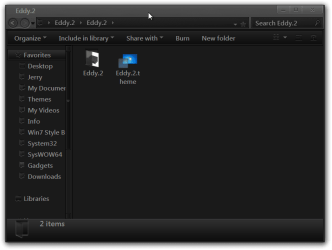
Did you put both, 1 theme folder and 1 .theme file look at screenshot provided in C:\Windows\Resources\Themes ?
Eddy.2.png

Does your system meets the minimum requirements to run Aero.
warnsmall.png
Warning

Aero Requirements to be Enabled in Windows 7

NOTE: If Aero is not enabled, then Aero Shake will not work even when enabled or turned on.
  • Aero is not included in Windows 7 Starter or Home Basic, so you must have Windows 7 Home Premium, Professional, Ultimate, or Enterprise installed.
  • 1 GHz 32-bit or 64-bit processor
  • 1 GB of system memory
  • A graphics card with support for DirectX 9 graphics with at least 128 MB of memory.
  • The graphics card must support Pixel Shader 2.0 and the Windows Display Driver Model (WDDM).
  • The Desktop Window Manager Session Manager and Themes Services need to be set as Started and Automatic.
  • You must be have True Color (32 bit) set instead of High Color (16 bit).
  • Desktop composition needs to be enabled (checked) in Visual Effects.
  • Refresh or update your WEI score.
After you answer these questions we will go from there.
Jerry
 

My Computer

Computer type
Laptop
Computer Manufacturer/Model Number
Sager NP9170
OS
Win 7 Pro x64 / Win 10 Pro
CPU
Intel(R) Core(TM) i7-3630QM CPU @ 2.40GHz
Motherboard
CLEVO P170EM
Memory
12 GB
Graphics Card(s)
(1) Intel(R) HD Graphics 4000 (2) NVIDIA GeForce GTX 675M
Sound Card
(1) Realtek High Definition Audio (2) Intel(R) Display Aud
Monitor(s) Displays
17.3
Screen Resolution
1920x1080
Hard Drives
(1) Samsung 860 EVO 500GB(OS) (1) Samsung 860 EVO 500GB(Data)
Keyboard
Backlite
Antivirus
MSE, Malwarebytes Pro
Browser
Firefox
Other Info
DESKTOP: Custom-built.
OS: Win 10 Pro x64.
CASE: Rosewill R5.
CPU: Intel I5 4670K CPU @ 3.40GHz.
CPU COOLER: Cool Master Hyper 212 EVO.
MOTHERBOARD: Asus Z87-A.
MEMORY: Kingston HyperX 2x4 GB.
GPU: Nvidia Geforce 650 TI.
PSU: Corsair TX750.
DRIVES: (1) Samsung 840 120 GB SSD (2) Western Digital blue 500 GB 7200 RPM.
Hey, Thanks for responding. I am running Aero right now, & I checked all of the things you listed and the only thing that was different was the "Themes Services", that was set to Automatic(delayed) so I switched it to just Automatic... I will DL the 7Zip as well. Outside of that I have all the other requirements covered
-Kevin
 

My Computer

Computer Manufacturer/Model Number
HP Pavilion g6
OS
Windows 7 Premium 64bit

My Computer

Computer type
Laptop
Computer Manufacturer/Model Number
Sager NP9170
OS
Win 7 Pro x64 / Win 10 Pro
CPU
Intel(R) Core(TM) i7-3630QM CPU @ 2.40GHz
Motherboard
CLEVO P170EM
Memory
12 GB
Graphics Card(s)
(1) Intel(R) HD Graphics 4000 (2) NVIDIA GeForce GTX 675M
Sound Card
(1) Realtek High Definition Audio (2) Intel(R) Display Aud
Monitor(s) Displays
17.3
Screen Resolution
1920x1080
Hard Drives
(1) Samsung 860 EVO 500GB(OS) (1) Samsung 860 EVO 500GB(Data)
Keyboard
Backlite
Antivirus
MSE, Malwarebytes Pro
Browser
Firefox
Other Info
DESKTOP: Custom-built.
OS: Win 10 Pro x64.
CASE: Rosewill R5.
CPU: Intel I5 4670K CPU @ 3.40GHz.
CPU COOLER: Cool Master Hyper 212 EVO.
MOTHERBOARD: Asus Z87-A.
MEMORY: Kingston HyperX 2x4 GB.
GPU: Nvidia Geforce 650 TI.
PSU: Corsair TX750.
DRIVES: (1) Samsung 840 120 GB SSD (2) Western Digital blue 500 GB 7200 RPM.
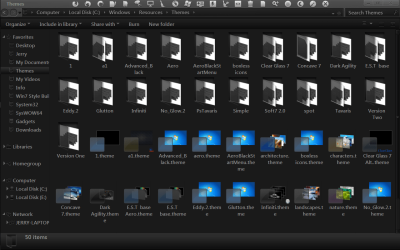
Here is the screen shot, it only has the files that came with the computer.
It wouldn't let me insert the image but I attached it.... Hope this helps in some way. And thank you for your help!
-Kevin
 

Attachments

  • Screen Shot Themes.jpg
    Screen Shot Themes.jpg
    37.2 KB · Views: 15

My Computer

Computer Manufacturer/Model Number
HP Pavilion g6
OS
Windows 7 Premium 64bit
I do not see a custom theme in there.
Post a link to the theme and I will look at it.
Jerry
 

My Computer

Computer type
Laptop
Computer Manufacturer/Model Number
Sager NP9170
OS
Win 7 Pro x64 / Win 10 Pro
CPU
Intel(R) Core(TM) i7-3630QM CPU @ 2.40GHz
Motherboard
CLEVO P170EM
Memory
12 GB
Graphics Card(s)
(1) Intel(R) HD Graphics 4000 (2) NVIDIA GeForce GTX 675M
Sound Card
(1) Realtek High Definition Audio (2) Intel(R) Display Aud
Monitor(s) Displays
17.3
Screen Resolution
1920x1080
Hard Drives
(1) Samsung 860 EVO 500GB(OS) (1) Samsung 860 EVO 500GB(Data)
Keyboard
Backlite
Antivirus
MSE, Malwarebytes Pro
Browser
Firefox
Other Info
DESKTOP: Custom-built.
OS: Win 10 Pro x64.
CASE: Rosewill R5.
CPU: Intel I5 4670K CPU @ 3.40GHz.
CPU COOLER: Cool Master Hyper 212 EVO.
MOTHERBOARD: Asus Z87-A.
MEMORY: Kingston HyperX 2x4 GB.
GPU: Nvidia Geforce 650 TI.
PSU: Corsair TX750.
DRIVES: (1) Samsung 840 120 GB SSD (2) Western Digital blue 500 GB 7200 RPM.
I got a Theme to WORK! There are just a few aspects that I need some help with.... Any help would be GREATLY appreciated!
I installed this Basic Black Theme for Windows 7 by: Mr. GriM which you can find here ( Basic Black Windows 7 Theme ) I just have a few questions, and I have a screen shot of where I'm at right now. Below is your list of what's included in the theme, I will Note which ones I have installed/completed, and see if you can help me in completing the rest.

Theme includes:
Basic Black theme - INSTALLED
2 Start Orbs - Don't Know How to do This
New user pic Frame - Don't Know How to do This
Media Player Skin (Optional) - Don't Know How to do This
System Tray Popup Clock - Don't Know How to do This
Full Glass Blue Icon pack with installers (Optional) - INSTALLED
Full Glass mod for full transparency (Optional) - INSTALLED
I have attached images of my current screen shot, as well as Mr. GriM's examples where I downloaded the theme.


It would be great if you, or anyone could help me out with the following:

  • How do I change my Start Orb?
  • How do I change the Media Player Skin?
  • In the examples of the theme that were showed on Virtual Customrs the Program Icons were centered at the top of the screen with Large custom Icons, is that a custom taskbar? Or did you just move the Icons to the Top Center of the screen?(I have a screen shot that will make sense of this if it's too vague)
  • I would also like to get more 3rd Party Icons to replace some of the program icons that I have on my desktop, like Adobe, Internet Explorer, Microsoft office's, Etc...... If you know where I can get similar Icons to replace those that would be great, I would obviously like all my desktop Icons to look the same. I'm sorry for the "Newbie" questions, I am new to this, I'm not bad with computers, BUT I would rather ask a question than try it myself and fu*k something up.
Thank you in advance for anyone who is able to answer any of my Quesions!
 

Attachments

  • Basic Black Theme Screen Shot.jpg
    Basic Black Theme Screen Shot.jpg
    65.4 KB · Views: 11
  • Basic Black Mr. Grim Screen Shot.jpg
    Basic Black Mr. Grim Screen Shot.jpg
    229.9 KB · Views: 8

My Computer

Computer Manufacturer/Model Number
HP Pavilion g6
OS
Windows 7 Premium 64bit
Did you get the information that you needed? We had a server crash and it deleted some posts let me know if you did not.
Jerry
 

My Computer

Computer type
Laptop
Computer Manufacturer/Model Number
Sager NP9170
OS
Win 7 Pro x64 / Win 10 Pro
CPU
Intel(R) Core(TM) i7-3630QM CPU @ 2.40GHz
Motherboard
CLEVO P170EM
Memory
12 GB
Graphics Card(s)
(1) Intel(R) HD Graphics 4000 (2) NVIDIA GeForce GTX 675M
Sound Card
(1) Realtek High Definition Audio (2) Intel(R) Display Aud
Monitor(s) Displays
17.3
Screen Resolution
1920x1080
Hard Drives
(1) Samsung 860 EVO 500GB(OS) (1) Samsung 860 EVO 500GB(Data)
Keyboard
Backlite
Antivirus
MSE, Malwarebytes Pro
Browser
Firefox
Other Info
DESKTOP: Custom-built.
OS: Win 10 Pro x64.
CASE: Rosewill R5.
CPU: Intel I5 4670K CPU @ 3.40GHz.
CPU COOLER: Cool Master Hyper 212 EVO.
MOTHERBOARD: Asus Z87-A.
MEMORY: Kingston HyperX 2x4 GB.
GPU: Nvidia Geforce 650 TI.
PSU: Corsair TX750.
DRIVES: (1) Samsung 840 120 GB SSD (2) Western Digital blue 500 GB 7200 RPM.
Back
Top