Solved Issues installing itunes

isaiah40

New member
Local time
5:11 PM
Messages
28
Trouble installing iTunes

Hi,
I am having trouble installing iTunes. A couple weeks ago, when after I had imported a cd and plug in my ipod to sync.
An error message popped up saying: Bonjour failed. Verify you have privileges. Also, I am only able to install or uninstall programs in safe mode. Please help!

Thanks!
 

My Computer

OS
I do not know
Hello,

A few details would be nice, if you could gather them for me.

Firstly, what version of windows 7 are you running?
Secondly, do you know if your user account is an administrator of the computer?
Thirdly, did you have iTunes previously installed, and remove it?
 

My Computer

Computer Manufacturer/Model Number
HP 6000 Pro Micro Tower
OS
W7 Professional x64
CPU
Core 2 Duo 2.93
Memory
2 GB
Graphics Card(s)
ATI Radeon 4695
Monitor(s) Displays
Two HP 17's
Hard Drives
150GB Sata Drive
Case
Tiny. Kinda cute.
Keyboard
HP Supplied. Surprisingly nice.
Mouse
Gateway Mouse from an E2610D
Internet Speed
45 mbps
I am sorry for the lack of details.
Version of Windows 7: 32
No, my user account is not the administrator account
Yes, I have previously installed itunes than removed it when
asked to after I had begun to sync my ipod.
 

My Computer

OS
I do not know
I would suggest contacting whoever is the administrator of your machine and having them install iTunes for you. That's going to be a lot more effective than attempting to install it yourself, since I don't believe you have the persmissions to do so.
 

My Computer

Computer Manufacturer/Model Number
HP 6000 Pro Micro Tower
OS
W7 Professional x64
CPU
Core 2 Duo 2.93
Memory
2 GB
Graphics Card(s)
ATI Radeon 4695
Monitor(s) Displays
Two HP 17's
Hard Drives
150GB Sata Drive
Case
Tiny. Kinda cute.
Keyboard
HP Supplied. Surprisingly nice.
Mouse
Gateway Mouse from an E2610D
Internet Speed
45 mbps
When you open Itunes, you need to right click on the icon and then press "Run as Administrator"
 

My Computer

Computer Manufacturer/Model Number
Acer Aspire AX3910-U3012 PT
OS
Windows 7 Home Premium 64 bit
CPU
Intel Pentium E5700
Memory
640GB HDD
Graphics Card(s)
Integrated Graphics
Sound Card
Integrated Audio
Monitor(s) Displays
Acer
I tried your suggetion. It did not work. Have any other solutions?
 

My Computer

OS
I do not know
Where are you downloading iTunes? Make sure you are selecting the correct bit version.

1. Click on start and then in the search bar type regedit and press enter.
2. Browse to the following location in the Registry Editor.
HKEY_Local_Machine > SYSTEM > CurrentControlSet > Services > Bonjour
3. Right click on Bonjour and click permissions and then click on Add.
4. In the space "Enter the object names to select" type Everyone and press Ok.
5. Now in the security tab highlight Everyone and place a check mark on "Full control" under Permissions to Everyone.
6. Click Apply and then Ok.
7. Try installing the iTunes again.
 

My Computer

Computer Manufacturer/Model Number
Macbook Pro 15" (2011) (Matte Version)
OS
Win 7 Pro x64 SP1 OS X Snow Leopard 10.6.7
CPU
Intel Core i7 2820QM 2.3GHz (Quad-Core)
Motherboard
N/A
Memory
8GB 1333 MHz PC3-10600 DDR3 SDRAM
Graphics Card(s)
ATI Radeon HD 6750M (1GB, GDDR5)
Sound Card
N/A
Monitor(s) Displays
1 Display
Screen Resolution
1,680 x 1050 (Matte Screen, Anti-Glare)
Hard Drives
750GB SATA (5400 rpm)
WD My Passport Essential 1TB Portable Hard Drive
PSU
N/A
Case
N/A
Cooling
N/A
Keyboard
Apple Wireless Keyboard
Mouse
Apple Wireless Magic Mouse
Internet Speed
Max - 2.2MB/sec; DSL provided by Telecom NZ
Other Info
MS Office Professional 2010
McAfee Total Protection 2011
On a Laptop Stand (Hand-Built)
I noticed that you previously created a thread about deleting one of your 2 accounts (1 was administrator).

Is it possible that you did something wrong and now dont have administrative rights?
 

My Computer

OS
Windows 7 64bit
It could be. I have tried creating an adminstrator's account and was unsuccessful.
How can I fix this problem?
 

My Computer

OS
I do not know
Hi isaiah,

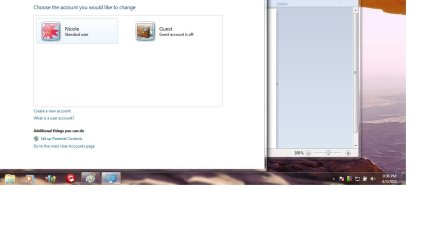
Can you please search for User Accounts in the Start Menu, open it and then click "Manage another Account"

Please post a screenshot so we can see what's going on,
Thanks
 

My Computer

Computer type
PC/Desktop
Computer Manufacturer/Model Number
Medion Erazer (note to self: insert model number) - with custom additions
OS
Windows 10 Pro x64
CPU
Intel Core i5 7400 @ 3.00GHz
Motherboard
OEM supllied with PC
Memory
8GB 2133Mhz DDR4 (OEM supplied)
Graphics Card(s)
Gygabyte Windforce GTX 1050Ti (Factory Overclocked)
Sound Card
Realtek
Monitor(s) Displays
Acer Al1980 + HKC
Screen Resolution
1360*768(HKC) / 1280*1024(Acer)
Hard Drives
1TB Toshiba
1TB WD Caviar Green
120GB Samsung Evo 840
PSU
OEM supplied (no power rating on case)
Case
OEM Supplied
Cooling
Stock
Keyboard
Logitech Wireless
Mouse
Logitect Wireless
Internet Speed
40Mb/s Down 10Mb/s Up
Antivirus
Defender
Browser
Firefox
Interesting...

You are running as a Standard User, and there is no Administrator account on your PC. Now technically speaking, Windows shouldn't have allowed you to do that. There should always be one Administrator account.

Take a look at this tutorial: http://www.sevenforums.com/tutorials/507-built-administrator-account-enable-disable.html to enable the build in Admin account, and give yourself Administrator access back.

I have this horrible feeling, that Windows will not allow you to do most of the steps because you are a Standard User, so you may need to skip to the bottom and do it from WinRE (Link at the bottom of the tutorial)

Hope it helps.
 

My Computer

Computer type
PC/Desktop
Computer Manufacturer/Model Number
Medion Erazer (note to self: insert model number) - with custom additions
OS
Windows 10 Pro x64
CPU
Intel Core i5 7400 @ 3.00GHz
Motherboard
OEM supllied with PC
Memory
8GB 2133Mhz DDR4 (OEM supplied)
Graphics Card(s)
Gygabyte Windforce GTX 1050Ti (Factory Overclocked)
Sound Card
Realtek
Monitor(s) Displays
Acer Al1980 + HKC
Screen Resolution
1360*768(HKC) / 1280*1024(Acer)
Hard Drives
1TB Toshiba
1TB WD Caviar Green
120GB Samsung Evo 840
PSU
OEM supplied (no power rating on case)
Case
OEM Supplied
Cooling
Stock
Keyboard
Logitech Wireless
Mouse
Logitect Wireless
Internet Speed
40Mb/s Down 10Mb/s Up
Antivirus
Defender
Browser
Firefox
Hi,
I have tried the possible solutions to this problem. Nothing worked.
Do you know of any other solutions? Thanks for your help.
 

My Computer

OS
I do not know
Did you see this one at the bottom of the last Tutorial I posted? http://www.sevenforums.com/tutorials/102552-built-administrator-enable-winre.html you will need to either boot into your recovery partition, or your Windows Disk, so obviously write the instructions down first.

If you don't know how to do this, then please supply your PC make/model and whether it came with Windows 7 pre-installed, or whether you installed it from a DVD and I will try and help you further.
 

My Computer

Computer type
PC/Desktop
Computer Manufacturer/Model Number
Medion Erazer (note to self: insert model number) - with custom additions
OS
Windows 10 Pro x64
CPU
Intel Core i5 7400 @ 3.00GHz
Motherboard
OEM supllied with PC
Memory
8GB 2133Mhz DDR4 (OEM supplied)
Graphics Card(s)
Gygabyte Windforce GTX 1050Ti (Factory Overclocked)
Sound Card
Realtek
Monitor(s) Displays
Acer Al1980 + HKC
Screen Resolution
1360*768(HKC) / 1280*1024(Acer)
Hard Drives
1TB Toshiba
1TB WD Caviar Green
120GB Samsung Evo 840
PSU
OEM supplied (no power rating on case)
Case
OEM Supplied
Cooling
Stock
Keyboard
Logitech Wireless
Mouse
Logitect Wireless
Internet Speed
40Mb/s Down 10Mb/s Up
Antivirus
Defender
Browser
Firefox
Yes, I did see the tutorial link. I did everything it said. It didn't work.
Which mode should I run my laptop in? I have a toshiba laptop.
Model number: Satellite L505D-S5983
 

My Computer

OS
I do not know
I've just had a thought.

Looking again at your User Accounts screenshot, it seems you have the ability to make a new Account. This should not be possible with a Standard Account. I wonder whether in fact you have an Admin Account, and Windows has incorrectly flagged it. Or more likely, whatever you did before corrupted the User Profile.

Follow my instructions in Post 4, but this time when you get to that screen, click "Create a new account" and make an Administrators account. For obvious reason's do NOT call it Nicole, even if you rename your current account, it will cause you confusion down the line, because the file structure will still be called Nicole. A sensible name choice would be something like Nicole-Admin.
 

My Computer

Computer type
PC/Desktop
Computer Manufacturer/Model Number
Medion Erazer (note to self: insert model number) - with custom additions
OS
Windows 10 Pro x64
CPU
Intel Core i5 7400 @ 3.00GHz
Motherboard
OEM supllied with PC
Memory
8GB 2133Mhz DDR4 (OEM supplied)
Graphics Card(s)
Gygabyte Windforce GTX 1050Ti (Factory Overclocked)
Sound Card
Realtek
Monitor(s) Displays
Acer Al1980 + HKC
Screen Resolution
1360*768(HKC) / 1280*1024(Acer)
Hard Drives
1TB Toshiba
1TB WD Caviar Green
120GB Samsung Evo 840
PSU
OEM supplied (no power rating on case)
Case
OEM Supplied
Cooling
Stock
Keyboard
Logitech Wireless
Mouse
Logitect Wireless
Internet Speed
40Mb/s Down 10Mb/s Up
Antivirus
Defender
Browser
Firefox
When I went to create an administrators account naming it Nicole-Admin.
I got an error message saying "The specified account name is not vaild, because account
names cannot contain the following characters: ^[]";<>+=?*" No matter what name I type
in I always get the same error message.
 
Last edited:

My Computer

OS
I do not know
Woops forgot about that, Usernames can't use special characters, sorry about that.

Try AdminNicole (all one word, I don't think it allows spaces either)
 

My Computer

Computer type
PC/Desktop
Computer Manufacturer/Model Number
Medion Erazer (note to self: insert model number) - with custom additions
OS
Windows 10 Pro x64
CPU
Intel Core i5 7400 @ 3.00GHz
Motherboard
OEM supllied with PC
Memory
8GB 2133Mhz DDR4 (OEM supplied)
Graphics Card(s)
Gygabyte Windforce GTX 1050Ti (Factory Overclocked)
Sound Card
Realtek
Monitor(s) Displays
Acer Al1980 + HKC
Screen Resolution
1360*768(HKC) / 1280*1024(Acer)
Hard Drives
1TB Toshiba
1TB WD Caviar Green
120GB Samsung Evo 840
PSU
OEM supplied (no power rating on case)
Case
OEM Supplied
Cooling
Stock
Keyboard
Logitech Wireless
Mouse
Logitect Wireless
Internet Speed
40Mb/s Down 10Mb/s Up
Antivirus
Defender
Browser
Firefox
I created an administrator's account in safe mode. I was unable to do so in normal mode.
I still receive the same error message when installing itunes. If you have any further suggestions, I would appreciate it.

Thanks.
 

My Computer

OS
I do not know
Oh dear, I was really hoping that would fix it.

At this point, I'm afraid we're going to have to start looking at the fact your install of windows may have something wrong.

Before we go into that though, a thought just occurred to me.

Do you have 32 bit or 64 bit Windows? (If you don't know, Click Start>Right Click Computer>Properties)

If 32 bit, did you download the 32 bit edition of Itunes, and if 64, did you download the 64 bit version?
 

My Computer

Computer type
PC/Desktop
Computer Manufacturer/Model Number
Medion Erazer (note to self: insert model number) - with custom additions
OS
Windows 10 Pro x64
CPU
Intel Core i5 7400 @ 3.00GHz
Motherboard
OEM supllied with PC
Memory
8GB 2133Mhz DDR4 (OEM supplied)
Graphics Card(s)
Gygabyte Windforce GTX 1050Ti (Factory Overclocked)
Sound Card
Realtek
Monitor(s) Displays
Acer Al1980 + HKC
Screen Resolution
1360*768(HKC) / 1280*1024(Acer)
Hard Drives
1TB Toshiba
1TB WD Caviar Green
120GB Samsung Evo 840
PSU
OEM supplied (no power rating on case)
Case
OEM Supplied
Cooling
Stock
Keyboard
Logitech Wireless
Mouse
Logitect Wireless
Internet Speed
40Mb/s Down 10Mb/s Up
Antivirus
Defender
Browser
Firefox
Back
Top