Solved Issues installing itunes

I did a scan. Here are the results.

Windows Resources protection found corrupt files and successfully repaired them.
Details are included in the CBS.Log windir\Logs\CBS\CBS.Log. For example: C:\windows\Logs\CBS\CBS.Log
 

My Computer

OS
I do not know
Ok, sounds like Windows fixed the problem.

Try installing Itunes again, making sure you are using the correct version for your System (32 or 64 bit)
 

My Computer

Computer type
PC/Desktop
Computer Manufacturer/Model Number
Medion Erazer (note to self: insert model number) - with custom additions
OS
Windows 10 Pro x64
CPU
Intel Core i5 7400 @ 3.00GHz
Motherboard
OEM supllied with PC
Memory
8GB 2133Mhz DDR4 (OEM supplied)
Graphics Card(s)
Gygabyte Windforce GTX 1050Ti (Factory Overclocked)
Sound Card
Realtek
Monitor(s) Displays
Acer Al1980 + HKC
Screen Resolution
1360*768(HKC) / 1280*1024(Acer)
Hard Drives
1TB Toshiba
1TB WD Caviar Green
120GB Samsung Evo 840
PSU
OEM supplied (no power rating on case)
Case
OEM Supplied
Cooling
Stock
Keyboard
Logitech Wireless
Mouse
Logitect Wireless
Internet Speed
40Mb/s Down 10Mb/s Up
Antivirus
Defender
Browser
Firefox
Hi,
I am still receiving the same error message when installing itunes. I am installing the correct
version. I tried going to services and right-clicking on Bonjour to start the services. All of the options
are faded. Any solutions?
 

My Computer

OS
I do not know
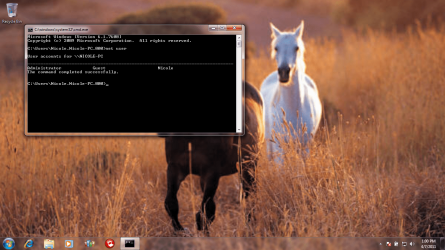
Could you bring up a command prompt (hold down the windows key, and press r, then type cmd and hit enter), type net user, and post the results?
 

My Computer

Computer Manufacturer/Model Number
HP 6000 Pro Micro Tower
OS
W7 Professional x64
CPU
Core 2 Duo 2.93
Memory
2 GB
Graphics Card(s)
ATI Radeon 4695
Monitor(s) Displays
Two HP 17's
Hard Drives
150GB Sata Drive
Case
Tiny. Kinda cute.
Keyboard
HP Supplied. Surprisingly nice.
Mouse
Gateway Mouse from an E2610D
Internet Speed
45 mbps
Here is the screenshot of the results.
 

Attachments

  • Untitled.png
    Untitled.png
    480.2 KB · Views: 13

My Computer

OS
I do not know
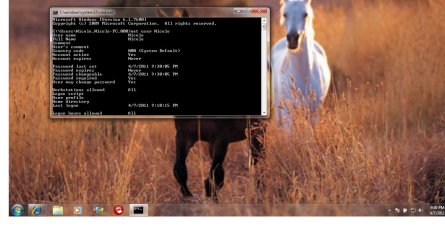
Could you run Net User Nichole and post the results? Sorry to keep asking you to do this, but I'm trying to figure out what precisely is going on with your machine, and how to help you. :)
 

My Computer

Computer Manufacturer/Model Number
HP 6000 Pro Micro Tower
OS
W7 Professional x64
CPU
Core 2 Duo 2.93
Memory
2 GB
Graphics Card(s)
ATI Radeon 4695
Monitor(s) Displays
Two HP 17's
Hard Drives
150GB Sata Drive
Case
Tiny. Kinda cute.
Keyboard
HP Supplied. Surprisingly nice.
Mouse
Gateway Mouse from an E2610D
Internet Speed
45 mbps
Here is the results of running in net user Nicole.
 

Attachments

  • Untitled.jpg
    Untitled.jpg
    114.7 KB · Views: 9

My Computer

OS
I do not know
I think I see what WebMattR is gettng at. Underneath the results shown in that screenshot, does it say "Local Group Memberships"?

If so, does it say Administrators or Users under that?
If it does NOT say Administrators, or if it just says Users, then please try the following:

1. boot back into Safe Mode and create the Administrators account, like you managed to before.
2. Once in that account, please go User Accounts>Manage another account,
3. Click on Nicole followed by "Change the Account Type"
4. Change Nicole over to an Administrators account (it should be set to Standard User)

That should hopefully fix it.
 

Attachments

  • Admin.png
    Admin.png
    4.4 KB · Views: 1

My Computer

Computer type
PC/Desktop
Computer Manufacturer/Model Number
Medion Erazer (note to self: insert model number) - with custom additions
OS
Windows 10 Pro x64
CPU
Intel Core i5 7400 @ 3.00GHz
Motherboard
OEM supllied with PC
Memory
8GB 2133Mhz DDR4 (OEM supplied)
Graphics Card(s)
Gygabyte Windforce GTX 1050Ti (Factory Overclocked)
Sound Card
Realtek
Monitor(s) Displays
Acer Al1980 + HKC
Screen Resolution
1360*768(HKC) / 1280*1024(Acer)
Hard Drives
1TB Toshiba
1TB WD Caviar Green
120GB Samsung Evo 840
PSU
OEM supplied (no power rating on case)
Case
OEM Supplied
Cooling
Stock
Keyboard
Logitech Wireless
Mouse
Logitect Wireless
Internet Speed
40Mb/s Down 10Mb/s Up
Antivirus
Defender
Browser
Firefox
Thank you so much!!!!!!!!!! It worked!!!
 

My Computer

OS
I do not know
Knew we'd get there in the end ;) Your welcome :)
 

My Computer

Computer type
PC/Desktop
Computer Manufacturer/Model Number
Medion Erazer (note to self: insert model number) - with custom additions
OS
Windows 10 Pro x64
CPU
Intel Core i5 7400 @ 3.00GHz
Motherboard
OEM supllied with PC
Memory
8GB 2133Mhz DDR4 (OEM supplied)
Graphics Card(s)
Gygabyte Windforce GTX 1050Ti (Factory Overclocked)
Sound Card
Realtek
Monitor(s) Displays
Acer Al1980 + HKC
Screen Resolution
1360*768(HKC) / 1280*1024(Acer)
Hard Drives
1TB Toshiba
1TB WD Caviar Green
120GB Samsung Evo 840
PSU
OEM supplied (no power rating on case)
Case
OEM Supplied
Cooling
Stock
Keyboard
Logitech Wireless
Mouse
Logitect Wireless
Internet Speed
40Mb/s Down 10Mb/s Up
Antivirus
Defender
Browser
Firefox
Back
Top