Issues with Bluetooth mouse. Microsoft Notebook Mouse 5000

kdogg

Enlightened
Member
VIP
Local time
4:25 PM
Messages
69
Location
Michigan
This is really starting to annoy the hell out of me. I just picked up a Microsoft Bluetooth mouse, the Notebook 5000 mouse to be exact for my home entertainment center.

I have my PC ran to a monitor and a 55 inch Samsung LED LCD TV for watching movies etc. The problem is, the HDMI cord is run threw the wall so the PC is in another room so I cant use the normal mouse on the PC. I bought a bluetooth mouse due to the increased range but I'm having nothing but issues.

I have the Microsoft Bluetooth dongle btw, didn't come with the mouse, the mouse actually comes with no dongle.

Anyway it connects fine but if I stop using it for like an hour or whatever it disconnects and nothing I do will reconnect it unless I take my other mouse, go into bluetooth devices, delete it and readd it all over again.

WHY THE HELL does it keep doing this lol? :)

It's very annoying, I sit down to watch a movie and discover I cant start it without first going into the other room and readding my mouse.

I'm well within range and I've tried moving the bluetooth mouse to the same room as the PC to use it with the PC and it still does the same thing.

Help? :)
 

My Computer

Computer Manufacturer/Model Number
My Own Computer!
OS
Windows 7 Ultimate x64
CPU
AMD Athlon II X2 245 Regor 2.9GHz Socket AM3 65W Dual-Core
Motherboard
ASUS M4A88TD-M/USB3 880G
Memory
Crucial Ballistix Tracer 8GB (4x2GB) DDR3 1600 (PC3 12800)
Graphics Card(s)
ATI Radeon HD3870 X2
Sound Card
Onboard HD Audio
Monitor(s) Displays
Westinghouse 22" LCD, Samsung 46" LCD TV
Screen Resolution
1680x1050, Extended Display Setup
Hard Drives
2x Western Digital 74GB Raptors SATA Raid (OS & Games Drive)
1x Western Digital 1.5TB SATA (Storage)
1x Western Digital 2TB SATA (Storage)
PSU
Antec 550 Watt
Case
Antec Three Hundred
Cooling
3x Antec 120mm Fans & OEM CPU/GPU Coolers
Keyboard
Microsoft Comfort Curve Keyboard 2000
Mouse
Microsoft Bluetooth Explorer Mouse
Internet Speed
Comcastic Cable Internet! When it works!
This is really starting to annoy the hell out of me. I just picked up a Microsoft Bluetooth mouse, the Notebook 5000 mouse to be exact for my home entertainment center.

I have my PC ran to a monitor and a 55 inch Samsung LED LCD TV for watching movies etc. The problem is, the HDMI cord is run threw the wall so the PC is in another room so I cant use the normal mouse on the PC. I bought a bluetooth mouse due to the increased range but I'm having nothing but issues.

I have the Microsoft Bluetooth dongle btw, didn't come with the mouse, the mouse actually comes with no dongle.

Anyway it connects fine but if I stop using it for like an hour or whatever it disconnects and nothing I do will reconnect it unless I take my other mouse, go into bluetooth devices, delete it and readd it all over again.

WHY THE HELL does it keep doing this lol? :)

It's very annoying, I sit down to watch a movie and discover I cant start it without first going into the other room and readding my mouse.

I'm well within range and I've tried moving the bluetooth mouse to the same room as the PC to use it with the PC and it still does the same thing.

Help? :)

It's your dongle. I have the same mouse and it works absolutely fine. I'll bet you have the USB option set to power the dongle down when unused. How's the radio in the mouse supposed to wake up a sleeping dongle?
 

My Computer

Computer type
Laptop
Computer Manufacturer/Model Number
Apple
OS
El Capitan / Windows 10
CPU
i7-4980HQ
Memory
16GB
Graphics Card(s)
Iris 5200
do this:

1. Start > Right click Computer > Properties
2. Find and open device manager
3. Find your bluetooth dongle from device manager and right click it, then press properties
4. Go to the Power Management tab
5. Untick the box that says "Allow the computer to turn off this device to save power"


Enjoy ;)
 

My Computer

Computer Manufacturer/Model Number
Dell 1440
OS
Windows 7 Ultimate 32x
CPU
Intel Core 2 Duo T6600 @ 2.2GHz
Motherboard
Dell 0K138P
Memory
DDR2 2GB
Graphics Card(s)
Intel Integrated GMA X4500MHD
Monitor(s) Displays
WXGA 14.1" Gloss
Hard Drives
320GB SATA HDD
PSU
Stock
Case
Stock
Cooling
Stock
I've got:

General Advanced Driver and Details

Looked under each of them, I see nothing about "Power Management". I'm in the Device Manager panel btw. Where else might it be?
 

My Computer

Computer Manufacturer/Model Number
My Own Computer!
OS
Windows 7 Ultimate x64
CPU
AMD Athlon II X2 245 Regor 2.9GHz Socket AM3 65W Dual-Core
Motherboard
ASUS M4A88TD-M/USB3 880G
Memory
Crucial Ballistix Tracer 8GB (4x2GB) DDR3 1600 (PC3 12800)
Graphics Card(s)
ATI Radeon HD3870 X2
Sound Card
Onboard HD Audio
Monitor(s) Displays
Westinghouse 22" LCD, Samsung 46" LCD TV
Screen Resolution
1680x1050, Extended Display Setup
Hard Drives
2x Western Digital 74GB Raptors SATA Raid (OS & Games Drive)
1x Western Digital 1.5TB SATA (Storage)
1x Western Digital 2TB SATA (Storage)
PSU
Antec 550 Watt
Case
Antec Three Hundred
Cooling
3x Antec 120mm Fans & OEM CPU/GPU Coolers
Keyboard
Microsoft Comfort Curve Keyboard 2000
Mouse
Microsoft Bluetooth Explorer Mouse
Internet Speed
Comcastic Cable Internet! When it works!
which device did you take?

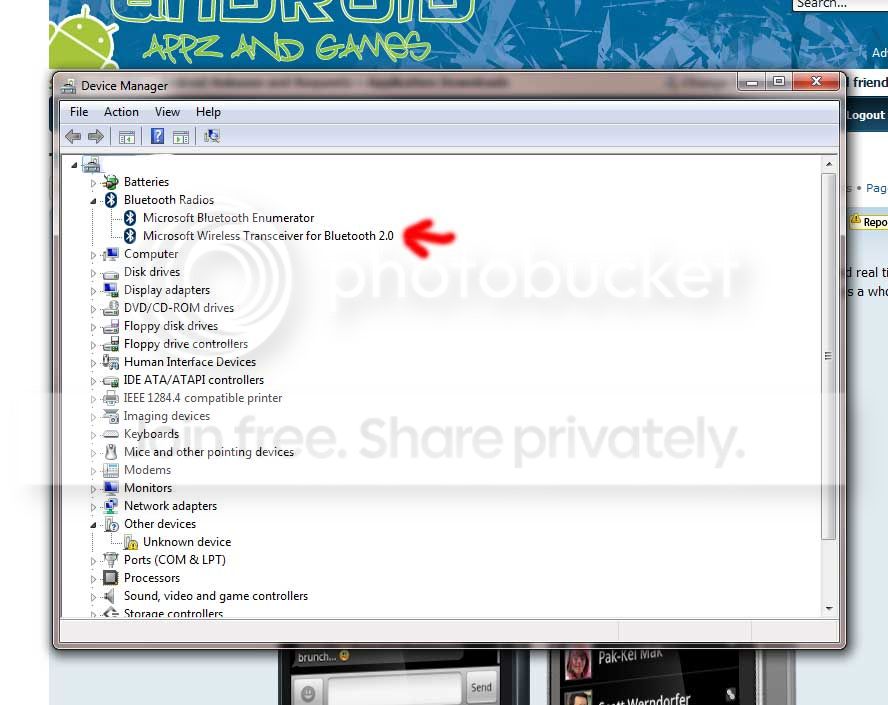
could you post a screenshot of the device manager with everything expanded and post here?
 

My Computer

Computer Manufacturer/Model Number
Dell 1440
OS
Windows 7 Ultimate 32x
CPU
Intel Core 2 Duo T6600 @ 2.2GHz
Motherboard
Dell 0K138P
Memory
DDR2 2GB
Graphics Card(s)
Intel Integrated GMA X4500MHD
Monitor(s) Displays
WXGA 14.1" Gloss
Hard Drives
320GB SATA HDD
PSU
Stock
Case
Stock
Cooling
Stock
The one with the red arrow but I checked all three and I also checked all the tabs within them.

device1.jpg


device2.jpg


Ignore the "Unknown device", thats a SIL SATA card I use for flashing DVDRoms. Doesn't need a driver installed because the program I use for flashing has it's own driver so it just stays on "Unknown device".
 

My Computer

Computer Manufacturer/Model Number
My Own Computer!
OS
Windows 7 Ultimate x64
CPU
AMD Athlon II X2 245 Regor 2.9GHz Socket AM3 65W Dual-Core
Motherboard
ASUS M4A88TD-M/USB3 880G
Memory
Crucial Ballistix Tracer 8GB (4x2GB) DDR3 1600 (PC3 12800)
Graphics Card(s)
ATI Radeon HD3870 X2
Sound Card
Onboard HD Audio
Monitor(s) Displays
Westinghouse 22" LCD, Samsung 46" LCD TV
Screen Resolution
1680x1050, Extended Display Setup
Hard Drives
2x Western Digital 74GB Raptors SATA Raid (OS & Games Drive)
1x Western Digital 1.5TB SATA (Storage)
1x Western Digital 2TB SATA (Storage)
PSU
Antec 550 Watt
Case
Antec Three Hundred
Cooling
3x Antec 120mm Fans & OEM CPU/GPU Coolers
Keyboard
Microsoft Comfort Curve Keyboard 2000
Mouse
Microsoft Bluetooth Explorer Mouse
Internet Speed
Comcastic Cable Internet! When it works!
Back
Top