
You are using an out of date browser. It may not display this or other websites correctly.
You should upgrade or use an alternative browser.
You should upgrade or use an alternative browser.
Solved Items showing on My Computer but do not exist
- Thread starter kodiak
- Start date

- Local time
- 11:18 PM
- Messages
- 124
Hi
Try going into admin tools, computer management, disk management and see if you can delete the non existing drivers there
Ashley
Try going into admin tools, computer management, disk management and see if you can delete the non existing drivers there
Ashley
My Computer
At a glance
OS X 10.10 Yosemite & Windows 7 Ultimate 64BitIntel Core i5 4570R8.00GBIntel Iris Pro 5200
- Computer type
- PC/Desktop
- Computer Manufacturer/Model Number
- iMac 21.5 Late 2013
- OS
- OS X 10.10 Yosemite & Windows 7 Ultimate 64Bit
- CPU
- Intel Core i5 4570R
- Motherboard
- Apple
- Memory
- 8.00GB
- Graphics Card(s)
- Intel Iris Pro 5200
- Monitor(s) Displays
- iMac 21.5 Inch
- Screen Resolution
- 1920 * 1080
- Hard Drives
- 1TB Apple HDD
- Keyboard
- Apple Wireless Keyboard
- Mouse
- Apple Magic Trackpad
~Hi
Try going into admin tools, computer management, disk management and see if you can delete the non existing drivers there
Ashley
Already tried that. Those items do not show there...
kodiak
My Computer
At a glance
MS Win Vista SP2
- OS
- MS Win Vista SP2

Maybe these are some sort of usb hub icons ? If so there's a setting to hide unpopulated devices under organize I believe.
My Computer
At a glance
windows 7 Professional 64 BitI7-3930G.Skill 4X 4 GB DR3 240 pin 16GB totalEVGA 670
- Computer Manufacturer/Model Number
- Custom build; parts from the Egg
- OS
- windows 7 Professional 64 Bit
- CPU
- I7-3930
- Motherboard
- Asus P9X79 PRO
- Memory
- G.Skill 4X 4 GB DR3 240 pin 16GB total
- Graphics Card(s)
- EVGA 670
- Sound Card
- Energy Take 5, Sennheiser HD 205 phones, X-FI
- Monitor(s) Displays
- Hanns G 21.5" HH221 and Samsung 19" 940BW and Hannspree
- Screen Resolution
- 2X 1920X1080 and 1X 1440X900
- Hard Drives
- 3-- internal 250 GB WD; 1-- internal 1 TB Samsung ---plus 3 WD external HDs (sizes vary to 1.5 TB); Crucial M4 128GB SSD, 1 Pioneer BDR-207 Bluray writer;
and 1--LG Lightscribe DVD drive
- PSU
- 1000 Watt XFX Pro Series
- Case
- Thermaltake Chaser
- Cooling
- Corsair H80
- Keyboard
- Logitech Wireless and backlit
- Mouse
- Logitech Rollerball
- Other Info
- 79 " long desk from Ikea. Sauder 71 inch long "speaker" shelf.
Optical and analog outs to a Yamaha RX-V 650 driving Energy Take 5.1 speaker system. Technics TT. Realistic mixer. Senns cans.
Maybe these are some sort of usb hub icons ? If so there's a setting to hide unpopulated devices under organize I believe.
No. There is nothing there...
My Computer
At a glance
MS Win Vista SP2
- OS
- MS Win Vista SP2
Hi there.
When I click on my computer, besides my drive letters it shows, in the Other tab, two local disks that do not exist.
How can I delete them?
Regards,

Welcome to SF , kodiak.
If you know something more about computer that can help you.
I had same problems but with Floppy . I dont have floppy but I see it in my computer. Try Disk Management or restart computer and open BIOS. Maybe you can there see that devices. If you found disable it and maybe fix your problem.
If you dont know how to do it ..... I dont know anything other for this problem.
Wait for other members.
Trinty.
My Computer
At a glance
Windows 7 Ultimate x64 - Service Pack 1Intel(R) Pentium(R) CPU G620 @ 2.60GHzTranscend Informations - 2*2048GB DDR3 @ 1066MHzATI Radeon HD 5670 - 1024MB DDR5 - Driver : 1...
- Computer Manufacturer/Model Number
- Trinty Self Build 2011
- OS
- Windows 7 Ultimate x64 - Service Pack 1
- CPU
- Intel(R) Pentium(R) CPU G620 @ 2.60GHz
- Motherboard
- ASUSTeK Computer INC. P8H61-M LX2
- Memory
- Transcend Informations - 2*2048GB DDR3 @ 1066MHz
- Graphics Card(s)
- ATI Radeon HD 5670 - 1024MB DDR5 - Driver : 19.04.2011
- Sound Card
- AMD High Definition Audio Device
- Monitor(s) Displays
- SAMSUNG SyncMaster 2220LM 22"
- Screen Resolution
- 1680x1050
- Hard Drives
- SAMSUNG HD503HI ATA Device - 500GB
- PSU
- Don't know for now !
- Case
- Case MSI
- Cooling
- Stock
- Keyboard
- MS Industrial 2.4GHz Wirelees Keyboard
- Mouse
- MS Industrial 2.4GHz Wirelees Optical Mouse
- Internet Speed
- Download speed : 6,5Mbps / Upload speed : 1Mpbs
- Other Info
- BIOS version : BIOS Date: 02/05/10 19:13:52 Ver: 08.00.10
Prime95 (4h) : max. 65°C
DirectX 11 version.
Logitech G13 Advanced Gaming Keyboard.
seavixen32
New member
Have you connected a camera recently?
If so, you need to install the camera drivers too.
Failing that, you might want to run a virus scan.
If so, you need to install the camera drivers too.
Failing that, you might want to run a virus scan.
My Computer
At a glance
Windows 7 Ultimate SP1 64-BitIntel Core i7 870 @ 2.93GHz8Gb Dual-Channel DDR3 @ 664MHznVidia GeForce GTX 460 1024MB dedicated RAM
- Computer Manufacturer/Model Number
- HP Pavilion Elite 495UK
- OS
- Windows 7 Ultimate SP1 64-Bit
- CPU
- Intel Core i7 870 @ 2.93GHz
- Motherboard
- MSI 2A9C (CPU1)
- Memory
- 8Gb Dual-Channel DDR3 @ 664MHz
- Graphics Card(s)
- nVidia GeForce GTX 460 1024MB dedicated RAM
- Sound Card
- Realtek HD Audio
- Monitor(s) Displays
- HP2310i
- Screen Resolution
- 1920 x 1080
- Hard Drives
- 1x1954GB Hitachi HDS22020ALA 330 (RAID), 1x1954GB Hitachi External for backup and storage
- PSU
- 460W
- Case
- HP Elite
- Cooling
- Air cooled
- Keyboard
- Logitech K750 solar-powered keyboard
- Mouse
- Logitech Wireless M180 mouse
- Internet Speed
- 2Mb
- Other Info
- Pure Avanti Flow Internet Radio with iPod Dock, 64Gb iPod, HP USB Speakers, Sony MDR-V500 Headphones, Sony Vaio F-Series Laptop
Have you connected a camera recently?
If so, you need to install the camera drivers too.
No.
No camera.
I'm using Windows 7 Ultimate 64bits
My Computer
At a glance
MS Win Vista SP2
- OS
- MS Win Vista SP2
seavixen32
New member
Try a virus scan. Many of us use Malwarebytes.
Malwarebytes : Malwarebytes Anti-Malware PRO removes malware including viruses, spyware, worms and trojans, plus it protects your computer
Malwarebytes : Malwarebytes Anti-Malware PRO removes malware including viruses, spyware, worms and trojans, plus it protects your computer
My Computer
At a glance
Windows 7 Ultimate SP1 64-BitIntel Core i7 870 @ 2.93GHz8Gb Dual-Channel DDR3 @ 664MHznVidia GeForce GTX 460 1024MB dedicated RAM
- Computer Manufacturer/Model Number
- HP Pavilion Elite 495UK
- OS
- Windows 7 Ultimate SP1 64-Bit
- CPU
- Intel Core i7 870 @ 2.93GHz
- Motherboard
- MSI 2A9C (CPU1)
- Memory
- 8Gb Dual-Channel DDR3 @ 664MHz
- Graphics Card(s)
- nVidia GeForce GTX 460 1024MB dedicated RAM
- Sound Card
- Realtek HD Audio
- Monitor(s) Displays
- HP2310i
- Screen Resolution
- 1920 x 1080
- Hard Drives
- 1x1954GB Hitachi HDS22020ALA 330 (RAID), 1x1954GB Hitachi External for backup and storage
- PSU
- 460W
- Case
- HP Elite
- Cooling
- Air cooled
- Keyboard
- Logitech K750 solar-powered keyboard
- Mouse
- Logitech Wireless M180 mouse
- Internet Speed
- 2Mb
- Other Info
- Pure Avanti Flow Internet Radio with iPod Dock, 64Gb iPod, HP USB Speakers, Sony MDR-V500 Headphones, Sony Vaio F-Series Laptop

I don't think that this is result of virus. Can you post screenshot from Disk Management ?
As sevixen said above, I think that it may be result of unsuccessful installation.
As sevixen said above, I think that it may be result of unsuccessful installation.
My Computer
At a glance
Windows 10 Pro x64Intel Core i5 4440 @Stock4 x 4GB HyperX Fury DDR3Gigabyte GTX 1050Ti O4G
- Computer type
- PC/Desktop
- Computer Manufacturer/Model Number
- Custom Build
- OS
- Windows 10 Pro x64
- CPU
- Intel Core i5 4440 @Stock
- Motherboard
- Gigabyte Z97 D3H
- Memory
- 4 x 4GB HyperX Fury DDR3
- Graphics Card(s)
- Gigabyte GTX 1050Ti O4G
- Sound Card
- Integrated
- Monitor(s) Displays
- Dell P2417H
- Screen Resolution
- 1920 x 1080
- Hard Drives
- Samsung EVO 850 120GB / Toshiba DT01ACA050 1TB 7200prm 32MB
- PSU
- Riotoro Onyx 750W
- Case
- NZXT H500 Black-Red
- Cooling
- Stock CPU + NZXT 120mm + 2x120mm red fans
- Keyboard
- Modecom Volcano Lanparty
- Mouse
- Asus ROG Gladius / DeepCool E-Pad Plus
- Internet Speed
- DOCSIS 50/3 Mbit
- Browser
- Google Chrome
- Other Info
- Asus K55VJ(i5 3210M, GT635M / 2GB, 8GB DDR3, 500GB HDD)
I don't think that this is result of virus. Can you post screenshot from Disk Management ?
As sevixen said above, I think that it may be result of unsuccessful installation.
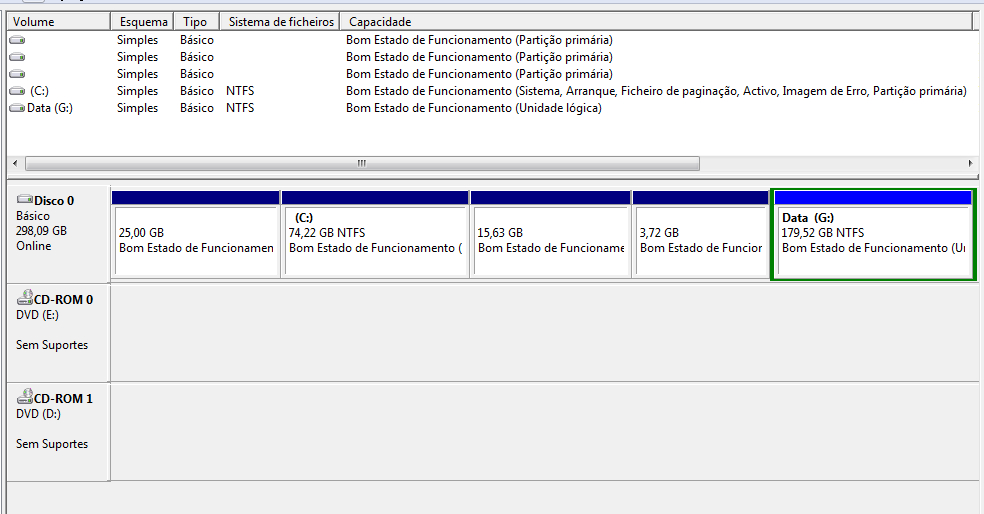
Everything is ok. The 25 GB partition is the ASUS recovery and the 15,63 and 3,72 GB are from my Ubuntu installation.
I believe this problem appeared when I was playing making partition on my USB flash drive...

My Computer
At a glance
MS Win Vista SP2
- OS
- MS Win Vista SP2
Everything is ok. The 25 GB partition is the ASUS recovery and the 15,63 and 3,72 GB are from my Ubuntu installation.
I believe this problem appeared when I was playing making partition on my USB flash drive...
That can be problem.
Win7 partition and ASUS recovery partition but Ubuntu....
Maybe you cant see these partitions because (maybe) that partition use other format system and Win7 cant read this......
That can be your problem.
Trinty.
My Computer
At a glance
Windows 7 Ultimate x64 - Service Pack 1Intel(R) Pentium(R) CPU G620 @ 2.60GHzTranscend Informations - 2*2048GB DDR3 @ 1066MHzATI Radeon HD 5670 - 1024MB DDR5 - Driver : 1...
- Computer Manufacturer/Model Number
- Trinty Self Build 2011
- OS
- Windows 7 Ultimate x64 - Service Pack 1
- CPU
- Intel(R) Pentium(R) CPU G620 @ 2.60GHz
- Motherboard
- ASUSTeK Computer INC. P8H61-M LX2
- Memory
- Transcend Informations - 2*2048GB DDR3 @ 1066MHz
- Graphics Card(s)
- ATI Radeon HD 5670 - 1024MB DDR5 - Driver : 19.04.2011
- Sound Card
- AMD High Definition Audio Device
- Monitor(s) Displays
- SAMSUNG SyncMaster 2220LM 22"
- Screen Resolution
- 1680x1050
- Hard Drives
- SAMSUNG HD503HI ATA Device - 500GB
- PSU
- Don't know for now !
- Case
- Case MSI
- Cooling
- Stock
- Keyboard
- MS Industrial 2.4GHz Wirelees Keyboard
- Mouse
- MS Industrial 2.4GHz Wirelees Optical Mouse
- Internet Speed
- Download speed : 6,5Mbps / Upload speed : 1Mpbs
- Other Info
- BIOS version : BIOS Date: 02/05/10 19:13:52 Ver: 08.00.10
Prime95 (4h) : max. 65°C
DirectX 11 version.
Logitech G13 Advanced Gaming Keyboard.
Everything is ok. The 25 GB partition is the ASUS recovery and the 15,63 and 3,72 GB are from my Ubuntu installation.
I believe this problem appeared when I was playing making partition on my USB flash drive...
That can be problem.
Win7 partition and ASUS recovery partition but Ubuntu....
Maybe you cant see these partitions because (maybe) that partition use other format system and Win7 cant read this......
That can be your problem.
Trinty.
Used the same USB flash and the same program to partition it. Restarted and now its all OK.
Thanks for all the help
My Computer
At a glance
MS Win Vista SP2
- OS
- MS Win Vista SP2
How can I see that? They are all on the same hdd...Is that 4 primary partitions + extended?
My Computer
At a glance
MS Win Vista SP2
- OS
- MS Win Vista SP2

Indeed
It looks like it to me too.
Click on picture for animation.
Something does look odd about your screenshot, though. Is that 4 primary partitions + extended?
It looks like it to me too.
How can I see that? They are all on the same hdd...
Click on picture for animation.
Last edited:
My Computer
At a glance
W7 Ultimate SP1, LM19.2 MATE, W10 Home 1703, ...AMD Phenom II x6 1100T, 3.3 GHz12GB DDR3 1333 G-Skill (4GB x 2), G-Skill (2G...NVIDIA GeForce GTX 660
- Computer type
- PC/Desktop
- Computer Manufacturer/Model Number
- n/a
- OS
- W7 Ultimate SP1, LM19.2 MATE, W10 Home 1703, W10 Pro 1703 VM, #All 64 bit
- CPU
- AMD Phenom II x6 1100T, 3.3 GHz
- Motherboard
- ASUS M4A88T-M/USB3 (AM3)
- Memory
- 12GB DDR3 1333 G-Skill (4GB x 2), G-Skill (2GB x 2)
- Graphics Card(s)
- NVIDIA GeForce GTX 660
- Sound Card
- Realtek?
- Monitor(s) Displays
- Samsung S23B350
- Screen Resolution
- 1920x1080
- Hard Drives
- WD Green 2TB (SATA), WD Green 3TB (SATA), WD Blue 4TB (SATA), WD Blue 6TB (SATA)
- PSU
- Cooler Master
- Case
- Antec GX300 Tower
- Cooling
- 3x Antec TRICOOL 120mm Fans
- Mouse
- Wired Optical
- Internet Speed
- DSL
- Antivirus
- Avast
- Browser
- Pale Moon (64 bit)
- Other Info
- 2018-12-27 Upgraded HDDs
2015-12-10 Upgraded case, graphics card, storage
2015-08-15 Upgraded motherboard & RAM
2015-07-15 Upgraded LM17.1 to LM17.2
Something does look odd about your screenshot, though. Is that 4 primary partitions + extended?
It looks like it to me too.
How can I see that? They are all on the same hdd...
Click on picture for animation.
1 - Asus recovery partition
2 - Ubuntu installation
3 - Ubuntu persistence
4 - c: | Windows 7 Ultimate x64
All of these are on the same hdd
My Computer
At a glance
MS Win Vista SP2
- OS
- MS Win Vista SP2
Not what we meant
That's fair enough.
However your picture shows 5 partitions on that HDD.
You can have 4 Primary Partitions on the same HDD, if you only want a maximum of 4 partitions.
If you need/want more than 4 partitions, you can only have 3 Primary Partitions + extra Extended Partition(s).
Since your HDD has 5 partitions, it shouldn't be able to have 4 Primary Partitions.
Something strange is happening.
What is the 3.72 GB partition?
Is your all of your data backed up?
If you have backed up your data AND there is nothing on the 3.72 GB partition, try deleting it.
Alternatively, you could try to create another partition after "Data G:" and copy the data from the 3.72 GB partition to it and then delete the original 3.72 GB partition.
Another option, wait until one of the HDD experts (on this forum) reads this thread.
1 - Asus recovery partition
2 - Ubuntu installation
3 - Ubuntu persistence
4 - c: | Windows 7 Ultimate x64
All of these are on the same hdd
That's fair enough.
However your picture shows 5 partitions on that HDD.
You can have 4 Primary Partitions on the same HDD, if you only want a maximum of 4 partitions.
If you need/want more than 4 partitions, you can only have 3 Primary Partitions + extra Extended Partition(s).
Disk partitioning - Wikipedia, the free encyclopediaThe total data storage space of a PC hard disk can be divided into at most four primary partitions, or alternatively three primary partitions and an extended partition. These partitions are described by 16-byte entries that constitute the Partition Table, located in the master boot record.
Since your HDD has 5 partitions, it shouldn't be able to have 4 Primary Partitions.
Something strange is happening.
What is the 3.72 GB partition?
Is your all of your data backed up?
If you have backed up your data AND there is nothing on the 3.72 GB partition, try deleting it.
Alternatively, you could try to create another partition after "Data G:" and copy the data from the 3.72 GB partition to it and then delete the original 3.72 GB partition.
Another option, wait until one of the HDD experts (on this forum) reads this thread.
My Computer
At a glance
W7 Ultimate SP1, LM19.2 MATE, W10 Home 1703, ...AMD Phenom II x6 1100T, 3.3 GHz12GB DDR3 1333 G-Skill (4GB x 2), G-Skill (2G...NVIDIA GeForce GTX 660
- Computer type
- PC/Desktop
- Computer Manufacturer/Model Number
- n/a
- OS
- W7 Ultimate SP1, LM19.2 MATE, W10 Home 1703, W10 Pro 1703 VM, #All 64 bit
- CPU
- AMD Phenom II x6 1100T, 3.3 GHz
- Motherboard
- ASUS M4A88T-M/USB3 (AM3)
- Memory
- 12GB DDR3 1333 G-Skill (4GB x 2), G-Skill (2GB x 2)
- Graphics Card(s)
- NVIDIA GeForce GTX 660
- Sound Card
- Realtek?
- Monitor(s) Displays
- Samsung S23B350
- Screen Resolution
- 1920x1080
- Hard Drives
- WD Green 2TB (SATA), WD Green 3TB (SATA), WD Blue 4TB (SATA), WD Blue 6TB (SATA)
- PSU
- Cooler Master
- Case
- Antec GX300 Tower
- Cooling
- 3x Antec TRICOOL 120mm Fans
- Mouse
- Wired Optical
- Internet Speed
- DSL
- Antivirus
- Avast
- Browser
- Pale Moon (64 bit)
- Other Info
- 2018-12-27 Upgraded HDDs
2015-12-10 Upgraded case, graphics card, storage
2015-08-15 Upgraded motherboard & RAM
2015-07-15 Upgraded LM17.1 to LM17.2
gilliganfitzger
New member
- Local time
- 6:18 PM
- Messages
- 1
I had this same problem and while reading your thread it occurred to me that I have a program on my machine (PowerISO) that defaults to creating (1) virtual drive.
I opened the PowerISO preferences, disabled the virtual drive and checked Windows Explorer to see the results. The non-existent CD-ROM drive that had been haunting explorer was gone!
Hope this helps anyone looking for answers.
I opened the PowerISO preferences, disabled the virtual drive and checked Windows Explorer to see the results. The non-existent CD-ROM drive that had been haunting explorer was gone!
Hope this helps anyone looking for answers.
My Computer
At a glance
Windows 7 Professional x64
- Computer type
- PC/Desktop
- Computer Manufacturer/Model Number
- HP
- OS
- Windows 7 Professional x64
- Antivirus
- AVG

- Local time
- 6:18 PM
- Messages
- 3,615
Just read this thread!
Prior post is correct, you cannot have 4 partitions & extended, you can have 4 partitions, or 3 partitions & extended!
I have dual boot, Linux Lite and Win7, Linux Lite & win10.
Fire up you Linux distro, you should be able to access everything, and open it on your drive. You can copy, paste, add, delete, anything from there. Windows cannot open Linux ext3, ext4, etc. formatted partitions.
Local disk is remainder from inserting USB Flash, xD card, Compact Flash, SD/MMC, Memory Stick, etc. If you restart your computer and they are not inserted, those should disappear.
Prior post is correct, you cannot have 4 partitions & extended, you can have 4 partitions, or 3 partitions & extended!
I have dual boot, Linux Lite and Win7, Linux Lite & win10.
Fire up you Linux distro, you should be able to access everything, and open it on your drive. You can copy, paste, add, delete, anything from there. Windows cannot open Linux ext3, ext4, etc. formatted partitions.
Local disk is remainder from inserting USB Flash, xD card, Compact Flash, SD/MMC, Memory Stick, etc. If you restart your computer and they are not inserted, those should disappear.
My Computer
At a glance
Win 10 x64, Linux Lite, Win 7 x64, BlackArch,...
- Computer type
- PC/Desktop
- Computer Manufacturer/Model Number
- HP Desktop & Compaq Laptop
- OS
- Win 10 x64, Linux Lite, Win 7 x64, BlackArch, & Kali
- Hard Drives
- Samsung 850 Pro 256Gb,
Hitachi HDD 1Tb,
Crucial MX SSD 250Gb
Segate 3Tb USB 3.0 Ext. Backup HDD
- Internet Speed
- 150Mbps dn, 20Mbps up
- Antivirus
- Avast Free, Malwarebytes Anti-Exploit & Anti-Ransomware
- Browser
- Firefox, Chrome, Opera, & VPN
Similar threads
- Replies
- 3
- Views
- 2K

- Replies
- 24
- Views
- 35K
- Replies
- 2
- Views
- 1K

- Replies
- 4
- Views
- 11K