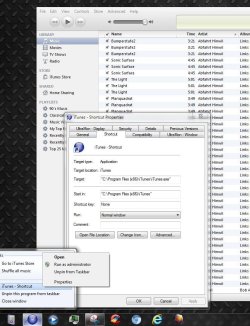
iTunes icon (stubbornly) won't change

lions

New member
Local time
12:12 AM
Messages
4
I've seen quite a few threads about this here, but none of them seem to address the problem I'm having. So, let's see what happens.

Step 1 to pinning the iTunes taskbar icon is to keep it from doing this:
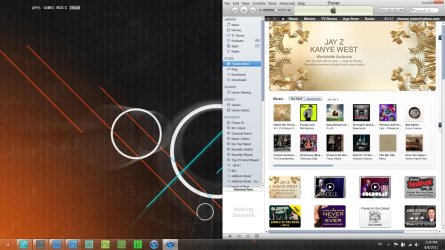
step 1.jpg

So, you just have to right click the open window, and pin it to the taskbar.
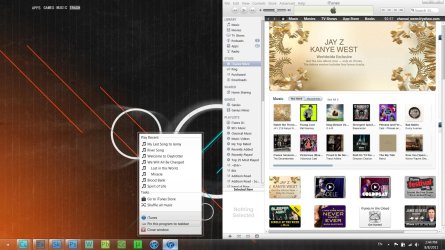
step 2.jpg

From there you can remove the other icon, so that you'll only have one pinned to the taskbar.
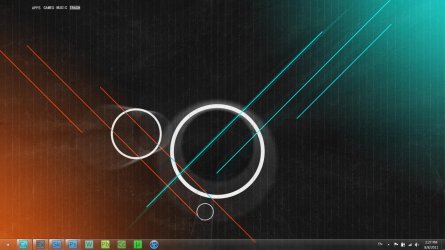
step 3.jpg

Now, I did that just to make sure that we're all starting out on the same page, because you can easily change the first icon, just not the second. The problem is, I do that by creating an shortcut on the desktop, changing the icon there, and then pinning it to the taskbar.
step 4.jpg

And obviously, you can't do that for this second window (at least, not that I know of). So, if you try to go through the properties in the taskbar to change it, you end up with an icon that's technically "changed," but the change in no way shows through on the taskbar.
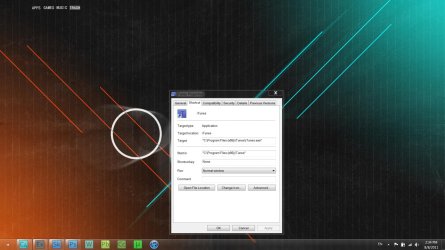
step 5.jpg

And that, ladies and gentlemen, is my problem. I can't get this icon changed, and it's definitely throwin' off my groove. As you can see, I've got a rocket dock that can substitute in for me, but I'd really rather just be able to figure this out.

Thanks in advance for all of your help!

edit: I'm running 64-bit Windows 7, if that helps at all.
 

My Computer My Computer

At a glance

Windows 7 Home-Premium x64intel i7 - 720QM6 GB DDR3nVIDIA GeForce GTS 360M
Computer Manufacturer/Model Number
Asus G51J
OS
Windows 7 Home-Premium x64
CPU
intel i7 - 720QM
Memory
6 GB DDR3
Graphics Card(s)
nVIDIA GeForce GTS 360M
What version of iTunes is it you're using? I haven't had to do the pin-unpin routine for quite a few versions back, to up-to-date.

I tried changing the icon from the taskbar properties, rebooting and even cleared the icon cache. Still wouldn't change.

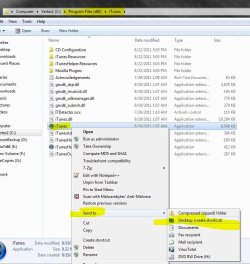
So I unpinned my iTunes icon on the taskbar, went to Program files (x86)/ iTunes, right clicked the icon there - send to desktop as shortcut - right clicked on that icon on the desktop - went to it's properties/change icon - pointed to a 256x256 pixel ico in my library. It that case it changed naturally, so I dragged and pinned it to the taskbar. Stays that changed icon after reboot and opening iTunes. As you can see in the screenshot.

If that doesn't work - it may have something to do with what's look like having a modified 3rd party theme/skin applied to your taskbar.


7.JPG
 

My Computer My Computer

At a glance

Windows 7 Ultimate x64 SP1Core i7 920 (D0) @ 4Ghz, *26c idle *65c full ...12GB DDR3 Corsair Dominator -CMD12GX3M6A1600C...Zotac Geforce GTX 770
Computer type
PC/Desktop
Computer Manufacturer/Model Number
Airbot 2.0
OS
Windows 7 Ultimate x64 SP1
CPU
Core i7 920 (D0) @ 4Ghz, *26c idle *65c full load on air
Motherboard
Asus P6X58D Premium - Sata 6Gb/s - USB 3.0
Memory
12GB DDR3 Corsair Dominator -CMD12GX3M6A1600C8 at 1600MHz
Graphics Card(s)
Zotac Geforce GTX 770
Sound Card
ASUS Xonar D2X
Monitor(s) Displays
1 LG 24" Flatron W2453V-PF 1 Samsung 24" P2450H both 2ms RT
Screen Resolution
1920x1080@60hz
Hard Drives
1 Samsung 250GB 840 Evo SSD
1 OCZ Vertex2 180GB SSD
1 TB Samsung Spinpoint F1 7200RPM 32MB cache
2 500GB WD Caviar Blacks 7200RPM 32MB cache (WD5001AALS)

Pioneer DVD Burner DVR-S18M
PSU
Corsair HX1000W
Case
Cooler Master HAF 932
Cooling
Case Fans *3 230mm, *1 140mm/CPU - *Tuniq Tower 120 Extreme
Keyboard
Logitech Wireless MK700
Mouse
Logitech Wireless MK700
Internet Speed
DL 15 Mbps UL 0.98 Mbps
Antivirus
None
Browser
Firefox Nightly
Other Info
Processor-7.7 *RAM- 7.9 *Graphics-7.9 *Gaming Graphics- 7.9 *SSD- 7.8 W.E.I final score= 7.7
*Phone- LG Nexus 5
Alternatively, you can change the .exe file's icon with resource haxer.
Go to icon groups and replace the itunes icon with your icon file.
 

My Computer My Computer

At a glance

Windows 7 Ultimate 64 bit SP1Intel(R) Core(TM) i5-2500K12GB Kingston Hyperx 1600MHzAsus GTS 450
Computer type
PC/Desktop
Computer Manufacturer/Model Number
Custom Built PC
OS
Windows 7 Ultimate 64 bit SP1
CPU
Intel(R) Core(TM) i5-2500K
Motherboard
Gigabyte Technology Co., Ltd. Z68X-UD3-B3
Memory
12GB Kingston Hyperx 1600MHz
Graphics Card(s)
Asus GTS 450
PSU
500W Coolink
Other Info
Genius G-Pen F610 (PenPad)
Alternatively, you can change the .exe file's icon with resource haxer.
Go to icon groups and replace the itunes icon with your icon file.
Sometimes that works sometimes it doesn't it depends on the .exe , I have tried it on a few.
Jerry
 

My Computer My Computer

At a glance

Win 7 Pro x64 / Win 10 ProIntel(R) Core(TM) i7-3630QM CPU @ 2.40GHz12 GB(1) Intel(R) HD Graphics 4000 (2) NVIDIA GeFo...
Computer type
Laptop
Computer Manufacturer/Model Number
Sager NP9170
OS
Win 7 Pro x64 / Win 10 Pro
CPU
Intel(R) Core(TM) i7-3630QM CPU @ 2.40GHz
Motherboard
CLEVO P170EM
Memory
12 GB
Graphics Card(s)
(1) Intel(R) HD Graphics 4000 (2) NVIDIA GeForce GTX 675M
Sound Card
(1) Realtek High Definition Audio (2) Intel(R) Display Aud
Monitor(s) Displays
17.3
Screen Resolution
1920x1080
Hard Drives
(1) Samsung 860 EVO 500GB(OS) (1) Samsung 860 EVO 500GB(Data)
Keyboard
Backlite
Antivirus
MSE, Malwarebytes Pro
Browser
Firefox
Other Info
DESKTOP: Custom-built.
OS: Win 10 Pro x64.
CASE: Rosewill R5.
CPU: Intel I5 4670K CPU @ 3.40GHz.
CPU COOLER: Cool Master Hyper 212 EVO.
MOTHERBOARD: Asus Z87-A.
MEMORY: Kingston HyperX 2x4 GB.
GPU: Nvidia Geforce 650 TI.
PSU: Corsair TX750.
DRIVES: (1) Samsung 840 120 GB SSD (2) Western Digital blue 500 GB 7200 RPM.
What version of iTunes is it you're using? I haven't had to do the pin-unpin routine for quite a few versions back, to up-to-date.

I tried changing the icon from the taskbar properties, rebooting and even cleared the icon cache. Still wouldn't change.

So I unpinned my iTunes icon on the taskbar, went to Program files (x86)/ iTunes, right clicked the icon there - send to desktop as shortcut - right clicked on that icon on the desktop - went to it's properties/change icon - pointed to a 256x256 pixel ico in my library. It that case it changed naturally, so I dragged and pinned it to the taskbar. Stays that changed icon after reboot and opening iTunes. As you can see in the screenshot.

If that doesn't work - it may have something to do with what's look like having a modified 3rd party theme/skin applied to your taskbar.


View attachment 169322

Alright, to start, I made sure I updated iTunes (I even went to the site and downloaded the latest version from there). Currently, I'm running version 10.4. Are you running 64 bit Windows 7? (Okay that was dumb, if your iTunes folder is in x86 then it's pretty probable you're running 64 bit Windows)

I think you might be on to something with my custom theme (which I installed awhile back, sometimes I forget that I have one), because that's honestly the only difference between you and me (from what I can tell). I wasn't able to "send to desktop as shortcut," but I'm guessing that's not a button you can press (I just tend to drag and drop as a shortcut).

Yeah, I might just have to stick with Rocket Dock on this one, oh well~
Alternatively, you can change the .exe file's icon with resource haxer.
Go to icon groups and replace the itunes icon with your icon file.
Thank you, I might check that out in the near future.
 

My Computer My Computer

At a glance

Windows 7 Home-Premium x64intel i7 - 720QM6 GB DDR3nVIDIA GeForce GTS 360M
Computer Manufacturer/Model Number
Asus G51J
OS
Windows 7 Home-Premium x64
CPU
intel i7 - 720QM
Memory
6 GB DDR3
Graphics Card(s)
nVIDIA GeForce GTS 360M
I wasn't able to "send to desktop as shortcut," but I'm guessing that's not a button you can press (I just tend to drag and drop as a shortcut).


Don't know why not. That's a standard feature in Windows. :huh:

t.JPG
 

My Computer My Computer

At a glance

Windows 7 Ultimate x64 SP1Core i7 920 (D0) @ 4Ghz, *26c idle *65c full ...12GB DDR3 Corsair Dominator -CMD12GX3M6A1600C...Zotac Geforce GTX 770
Computer type
PC/Desktop
Computer Manufacturer/Model Number
Airbot 2.0
OS
Windows 7 Ultimate x64 SP1
CPU
Core i7 920 (D0) @ 4Ghz, *26c idle *65c full load on air
Motherboard
Asus P6X58D Premium - Sata 6Gb/s - USB 3.0
Memory
12GB DDR3 Corsair Dominator -CMD12GX3M6A1600C8 at 1600MHz
Graphics Card(s)
Zotac Geforce GTX 770
Sound Card
ASUS Xonar D2X
Monitor(s) Displays
1 LG 24" Flatron W2453V-PF 1 Samsung 24" P2450H both 2ms RT
Screen Resolution
1920x1080@60hz
Hard Drives
1 Samsung 250GB 840 Evo SSD
1 OCZ Vertex2 180GB SSD
1 TB Samsung Spinpoint F1 7200RPM 32MB cache
2 500GB WD Caviar Blacks 7200RPM 32MB cache (WD5001AALS)

Pioneer DVD Burner DVR-S18M
PSU
Corsair HX1000W
Case
Cooler Master HAF 932
Cooling
Case Fans *3 230mm, *1 140mm/CPU - *Tuniq Tower 120 Extreme
Keyboard
Logitech Wireless MK700
Mouse
Logitech Wireless MK700
Internet Speed
DL 15 Mbps UL 0.98 Mbps
Antivirus
None
Browser
Firefox Nightly
Other Info
Processor-7.7 *RAM- 7.9 *Graphics-7.9 *Gaming Graphics- 7.9 *SSD- 7.8 W.E.I final score= 7.7
*Phone- LG Nexus 5
Back
Top