Solved iTunes

  • Thread starter Thread starter Jonezy
  • Start date Start date
J

Jonezy

Guest
Has anyone got iTunes to install? I tried to install it and it told me that it couldn't install because there was a problem installing quicktime which iTunes needs to run so I right clicked it and went through troubleshoot compatibility mode and clicked vista as the last working thing and it still wouldnt install :(
 
My install just freezes. Gets about 75% of the way done and then never goes anywhere else. The Apple Updater installed though....fantastic!

I've tried compatibility mode as well. My next step is to see if I can get one of the older versions to install, and then update.
 

My Computer

Computer Manufacturer/Model Number
Dell 8400
OS
Windows 7 Beta 1 b7000
CPU
Intel Pentium 4
Memory
4GB
Graphics Card(s)
ATI Radeon HD3450
Sound Card
Creative SoundBlaster Audigy 2
Monitor(s) Displays
Acer AL2016W
Screen Resolution
1680x1050
Hard Drives
1x500GB
1x100GB
Case
Dell 8400
Cooling
Standard
Keyboard
Dell Multimedia Keyboard
Mouse
Logitech MediaPlay
Internet Speed
Comcastic!
Installed fine for me. Run it as an Admin and in Compatibility for Windows Vista.
 

My Computer

OS
Windows 7 Ultimate Beta x64 / Windows Vista Home Premium / Windows XP Professional / Linux Ubunu
CPU
AMD Athlon x64 Dual Core
Memory
2 GB
Hard Drives
160 GB Western Digital
Internet Speed
Bad
interesting update.... I just plugged my ipod into my laptop which I had upgraded to 7 from vista, as I remembered I had installed iTunes before the upgrade, and it works! so far hasn't crashed, is playing my music etc :)
 
Installed fine for me. Run it as an Admin and in Compatibility for Windows Vista.
I've tried that...no dice here.
 

My Computer

Computer Manufacturer/Model Number
Dell 8400
OS
Windows 7 Beta 1 b7000
CPU
Intel Pentium 4
Memory
4GB
Graphics Card(s)
ATI Radeon HD3450
Sound Card
Creative SoundBlaster Audigy 2
Monitor(s) Displays
Acer AL2016W
Screen Resolution
1680x1050
Hard Drives
1x500GB
1x100GB
Case
Dell 8400
Cooling
Standard
Keyboard
Dell Multimedia Keyboard
Mouse
Logitech MediaPlay
Internet Speed
Comcastic!
It runs for me, the only down side is that it likes to randomly get choppy, it'll play a half second of the song for two seconds :\.
 

My Computer

OS
Windows Vista Ultimate x86
CPU
Q6600
Motherboard
X38
Memory
4gb
Graphics Card(s)
nVidia 8800
Sound Card
Integrated
Monitor(s) Displays
2x 22"
Screen Resolution
3360x1050 (2x 1680x1050)
Hard Drives
1x 320gb,
1x 160gb,
1x 1tb
Cooling
Air
Internet Speed
3mbp/s down 1mbp/s up
I for some reason it will not let me burn my cd's on my laptop says it did not install correctly anyone have any ideas????
 
I for some reason it will not let me burn my cd's on my laptop says it did not install correctly anyone have any ideas????

You should start your own thread when a new problem comes up. not many ppl will look at a thread which is 9 months old. Just a friendly heads up. Btw Itunes 9 just came out and installs fine on win 7


Kenn
 

My Computer

Computer Manufacturer/Model Number
HP Pavillion dv-7 1005 Tx
OS
Win 8 Release candidate 8400
CPU
[email protected]
Memory
4 gigs
Graphics Card(s)
Nvidia 9600M
Sound Card
HD built-in
Monitor(s) Displays
17" Wxga
Screen Resolution
1440x900
Cooling
none
Internet Speed
45Mb down 5Mb up
I for some reason it will not let me burn my cd's on my laptop says it did not install correctly anyone have any ideas????
We suggest that the install was sucessful to a degree.
However your drive is not recognised by GEAR which is used by ITunes to make copies of your data.
Perform the following function:
  1. Bring up ITunes on your system
  2. Go to the help function on the top left of your screen
  3. In the help function run the diagnostic function
  4. Insert a musical cd in your drive
  5. Diagnostics will run several functions 1 of which will be to test your cd drive.
  6. If the drive test fails it means ITunes was looking for a partiular driver
ITunes uses gear to burn data and Gear does not recognise your drive.
Give us a more complete system spec. IE: OS & build, X86 or X64 etc.
Adrian
 

My Computer

Computer Manufacturer/Model Number
Custom Build
OS
Windows 7 7600 1 X64
CPU
AMD PHENOM II X 550 PROCESSOR 3.1 ghz
Motherboard
ASUS M4A78-TE
Memory
Corsair 4 gig ddr 3
Graphics Card(s)
ati radeon 3300
Sound Card
ati hd
Monitor(s) Displays
syncmaster 2033sw
Screen Resolution
1600X900 60 hz refresh
Hard Drives
twin_seagates SATA's 1 TB & 500 Gig, hitachi_slimline 160 gig
PSU
antec_550 watt
Case
cooler master GLite
Cooling
stock_heat sink
Internet Speed
20mbs up/ 1.5mbs down
Other Info
favorite child "stewie"
favorite dog "brian"
Hey guys,

Sorry if this is a repost or call for help but... just got a new pc (windows 7, 64 bit). I cannot get any version of itunes to recognize my ipod. everything installs fine, my computer sees the ipod, everything looks clean except my ipod does not get recognized in the source pane in itunes... i think I have tried everything on the planet. even talked with 2 techies @ apple to no avail. my ipod is functional as it stills runs perfect on my XP machine. could there be anything missing from 7 that is causing this conflict? thanks in advance.
 

My Computer

Computer Manufacturer/Model Number
HP Pavilion DV7
OS
Windows 7 Premium
CPU
Intel Core i7 - 64 Bit
Motherboard
1.60 Ghz
Memory
6Gb
Hey guys,

Sorry if this is a repost or call for help but... just got a new pc (windows 7, 64 bit). I cannot get any version of itunes to recognize my ipod. everything installs fine, my computer sees the ipod, everything looks clean except my ipod does not get recognized in the source pane in itunes... i think I have tried everything on the planet. even talked with 2 techies @ apple to no avail. my ipod is functional as it stills runs perfect on my XP machine. could there be anything missing from 7 that is causing this conflict? thanks in advance.


+1!!!1 I think the issue is that ITUNES and IPODS are extremely obscure and the Windows Engineers didn't bother to check compatibility, I am certain that we are the only 2 people having issues.
 

My Computer

Computer Manufacturer/Model Number
Gateway NV52
OS
Windows 7
Graphics Card(s)
ATI
Hey Windows7inMiami... i actually, finally got it to work. forgot to post the updates here tho... i took a chance and simply updated my ipod from within itunes. i was freaked out thinking it was going to force me to restore (and lose 75 Gigs of music... I'd be PISSED!). my ipod was older and it apparently just needed a simple software update. simple as that, works perfectly! just updated the software from version 1, to version 2 and it recognized it...sweet...so happy. good luck buddy.
 

My Computer

Computer Manufacturer/Model Number
HP Pavilion DV7
OS
Windows 7 Premium
CPU
Intel Core i7 - 64 Bit
Motherboard
1.60 Ghz
Memory
6Gb
Hey Windows7inMiami... i actually, finally got it to work. forgot to post the updates here tho... i took a chance and simply updated my ipod from within itunes. i was freaked out thinking it was going to force me to restore (and lose 75 Gigs of music... I'd be PISSED!). my ipod was older and it apparently just needed a simple software update. simple as that, works perfectly! just updated the software from version 1, to version 2 and it recognized it...sweet...so happy. good luck buddy.
Yes, I had the same issue with Iphone, simply restored it to original config and re-synched.
 

My Computer

Computer Manufacturer/Model Number
Custom Build
OS
Windows 7 7600 1 X64
CPU
AMD PHENOM II X 550 PROCESSOR 3.1 ghz
Motherboard
ASUS M4A78-TE
Memory
Corsair 4 gig ddr 3
Graphics Card(s)
ati radeon 3300
Sound Card
ati hd
Monitor(s) Displays
syncmaster 2033sw
Screen Resolution
1600X900 60 hz refresh
Hard Drives
twin_seagates SATA's 1 TB & 500 Gig, hitachi_slimline 160 gig
PSU
antec_550 watt
Case
cooler master GLite
Cooling
stock_heat sink
Internet Speed
20mbs up/ 1.5mbs down
Other Info
favorite child "stewie"
favorite dog "brian"
Well I just restored it and am now re-syncing it, I will post what happens. YES I had to delete everything off my IPOD but I used Sharepod to move all my music so no worries. will follow-up soon.
 

My Computer

Computer Manufacturer/Model Number
Gateway NV52
OS
Windows 7
Graphics Card(s)
ATI
Well everything seems to work except auto-sync. I have no idea why. I have to physically open ITUNES and THEN it see's my IPOD and THEN it SYNC's.

Any ideas?
 

My Computer

Computer Manufacturer/Model Number
Gateway NV52
OS
Windows 7
Graphics Card(s)
ATI
Well everything seems to work except auto-sync. I have no idea why. I have to physically open ITUNES and THEN it see's my IPOD and THEN it SYNC's.

Any ideas?
Hey Miami, thats how its supposed to work!
 

My Computer

Computer Manufacturer/Model Number
Custom Build
OS
Windows 7 7600 1 X64
CPU
AMD PHENOM II X 550 PROCESSOR 3.1 ghz
Motherboard
ASUS M4A78-TE
Memory
Corsair 4 gig ddr 3
Graphics Card(s)
ati radeon 3300
Sound Card
ati hd
Monitor(s) Displays
syncmaster 2033sw
Screen Resolution
1600X900 60 hz refresh
Hard Drives
twin_seagates SATA's 1 TB & 500 Gig, hitachi_slimline 160 gig
PSU
antec_550 watt
Case
cooler master GLite
Cooling
stock_heat sink
Internet Speed
20mbs up/ 1.5mbs down
Other Info
favorite child "stewie"
favorite dog "brian"
Well everything seems to work except auto-sync. I have no idea why. I have to physically open ITUNES and THEN it see's my IPOD and THEN it SYNC's.

Any ideas?
Hey Miami, thats how its supposed to work!


No, you plug in your ipod, Itunes automatically opens and then sync's, maybe it is a setting I missed?


Thanks Again!!!
 

My Computer

Computer Manufacturer/Model Number
Gateway NV52
OS
Windows 7
Graphics Card(s)
ATI
Set prog defaults

Well everything seems to work except auto-sync. I have no idea why. I have to physically open ITUNES and THEN it see's my IPOD and THEN it SYNC's.

Any ideas?
Hey Miami, thats how its supposed to work!


No, you plug in your ipod, Itunes automatically opens and then sync's, maybe it is a setting I missed?


Thanks Again!!!
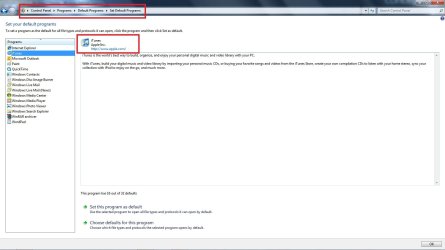
Ok. I see what you are saying.
You need to set your program defaults.
  1. Go to start
  2. Click on default programs
  3. On the left you will see various programs
  4. Click on Itunes.
  5. Set it to the default option you require
  6. Go to itunes, set it to autosync when ever you plug in the device
Miami I made you a screenshot to look at.
 

Attachments

  • apple_default.jpg
    apple_default.jpg
    82.3 KB · Views: 34

My Computer

Computer Manufacturer/Model Number
Custom Build
OS
Windows 7 7600 1 X64
CPU
AMD PHENOM II X 550 PROCESSOR 3.1 ghz
Motherboard
ASUS M4A78-TE
Memory
Corsair 4 gig ddr 3
Graphics Card(s)
ati radeon 3300
Sound Card
ati hd
Monitor(s) Displays
syncmaster 2033sw
Screen Resolution
1600X900 60 hz refresh
Hard Drives
twin_seagates SATA's 1 TB & 500 Gig, hitachi_slimline 160 gig
PSU
antec_550 watt
Case
cooler master GLite
Cooling
stock_heat sink
Internet Speed
20mbs up/ 1.5mbs down
Other Info
favorite child "stewie"
favorite dog "brian"
Hey Miami, thats how its supposed to work!


No, you plug in your ipod, Itunes automatically opens and then sync's, maybe it is a setting I missed?


Thanks Again!!!
Ok. I see what you are saying.
You need to set your program defaults.
  1. Go to start
  2. Click on default programs
  3. On the left you will see various programs
  4. Click on Itunes.
  5. Set it to the default option you require
  6. Go to itunes, set it to autosync when ever you plug in the device
Miami I made you a screenshot to look at.


This did not work? Also my screen did not look like yours did with the settings? I have Windows 7 64X?
 

My Computer

Computer Manufacturer/Model Number
Gateway NV52
OS
Windows 7
Graphics Card(s)
ATI
Back
Top