I've got a doozy. KB4512506 and kb4512514.

Orroborous

New member
Local time
3:46 AM
Messages
7
Failed to find OS loader 0x490, computer attempts to download, reboot, fails, restore point and repeat. PC works, I just can't update.

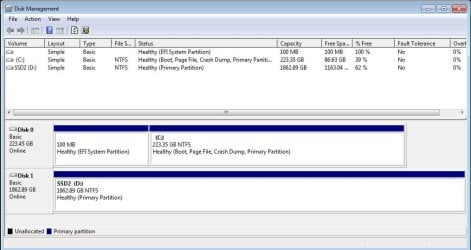
I swapped the HDD with the OS for an SSD a few months ago and I've had no issues with windows updates until this patch. I have a separate SSD with all my media/games on it that I kept during the swap, but had to change a few drive letters during the process, now I just have C: (OS) and D: (mostly everything else). I have the patches for the SHA2 fix, I've tried SFC with no results (I've only done it once with nothing wrong but I know its prone to fix things and lie), and I've noticed in diskpart that the volume with my system doesn't have a letter assigned and my C drive has Boot on it. Same missing assignment in disk management, but listed as a small partition of C:.

Is it possible there could have been something corrupted when I cloned over my OS? And if so is there any way to fix it without wiping my SSD and reghosting from the HDD?

Thank you.
 

My Computer My Computer

At a glance

Windows 7 Professional x64
Computer type
PC/Desktop
OS
Windows 7 Professional x64
I'll also get the "Windows cant update important files while the system is using them" pop-up and I have to constantly push back the restart.
 

My Computer My Computer

At a glance

Windows 7 Professional x64
Computer type
PC/Desktop
OS
Windows 7 Professional x64
Hi Orroborous,

definately sounds like disk management is the culprit

Is the System reserved partition shown as active??

please provide a screenshot of it.

Roy
 

My Computer My Computer

At a glance

W7 home premium 32bit/W7HP 64bit/w10 tp insid...E5300 dual core3gbNvidia Geforce 7100 Nforce 630i
Computer type
PC/Desktop
Computer Manufacturer/Model Number
medionl/Aspire 6930G/acer x55a
OS
W7 home premium 32bit/W7HP 64bit/w10 tp insider ring
CPU
E5300 dual core
Motherboard
medion MS7366
Memory
3gb
Graphics Card(s)
Nvidia Geforce 7100 Nforce 630i
Monitor(s) Displays
avixc
Internet Speed
n (isp resticted to 72)
Antivirus
mse/pands
Browser
palemoon
Other Info
Belkin Fd7050 n USB using Railink RT2870 drivers, more upto date
Hi Roy,

Where did I go wrong?

diskmgmt.jpg
 

My Computer My Computer

At a glance

Windows 7 Professional x64
Computer type
PC/Desktop
OS
Windows 7 Professional x64
Last edited:

My Computer My Computer

At a glance

Win 10 x64, Linux Lite, Win 7 x64, BlackArch,...
Computer type
PC/Desktop
Computer Manufacturer/Model Number
HP Desktop & Compaq Laptop
OS
Win 10 x64, Linux Lite, Win 7 x64, BlackArch, & Kali
Hard Drives
Samsung 850 Pro 256Gb,
Hitachi HDD 1Tb,
Crucial MX SSD 250Gb
Segate 3Tb USB 3.0 Ext. Backup HDD
Internet Speed
150Mbps dn, 20Mbps up
Antivirus
Avast Free, Malwarebytes Anti-Exploit & Anti-Ransomware
Browser
Firefox, Chrome, Opera, & VPN
Hi

Disclaimer - EUFI might be different @Megahertz07
Mines legacy but - System reserved should be marked as Active - WU uses this
you dont appear to have any active partitions!!!!


Partition - Mark as Active

Roy
 

Attachments

  • ntfs.PNG
    ntfs.PNG
    3.3 KB · Views: 14

My Computer My Computer

At a glance

W7 home premium 32bit/W7HP 64bit/w10 tp insid...E5300 dual core3gbNvidia Geforce 7100 Nforce 630i
Computer type
PC/Desktop
Computer Manufacturer/Model Number
medionl/Aspire 6930G/acer x55a
OS
W7 home premium 32bit/W7HP 64bit/w10 tp insider ring
CPU
E5300 dual core
Motherboard
medion MS7366
Memory
3gb
Graphics Card(s)
Nvidia Geforce 7100 Nforce 630i
Monitor(s) Displays
avixc
Internet Speed
n (isp resticted to 72)
Antivirus
mse/pands
Browser
palemoon
Other Info
Belkin Fd7050 n USB using Railink RT2870 drivers, more upto date
I can't make any of them active through Disk Management (option is greyed out), but I can try in CMD. Before I do though, should I be marking it as active if its missing the OS loader?

KB2862330 was just pushed to windows update for me (?) and I don't know if it's a prerequisite fix. I was able to install it successfully, I'll try KB4512506 and kb4512514 now.
 

My Computer My Computer

At a glance

Windows 7 Professional x64
Computer type
PC/Desktop
OS
Windows 7 Professional x64
Hey torchwood, I was able to install the september Security update and monthly quality rollup, but still can't install 4516065, 4474419. and 4512506. Windows no longer considers them "important" so I can download them manually.

Any idea if I should try to mark C: as active thru CMD? The warning of the guide just scares me - "Do not mark a partition as active if it doesn't contain the loader for an operating system. Doing so will make your computer unbootable."

Is it possible my computer recognizes my old HDD as the "active" partition, and not my current SSD?

Thank you.
 

My Computer My Computer

At a glance

Windows 7 Professional x64
Computer type
PC/Desktop
OS
Windows 7 Professional x64
Back
Top