

- Local time
- 10:51 PM
- Messages
- 8,608
Good job, everything appears to be clean. 
Remove ComboFix
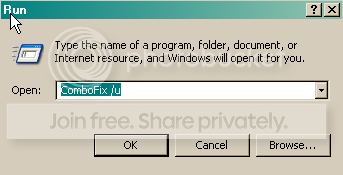
Go to Start---> Run Command ---> In the space provided, type ComboFix /u and press the Enter Key.
You can manually delete OTList it
Next,
Reset and Re-enable your System Restore
We need to do this to remove infected files that have been backed up by
Windows. The files in System Restore are protected to prevent any programs
from changing those files. This is the only way to clean these files: (You
will lose all previous restore points which are likely to be infected)
new one again since your computer is already clean.
BTW, I don't suppose I have to tell you about the dangers of downloading cracks and keygens do I?
Remove ComboFix
Go to Start---> Run Command ---> In the space provided, type ComboFix /u and press the Enter Key.
- Click START then RUN
- Now type Combofix /u in the runbox and click OK. Note the space between the X and the U, it needs to be there.
-
- When/if shown the disclaimer, Select "2"
- ComboFix and its associated files and folders
You can manually delete OTList it
Next,
Reset and Re-enable your System Restore
We need to do this to remove infected files that have been backed up by
Windows. The files in System Restore are protected to prevent any programs
from changing those files. This is the only way to clean these files: (You
will lose all previous restore points which are likely to be infected)
- Click Start » Run » type: SYSDM.CPL » OK
- Click the System Restore tab.
- Check - Turn off System Restore.
- Click Apply.
- Uncheck - Turn off System Restore.
- Click OK.
new one again since your computer is already clean.
- Go to Start » All Programs » Accessories » System Tools, and
select System Restore - In the System Restore prompt, select: Create a restore point
- Click Next
- Give a description to the new Restore Point. (Something like:
Clean PC) - Click Create
- Then close the window
BTW, I don't suppose I have to tell you about the dangers of downloading cracks and keygens do I?
My Computer
- Computer type
- PC/Desktop
- Computer Manufacturer/Model Number
- Bruce ... somewhere in his 40's
- OS
- Windows 7 Ultimate 32bit SP1
- CPU
- Intel(R) Core(TM)2 Quad CPU @ 2.40GHz, 2400 MHz
- Motherboard
- INTEL/D975XBX2
- Memory
- 4 GB
- Graphics Card(s)
- ATI Radeon HD 2600 Pro
- Monitor(s) Displays
- Samsung SyncMaster 914v
- Screen Resolution
- 1280 x 1024
- Hard Drives
- 2/500GB each ... ST3500630AS ATA Device.
One is not connected
- PSU
- Rocketfish 700 W
- Case
- G.Skill Gigabyte Chassis
- Keyboard
- Standard PS/2 Keyboard
- Mouse
- Microsoft PS/2 Mouse
- Internet Speed
- DSL
- Antivirus
- Avira Internet Security
- Browser
- IE 11
- Other Info
- ATI HDMI Audio


