Java 7 update 15 issue

pain55

New member
Member
Local time
7:10 PM
Messages
60
Hi, today i updated java to the latest version and although it is detected on my laptop through the java test page, when i try to launch the java control panel or java.exe, command prompt opens with loads of code then closes quickly. I uninstalled then reinstalled yet same issue. Is this something to fret about or should i investigate further? Thanks!
 

My Computer

Computer type
Laptop
Computer Manufacturer/Model Number
HP Mini 2133
OS
windows 7 ultimate 32-bit
Memory
2GB
Antivirus
Avira
Browser
Firefox

My Computer

Computer type
PC/Desktop
Computer Manufacturer/Model Number
Own build (new) Desk1 / Asus ROG Win 7 / Desk2 1st build
OS
Desk1 7 Home Prem / Desk2 10 Pro / Main lap Asus ROG 10 Pro 2 laptop Toshiba 7 Pro Asus P2520 7 & 10
CPU
Desk1 i5 3750K / Laptop i7 GTX 860M / Desk2 i5 2500
Motherboard
Desk1 Asus P877-V / Desk2 Gigabyte H67 UD3H / Laptop ?
Memory
Desk1 8GB (1866) / Desk2 16GB (1333) / Laptop 8Gb DDR3
Graphics Card(s)
Desk 1& 2NVidia GTX 650 & Laptops on board Intel
Sound Card
Desk 1 & 2 -XONAR DG Realtek High Def audio Laptop
Monitor(s) Displays
Desk 1 Benq HD 2450 / Desk2 Philips 24" / Laptop 17.5"
Screen Resolution
1920x1080 D1 & D2 & Laptop 1
Hard Drives
Desk1 Samsung 120GB 830 SSD
Asus ROG 256GB 850 Pro SSD
Desk2 Samsung 840 256 SSD
Toshiba 120GB EVO
PSU
Desk 1 Corsair HX 1050/ Laptop ? / Desk 2 Corsair HX 650
Case
Desk 1 Cooler HAF XM ? Toshiba laptop / Desk2 Coolermaster
Cooling
Fans on all Desk1 -2 Desk2 - all Coolermasters 5 Laptop ?
Keyboard
Desk 1 MS Sidewinder X6 Desk 2 MS Sidewinder X 4
Mouse
Desk 1&2 - Gigabyte MS 900 gamer - laptop - Logitec wireless
Internet Speed
ADSL2+
Other Info
One other Desktop (tester) and spare Toshba laptop both with SSD's
Running Kaspersky 2016 ISS on all machines config'd identically
Logitec audio stereo systems on each machine (x3)
Canon MG5250MFC
Router/modem TP-Link running WPA2SK
I agree with ICit2lol. Java has been experiencing some critical security issues lately. Unless you absolutely need it for something to work, I'd leave it uninstalled.

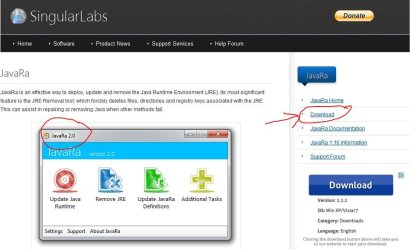
There's a tool called JavaRa that might help in the complete removal of Java. I'd give it a try in case something corrupted your latest installation attempt. (That might be why you're getting those lines of code and having Java shut down.) Once Java is completely removed you could try reinstalling it from Java's official site. As with many free products there's a lot of download buttons on the JavaRa page. Make sure you use the correct button. Although the screenshot provided by JavaRa says Version 2.0, you'll actually be getting Version 2.1.

JavaRa | SingularLabs

JavaRa.JPG
 

My Computer

Computer type
Laptop
Computer Manufacturer/Model Number
Sony Vaio VPCEB47GM Laptop
OS
Win 7 Pro 64-bit
CPU
Intel i5 2.4 Ghz
Memory
8GB DDR3
Graphics Card(s)
Intel HD 3000
Sound Card
IDT High Definition
Monitor(s) Displays
15.6 WGXA Anti-Glare LED
Screen Resolution
1280x800
Hard Drives
640Gb 7200rpm
Antivirus
MSE
Browser
Opera (primary) with IE9 backup
Sorry for the late, late reply but yeah i left it uninstalled never had any use for it anyway, thanks for your help :)
 

My Computer

Computer type
Laptop
Computer Manufacturer/Model Number
HP Mini 2133
OS
windows 7 ultimate 32-bit
Memory
2GB
Antivirus
Avira
Browser
Firefox
Good deal. Glad you got it sorted out. Thanks for posting back! :thumbsup:
 

My Computer

Computer type
Laptop
Computer Manufacturer/Model Number
Sony Vaio VPCEB47GM Laptop
OS
Win 7 Pro 64-bit
CPU
Intel i5 2.4 Ghz
Memory
8GB DDR3
Graphics Card(s)
Intel HD 3000
Sound Card
IDT High Definition
Monitor(s) Displays
15.6 WGXA Anti-Glare LED
Screen Resolution
1280x800
Hard Drives
640Gb 7200rpm
Antivirus
MSE
Browser
Opera (primary) with IE9 backup
Back
Top