Java autoupdate not working

81emirpk

New member
Local time
9:20 AM
Messages
4
Hi,

I'm having a problem with java autoupdate. Last week I received a notification saying a new update was available. I clicked to install and i got an error saying it cannot proceed with the current connection (my internet may have been down, not sure). Anyway I figured I would just update the next time I restarted because usually when I ignore an update I get the notification again when I restart. But I haven't received any more notifications from autoupdate. I know I can go through the website to download the update but I always feel safer going through autoupdate what with all the fake java updates I've heard about. Any way I can get java autoupdate to notify me again? Is updating through the control panel equally safe?Thanks.
 

My Computer

Computer type
PC/Desktop
OS
Windows 7 64 bit

My Computer

Computer type
PC/Desktop
Computer Manufacturer/Model Number
Home Built
OS
Win 7 Pro x64, Win 10 Pro x64, Linux Light x86
CPU
Core i7 3770K
Motherboard
Gigabyte GA-Z77P-D3
Memory
Crucial Ballistix Sport 8GB
Graphics Card(s)
ASUS GeForce GTX 650 Ti
Sound Card
On board
Monitor(s) Displays
ASUS 22 W/S
Screen Resolution
1920 x 1080
Hard Drives
Intel 320 Series SSD, WD Caviar Black 1TB
PSU
Corsair CX 750w
Case
Black Night
Cooling
120mm fans front/back, Coolermaster Hyper 212 Evo
Keyboard
Razer Blackwidow Expert 2013 Mechanical Keyboard
Mouse
Logitech G300 Gaming Mouse
Internet Speed
20mb Unlimited
Antivirus
ZA Antivirus + Firewall
Browser
Cyberfox
Other Info
Powered USB Hub, External Drives 3 x 1TB, Phone Dock.
Welcome to Seven Forums 81emirpk. Actually, I'd trust going to the Java website more then a popup on my PC. A popup can be fake. If you go to the official Java website, you're more likely to get the legit file. And, as Stephanie said, you confirm you actually need an update first.

What is Java Update and how do I change the update schedule?

Scroll down to Java Update Options

A Guy
 

My Computer

Computer type
PC/Desktop
OS
Windows 10 Home x64
CPU
INTEL Core i5-750 Quad-Core 3.37GHz
Motherboard
ASUS P7P55D
Memory
HyperX Fury Black Series 8GB (2 x 4GB) 1866Mhz
Graphics Card(s)
EVGA GeForce GTX 750 Superclocked 1GB 128-Bit GDDR5
Monitor(s) Displays
LG 32MA68HY 32" IPS
Screen Resolution
1920 x 1080
Hard Drives
Samsung 840 Evo 120GB, SEAGATE 500GB Barracuda® 7200.12, SATA 3 Gb/s, 7200 RPM, 16MB cache
PSU
ANTEC TruePower New TP-550, 80 PLUS, 550W
Case
ANTEC Three Hundred Illusion
Cooling
COOLER MASTER Hyper 212 Plus, 4 x 120mm 1 x 140mm Noctua's
Internet Speed
85 + Mbps
Antivirus
Avast
Browser
Vivaldi
Thanks for the warm welcome!

I am in need of an update for sure, I have java 7u25 And I believe the latest is 7u40. You mention that pop ups can be fake but the real java autoupdate always appears in the system tray correct. And the download prompt generated by clicking those fake pop ups always say origin from internet rather than from hard drive? Those are the usually the two things I check for. I'm just a little wary of downloading anything off of some website (mistyping the address or following a bad download link) which is why I prefer the automatic update. Anyhow would you recommend updating from the control panel (update now option)?

Thanks again for your help.
 

My Computer

Computer type
PC/Desktop
OS
Windows 7 64 bit
What browser are you using? IE10?

What do you use Java for?

If you need Java - then by all means keep it.

If you do not need Java, then you should uninstall it. You are putting your computer at risk and getting absolutely no benefit from taking that risk.

Yes, it is safe to update Java using the "Update Now" button via:
Start >
Control Panel >
(View by large or small icons)
Java*

*you may see Java (32-bit)

That should bring up the Java Control Panel applet. If you see a tab named Update, then you have the 32bit version of Java installed. (The Java Control Panel applet for the 64bit version of Java does not have this tab. The 64bit version of Java should be updated manually by downloading the installer.)

The latest version of Java is 7u45.

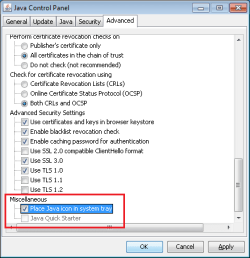
I would also add a check mark by this setting:

java.png

Each time a website loads Java - you can be notified about it.


If you opt the change how often Java checks for updates...

java2.png

...you might need to navigate to this file:

C:\Program Files (x86)\Java\jre7\bin\javacpl.exe

Then right click on javacpl.exe and run it as administrator.

The Java Control Panel applet must run with elevated privileges to be able to store new update settings. If you have turned your User Account Controls off, then everything runs at elevated privileges - including infections :-(
 
Last edited:

My Computer

Computer type
Laptop
Computer Manufacturer/Model Number
Employer provided Dell Latitude
OS
W7 Pro SP1 64bit
CPU
i7
Memory
8GB
Graphics Card(s)
Intel HD Graphics
Hard Drives
crappy SSD
Antivirus
Employer mandated Symantec Endpoint Protection
Browser
Pale Moon 64bit, IE11 64bit & Chrome 64bit
Yep.. if no need for it.. then don't have it.. I have after the Oracle issue months ago, have not reinstalled Java yet.
 

My Computer

Computer type
PC/Desktop
Computer Manufacturer/Model Number
Dell optiplex 740
OS
Win 7 Home Premium SP1 32 bit
CPU
AMD Athlon 64 X2 5000B
Motherboard
Dell Inc. 0YP696 (Socket M2 )
Memory
4.00 GB Dual-Channel DDR2 @ 370MHz (6-6-6-18)
Graphics Card(s)
Acer E181H (1366x768@60Hz) 64MB GeForce 6150 LE (Dell)
Sound Card
SigmaTel High Definition Audio CODEC
Monitor(s) Displays
Acer E181H (1366x768@60Hz) 64MB GeForce 6150 LE (Dell)
Hard Drives
699GB Seagate ST375064 0NS SCSI Disk Device (ATA)
Case
Mini tower
Internet Speed
Ping 36 ms, Download 57.71 mbps , Upload 11.79mbps
Antivirus
Free Avast. Pro paid Mbam , Free Sas
Browser
Palemoon .
Thanks for that great explanation usernameissues! I actually do not use java on this particular laptop and I have contemplated uninstalling it. I am aware of all the security issues associated with java and I have disabled it in my web browsers so I really don't know why I bother with it :). Thank you all for your help and input!
 

My Computer

Computer type
PC/Desktop
OS
Windows 7 64 bit
Sorry but I have one more question. I know that you suggest uninstalling java altogether, I keep it installed just in case I do need it. But I have t disabled in my web browsers (I mainly use Firefox) and I have even disabled website content in the java control panel security tab. Do you believe that is sufficient protection against attacks using java vulnerabilities, I believe most of those attacks come from browsing website? Thanks again.
 

My Computer

Computer type
PC/Desktop
OS
Windows 7 64 bit
Hi 81emirpk

It all depends on what sites you go to (keeping away from porn, warez, torrent sites will help) :)
 

My Computer

Computer type
PC/Desktop
Computer Manufacturer/Model Number
Home Built
OS
Win 7 Pro x64, Win 10 Pro x64, Linux Light x86
CPU
Core i7 3770K
Motherboard
Gigabyte GA-Z77P-D3
Memory
Crucial Ballistix Sport 8GB
Graphics Card(s)
ASUS GeForce GTX 650 Ti
Sound Card
On board
Monitor(s) Displays
ASUS 22 W/S
Screen Resolution
1920 x 1080
Hard Drives
Intel 320 Series SSD, WD Caviar Black 1TB
PSU
Corsair CX 750w
Case
Black Night
Cooling
120mm fans front/back, Coolermaster Hyper 212 Evo
Keyboard
Razer Blackwidow Expert 2013 Mechanical Keyboard
Mouse
Logitech G300 Gaming Mouse
Internet Speed
20mb Unlimited
Antivirus
ZA Antivirus + Firewall
Browser
Cyberfox
Other Info
Powered USB Hub, External Drives 3 x 1TB, Phone Dock.
Sorry but I have one more question. I know that you suggest uninstalling java altogether, I keep it installed just in case I do need it. But I have t disabled in my web browsers (I mainly use Firefox) and I have even disabled website content in the java control panel security tab. Do you believe that is sufficient protection against attacks using java vulnerabilities, I believe most of those attacks come from browsing website? Thanks again.
I don't think that anyone here would be confident in saying that they know more than the people that write malware. We just don't know how tricky everything out there is. I've never hear of an exploit that could enable Java in a web browser - but then again, I've not seen any expert claim that it cannot be done.
 

My Computer

Computer type
Laptop
Computer Manufacturer/Model Number
Employer provided Dell Latitude
OS
W7 Pro SP1 64bit
CPU
i7
Memory
8GB
Graphics Card(s)
Intel HD Graphics
Hard Drives
crappy SSD
Antivirus
Employer mandated Symantec Endpoint Protection
Browser
Pale Moon 64bit, IE11 64bit & Chrome 64bit
Disabling in your browser will mitigate the majority of threats, but certainly not all. And you still need to keep it updated. It's likely you'd not have an issue that way, but certainly the risk exists ;)

A Guy
 

My Computer

Computer type
PC/Desktop
OS
Windows 10 Home x64
CPU
INTEL Core i5-750 Quad-Core 3.37GHz
Motherboard
ASUS P7P55D
Memory
HyperX Fury Black Series 8GB (2 x 4GB) 1866Mhz
Graphics Card(s)
EVGA GeForce GTX 750 Superclocked 1GB 128-Bit GDDR5
Monitor(s) Displays
LG 32MA68HY 32" IPS
Screen Resolution
1920 x 1080
Hard Drives
Samsung 840 Evo 120GB, SEAGATE 500GB Barracuda® 7200.12, SATA 3 Gb/s, 7200 RPM, 16MB cache
PSU
ANTEC TruePower New TP-550, 80 PLUS, 550W
Case
ANTEC Three Hundred Illusion
Cooling
COOLER MASTER Hyper 212 Plus, 4 x 120mm 1 x 140mm Noctua's
Internet Speed
85 + Mbps
Antivirus
Avast
Browser
Vivaldi
I would just uninstall it. If its not running in the browser, its not running at all most likely for you. So just uninstall it.
A few exceptions are programs like openoffice and libre office use java.
 

My Computer

Computer type
PC/Desktop
Computer Manufacturer/Model Number
Custom Built
OS
Windows 10 Pro
CPU
AMD Ryzen 5 2400G Processor with Radeon RX Vega 11 Graphics
Motherboard
ASRock X470 Master SLI/AC AM4 AMD Promontory X470 SATA 6Gb/s
Memory
G.SKILL Ripjaws V Series 16GB (2 x 8GB) 288-Pin DDR4 SDRAM D
Graphics Card(s)
2047MB NVIDIA GeForce GTX 1060 6GB (EVGA)
Sound Card
Motherboard Built in
Monitor(s) Displays
Acer R240HY bidx 23.8-Inch IPS HDMI DVI VGA (1920 x 1080) Wi
Screen Resolution
1920 x 1080
Hard Drives
1TB Sandisk SSD PLUS (Main drive)
500 GB Seagate 7200 RPM (Games)
500 GB Western Digital 7200 RPM (Virtual Machines)
PSU
CORSAIR TX Series TX650M 650W 80+ Gold Modular Power Supply
Case
CORSAIR CARBIDE SPEC-02 Mid-Tower Gaming Case, Red LED Fan
Cooling
220mm, two 120mm, and four 60mm fans
Keyboard
Wired Dell keyboard
Mouse
Wireless Logitech mouse
Internet Speed
250mb down, 30mb up
Antivirus
Panda Cloud Antivirus
Browser
Chrome-ish x64
Other Info
Your awesome for reading this.
Agree with A Guy (Bill). Having it increases the risk. You can remove it - Just install it when you need it :sarc:
Keeping it updated just wastes your time, takes time to download, etc.

See if this tool helps you remove ALL of java (unlike the windows uninstaller, which doesn't) - http://java.com/en/download/uninstallapplet.jsp
 

My Computer

Computer type
PC/Desktop
Computer Manufacturer/Model Number
Custom Asus Build
OS
Microsoft Windows 8.1 Pro 64-bit
CPU
Intel(R) Core(TM) i3-4130 CPU @ 3.40GHz
Motherboard
B85M-E
Memory
8.00 GB
Graphics Card(s)
None
Sound Card
Realtek High Definition Audio
Monitor(s) Displays
Asus 23.6" Monitor
Screen Resolution
1920 x 1080 x 32 bits (4294967296 colors) @ 60 Hz
Hard Drives
INTEL SSDSC2BW180A4
Samsung SSD 840 PRO Series
PSU
Seasonic S12II-380Bronze
Case
Lian Li
Cooling
Fan, Passive
Keyboard
Logitech K120
Mouse
Microsoft Touch Mouse
Internet Speed
4ms Ping, 19.0 Mbps Download, 19.0 Mbps Upload
Antivirus
Eset Endpoint
Browser
Internet Explorer, Chrome
Back
Top