Solved Java(Sun) does not appear in Internet Options/Advanced

Judesman

New member
Member
VIP
Local time
9:51 PM
Messages
217
I am having a problem downloading an Add-on from Ancesrtry.co.uk. Ancestry tell me that I should be using IE8 so I have reverted having upgraded to IE9. I have to install Java but that is allready installed (I have re-installed anyway). However if I go to Internet Options/Advanced Java(Sun) does not appear just before Multimedia so I can not check the box next to Use JRE (Current version number). I think this is the problem so why does this not appear in Internet Options/Advanced?

Any help please.
 

My Computer

Computer type
PC/Desktop
Computer Manufacturer/Model Number
Dell OptiPlex 960
OS
Windows 7 64 bit
Memory
8 GB
Graphics Card(s)
Redeon HD 4670
Monitor(s) Displays
Dell
Antivirus
Norton
Browser
IE 10
Add-ons for IE are listed under Tools/Manage Add-ons (or possibly via the Windows Control Panel). I have a PC with Java but it doesn't appear in Internet Options.
 

My Computer

Computer type
PC/Desktop
Computer Manufacturer/Model Number
OQO 2+
OS
Windows 8 Pro w/MC 32-bit
CPU
Intel Atom 1.86 GHz
Motherboard
OQO 2+
Memory
2 GB
Graphics Card(s)
Intel GMA 500
Sound Card
IDT
Monitor(s) Displays
LCD
Screen Resolution
800 x 480 (portable) 1280 x 1024 (docked)
Hard Drives
64 GB SSD
PSU
9 Ah Battery (portable) or OQO Brick (docked)
Case
Shirt Pocket Sized
Cooling
Tiny Fan
Keyboard
Slide out (portable) DiNovo Edge (docked)
Mouse
Eraser head (portable) Logitech Bluetooth (docked)
Internet Speed
WWAN or 802.11G (portable) T1 (docked)
Browser
IE 10
Other Info
DVD-RW OQO Docking Station
Hi Judesman. :)
Go to Tools > Internet Options > Programs tab > Manage Add-ons > Toolbar and Extensions > scroll down 'til Sun Microsystems, Inc.
Enable it if it is disabled. Hope that helps! ;)
 

My Computer

Computer Manufacturer/Model Number
WALLONN7 / LIN BLACK SERIES II
OS
Windows 7 Ultimate x64 SP1
CPU
AMD PHENOM II X6 1090T 3.2GHz
Motherboard
GIGABYTE GA-890FXA-UD7
Memory
8GB G.SKILL RIPJAWS - F3-10666CL7D
Graphics Card(s)
SAPPHIRE ATI RADEON HD 5870 VAPOR X OC
Sound Card
REALTEK DOLBY HOME THEATER
Monitor(s) Displays
LED LG W2486L
Screen Resolution
1080p
Hard Drives
SEAGATE 1TB -ST31000528AS - AHCI MODE - AS SATA
PSU
ZALMAN ZM1000-HP 1000W
Case
THERMALTAKE XASER VI VG4000SWA
Cooling
140MM x3 / 120MM x1 AIR COOLING - THERMALTAKE
Keyboard
MICROSOFT DIGITAL MEDIA KEYBOARD 3000 - USB
Mouse
MICROSOFT BASIC OPTICAL MOUSE 2.0 - USB
Internet Speed
600KBPS
Other Info
MICROSOFT XBOX 360 CONTROLLER
Thank you very much. I have found it now and Java was enabled so the guidance I was given by Ancestry.co.uk was out of date and most likely related to XP! Whenever I access their web site I get a message "An Add-on for this website failed to run" The information bar tells me to "Check the security settings in Internet Options for potential conflicts" but apart from the advice given by Ancestry that I have followed to the letter I don't really know what I am looking for.
 

My Computer

Computer type
PC/Desktop
Computer Manufacturer/Model Number
Dell OptiPlex 960
OS
Windows 7 64 bit
Memory
8 GB
Graphics Card(s)
Redeon HD 4670
Monitor(s) Displays
Dell
Antivirus
Norton
Browser
IE 10
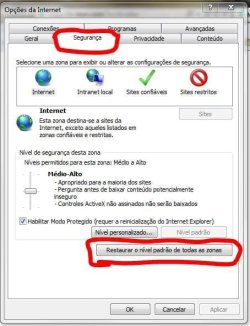
I had no problems accessing the site with Firefox 4.0.1 / Internet Explorer 9. You tried both? If the problem does not manifest in Firefox, try resetting the security settings of IE to defaults. To do this, go to Tools > Internet Options > Security tab > Restore the default level for all zones as shown below. Let us know the results.


Attachments

  • Capturar.JPG
    Capturar.JPG
    50.4 KB · Views: 67

My Computer

Computer Manufacturer/Model Number
WALLONN7 / LIN BLACK SERIES II
OS
Windows 7 Ultimate x64 SP1
CPU
AMD PHENOM II X6 1090T 3.2GHz
Motherboard
GIGABYTE GA-890FXA-UD7
Memory
8GB G.SKILL RIPJAWS - F3-10666CL7D
Graphics Card(s)
SAPPHIRE ATI RADEON HD 5870 VAPOR X OC
Sound Card
REALTEK DOLBY HOME THEATER
Monitor(s) Displays
LED LG W2486L
Screen Resolution
1080p
Hard Drives
SEAGATE 1TB -ST31000528AS - AHCI MODE - AS SATA
PSU
ZALMAN ZM1000-HP 1000W
Case
THERMALTAKE XASER VI VG4000SWA
Cooling
140MM x3 / 120MM x1 AIR COOLING - THERMALTAKE
Keyboard
MICROSOFT DIGITAL MEDIA KEYBOARD 3000 - USB
Mouse
MICROSOFT BASIC OPTICAL MOUSE 2.0 - USB
Internet Speed
600KBPS
Other Info
MICROSOFT XBOX 360 CONTROLLER
Thank you Wallonn7. I can access the site it is just that I get this warning about the Add-on failing to run. Ancestry told me that I should be using IE8 so I reverted and it didn't make ant difference. I have restored the default level for all zones but that doesn't make any difference and will have undone a number of changes that Ancestry told me to make. But if you are using IE9 at default level and you do not have this problem then I don't know where to go from here. I don't really want to download Firefox especially as there should not be aproblem with IE. Ancestry can not even tell me what the Add-on is although I suspect it might be their Enhanced Image Viewer. I am registered with Ancestry but don't pay them a subscription at present but that should not make any difference.
 

My Computer

Computer type
PC/Desktop
Computer Manufacturer/Model Number
Dell OptiPlex 960
OS
Windows 7 64 bit
Memory
8 GB
Graphics Card(s)
Redeon HD 4670
Monitor(s) Displays
Dell
Antivirus
Norton
Browser
IE 10
Open IE. Hold Ctrl + Shift + Del and clear its cache. Make sure you remember all passwords before do that.

Run Internet Explorer 9 in compatibility mode. To run in compatibility mode, click on the compatibility icon located next to the web
address bar. This icon looks like a piece of paper torn in half horizontally.

Try disabling "Protected Mode" using the following:

1. Close all open windows and programs.
2. Click on the Start button and then on Control Panel.
3. Click on "Classic View" on the left side, then double-click on Internet Options.
4. Click on the Security tab
5. Un-check the box for "Internet Explorer Protected Mode"
6. Click OK at the bottom, close the Control Panel, and open Internet Explorer to try again.

If this resolves the issue, then you might want to add Ancestry to your Trusted Sites in Internet Explorer. This will make it so that you
can enable protected mode for every other website but for ours it will be off. To add this to the trusted sites, go back to the options
and the Security tab, click on Trusted Sites, then the Sites button. Type in *.ancestry.co.uk, untick the "Require server verification"
box, and click Add. Then restart Internet Explorer and try again.

Let us know the results.
 
Last edited:

My Computer

Computer Manufacturer/Model Number
WALLONN7 / LIN BLACK SERIES II
OS
Windows 7 Ultimate x64 SP1
CPU
AMD PHENOM II X6 1090T 3.2GHz
Motherboard
GIGABYTE GA-890FXA-UD7
Memory
8GB G.SKILL RIPJAWS - F3-10666CL7D
Graphics Card(s)
SAPPHIRE ATI RADEON HD 5870 VAPOR X OC
Sound Card
REALTEK DOLBY HOME THEATER
Monitor(s) Displays
LED LG W2486L
Screen Resolution
1080p
Hard Drives
SEAGATE 1TB -ST31000528AS - AHCI MODE - AS SATA
PSU
ZALMAN ZM1000-HP 1000W
Case
THERMALTAKE XASER VI VG4000SWA
Cooling
140MM x3 / 120MM x1 AIR COOLING - THERMALTAKE
Keyboard
MICROSOFT DIGITAL MEDIA KEYBOARD 3000 - USB
Mouse
MICROSOFT BASIC OPTICAL MOUSE 2.0 - USB
Internet Speed
600KBPS
Other Info
MICROSOFT XBOX 360 CONTROLLER
Yes, I have done that-no difference. I have been in touch with Ancestry support but I don't think they have an answer. I may just have to put up with this irritating feature but it would be good to know what the Add-on is. Thanks for your input.
 

My Computer

Computer type
PC/Desktop
Computer Manufacturer/Model Number
Dell OptiPlex 960
OS
Windows 7 64 bit
Memory
8 GB
Graphics Card(s)
Redeon HD 4670
Monitor(s) Displays
Dell
Antivirus
Norton
Browser
IE 10
Have you done all above?...
 

My Computer

Computer Manufacturer/Model Number
WALLONN7 / LIN BLACK SERIES II
OS
Windows 7 Ultimate x64 SP1
CPU
AMD PHENOM II X6 1090T 3.2GHz
Motherboard
GIGABYTE GA-890FXA-UD7
Memory
8GB G.SKILL RIPJAWS - F3-10666CL7D
Graphics Card(s)
SAPPHIRE ATI RADEON HD 5870 VAPOR X OC
Sound Card
REALTEK DOLBY HOME THEATER
Monitor(s) Displays
LED LG W2486L
Screen Resolution
1080p
Hard Drives
SEAGATE 1TB -ST31000528AS - AHCI MODE - AS SATA
PSU
ZALMAN ZM1000-HP 1000W
Case
THERMALTAKE XASER VI VG4000SWA
Cooling
140MM x3 / 120MM x1 AIR COOLING - THERMALTAKE
Keyboard
MICROSOFT DIGITAL MEDIA KEYBOARD 3000 - USB
Mouse
MICROSOFT BASIC OPTICAL MOUSE 2.0 - USB
Internet Speed
600KBPS
Other Info
MICROSOFT XBOX 360 CONTROLLER
Yes, I have done that-no difference. I have been in touch with Ancestry support but I don't think they have an answer. I may just have to put up with this irritating feature but it would be good to know what the Add-on is. Thanks for your input.

Try dis-abling one add-on at a time, see if you can narrow it down.
 

My Computer

Computer type
PC/Desktop
Computer Manufacturer/Model Number
Self Built
OS
Win 10 Pro x64
CPU
Intel I5-2500K @3.3GHz
Motherboard
Asrock P67 Extreme4
Memory
16GB G.Skill Ripjaws X (4x4GB)
Graphics Card(s)
EVGA GeForce 750 Ti SC 2GB
Sound Card
ASUS Xonar DG 5.1 Channels 24-bit 96KHz PCI Interface Sound
Monitor(s) Displays
auria eq2367
Screen Resolution
1920 x 1080
Hard Drives
250GB Samsung 850 EVO SSD
1TB WD Blue
1TB Hitachi
PSU
SeaSonic X 650W 80 Plus Gold
Case
Corsair Obsidian 750D
Cooling
Corsair H60, Three 140mm case fans
Keyboard
Logitech Wireless Keyboard K520
Mouse
Logitech Wireless Mouse M310
Internet Speed
Wave Broadband ~ 100 dn 5 up
Antivirus
Windows Defender, Malwarebytes Premium
Browser
Edge, IE11, Chrome
Other Info
Laptop specs: HP g7-1365dx /
CPU: AMD A6-3420M APU with Radeon(tm) HD Graphics /
RAM: Crucial 8Gb (2x4Gb) /
SSD: Crucial M4-CT128M4SSD2 ATA Device/ FW 000F /
GFX: AMD Radeon HD 6520G /
OS: Windows 10 Pro x64
Thanks for all your efforts Wallonn7. When I first saw your post only the first two lines appeared but now I have followed all you advice and still no change although I had tried some of your suggestions and ancestry is already in my trusted sites.I am using IE8 at present having reverted at the suggestion of ancestry.

Derekimo I will now try dis-abling the Ad-ons and see what happens. I assume that I do that in Manage Add-ons.
 

My Computer

Computer type
PC/Desktop
Computer Manufacturer/Model Number
Dell OptiPlex 960
OS
Windows 7 64 bit
Memory
8 GB
Graphics Card(s)
Redeon HD 4670
Monitor(s) Displays
Dell
Antivirus
Norton
Browser
IE 10
Thanks for all your efforts Wallonn7. When I first saw your post only the first two lines appeared but now I have followed all you advice and still no change although I had tried some of your suggestions and ancestry is already in my trusted sites.I am using IE8 at present having reverted at the suggestion of ancestry.

Derekimo I will now try dis-abling the Ad-ons and see what happens. I assume that I do that in Manage Add-ons.

Yeah, just do one at a time, close your browser, re-open and see if it helps.
 

My Computer

Computer type
PC/Desktop
Computer Manufacturer/Model Number
Self Built
OS
Win 10 Pro x64
CPU
Intel I5-2500K @3.3GHz
Motherboard
Asrock P67 Extreme4
Memory
16GB G.Skill Ripjaws X (4x4GB)
Graphics Card(s)
EVGA GeForce 750 Ti SC 2GB
Sound Card
ASUS Xonar DG 5.1 Channels 24-bit 96KHz PCI Interface Sound
Monitor(s) Displays
auria eq2367
Screen Resolution
1920 x 1080
Hard Drives
250GB Samsung 850 EVO SSD
1TB WD Blue
1TB Hitachi
PSU
SeaSonic X 650W 80 Plus Gold
Case
Corsair Obsidian 750D
Cooling
Corsair H60, Three 140mm case fans
Keyboard
Logitech Wireless Keyboard K520
Mouse
Logitech Wireless Mouse M310
Internet Speed
Wave Broadband ~ 100 dn 5 up
Antivirus
Windows Defender, Malwarebytes Premium
Browser
Edge, IE11, Chrome
Other Info
Laptop specs: HP g7-1365dx /
CPU: AMD A6-3420M APU with Radeon(tm) HD Graphics /
RAM: Crucial 8Gb (2x4Gb) /
SSD: Crucial M4-CT128M4SSD2 ATA Device/ FW 000F /
GFX: AMD Radeon HD 6520G /
OS: Windows 10 Pro x64
Derekimo- I have done that - no change. Thanks for your help.
 

My Computer

Computer type
PC/Desktop
Computer Manufacturer/Model Number
Dell OptiPlex 960
OS
Windows 7 64 bit
Memory
8 GB
Graphics Card(s)
Redeon HD 4670
Monitor(s) Displays
Dell
Antivirus
Norton
Browser
IE 10
Derekimo- I have done that - no change. Thanks for your help.

Oh well, worth a try.

Any toolbars?

Have you tried uninstalling and reinstalling Java and Flash, just thinking out loud.


Or open command prompt and type or copy/paste this

ipconfig /flushdns

press enter.

That's about all I have. By the way it was working fine for me too in IE9.
 

My Computer

Computer type
PC/Desktop
Computer Manufacturer/Model Number
Self Built
OS
Win 10 Pro x64
CPU
Intel I5-2500K @3.3GHz
Motherboard
Asrock P67 Extreme4
Memory
16GB G.Skill Ripjaws X (4x4GB)
Graphics Card(s)
EVGA GeForce 750 Ti SC 2GB
Sound Card
ASUS Xonar DG 5.1 Channels 24-bit 96KHz PCI Interface Sound
Monitor(s) Displays
auria eq2367
Screen Resolution
1920 x 1080
Hard Drives
250GB Samsung 850 EVO SSD
1TB WD Blue
1TB Hitachi
PSU
SeaSonic X 650W 80 Plus Gold
Case
Corsair Obsidian 750D
Cooling
Corsair H60, Three 140mm case fans
Keyboard
Logitech Wireless Keyboard K520
Mouse
Logitech Wireless Mouse M310
Internet Speed
Wave Broadband ~ 100 dn 5 up
Antivirus
Windows Defender, Malwarebytes Premium
Browser
Edge, IE11, Chrome
Other Info
Laptop specs: HP g7-1365dx /
CPU: AMD A6-3420M APU with Radeon(tm) HD Graphics /
RAM: Crucial 8Gb (2x4Gb) /
SSD: Crucial M4-CT128M4SSD2 ATA Device/ FW 000F /
GFX: AMD Radeon HD 6520G /
OS: Windows 10 Pro x64
I've flushed the DNS cache, re-installed Flash (Java was re-installed a few days ago). What do you mean by "Any toolbars"?

Otheres are saying that they do not have a problem with IE9, I will probably re-install, it is better than IE8.

Ancestry are not replying to my emails now. I guess that they do not have an answer. I will phone their support and see what happens.

Your help is appreciated.
 

My Computer

Computer type
PC/Desktop
Computer Manufacturer/Model Number
Dell OptiPlex 960
OS
Windows 7 64 bit
Memory
8 GB
Graphics Card(s)
Redeon HD 4670
Monitor(s) Displays
Dell
Antivirus
Norton
Browser
IE 10
I've flushed the DNS cache, re-installed Flash (Java was re-installed a few days ago). What do you mean by "Any toolbars"?

Otheres are saying that they do not have a problem with IE9, I will probably re-install, it is better than IE8.

Ancestry are not replying to my emails now. I guess that they do not have an answer. I will phone their support and see what happens.

Your help is appreciated.

Browser toolbars, I was just throwing that out there, you didn't mention any so I thought I'd ask.

Sorry, that's all I have. I'm sure others will have some suggestions.
 

My Computer

Computer type
PC/Desktop
Computer Manufacturer/Model Number
Self Built
OS
Win 10 Pro x64
CPU
Intel I5-2500K @3.3GHz
Motherboard
Asrock P67 Extreme4
Memory
16GB G.Skill Ripjaws X (4x4GB)
Graphics Card(s)
EVGA GeForce 750 Ti SC 2GB
Sound Card
ASUS Xonar DG 5.1 Channels 24-bit 96KHz PCI Interface Sound
Monitor(s) Displays
auria eq2367
Screen Resolution
1920 x 1080
Hard Drives
250GB Samsung 850 EVO SSD
1TB WD Blue
1TB Hitachi
PSU
SeaSonic X 650W 80 Plus Gold
Case
Corsair Obsidian 750D
Cooling
Corsair H60, Three 140mm case fans
Keyboard
Logitech Wireless Keyboard K520
Mouse
Logitech Wireless Mouse M310
Internet Speed
Wave Broadband ~ 100 dn 5 up
Antivirus
Windows Defender, Malwarebytes Premium
Browser
Edge, IE11, Chrome
Other Info
Laptop specs: HP g7-1365dx /
CPU: AMD A6-3420M APU with Radeon(tm) HD Graphics /
RAM: Crucial 8Gb (2x4Gb) /
SSD: Crucial M4-CT128M4SSD2 ATA Device/ FW 000F /
GFX: AMD Radeon HD 6520G /
OS: Windows 10 Pro x64
Many thanks, derekimo.
 

My Computer

Computer type
PC/Desktop
Computer Manufacturer/Model Number
Dell OptiPlex 960
OS
Windows 7 64 bit
Memory
8 GB
Graphics Card(s)
Redeon HD 4670
Monitor(s) Displays
Dell
Antivirus
Norton
Browser
IE 10

My Computer

Computer type
PC/Desktop
Computer Manufacturer/Model Number
Self Built
OS
Win 10 Pro x64
CPU
Intel I5-2500K @3.3GHz
Motherboard
Asrock P67 Extreme4
Memory
16GB G.Skill Ripjaws X (4x4GB)
Graphics Card(s)
EVGA GeForce 750 Ti SC 2GB
Sound Card
ASUS Xonar DG 5.1 Channels 24-bit 96KHz PCI Interface Sound
Monitor(s) Displays
auria eq2367
Screen Resolution
1920 x 1080
Hard Drives
250GB Samsung 850 EVO SSD
1TB WD Blue
1TB Hitachi
PSU
SeaSonic X 650W 80 Plus Gold
Case
Corsair Obsidian 750D
Cooling
Corsair H60, Three 140mm case fans
Keyboard
Logitech Wireless Keyboard K520
Mouse
Logitech Wireless Mouse M310
Internet Speed
Wave Broadband ~ 100 dn 5 up
Antivirus
Windows Defender, Malwarebytes Premium
Browser
Edge, IE11, Chrome
Other Info
Laptop specs: HP g7-1365dx /
CPU: AMD A6-3420M APU with Radeon(tm) HD Graphics /
RAM: Crucial 8Gb (2x4Gb) /
SSD: Crucial M4-CT128M4SSD2 ATA Device/ FW 000F /
GFX: AMD Radeon HD 6520G /
OS: Windows 10 Pro x64
Will do.
 

My Computer

Computer type
PC/Desktop
Computer Manufacturer/Model Number
Dell OptiPlex 960
OS
Windows 7 64 bit
Memory
8 GB
Graphics Card(s)
Redeon HD 4670
Monitor(s) Displays
Dell
Antivirus
Norton
Browser
IE 10
Well Derekimo, I spoke to Ancestry support in the USA and they told me to download Firefox 3.6.17 (They don't support V.4). They insist that the problem is that I am trying to use IE9 which does not work with Ancestry, in spite of the fact that users all over the place are saying that it does work. Ancestry say that once you have downloaded IE9 you can not just revert to IE8 becuase IE9 is still in the registry.

I downloaded Firefox and there are no warning messages except where there is an advert there was a notice saying that I needed to download Adobe Flash Player 10 Plugin. I did that and the advert appeared. With IE8/9 all I got was an empty box.
So is Flashplayer the Add-on that would not run with IE? If so that is odd because I have Adobe Flash player 10 Activex that runs perfectly with all other IE websites.

The Ancestry guidance on enabling Java relates to Win XP and Ancestry support thanked me for pointing that out to them!! I think Ancestry need to get their act together. Perhaps they should spend less on advertising in the UK and more on IT.
 

My Computer

Computer type
PC/Desktop
Computer Manufacturer/Model Number
Dell OptiPlex 960
OS
Windows 7 64 bit
Memory
8 GB
Graphics Card(s)
Redeon HD 4670
Monitor(s) Displays
Dell
Antivirus
Norton
Browser
IE 10
Back
Top