Javascript:void(0) message

PatientOne

New member
Local time
12:40 AM
Messages
3
I was using AccuRadio without problem on my previous computer with XP. Now that I have Windows 7, I get the music player to load but there is no volume. There is a message at the bottom saying javascript:void(0); Other than saying to make sure javascript is enabled, I cannot find any help with this anywhere.
 

My Computer

Computer Manufacturer/Model Number
Dell XPS 8300
OS
Windows 7 Home Premium 64-bit
CPU
Intel i7-2600 @ 3.4 GHz
Memory
12.0 GB
Graphics Card(s)
AMD RadeonHD 6770
Welcome to Seven Forums PatientOne. What browser are you using? Are you ising any popup blockers or no script addons/extensions? Have a look here and then let us know if any help, or still have problem.

FAQ | AccuRadio online radio

A Guy
 

My Computer

Computer type
PC/Desktop
OS
Windows 10 Home x64
CPU
INTEL Core i5-750 Quad-Core 3.37GHz
Motherboard
ASUS P7P55D
Memory
HyperX Fury Black Series 8GB (2 x 4GB) 1866Mhz
Graphics Card(s)
EVGA GeForce GTX 750 Superclocked 1GB 128-Bit GDDR5
Monitor(s) Displays
LG 32MA68HY 32" IPS
Screen Resolution
1920 x 1080
Hard Drives
Samsung 840 Evo 120GB, SEAGATE 500GB Barracuda® 7200.12, SATA 3 Gb/s, 7200 RPM, 16MB cache
PSU
ANTEC TruePower New TP-550, 80 PLUS, 550W
Case
ANTEC Three Hundred Illusion
Cooling
COOLER MASTER Hyper 212 Plus, 4 x 120mm 1 x 140mm Noctua's
Internet Speed
85 + Mbps
Antivirus
Avast
Browser
Vivaldi
I am using internet explorer 9. Pop-up blocker is disabled. I don't know what no script addons/extensions are.
 

My Computer

Computer Manufacturer/Model Number
Dell XPS 8300
OS
Windows 7 Home Premium 64-bit
CPU
Intel i7-2600 @ 3.4 GHz
Memory
12.0 GB
Graphics Card(s)
AMD RadeonHD 6770
OK, in IE 9, make sure scripting is enabled.

Open IE> Click on Tools in upper right (may be a little gear icon) Tools.jpg

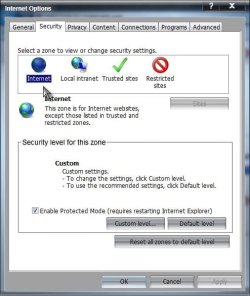
Click on Internet Options> Click on Security tab> Make sure Internet is highlighted by clicking on it

Options.jpg

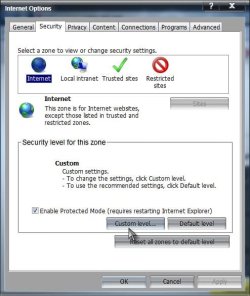
Click on Custom Level in "Security level for this zone" area

Custom.jpg

Scroll down to Scripting area> Active scripting

Active Scripting.jpg

Make sure Active scripting is set to Enable> If it is not, click enable and OK your way out. Try it now. If no fix, close IE, open again, and confirm Active scripting is still set to enable. If this isn't the problem, we can go further, a firewall may be the issue, as mentioned in the FAQ I linked to in my 1st reply. A Guy
 

My Computer

Computer type
PC/Desktop
OS
Windows 10 Home x64
CPU
INTEL Core i5-750 Quad-Core 3.37GHz
Motherboard
ASUS P7P55D
Memory
HyperX Fury Black Series 8GB (2 x 4GB) 1866Mhz
Graphics Card(s)
EVGA GeForce GTX 750 Superclocked 1GB 128-Bit GDDR5
Monitor(s) Displays
LG 32MA68HY 32" IPS
Screen Resolution
1920 x 1080
Hard Drives
Samsung 840 Evo 120GB, SEAGATE 500GB Barracuda® 7200.12, SATA 3 Gb/s, 7200 RPM, 16MB cache
PSU
ANTEC TruePower New TP-550, 80 PLUS, 550W
Case
ANTEC Three Hundred Illusion
Cooling
COOLER MASTER Hyper 212 Plus, 4 x 120mm 1 x 140mm Noctua's
Internet Speed
85 + Mbps
Antivirus
Avast
Browser
Vivaldi
I have enabled active scripting already. Also, the Windows Firewall and the McAfee Firewall are turned off. Any other ideas?
 

My Computer

Computer Manufacturer/Model Number
Dell XPS 8300
OS
Windows 7 Home Premium 64-bit
CPU
Intel i7-2600 @ 3.4 GHz
Memory
12.0 GB
Graphics Card(s)
AMD RadeonHD 6770
Back
Top