Joystick Calibration

MeatPopsicle

New member
Local time
3:51 PM
Messages
4
I've recently decided to dig out my old Logitech Extreme 3D Pro joystick and put it to good use. However, it seems that Windows 7 either lacks the calibration wizard that Windows XP had or it's just hidden very well. I've google searched "Joystick calibration windows 7" and the like numerous times, all coming up with some tutorial for XP.

So I would greatly appreciate it if anyone could point me in the right direction as to what I should do or where I can go to calibrate this.
 

My Computer

OS
Windows 7 Home Premium x64
If you do a search from the start menu for 'game controllers' you should find the option "Set up USB game controllers". That should give you a list of what's connected to your machine. If your Logitech shows up on that list you should be able to click on it and then go to properties, and calibration is under the settings tab.
 

My Computer

OS
Windows 7 Ultimate x64
CPU
Intel i5 750
Motherboard
ASUS P7P55D Pro
Memory
GSkill 8GB DDR3-1600
Graphics Card(s)
EVGA Nvidia GTX 460
Sound Card
Onboard and external Presonus Firestudio Project
Monitor(s) Displays
2 x NEC LCD 1850E
Screen Resolution
1280x1024 x2
Hard Drives
lots of 'em
PSU
Thermaltake ToughPower 750W
Case
NZXT Lexa
Cooling
Air cooled
Keyboard
Logitech G15
Mouse
Logitech MX Revolution
Internet Speed
25 Mb/s down 1.5 Mb/s up
Other Info
This is my recording studio PC. I also have a gaming rig, a HTPC, an old dual-core system I set up as a server, and a few old dinosaurs (the oldest is an Intel P-90) that I use for DOS and Win95 gaming when I feel nostalgic.
Nope, that's the answer I've gotten every time and there is no such settings tab.
I'm fairly certain that method doesn't work with home premium. Either that or it only works for XP, because your description is essentially what the XP tutorials say.

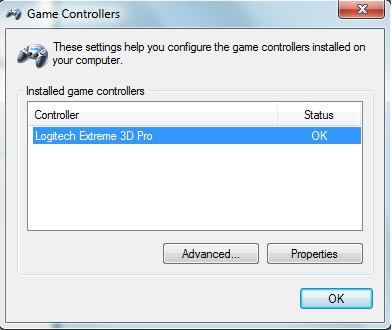
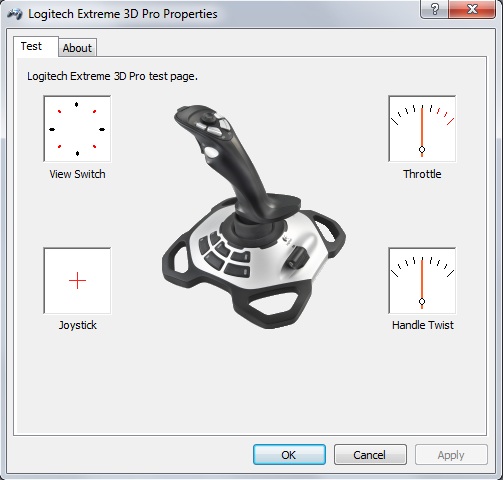
Here's what I get after clicking on "Properties". It just goes to some testing screen.

k7oEf.jpg


CvmGy.jpg


The "About" tab doesn't have it, and the "Advanced" button leads to nothing.
 

My Computer

OS
Windows 7 Home Premium x64
Very odd, that's how I was doing it since I installed Win7, but I am using Pro. Unfortunately, I don't have a working Logitech stick anymore to confirm, only a 360 controller and it still comes up there. Hope someone else here has what you're looking for.
 

My Computer

OS
Windows 7 Ultimate x64
CPU
Intel i5 750
Motherboard
ASUS P7P55D Pro
Memory
GSkill 8GB DDR3-1600
Graphics Card(s)
EVGA Nvidia GTX 460
Sound Card
Onboard and external Presonus Firestudio Project
Monitor(s) Displays
2 x NEC LCD 1850E
Screen Resolution
1280x1024 x2
Hard Drives
lots of 'em
PSU
Thermaltake ToughPower 750W
Case
NZXT Lexa
Cooling
Air cooled
Keyboard
Logitech G15
Mouse
Logitech MX Revolution
Internet Speed
25 Mb/s down 1.5 Mb/s up
Other Info
This is my recording studio PC. I also have a gaming rig, a HTPC, an old dual-core system I set up as a server, and a few old dinosaurs (the oldest is an Intel P-90) that I use for DOS and Win95 gaming when I feel nostalgic.
I've seem threads from a couple years ago giving links to some sort of Logitech calibration software that was available for download on there website, but is gone now. Perhaps someone may offer an alternate link for this?
 

My Computer

OS
Windows 7 Home Premium x64
This might help ...

...

Here's what I get after clicking on "Properties". It just goes to some testing screen.

k7oEf.jpg


CvmGy.jpg


The "About" tab doesn't have it, and the "Advanced" button leads to nothing.

That's what I get too ... unless I hold down <Shift><Ctrl> while I left-click the "Properties" button, then I get a window with a "Settings" tab that has a "Calibrate..." button.

Now, the advice I found stated that you should click the "Test" tab, but don't actually test the joystick, just click back to "Settings" and hit the "Calibration..." button.

I'm sure that was intuitively obvious to some genius on the programming team ...
 

My Computer

Computer Manufacturer/Model Number
HP Elitebook 8760w
OS
Windows 7 Professional
CPU
i7-2720QM
Memory
8 GB
Graphics Card(s)
Nvidia Quadro 3000M
Sound Card
Nvidia high definition audio
Monitor(s) Displays
1920x1080
Hard Drives
Hitachi 678 GB
That's what I get too ... unless I hold down <Shift><Ctrl> while I left-click the "Properties" button, then I get a window with a "Settings" tab that has a "Calibrate..." button.

Wow who would have guessed. Where did you find that out?
 

My Computer

Computer Manufacturer/Model Number
Self built
OS
Windows 7 Ultimate x64
CPU
Intel Pentium Dual Core E5200 2.5GHz (3.77GHz OC)
Motherboard
Asus P5Q-E
Memory
Corsair 4GB DDR2 (4x1GB CM2X1024-6400C4)
Graphics Card(s)
Palit GeForce GTS 250 (1024MB)
Sound Card
On Board (ADI AD2000B 8ch HD)
Monitor(s) Displays
Samsung 32in LCD TV
Screen Resolution
1360x768
Hard Drives
2 x 1TB Samsung 103SJ (Raid0)
2 x External 500GB Samsung 502IJ (NexStar 3 HD Enclosures)
PSU
550W Antec Neo HE 550
Case
Antec P180
Cooling
Xigmatex Red Scorpion CPU Cooler. 3x120mm Fans
Keyboard
Logitech MX5000 Laser (Combo)
Mouse
Logitech MX5000 Laser (Combo)
Internet Speed
ADSL2+ (avg 10 Mbps Down, 0.80 Mbps up)
Other Info
Gigabyte GN-WP01GS 54g Wireless Lan Card
Amazing!!

Amazing!! Why would Microsoft do that to me?? I've been using Windows and joysticks forever! I've always been able to calibrate until a few days ago when I couldn't find the calibration tab in the joystick properties. Found this forum and found the solution. When the heck did they add the CTRL SHIFT secret?? I couldn't even find this out through the Windows 7 Help on my computer. I've been using Windows and joysticks forever! Without this thread I would have been searching for at least another hour.
 

My Computer

OS
Windows 7 Professional 64-bit
Hi folks, my first post on the forum :D

I'm not sure if this post should go here or if I should create a new one, as the thread is old, so please accept my apologies if I'm wrong.

So to begin, I have had a Logitech 3D Pro for a few years. I use it on & off with flight sims & bf2 etc. Recently it seems to not calibrate correctly for the TWIST AXIS, and I think it is broken (many forums say there is a known fault for this). Re calibration doesn't fix this.

If I persist I can get the calibration spot on by turning the TWIST AXIS and unplug the USB, repeating this until calibration is OK. I then use the Logitech Profiler to adjust the dead zone & add a game profile & run game from profiler. Works great.

My Issue is the calibration can take maybe 5 or 50 attempts to get correct so I would like to Back-Up a GOOD Calibration and when I plug in the controller, simply over wright the new (if BAD) calibration with a GOOD Backup copy. Is this possible as it would save me lots of time. Of course I could buy a new controller but Id like to try this first.

1. Is it possible to Backup controller calibration for windows 7?
2. Where is the Calibration Located?

Many Thanks

Zip
 

My Computer

Computer type
Laptop
Computer Manufacturer/Model Number
Dell M5030 Laptop
OS
Windows 7 Home Premium 64bit
CPU
AMD V120 2.2GHz
Motherboard
Dell
Memory
2GB (1.75GB for Processor & 0.25GB for GFX)
Graphics Card(s)
ATI Radeon HD 4200
Hard Drives
240GB
Antivirus
Avast
Browser
Google
Huge thank you!

Oh my goodness you saved me hours of grief. I dug out my old Logitech Extreme 3D Pro and could not figure out how to set the calibration. This was wonderful! Thank you!
 

My Computer

Computer type
PC/Desktop
Computer Manufacturer/Model Number
Dell
OS
Windows 7 Ultimate x64
For those who still wish to find the game controller setup without searching, you can find the game controller options by simply clicking the Start button, and selecting Games on the right side of the Start Menu, just above where Control Panel is. Once the Games window is opened, click on Tools and choose Input Devices on the dropdown menu.
 

My Computer

Computer type
PC/Desktop
Computer Manufacturer/Model Number
Custom
OS
Windows 7 Ultimate x64
CPU
Intel(R) Core(TM) i3 CPU 540 @ 3.07GHz
Motherboard
Biostar H55 HD
Memory
4gb DDR3 1333
Graphics Card(s)
Nvidia GeForce GTX 460 1gb soc
Hard Drives
WD 500 GB
Antivirus
Security Essentials
Browser
IE 10
After reading through all the posts twice, and attempting the "Shift+Ctrl" method on ALL of the "Properties" buttons I could find in conjunction with the game controller, I cannot seem to locate a screen, tab, place, or other to calibrate my Saitek AV8R.
Does anyone here have any ideas or thoughts about that?
 

My Computer

Computer type
PC/Desktop
OS
Windows 7 Pro 64 Bit
For me, right clicking on my joystick icon in Devices shows a menu and at the top there is game controller settings. After clicking it, it will show the controllers. Choose Properties to show the test and settings window. The settings tab has the calibrate option. Clicking it will show the calibration wizard to calibrate the game controller.
Hope this helps.
 

My Computer

Computer type
PC/Desktop
Computer Manufacturer/Model Number
custom build
OS
Windows 7 Ultimate x64
CPU
Intel Core i5 4590 CPU 3.30 GHz
Motherboard
Asus Z87-K
Memory
8 GB DDR3
Graphics Card(s)
Asus EAH6570
Hard Drives
Samsung SSD 840 PRO 256gb
Seagate NAS 2TB ST2000VN
Seagate 1TB ST310005
Seagate 1TB ST310003
Antivirus
Eset NOD32
Browser
Mozilla Firefox
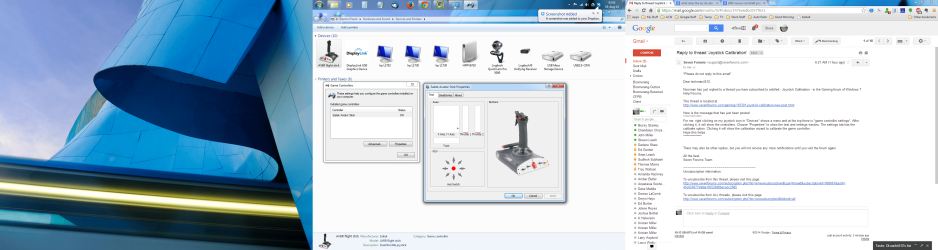
How it looks for me

Screenshot 2014-08-19 07.53.29.pngThanks for the reply. I've attached a screen shot that shows what I see when I follow the steps you outlined. Just to be clear, here they are:
Joystick is plugged in.
Click on Start> Devices and Printers.
Find my saitek joystick, right click on it, and select game controller settings.
The only game controller on my machine right now is the Saitek. I click on properties, and I get the larger box on the right; Tab options are test, deadzones, and about. No option to calibrate.

Someone please correct me if i'm wrong, but I believe the idea here is that the joystick is self calibrating. I think I read that here in the forum somewhere...
 
Last edited:

My Computer

Computer type
PC/Desktop
OS
Windows 7 Pro 64 Bit

My Computer

Computer type
PC/Desktop
Computer Manufacturer/Model Number
custom build
OS
Windows 7 Ultimate x64
CPU
Intel Core i5 4590 CPU 3.30 GHz
Motherboard
Asus Z87-K
Memory
8 GB DDR3
Graphics Card(s)
Asus EAH6570
Hard Drives
Samsung SSD 840 PRO 256gb
Seagate NAS 2TB ST2000VN
Seagate 1TB ST310005
Seagate 1TB ST310003
Antivirus
Eset NOD32
Browser
Mozilla Firefox
Thanks

Thanks for that, I appreciate it. Sadly, the joystick seems to be past saving and their "tech support" was a jerk, so i've tossed it out. Here's hoping this'll help someone else!
 

My Computer

Computer type
PC/Desktop
OS
Windows 7 Pro 64 Bit
speedlink SL-6640-SBK

I would be most grateful for any help solving the sensitivity problem with this game controller. I have tried different drivers, calibrated and re calibrated all to no avail. I did once find a German gentleman who had a utility which worked but since has become lost. Many thanks for reading this.
 

My Computer

OS
windows7enterprise
Hardware...

FWIW,
Mine turned out to be primarily a hardware issue.
These joysticks were designed so that they never needed to be calibrated in the traditional sense; they auto-calibrate at every reboot.
The idea is that the stick returns to center when you let it go, and when it's first powered up, the PC recognizes that as the "dead center" position.
For my stick, it wasn't returning properly, due to the springs and hardware inside.
YMMV, but if you're having a repeatable issue with your stick and calibration is your desired answer, it's probably a hardware issue.
 

My Computer

Computer type
PC/Desktop
OS
Windows 7 Pro 64 Bit
Back
Top