Just need an advice :)

Dobroslav

New member
Local time
12:29 PM
Messages
16
For computer from my profile, I've installed Windows 7 many times, and it works well for couple of months. Then I must reinstall it and so on. I must ask you a question: how to "tweak" Windows 7 to work good with 512MB RAM? I am using my pc for surfing the net and sometimes for work with documents and printing. I've not touched anything after the clean installation of Windows 7(I've not turned off some services etc.). Now I am using XP.

Regards.
 

My Computer

OS
Windows 7 SP1 32bit
CPU
Intel Pentium 4 2.80GHz
Motherboard
Asus P4v800d-x
Memory
1.5GB RAM ddr
Graphics Card(s)
ATi Radeon 9600 pro 256mb agp
Sound Card
integrated
Monitor(s) Displays
Asus VW193D-b
Hard Drives
WD 320GB AAJS
PSU
350W
Case
I don't know
Keyboard
Logitech PS/2
Mouse
Logitech USB
Internet Speed
4 MB/s
Hello, Welcome!

Could you please be more specific? What problems do you have?
 

My Computer

Computer Manufacturer/Model Number
Custom
OS
Windows 7 Professional x64
CPU
Intel i7 2600K OC'd @ 4620 MHz
Motherboard
Asus P8Z68-V Pro
Memory
16GB GSkill Sniper 2133 Mhz (4x4GB)
Graphics Card(s)
EVGA GeForce GTX 480 SuperClocked+
Sound Card
Realtek High Definition Audio
Monitor(s) Displays
2x Acer S273HLbmii 27"
Screen Resolution
2 x 1920x1080
Hard Drives
64GB Crucial M4 SSD

Storage: Hitachi 1TB 5400RPM, Samsung 1.5TB 5400RPM
PSU
Corsair HW Series 750w (modular)
Case
Cooler Master HAF 932 Advanced Blue Edition
Cooling
CM Hyper 212+ CPU cooler, 3x 230mm + 1x 140mm case fans
Keyboard
Logitech MK320 (wireless)
Mouse
Logitech MK320 (wireless)
Internet Speed
30 Mb/s : 2 Mb/s
Looks like the easiest way is to add more memory.

MemoryDual Channel Memory Architecture
4 x 184-pin DIMM Sockets support max. 4GB
PC3200/PC2700/PC2100 non-ECC DDR SDRAM memory

I have put a 4gb USB flash drive on a 512mb 600mhz Intel computer as ready boost, but it is still slow :(
 

My Computer

Computer type
PC/Desktop
Computer Manufacturer/Model Number
Built them myself, Science Experiments !
OS
Win7 Enterprise, Win7 x86 (Ult 7600), Win7 x64 Ult 7600, TechNet RTM on AMD x64 (2.8Ghz)
CPU
AMD fx8350 4ghz, AMD-32 2400mhz, AMD-64 3200mhz, AMDx64 2.8G
Motherboard
SIS 755, ECS-K8M890M-M (Ult 7600), GigaByte & others
Memory
2gb, 4gb on the Ult 7600, 4gb on Technet RTM, 32gb on FX8350
Graphics Card(s)
Draw my own Graphics, several nVidia cards
Sound Card
on motherboard
Monitor(s) Displays
19" flat scr, 28" I-Inc widescr,22" Emprex Widescr, 23" Acer
Screen Resolution
1280 x 1024, 1440 x 900, 1920 x 1080
Hard Drives
6 pata Ide HD's & 2 Sata HD's
added 80gb external on Ult 7600 computer,
numerous extra 1tb, 2TB, 3Tb SATA HD's
A collection of ext HD Docks w/ HDs
PSU
430w, 550w, 600w, 700, 800, etc
Case
All Generic Full Towers
Cooling
Open Air & a few fans, some w/ colored LEDs
Keyboard
Compaq & Dell recycled from GoodWill
Mouse
Made in China Optical Wired Mouse
Internet Speed
Fast Cable InterNet
Antivirus
AVG Free on 24 different Desktops, NO Problems!
Browser
IE 8 is preferred, but use FireFox sometimes
Other Info
Linksys Routers, switches, & Hubs
Too Many USB Flash Drives to count, Biggest is 64GB !
Eight computers in my home network.
Sixteen computers at my business network.
Linked via TeamViewer !
Lots of old used spare computer parts everywhere!
I don't have any problems, infact, I'm just asking for improvement :)

Well, my question is: What do I need to improve the work with windows 7 on 512mb ram? You can work with 7 for a period of time, but, after that you will become impatient during the boot(almost 1 minute), reading PDF files via Firefox(it is always) and many more...

@DocBrown

You mean, to put a flash memory and use it as RAM? Well, I have one 2gb flash.... :) Is it good?
 

My Computer

OS
Windows 7 SP1 32bit
CPU
Intel Pentium 4 2.80GHz
Motherboard
Asus P4v800d-x
Memory
1.5GB RAM ddr
Graphics Card(s)
ATi Radeon 9600 pro 256mb agp
Sound Card
integrated
Monitor(s) Displays
Asus VW193D-b
Hard Drives
WD 320GB AAJS
PSU
350W
Case
I don't know
Keyboard
Logitech PS/2
Mouse
Logitech USB
Internet Speed
4 MB/s
For computer from my profile, I've installed Windows 7 many times, and it works well for couple of months. Then I must reinstall it and so on. I must ask you a question: how to "tweak" Windows 7 to work good with 512MB RAM? I am using my pc for surfing the net and sometimes for work with documents and printing. I've not touched anything after the clean installation of Windows 7(I've not turned off some services etc.). Now I am using XP.

Regards.

If you are saying that the OS is slow, thats natural for 512 megs of RAM. Sorryonly thing that can help that is adding more RAM.
 

My Computer

Computer Manufacturer/Model Number
Acer Veriton m261 (modded)
OS
Win 7 pro 64-bit, Ubuntu 9.10 64-bit
CPU
Intel Core 2 Duo 2.60 Ghz
Motherboard
Whatever came with the system
Memory
4 gb ddr2 667 Mhz
Graphics Card(s)
NVidia Geforce 9400 GS 1 gb ddr2 550 mhz GPU
Sound Card
Intergrated
Monitor(s) Displays
samsung SyncMaster 2494 24"
Screen Resolution
1080p
Hard Drives
80gb - IDE
750gb - SATA II
PSU
whatever came with the system
Case
whatever came with the system
Cooling
whatever came with the system
Keyboard
Apple Aluminium (Awesome)
Mouse
Some awesome Dell mouse, really good.
Internet Speed
100mbps
I know that Windows 7 is "flying" on 1gb and 2gb of ram, and it works pretty good on 512, but I can't buy new ram because it's DDR1 and there is not any shop near me that sells DDR1 ram...
 

My Computer

OS
Windows 7 SP1 32bit
CPU
Intel Pentium 4 2.80GHz
Motherboard
Asus P4v800d-x
Memory
1.5GB RAM ddr
Graphics Card(s)
ATi Radeon 9600 pro 256mb agp
Sound Card
integrated
Monitor(s) Displays
Asus VW193D-b
Hard Drives
WD 320GB AAJS
PSU
350W
Case
I don't know
Keyboard
Logitech PS/2
Mouse
Logitech USB
Internet Speed
4 MB/s
Well, my question is: What do I need to improve the work with windows 7 on 512mb ram? You can work with 7 for a period of time, but, after that you will become impatient during the boot (almost 1 minute), reading PDF files via Firefox(it is always) and many more...

You can doubtless improve performance by turning off all the eye-candy, like aero, and themes, and arguably by trying a classic shell out...

Otherwise fit more memory... :p

Reinstalling isn't necessary, just use some kind of disk imaging program to create a copy of your bare metal OS and roll back to that in the event of corruption etc...
 

My Computer

Computer Manufacturer/Model Number
Custom built machine
OS
W7 x64
CPU
Intel Q9300 2.5Ghz Quad LGA775 (Would like Q9650)
Motherboard
Gigabyte GA-EP45T-UD3R (F6 Bios)
Memory
4Gb OCZ Gold 1,333Mhz
Graphics Card(s)
Palit HD4850 O/C Sonic 512Mb DDR3, Dual DViD's
Sound Card
Azalia to twin Samson 50w Studio Monitors
Monitor(s) Displays
Twin Dell (E-IPS) U2311H 23.6" Screens
Screen Resolution
1920 x 1080 @ 60Hz
Hard Drives
Crucial M4 SSD, archives on twin Western Digital Caviar Black WD2002FAEX, 2TB, 7200rpm HDD's, Samsung Ritemaster CD/DVD Burner...
PSU
OCZ 600w
Case
Lian-Li PC8 acoustifoamed' aluminium tower
Cooling
Scythe 140mm Zipang
Keyboard
Cherry PS/2 custom model
Mouse
Lenovo USB laser "Thinkpad" Mouse
Internet Speed
ADSL2+ @14Mbps downstream & Cat6 Gigabit Ethernet
Antivirus
NOD32
Browser
Opera
Other Info
Silicon Dust HD Homerun Dual FTA (Ethernet) TV Tuners, Dray Tek Vigor 2850Vn router and 8x HP Gigabit Switch. Lian-Li CR26 Card Reader, Canon MF4430 iSensys laser printer/scanner.
I don't have any problems, infact, I'm just asking for improvement :)

@DocBrown

You mean, to put a flash memory and use it as RAM? Well, I have one 2gb flash.... :) Is it good?


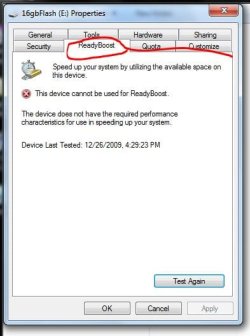
Put in the flash drive. Open it. Then right click to see if it is Ready Boost capable.

This one I just plugged in was not. :o

If it works, it might give you a liitle improvement in opening the .pdf files, etc
 

Attachments

  • Ready_Boost.JPG
    Ready_Boost.JPG
    34 KB · Views: 15

My Computer

Computer type
PC/Desktop
Computer Manufacturer/Model Number
Built them myself, Science Experiments !
OS
Win7 Enterprise, Win7 x86 (Ult 7600), Win7 x64 Ult 7600, TechNet RTM on AMD x64 (2.8Ghz)
CPU
AMD fx8350 4ghz, AMD-32 2400mhz, AMD-64 3200mhz, AMDx64 2.8G
Motherboard
SIS 755, ECS-K8M890M-M (Ult 7600), GigaByte & others
Memory
2gb, 4gb on the Ult 7600, 4gb on Technet RTM, 32gb on FX8350
Graphics Card(s)
Draw my own Graphics, several nVidia cards
Sound Card
on motherboard
Monitor(s) Displays
19" flat scr, 28" I-Inc widescr,22" Emprex Widescr, 23" Acer
Screen Resolution
1280 x 1024, 1440 x 900, 1920 x 1080
Hard Drives
6 pata Ide HD's & 2 Sata HD's
added 80gb external on Ult 7600 computer,
numerous extra 1tb, 2TB, 3Tb SATA HD's
A collection of ext HD Docks w/ HDs
PSU
430w, 550w, 600w, 700, 800, etc
Case
All Generic Full Towers
Cooling
Open Air & a few fans, some w/ colored LEDs
Keyboard
Compaq & Dell recycled from GoodWill
Mouse
Made in China Optical Wired Mouse
Internet Speed
Fast Cable InterNet
Antivirus
AVG Free on 24 different Desktops, NO Problems!
Browser
IE 8 is preferred, but use FireFox sometimes
Other Info
Linksys Routers, switches, & Hubs
Too Many USB Flash Drives to count, Biggest is 64GB !
Eight computers in my home network.
Sixteen computers at my business network.
Linked via TeamViewer !
Lots of old used spare computer parts everywhere!
^^ I'll try it.
 

My Computer

OS
Windows 7 SP1 32bit
CPU
Intel Pentium 4 2.80GHz
Motherboard
Asus P4v800d-x
Memory
1.5GB RAM ddr
Graphics Card(s)
ATi Radeon 9600 pro 256mb agp
Sound Card
integrated
Monitor(s) Displays
Asus VW193D-b
Hard Drives
WD 320GB AAJS
PSU
350W
Case
I don't know
Keyboard
Logitech PS/2
Mouse
Logitech USB
Internet Speed
4 MB/s
The simple answer, which has already been given, is to install more RAM. Sure, Windows 7 will work with 512MB (it might even work with less), but you are not going to get satisfactory performance.

With such a small amount of RAM, applications and their associated data (by which I mean Notepad, Paint and other built-in programs as well as those you install yourself), system drivers and other files are constantly juggling for space. Unfortunately, with this amount of RAM it soon gets full. And that means that extra memory needs to be brought in. This is Virtual Memory, also known as the Paging File or the Swap File. This resides on your hard disk which is much slower than RAM. The more your system is reliant on this file, the slower it is as data is being constantly swapped out of RAM and into this file (and vice-versa).

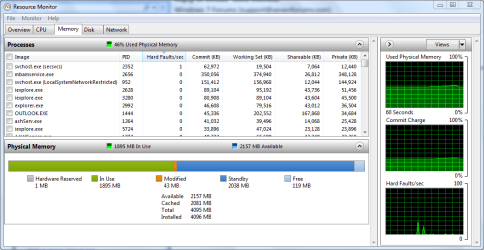
Each time your system needs to access this file, a Hard Fault is generated. You can see the number of such faults in the http://www.sevenforums.com/tutorials/12523-resource-monitor.html

This is what mine looks like. As you can see, even with my specifications, Hard Faults are still generated (the bottom graph).

Capture.PNG

What does yours look like?
 

My Computer

Computer type
PC/Desktop
Computer Manufacturer/Model Number
Dwarf Dwf/11/2012 r09/2013
OS
Windows 8.1 Pro RTM x64
CPU
Intel Core-i5-3570K 4-core @ 3.4GHz (Ivy Bridge) (OC 4.4GHz)
Motherboard
ASRock Z77 Extreme4-M
Memory
4 x 4GB DDR3-1600 Corsair Vengeance CMZ8GX3M2A1600C9B (16GB)
Graphics Card(s)
MSI GeForce GTX770 Gaming OC 2GB
Sound Card
Realtek High Definition on board solution (ALC 898)
Monitor(s) Displays
ViewSonic VA1912w Widescreen (VGA)
Screen Resolution
1440x900
Hard Drives
OCZ Agility 3 SSD 120GB SATA III x2 (RAID 0)
Samsung HD501LJ 500GB SATA II x2
Hitachi HDS721010CLA332 1TB SATA II
Iomega 1.5TB Ext USB 2.0
WD 2.0TB Ext USB 3.0
PSU
XFX Pro Series 850W Semi-Modular
Case
Gigabyte IF233
Cooling
1 x 120mm Front Inlet 1 x 120mm Rear Exhaust
Keyboard
Microsoft Comfort Curve Keyboard 3000 (USB)
Mouse
Microsoft Comfort Mouse 3000 for Business (USB)
Internet Speed
NetGear DG834Gv3 ADSL Modem/Router (Ethernet) ~4.0 Mb/s (O2)
Antivirus
Avast! 8.0.1497
Browser
IE 11
Other Info
Optical Drive: HL-DT-ST BD-RE BH10LS30 SATA Bluray
Lexmark S305 Printer/Scanner/Copier (USB)
WEI Score: 8.1/8.1/8.5/8.5/8.25
Asus Eee PC 1011PX Netbook (Windows 7 x86 Starter)
I've putted a flash drive and now it works great with tiny version! But with another start menu (smaller)

Can someone give me "normal" start menu files?
 

My Computer

OS
Windows 7 SP1 32bit
CPU
Intel Pentium 4 2.80GHz
Motherboard
Asus P4v800d-x
Memory
1.5GB RAM ddr
Graphics Card(s)
ATi Radeon 9600 pro 256mb agp
Sound Card
integrated
Monitor(s) Displays
Asus VW193D-b
Hard Drives
WD 320GB AAJS
PSU
350W
Case
I don't know
Keyboard
Logitech PS/2
Mouse
Logitech USB
Internet Speed
4 MB/s
Back
Top