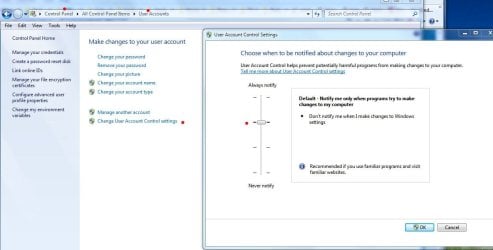
And this time i will not mess with permissions to folders like you all told me. But good god, i MUST have permissions so do some things because with 7 it seems if you just LOOK at the freakin' desktop it will pop up a prompt that says you don't have permission to look ! Seriously tho, it's truly a PITA. So to start, Is there a way to give myself the max global permissions i can have w/o screwing up the works? Right now when i rename a shortcut it tells me i can't because i don't have permission, then it goes ahead and allows the rename to take place anyways ! What the #$%@ is that about and how can i stop it from prompting me?
Sorry, but this OS is just so frustrating. Anyways, a way to turn that off would be a tiny start, but if theres a way to set all security/permissions that are safe in one fell swoop i would be eternally grateful ! Sorry, i'm just so frusterated you have no idea. XP was a walk in the park.
Sorry, but this OS is just so frustrating. Anyways, a way to turn that off would be a tiny start, but if theres a way to set all security/permissions that are safe in one fell swoop i would be eternally grateful ! Sorry, i'm just so frusterated you have no idea. XP was a walk in the park.
My Computer
At a glance
windows 7 pro 64 biti5 7604GB G skill DDR3 1600XFX 5850
- OS
- windows 7 pro 64 bit
- CPU
- i5 760
- Motherboard
- GIGABYTE GA-P55A-UD3
- Memory
- 4GB G skill DDR3 1600
- Graphics Card(s)
- XFX 5850
- Sound Card
- audigy 2 ZS
- Monitor(s) Displays
- samsung 22" 1650x1080
- Hard Drives
- Patriot SSD 120GB Inferno
maxtor 300GB IDE storage drive
- PSU
- Corsair TX650w