

My laptop comes with 4 drives...
C,D,E and F
see snip photo in how they are set up...
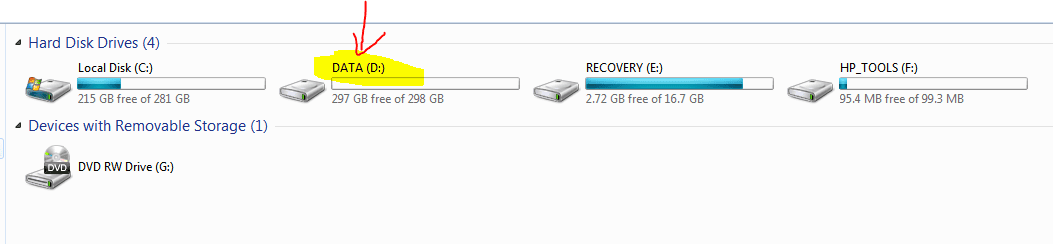
My question is it possible, when Windows 8 arrives, to load it on D drive?
That way I will have both Win 7 on "C" and Win 8 on "D".
I had Vista Home Premium on my Desktop then upgraded 7 Home Premium over it.
So my 2nd question is ....Anyway to fetch Vista HP off desktop and transfer it to Laptop?
Forgive my dumb questions but was told the only dumb question is one that is never asked.
Thanks In Advance,
THW
C,D,E and F
see snip photo in how they are set up...
My question is it possible, when Windows 8 arrives, to load it on D drive?
That way I will have both Win 7 on "C" and Win 8 on "D".
I had Vista Home Premium on my Desktop then upgraded 7 Home Premium over it.
So my 2nd question is ....Anyway to fetch Vista HP off desktop and transfer it to Laptop?
Forgive my dumb questions but was told the only dumb question is one that is never asked.
Thanks In Advance,
THW
My Computer
- Computer Manufacturer/Model Number
- HP M9077c
- OS
- Windows 7 Home Premium 64bit
- CPU
- Intel(R)Core(TM)2 quad [email protected] 2.39GHz
- Motherboard
- ASUSeK
- Memory
- 6GB DDR2 6400
- Graphics Card(s)
- GeForce 8500/512MB
- Sound Card
- Realtek High Def Audio
- Monitor(s) Displays
- HP w2408 LCD 24" widescreen
- Screen Resolution
- 1920x1200
- Cooling
- 6 pack of Bud
- Keyboard
- MS wireless Inteli
- Mouse
- MS wireless Inteli


