
help me please
New member
- Local time
- 7:02 PM
- Messages
- 61
i recently when back to windows 7 because i didn't like windows 10. Every thing went well except that kaspersky doesn't run. i tried every thing but i doesn't seem to work 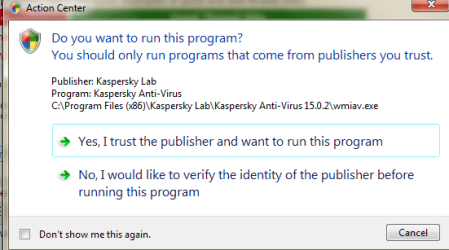
My Computer
- Computer type
- PC/Desktop
- Computer Manufacturer/Model Number
- hp
- OS
- windows 7 home premium
- CPU
- AMD A6-3620 APU with Radeon(tm) HD Graphics
- Motherboard
- PEGATRON CORPORATION 2ACF
- Memory
- 8192 MB RAM
- Graphics Card(s)
- AMD Radeon HD 6530D Graphics
- Sound Card
- 1) Realtek High Definition Audio (2) Bluetooth Hands-free
- Keyboard
- logitech keyboard and mouse
- Antivirus
- karpersky internet security
- Browser
- google chrome and firefox


