Solved KB 3033929 & KB 3035131 issue.

TooTiredForThis

New member
Local time
7:38 AM
Messages
5
Problem Solved!:D

I Uninstalled KB 3033929 using a Command Line utility, And then both Installed KB 3035131 and KB3033929(re-installed) By using DISM Exactly as instructed here:

How to use DISM to install a hotfix from within Windows | Ask the Core Team

picture,
Solvedproblemos.pnghttp:
:D

Thanks to everyone that tried to help!


[SOLVED]
This Problem been bothering me for a while now. I installed a new win 7 pro 64 bit. The Graphic Drivers require both the KB 3033929 and KB 3035131 updates.

Problem according to this site: https://support.microsoft.com/en-us/kb/3035131
Known issues

For Windows 7 and Windows Server 2008 R2, the security update 3035131 shares affected binaries with the security update that is described in Security Advisory 3033929. This overlap in affected binaries causes one update to supersede the other. In this case, security advisory update 3033929 supersedes security update 3035131.

If you have automatic updating enabled, you should experience no unusual installation behavior. Both updates should install automatically and both updates appear in the list of installed updates.

However, if you download and install updates manually, you have to install security update 3035131 before you install security advisory update 3033929. Otherwise, when you install security update 3035131, you may receive a message that states that update 3035131 is already installed, and security update 3035131 is not added to the list of installed updates.
even thought it's a new windows installation, it comes pre installed with a KB3033929 update. therefore when I tried to install KB3035131 update, an error occurred:
troubles.png


but it is in fact, not installed. as the site explained, KB 3035131 need to be installed first before KB3033929. But the Windows installation comes with pre installed with KB3033929.

I've tried uninstalling KB3033929. but the error message still occurred. What Should I do? :sleepy:
 
Last edited:

My Computer My Computer

Computer type
PC/Desktop
Computer Manufacturer/Model Number
Custom Build
OS
Win 7 Pro 64 Bit
CPU
i5
Motherboard
Asus
Memory
6gb
Graphics Card(s)
Amd
Is there any files I should Temper with? maybe Editing something that has KB3035131 as 'installed' when it's actually not?


Side question, is C:\Windows\SoftwareDistribution\Download folder supposed to be empty? where do all the installed updates go? Under Installed Updates section, the computer have more then 200 updates.
 
Last edited:

My Computer My Computer

Computer type
PC/Desktop
Computer Manufacturer/Model Number
Custom Build
OS
Win 7 Pro 64 Bit
CPU
i5
Motherboard
Asus
Memory
6gb
Graphics Card(s)
Amd
Hi and welcome to SevenForums,
I doubt it would come on win-7 sp1 media seeing the update was released in 2015 and sp1 was released in 2009 :)
 

My Computer My Computer

Computer type
PC/Desktop
Computer Manufacturer/Model Number
Custom assembled by me :}
OS
Win-7-Pro64bit 7-H-Prem-64bit
CPU
i7-5930K 2nd i9-9940x both water blocked VRM's too
Motherboard
ASUS SABERTOOTH X99 2nd ASUS x299 Apex
Memory
Trident-z 3200C14 2nd Trident-z 3600C16
Graphics Card(s)
EVGA 1080ti ftw3 2nd Titan Xp both water blocked
Sound Card
Built-in Realtek
Monitor(s) Displays
1-AOC G2460PG 24"G-Sync 144Hz/ 2nd 1-ASUS VG248QE 24" 144Hz
Screen Resolution
1920 x 1080 144Hz
Hard Drives
2-Samsung M.2 Evo & Evo Plus
2-Samsung 850 EVO 500GB SSD's/ 3-2.5 W.D. Black 1tb-&3-1tb/3-3.5 WD Black 1tb hdd's
PSU
EVGA SuperNOVA 1000-P2 2nd 1200-P2
Case
2-Corsair Obsidian Series 450D Black ATX Mid Tower
Cooling
Custom water loops
Keyboard
Logitech G710+/ 2nd Logitech G910
Mouse
2-RedDragon M901 Perdition 16400 dpi Gaming mouse = wired
Internet Speed
Comcast Ping 19ms 89.31mbps download speed 6.12mbps upload
Antivirus
Malwarebytes Pro/ Superantispyware Pro
Browser
FireFox & Pale moon
Other Info
2nd ASUS X299 Apex/Intel i9-9940x with Custom water loop/7H-Prem-x64/Corsair 450D case/Ram Trident-z 3600C16 4x8gb / Samsung970Evo plus 500gb SSD/Dual ssd EZ swap evo/PSU EVGA SuperNova 1200w-P2 80+Platinum/GPU Titan Xp /8-ML-140 on push-pull on 2-280GTX rads
Hi and welcome to SevenForums,
I doubt it would come on win-7 sp1 media seeing the update was released in 2015 and sp1 was released in 2009 :)

Thanks for having me.

that's what I thought too. this was a clean install of windows 7. So I figured I might've gotten the update somehow through the windows update option. But no, I Re installed win 7 again and the Patch (KB 3033929)
is still there.:confused:

Maybe it something left behind from previous build? And the update data reside somewhere on the Hard Drive that windows formatting option during Re-installation did not reach? But it is strange, as previously I used Dban data wiping software and Used the AutoNuke option to delete every single file on the HDD..:confused:

Is there any files I could Delete in the win 7 Boot Drive that would Prevent windows installing unwanted updates during Installation? Or Maybe there's something I need to delete in Windows System Partition? Since I did not Touch it during Re-Installation of windows.
 

My Computer My Computer

Computer type
PC/Desktop
Computer Manufacturer/Model Number
Custom Build
OS
Win 7 Pro 64 Bit
CPU
i5
Motherboard
Asus
Memory
6gb
Graphics Card(s)
Amd
Hi,
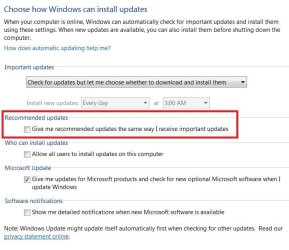
It all depends on how your windows update settings are set
If you're set to auto I'm sure just about anything would start to download and install
If one was on manual nothing would
update settings.JPG

The updates might be included in this updating process
Clean install see post #2 below
windows update
 

My Computer My Computer

Computer type
PC/Desktop
Computer Manufacturer/Model Number
Custom assembled by me :}
OS
Win-7-Pro64bit 7-H-Prem-64bit
CPU
i7-5930K 2nd i9-9940x both water blocked VRM's too
Motherboard
ASUS SABERTOOTH X99 2nd ASUS x299 Apex
Memory
Trident-z 3200C14 2nd Trident-z 3600C16
Graphics Card(s)
EVGA 1080ti ftw3 2nd Titan Xp both water blocked
Sound Card
Built-in Realtek
Monitor(s) Displays
1-AOC G2460PG 24"G-Sync 144Hz/ 2nd 1-ASUS VG248QE 24" 144Hz
Screen Resolution
1920 x 1080 144Hz
Hard Drives
2-Samsung M.2 Evo & Evo Plus
2-Samsung 850 EVO 500GB SSD's/ 3-2.5 W.D. Black 1tb-&3-1tb/3-3.5 WD Black 1tb hdd's
PSU
EVGA SuperNOVA 1000-P2 2nd 1200-P2
Case
2-Corsair Obsidian Series 450D Black ATX Mid Tower
Cooling
Custom water loops
Keyboard
Logitech G710+/ 2nd Logitech G910
Mouse
2-RedDragon M901 Perdition 16400 dpi Gaming mouse = wired
Internet Speed
Comcast Ping 19ms 89.31mbps download speed 6.12mbps upload
Antivirus
Malwarebytes Pro/ Superantispyware Pro
Browser
FireFox & Pale moon
Other Info
2nd ASUS X299 Apex/Intel i9-9940x with Custom water loop/7H-Prem-x64/Corsair 450D case/Ram Trident-z 3600C16 4x8gb / Samsung970Evo plus 500gb SSD/Dual ssd EZ swap evo/PSU EVGA SuperNova 1200w-P2 80+Platinum/GPU Titan Xp /8-ML-140 on push-pull on 2-280GTX rads
Hi,
It all depends on how your windows update settings are set
If you're set to auto I'm sure just about anything would start to download and install
If one was on manual nothing would
View attachment 394779

The updates might be included in this updating process
Clean install see post #2 below
windows update

It's a clean install of windows 7. there is no connection to the internet during installation phase. I think the KB 3033929 was installed during the installation of windows itself. Is there a way to decide What Updates to install during windows installation? During installation of windows 7, there was a message showing "installing update files" I figure, it installed KB 3033929 during that time. Somehow someone included the Update files in the ISO, and set it to install during Win 7 installation.

In Summary, Is there a way to block windows from installing updates files during OS installation phase?

I will Try the advice you've given regardless. Thanks for helping man.
 

My Computer My Computer

Computer type
PC/Desktop
Computer Manufacturer/Model Number
Custom Build
OS
Win 7 Pro 64 Bit
CPU
i5
Motherboard
Asus
Memory
6gb
Graphics Card(s)
Amd
Hi,
Well if you have an already updated iso there's not really too much you can do beside download an older one ?
Although if you're getting 200+ updates afterwards it doesn't sound like the installer is very new to me
But there are about 350 updates since sp1 was released :)
 

My Computer My Computer

Computer type
PC/Desktop
Computer Manufacturer/Model Number
Custom assembled by me :}
OS
Win-7-Pro64bit 7-H-Prem-64bit
CPU
i7-5930K 2nd i9-9940x both water blocked VRM's too
Motherboard
ASUS SABERTOOTH X99 2nd ASUS x299 Apex
Memory
Trident-z 3200C14 2nd Trident-z 3600C16
Graphics Card(s)
EVGA 1080ti ftw3 2nd Titan Xp both water blocked
Sound Card
Built-in Realtek
Monitor(s) Displays
1-AOC G2460PG 24"G-Sync 144Hz/ 2nd 1-ASUS VG248QE 24" 144Hz
Screen Resolution
1920 x 1080 144Hz
Hard Drives
2-Samsung M.2 Evo & Evo Plus
2-Samsung 850 EVO 500GB SSD's/ 3-2.5 W.D. Black 1tb-&3-1tb/3-3.5 WD Black 1tb hdd's
PSU
EVGA SuperNOVA 1000-P2 2nd 1200-P2
Case
2-Corsair Obsidian Series 450D Black ATX Mid Tower
Cooling
Custom water loops
Keyboard
Logitech G710+/ 2nd Logitech G910
Mouse
2-RedDragon M901 Perdition 16400 dpi Gaming mouse = wired
Internet Speed
Comcast Ping 19ms 89.31mbps download speed 6.12mbps upload
Antivirus
Malwarebytes Pro/ Superantispyware Pro
Browser
FireFox & Pale moon
Other Info
2nd ASUS X299 Apex/Intel i9-9940x with Custom water loop/7H-Prem-x64/Corsair 450D case/Ram Trident-z 3600C16 4x8gb / Samsung970Evo plus 500gb SSD/Dual ssd EZ swap evo/PSU EVGA SuperNova 1200w-P2 80+Platinum/GPU Titan Xp /8-ML-140 on push-pull on 2-280GTX rads
where could I download an older version of win 7 iso? And would it be compatible with my current product key? I bought this ISO + product key cheap off a seller online.

Also, is there some way to tamper with the Program that decide what updates to install during windows installation phase?

win 7 installation USB:
updates_pic.png

maybe I could replace one of the files that initiate unwanted installation of updates during windows installation?

EDITED: I am Unable to to download older win 7 ISO. Meaning, I have to work with the current ISO that I have.
 
Last edited:

My Computer My Computer

Computer type
PC/Desktop
Computer Manufacturer/Model Number
Custom Build
OS
Win 7 Pro 64 Bit
CPU
i5
Motherboard
Asus
Memory
6gb
Graphics Card(s)
Amd
Back
Top