KB2952664 won't uninstall

NotThisMind

New member
Local time
9:40 AM
Messages
17
I can't get KB2952664 to uninstall, it just reboots, "configuring computer" "100%" and when i check again it's still there.

I've tried using wusa /uninstall and searching online including http://www.sevenforums.com/windows-...lly-after-uninstalling-certain-updates-2.html thread, i used option two on that link too, turned off wireless and it was still there.

I can't find any solution online, there's no error on uninstall, it just doesn't disappear from the list.

That uninstall was followed in this https://www.reddit.com/r/pcmasterrace/comments/3g7hr0/removing_telemetry_from_windows_7_and_8x/ list, i removed them step by step, i had one or two already uninstalled, another 2 or 3 i rebooted immediately when asked, the rest i uninstalled them all before rebooting.

And everything uninstalled correctly except KB2952664, i see many people with the same problem but not really a solution for this.

Can somebody help?

Edit: This is odd, the update is listed as 'Optional' now to install, but it's also listed in the installed updates? wtf? http://i.imgur.com/NrBwFke.png

Edit2: I hid it and it's still installed, oh well, idk what to do.
 
Last edited:

My Computer My Computer

Computer type
Laptop
OS
Windows 7 Ultimate x64

My Computer My Computer

Computer type
PC/Desktop
Computer Manufacturer/Model Number
Custom assembled by me :}
OS
Win-7-Pro64bit 7-H-Prem-64bit
CPU
i7-5930K 2nd i9-9940x both water blocked VRM's too
Motherboard
ASUS SABERTOOTH X99 2nd ASUS x299 Apex
Memory
Trident-z 3200C14 2nd Trident-z 3600C16
Graphics Card(s)
EVGA 1080ti ftw3 2nd Titan Xp both water blocked
Sound Card
Built-in Realtek
Monitor(s) Displays
1-AOC G2460PG 24"G-Sync 144Hz/ 2nd 1-ASUS VG248QE 24" 144Hz
Screen Resolution
1920 x 1080 144Hz
Hard Drives
2-Samsung M.2 Evo & Evo Plus
2-Samsung 850 EVO 500GB SSD's/ 3-2.5 W.D. Black 1tb-&3-1tb/3-3.5 WD Black 1tb hdd's
PSU
EVGA SuperNOVA 1000-P2 2nd 1200-P2
Case
2-Corsair Obsidian Series 450D Black ATX Mid Tower
Cooling
Custom water loops
Keyboard
Logitech G710+/ 2nd Logitech G910
Mouse
2-RedDragon M901 Perdition 16400 dpi Gaming mouse = wired
Internet Speed
Comcast Ping 19ms 89.31mbps download speed 6.12mbps upload
Antivirus
Malwarebytes Pro/ Superantispyware Pro
Browser
FireFox & Pale moon
Other Info
2nd ASUS X299 Apex/Intel i9-9940x with Custom water loop/7H-Prem-x64/Corsair 450D case/Ram Trident-z 3600C16 4x8gb / Samsung970Evo plus 500gb SSD/Dual ssd EZ swap evo/PSU EVGA SuperNova 1200w-P2 80+Platinum/GPU Titan Xp /8-ML-140 on push-pull on 2-280GTX rads
I did the reset, option two, the problem with hiding the update is the update does not disappear from the 'installed list', even though it doesn't throw an error when i uninstall, it just doesn't uninstall.

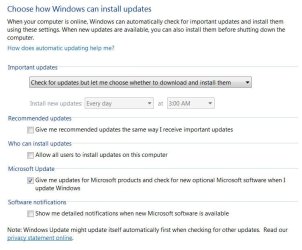
I have that setting set on windows update, "check for updates but let me download/install" already.

To clarify, i've run that powershell command, only kb2952664 is installed with no 'InstalledOn' date, i'm uninstalling right now again with wusa, will edit in 2min.

Edit: Still installed, how can i remove this?
 

My Computer My Computer

Computer type
Laptop
OS
Windows 7 Ultimate x64
Does nobody have a solution? I tried many things i found online, none of them work... why
 

My Computer My Computer

Computer type
Laptop
OS
Windows 7 Ultimate x64
After you make your setting as per post #2 reboot a couple of times.
Now remove the Kb again.
Reboot and then search with Windows Updates and see if the KB is offered again. If it's offered again then you did remove it. Just right tick on it and select hide. Reboot.

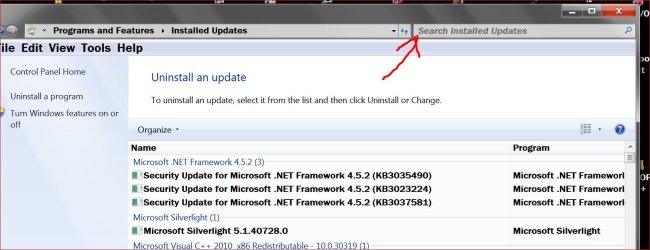
You can also open WU and go to the lower left corner and select Installed Updates

Then go to the search bar and type in the KB.
If the KB is still installed it will show it.
If it finds the KB just tick on it and select remove and then close WU and reboot.

Windows Update search.JPG

Then search WU again and when it offered again just right tick on it and select hide.
Then of course Reboot again. When you do changes to Windows 7 it like reboots to complete things.

Here is the kicker.
Later on in life Windows 7 Updates might offer the same KB again. I don't know how but it does happen. Just watch for it and then hide it again.
 

My Computer My Computer

Computer type
PC/Desktop
Computer Manufacturer/Model Number
Home made Desktop
OS
Windows 10 Pro. 64/ version 1709 Windows 7 Pro/64
CPU
Intel i7-6800K @ 4.3
Motherboard
ASUS X-99 Deluxe II
Memory
Corsair Platinum 16 gig @2400
Graphics Card(s)
EVGA GTX 1070 OC
Monitor(s) Displays
Asus 27" LED LCD/VE278Q
Screen Resolution
1920-1080 or 1280-720 HDMI
Hard Drives
INTEL SSD 730-240 Gb Sata 3.0/
PSU
EVGA Platium 1200W
Case
Phanteks Luxe Tempered Glass 8 fans/ one radiator
Cooling
XSPC/ Water Cooled CPU
Keyboard
Das 4 Professional
Mouse
Logitech M705/MX Anywhere 2-S
Internet Speed
100 mbits
Antivirus
Microsoft Security Essentials/ Malwarebytes Premium 3.0/ SAS
Browser
I.E. 11 default/Firefox/ ISP Time Warner Cable/Spectrum
Other Info
LG BluRay Burner/
Sound system-KLipsch-THX/
Icy Dock ssd Hot Swap bays.
I did as you say, and i got 1 optional update (kb2952664) with 6.1mb and one installed (kb2952664)

I've tried wusa uninstall and everything i can find on google, i found this thread http://www.sevenforums.com/windows-...55-kb2952664-shows-both-installed-hidden.html and the user says system restore did not help, what the hell is this? That was my last resort and it doesn't remove this crap?

I found Windows 10 Crapware KB3035583 KB2952664 KB2976978 KB3021917 - Pastebin.com as a solution, if you don't have a better option i'll run it.
 

My Computer My Computer

Computer type
Laptop
OS
Windows 7 Ultimate x64
The script above apparently solved the problem, after reboot and couple wu checks, the stupid-ass update is no longer listed on installed updates.

I hope it stays that way.

Thanks for the help.
 

My Computer My Computer

Computer type
Laptop
OS
Windows 7 Ultimate x64
Some where on this forum or maybe the Ten Forum I have seen that.
Forgot all about it until you mentioned it.

I have already remove all those KB you list just the way I posted.
But I also went through the registry and removed all the W-10 garbage. That might be the reason my method worked for me and not others.

I keep a list of all those removed or hide updates so I can keep checking to make sure they don't slip back in.

Glad you got fixed.
 

My Computer My Computer

Computer type
PC/Desktop
Computer Manufacturer/Model Number
Home made Desktop
OS
Windows 10 Pro. 64/ version 1709 Windows 7 Pro/64
CPU
Intel i7-6800K @ 4.3
Motherboard
ASUS X-99 Deluxe II
Memory
Corsair Platinum 16 gig @2400
Graphics Card(s)
EVGA GTX 1070 OC
Monitor(s) Displays
Asus 27" LED LCD/VE278Q
Screen Resolution
1920-1080 or 1280-720 HDMI
Hard Drives
INTEL SSD 730-240 Gb Sata 3.0/
PSU
EVGA Platium 1200W
Case
Phanteks Luxe Tempered Glass 8 fans/ one radiator
Cooling
XSPC/ Water Cooled CPU
Keyboard
Das 4 Professional
Mouse
Logitech M705/MX Anywhere 2-S
Internet Speed
100 mbits
Antivirus
Microsoft Security Essentials/ Malwarebytes Premium 3.0/ SAS
Browser
I.E. 11 default/Firefox/ ISP Time Warner Cable/Spectrum
Other Info
LG BluRay Burner/
Sound system-KLipsch-THX/
Icy Dock ssd Hot Swap bays.
I've already tried that step two as i said when i started this thread, you asked to try again and i did, still didn't uninstall, i've tried wusa /uninstall, rebooting, cleaning wu history, nothing worked... glad i found that script because apparently it removed the update.

One thing i don't get is, why the hell this crap doesn't uninstall normally? Yea it could be a conflict, but it's 2015 and m$ has been on this game for over 20 years, and this still happens.

well, i can only thank for everyone's help and time in these forums ;)
 

My Computer My Computer

Computer type
Laptop
OS
Windows 7 Ultimate x64
In my opinion Microsoft want everybody to move to W-10.
Microsoft will make Windows 7 as miserable to update properly as possible.

When you start reading the the forum you will see dozens having problems go back to Windows 7 from W-10. They don't make that work easy as they stated.

They somehow want W-10 to sell better that Windows 8 and will try anything to do so.

To me it is simple.
To hell with the free W-10. When W-10 is worth paying for I will take another look. I really don't know why so many are in a hurry. W-10 isn't leaving town.

The new rulers of Microsoft have got their cahoonas on the chopping block.
So they want W-10 to out sell Windows 7 and for Windows 7 to go away, NOW.
 

My Computer My Computer

Computer type
PC/Desktop
Computer Manufacturer/Model Number
Home made Desktop
OS
Windows 10 Pro. 64/ version 1709 Windows 7 Pro/64
CPU
Intel i7-6800K @ 4.3
Motherboard
ASUS X-99 Deluxe II
Memory
Corsair Platinum 16 gig @2400
Graphics Card(s)
EVGA GTX 1070 OC
Monitor(s) Displays
Asus 27" LED LCD/VE278Q
Screen Resolution
1920-1080 or 1280-720 HDMI
Hard Drives
INTEL SSD 730-240 Gb Sata 3.0/
PSU
EVGA Platium 1200W
Case
Phanteks Luxe Tempered Glass 8 fans/ one radiator
Cooling
XSPC/ Water Cooled CPU
Keyboard
Das 4 Professional
Mouse
Logitech M705/MX Anywhere 2-S
Internet Speed
100 mbits
Antivirus
Microsoft Security Essentials/ Malwarebytes Premium 3.0/ SAS
Browser
I.E. 11 default/Firefox/ ISP Time Warner Cable/Spectrum
Other Info
LG BluRay Burner/
Sound system-KLipsch-THX/
Icy Dock ssd Hot Swap bays.
But isn't w10 'free'? aside from the enterprise version... as long as you have w7/w8 with the correspondent home or ultimate edition ofc.

I can only think of another way they can profit from 'giving' it away for free... and that doesn't sound that good.
Also, it would be a stupid move to start ****ing around with the only OS that they did get right after all of these years (aside from XP), which is w7, but hey, it's m$, they sure know better.

We'll see if anything changes in the meantime, otherwise it would be a sad day when they discontinue w7, even though w8 can be manageable through stripping that metro-UI with classic shell and stuff, it's not the same thing.
 

My Computer My Computer

Computer type
Laptop
OS
Windows 7 Ultimate x64
It's free to use now but what happens when that time is over and you want to go back to Windows 7. Now the hell starts.
 

My Computer My Computer

Computer type
PC/Desktop
Computer Manufacturer/Model Number
Home made Desktop
OS
Windows 10 Pro. 64/ version 1709 Windows 7 Pro/64
CPU
Intel i7-6800K @ 4.3
Motherboard
ASUS X-99 Deluxe II
Memory
Corsair Platinum 16 gig @2400
Graphics Card(s)
EVGA GTX 1070 OC
Monitor(s) Displays
Asus 27" LED LCD/VE278Q
Screen Resolution
1920-1080 or 1280-720 HDMI
Hard Drives
INTEL SSD 730-240 Gb Sata 3.0/
PSU
EVGA Platium 1200W
Case
Phanteks Luxe Tempered Glass 8 fans/ one radiator
Cooling
XSPC/ Water Cooled CPU
Keyboard
Das 4 Professional
Mouse
Logitech M705/MX Anywhere 2-S
Internet Speed
100 mbits
Antivirus
Microsoft Security Essentials/ Malwarebytes Premium 3.0/ SAS
Browser
I.E. 11 default/Firefox/ ISP Time Warner Cable/Spectrum
Other Info
LG BluRay Burner/
Sound system-KLipsch-THX/
Icy Dock ssd Hot Swap bays.
MS has a habit of having a big-time winning OS, followed by a flop Win 10 is really very good - but I'm struggling with finding any real reason to move from Win7 unless you have touch-screen capability.

MS intend to make their money out of selling the Apps that people seem to love installing on their machines, and selling advertising space inside the free apps. It really is that simple.
They will also be saving bucketloads of cash because...
1) there won't be so many operating systems to support once Vista dies in 18 months - Windows 10 is scheduled to be a never-ending update so after 2023, they'll only have one OS to support (in theory!)
2) One of the big changes in Win10 is that updates can be channelled through P2P rather than having to always come from the MS servers. This should reduce their server requirement significantly (and here we're talking in the millions of dollars per year).

The fly in the ointment is the Volume License customer - who won't make the change for years yet, and is possibly still wedded to XP. MS will try to get them to bypass 7 and 8 and move straight to 10. I don't see that happening until 7 goes out of support in 2019/20
 

My Computer My Computer

Computer type
Laptop
Computer Manufacturer/Model Number
Asus K52F or Lenovo B51-80
OS
Win 7 x64 Home Premium (and x86 VirtualBox VM)/Win10
CPU
i3 370M/i7 6500U
Motherboard
Asus/Lenovo
Memory
8GB - finally :)/8GB
Graphics Card(s)
it's an i3, dude!/dual Intel&nVidia
Sound Card
onboard
Monitor(s) Displays
15.6" built-in
Screen Resolution
1366x768/1920x1080
Hard Drives
750GB Seagate internal
Sundry external drives attached to other computers on the local network
1TB SSD on the Lenovo
PSU
n/a
Internet Speed
as much as I can get - usually on a dongle/phone, so <1MB/s
Antivirus
MSE/Defender
Browser
IE11/12/Edge/Chrome/FF(if I must)
lol yea x-p to win-10 would be a drastic transition :D
 

My Computer My Computer

Computer type
PC/Desktop
Computer Manufacturer/Model Number
Custom assembled by me :}
OS
Win-7-Pro64bit 7-H-Prem-64bit
CPU
i7-5930K 2nd i9-9940x both water blocked VRM's too
Motherboard
ASUS SABERTOOTH X99 2nd ASUS x299 Apex
Memory
Trident-z 3200C14 2nd Trident-z 3600C16
Graphics Card(s)
EVGA 1080ti ftw3 2nd Titan Xp both water blocked
Sound Card
Built-in Realtek
Monitor(s) Displays
1-AOC G2460PG 24"G-Sync 144Hz/ 2nd 1-ASUS VG248QE 24" 144Hz
Screen Resolution
1920 x 1080 144Hz
Hard Drives
2-Samsung M.2 Evo & Evo Plus
2-Samsung 850 EVO 500GB SSD's/ 3-2.5 W.D. Black 1tb-&3-1tb/3-3.5 WD Black 1tb hdd's
PSU
EVGA SuperNOVA 1000-P2 2nd 1200-P2
Case
2-Corsair Obsidian Series 450D Black ATX Mid Tower
Cooling
Custom water loops
Keyboard
Logitech G710+/ 2nd Logitech G910
Mouse
2-RedDragon M901 Perdition 16400 dpi Gaming mouse = wired
Internet Speed
Comcast Ping 19ms 89.31mbps download speed 6.12mbps upload
Antivirus
Malwarebytes Pro/ Superantispyware Pro
Browser
FireFox & Pale moon
Other Info
2nd ASUS X299 Apex/Intel i9-9940x with Custom water loop/7H-Prem-x64/Corsair 450D case/Ram Trident-z 3600C16 4x8gb / Samsung970Evo plus 500gb SSD/Dual ssd EZ swap evo/PSU EVGA SuperNova 1200w-P2 80+Platinum/GPU Titan Xp /8-ML-140 on push-pull on 2-280GTX rads
Yep it's been stated in the terms to go back you'd need to clean install,
Most of the :Not genuine: questions popping up after using 10 system restore OEM SLP posts kind of prove that I'll bet.
A lot of OEM owner do not have clean install disks so they have to go to the manufacture to plead the case how to reactivate the OEM now :confused:
 

My Computer My Computer

Computer type
PC/Desktop
Computer Manufacturer/Model Number
Custom assembled by me :}
OS
Win-7-Pro64bit 7-H-Prem-64bit
CPU
i7-5930K 2nd i9-9940x both water blocked VRM's too
Motherboard
ASUS SABERTOOTH X99 2nd ASUS x299 Apex
Memory
Trident-z 3200C14 2nd Trident-z 3600C16
Graphics Card(s)
EVGA 1080ti ftw3 2nd Titan Xp both water blocked
Sound Card
Built-in Realtek
Monitor(s) Displays
1-AOC G2460PG 24"G-Sync 144Hz/ 2nd 1-ASUS VG248QE 24" 144Hz
Screen Resolution
1920 x 1080 144Hz
Hard Drives
2-Samsung M.2 Evo & Evo Plus
2-Samsung 850 EVO 500GB SSD's/ 3-2.5 W.D. Black 1tb-&3-1tb/3-3.5 WD Black 1tb hdd's
PSU
EVGA SuperNOVA 1000-P2 2nd 1200-P2
Case
2-Corsair Obsidian Series 450D Black ATX Mid Tower
Cooling
Custom water loops
Keyboard
Logitech G710+/ 2nd Logitech G910
Mouse
2-RedDragon M901 Perdition 16400 dpi Gaming mouse = wired
Internet Speed
Comcast Ping 19ms 89.31mbps download speed 6.12mbps upload
Antivirus
Malwarebytes Pro/ Superantispyware Pro
Browser
FireFox & Pale moon
Other Info
2nd ASUS X299 Apex/Intel i9-9940x with Custom water loop/7H-Prem-x64/Corsair 450D case/Ram Trident-z 3600C16 4x8gb / Samsung970Evo plus 500gb SSD/Dual ssd EZ swap evo/PSU EVGA SuperNova 1200w-P2 80+Platinum/GPU Titan Xp /8-ML-140 on push-pull on 2-280GTX rads
The vast majority of non-genuine cases I see after downgrading from Windows 10 are caused by having been counterfeit before the upgrade - the upgrade/downgrade cycle breaks the Activation Exploit that had been previously used to make the system look genuine.
 

My Computer My Computer

Computer type
Laptop
Computer Manufacturer/Model Number
Asus K52F or Lenovo B51-80
OS
Win 7 x64 Home Premium (and x86 VirtualBox VM)/Win10
CPU
i3 370M/i7 6500U
Motherboard
Asus/Lenovo
Memory
8GB - finally :)/8GB
Graphics Card(s)
it's an i3, dude!/dual Intel&nVidia
Sound Card
onboard
Monitor(s) Displays
15.6" built-in
Screen Resolution
1366x768/1920x1080
Hard Drives
750GB Seagate internal
Sundry external drives attached to other computers on the local network
1TB SSD on the Lenovo
PSU
n/a
Internet Speed
as much as I can get - usually on a dongle/phone, so <1MB/s
Antivirus
MSE/Defender
Browser
IE11/12/Edge/Chrome/FF(if I must)
Very good point Noel.

I do remember Microsoft stating that a counterfeit W-7 could move to W-10
BUT they never said when you went back to W-7 the hack would still work.

I think it might be a gotcha or a sneaky by Microsoft.
 

My Computer My Computer

Computer type
PC/Desktop
Computer Manufacturer/Model Number
Home made Desktop
OS
Windows 10 Pro. 64/ version 1709 Windows 7 Pro/64
CPU
Intel i7-6800K @ 4.3
Motherboard
ASUS X-99 Deluxe II
Memory
Corsair Platinum 16 gig @2400
Graphics Card(s)
EVGA GTX 1070 OC
Monitor(s) Displays
Asus 27" LED LCD/VE278Q
Screen Resolution
1920-1080 or 1280-720 HDMI
Hard Drives
INTEL SSD 730-240 Gb Sata 3.0/
PSU
EVGA Platium 1200W
Case
Phanteks Luxe Tempered Glass 8 fans/ one radiator
Cooling
XSPC/ Water Cooled CPU
Keyboard
Das 4 Professional
Mouse
Logitech M705/MX Anywhere 2-S
Internet Speed
100 mbits
Antivirus
Microsoft Security Essentials/ Malwarebytes Premium 3.0/ SAS
Browser
I.E. 11 default/Firefox/ ISP Time Warner Cable/Spectrum
Other Info
LG BluRay Burner/
Sound system-KLipsch-THX/
Icy Dock ssd Hot Swap bays.
Sounds like a lot of interesting phone calls to both M$ and manufactures and or sellers of the media in question :)
 

My Computer My Computer

Computer type
PC/Desktop
Computer Manufacturer/Model Number
Custom assembled by me :}
OS
Win-7-Pro64bit 7-H-Prem-64bit
CPU
i7-5930K 2nd i9-9940x both water blocked VRM's too
Motherboard
ASUS SABERTOOTH X99 2nd ASUS x299 Apex
Memory
Trident-z 3200C14 2nd Trident-z 3600C16
Graphics Card(s)
EVGA 1080ti ftw3 2nd Titan Xp both water blocked
Sound Card
Built-in Realtek
Monitor(s) Displays
1-AOC G2460PG 24"G-Sync 144Hz/ 2nd 1-ASUS VG248QE 24" 144Hz
Screen Resolution
1920 x 1080 144Hz
Hard Drives
2-Samsung M.2 Evo & Evo Plus
2-Samsung 850 EVO 500GB SSD's/ 3-2.5 W.D. Black 1tb-&3-1tb/3-3.5 WD Black 1tb hdd's
PSU
EVGA SuperNOVA 1000-P2 2nd 1200-P2
Case
2-Corsair Obsidian Series 450D Black ATX Mid Tower
Cooling
Custom water loops
Keyboard
Logitech G710+/ 2nd Logitech G910
Mouse
2-RedDragon M901 Perdition 16400 dpi Gaming mouse = wired
Internet Speed
Comcast Ping 19ms 89.31mbps download speed 6.12mbps upload
Antivirus
Malwarebytes Pro/ Superantispyware Pro
Browser
FireFox & Pale moon
Other Info
2nd ASUS X299 Apex/Intel i9-9940x with Custom water loop/7H-Prem-x64/Corsair 450D case/Ram Trident-z 3600C16 4x8gb / Samsung970Evo plus 500gb SSD/Dual ssd EZ swap evo/PSU EVGA SuperNova 1200w-P2 80+Platinum/GPU Titan Xp /8-ML-140 on push-pull on 2-280GTX rads
Back
Top