Keep getting Windows not Genuine error

ZaPS

New member
Local time
5:28 AM
Messages
6
I've tried solutions on several threads in here and still nothing works so I'm reaching out for help now.

About two months ago I did a factory reset on this system and everything was running fine until April 4, 2016.

Now I keep getting a a Windows not Genuine error on bottom right.
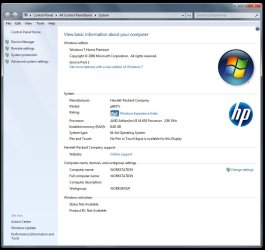
Basic information also shows Windows Activation and Product ID as Not Available but Windows Update still works and the system is fully updates.

sppsvc is visible but I keep getting error 2 and I can't start it. Administrator's do have access to it from what I can see.
C:\Windows\System32>net start sppsvc
System error 2 has occurred.


Diagnostic Report (1.9.0027.0):
-----------------------------------------
Windows Validation Data-->

Validation Code: 0x8004FE21
Cached Online Validation Code: N/A, hr = 0x80070002
Windows Product Key: *****-*****-73CQT-WMF7J-3Q6C9
Windows Product Key Hash: KaFG+RmurcM3ZxzWyfEP9WtPUJw=
Windows Product ID: 00359-OEM-8992687-00010
Windows Product ID Type: 2
Windows License Type: OEM SLP
Windows OS version: 6.1.7601.2.00010300.1.0.003
ID: {C6654D6F-1E7C-4D9E-8170-502224052D1F}(3)
Is Admin: Yes
TestCab: 0x0
LegitcheckControl ActiveX: N/A, hr = 0x80070002
Signed By: N/A, hr = 0x80070002
Product Name: Windows 7 Home Premium
Architecture: 0x00000009
Build lab: 7601.win7sp1_gdr.160211-0600
TTS Error:
Validation Diagnostic:
Resolution Status: N/A

Vista WgaER Data-->
ThreatID(s): N/A, hr = 0x80070002
Version: N/A, hr = 0x80070002

Windows XP Notifications Data-->
Cached Result: N/A, hr = 0x80070002
File Exists: No
Version: N/A, hr = 0x80070002
WgaTray.exe Signed By: N/A, hr = 0x80070002
WgaLogon.dll Signed By: N/A, hr = 0x80070002

OGA Notifications Data-->
Cached Result: N/A, hr = 0x80070002
Version: N/A, hr = 0x80070002
OGAExec.exe Signed By: N/A, hr = 0x80070002
OGAAddin.dll Signed By: N/A, hr = 0x80070002

OGA Data-->
Office Status: 109 N/A
OGA Version: N/A, 0x80070002
Signed By: N/A, hr = 0x80070002
Office Diagnostics: 025D1FF3-364-80041010_025D1FF3-229-80041010_025D1FF3-230-1_025D1FF3-517-80040154_025D1FF3-237-80040154_025D1FF3-238-2_025D1FF3-244-80070002_025D1FF3-258-3

Browser Data-->
Proxy settings: N/A
User Agent: Mozilla/4.0 (compatible; MSIE 8.0; Win32)
Default Browser: C:\Program Files (x86)\Mozilla Firefox\firefox.exe
Download signed ActiveX controls: Prompt
Download unsigned ActiveX controls: Disabled
Run ActiveX controls and plug-ins: Allowed
Initialize and script ActiveX controls not marked as safe: Disabled
Allow scripting of Internet Explorer Webbrowser control: Disabled
Active scripting: Allowed
Script ActiveX controls marked as safe for scripting: Allowed

File Scan Data-->

Other data-->
Office Details: <GenuineResults><MachineData><UGUID>{C6654D6F-1E7C-4D9E-8170-502224052D1F}</UGUID><Version>1.9.0027.0</Version><OS>6.1.7601.2.00010300.1.0.003</OS><Architecture>x64</Architecture><PKey>*****-*****-*****-*****-3Q6C9</PKey><PID>00359-OEM-8992687-00010</PID><PIDType>2</PIDType><SID>S-1-5-21-3824366254-967493284-244318520</SID><SYSTEM><Manufacturer>Hewlett-Packard</Manufacturer><Model>p6677c</Model></SYSTEM><BIOS><Manufacturer>American Megatrends Inc.</Manufacturer><Version>6.02</Version><SMBIOSVersion major="2" minor="6"/><Date>20100721000000.000000+000</Date></BIOS><HWID>6BED3207018400F2</HWID><UserLCID>1009</UserLCID><SystemLCID>0409</SystemLCID><TimeZone>Eastern Standard Time(GMT-05:00)</TimeZone><iJoin>0</iJoin><SBID><stat>3</stat><msppid></msppid><name></name><model></model></SBID><OEM><OEMID>HPQOEM</OEMID><OEMTableID>SLIC-CPC</OEMTableID></OEM><GANotification/></MachineData><Software><Office><Result>109</Result><Products/><Applications/></Office></Software></GenuineResults>

Spsys.log Content: 0x80070002

Licensing Data-->
On a computer running Microsoft Windows non-core edition, run 'slui.exe 0x2a 0x80070002' to display the error text.
Error: 0x80070002

Windows Activation Technologies-->
HrOffline: 0x8004FE21
HrOnline: N/A
HealthStatus: 0x0001000000000000
Event Time Stamp: 4:5:2016 03:56
ActiveX: Registered, Version: 7.1.7600.16395
Admin Service: Registered, Version: 7.1.7600.16395
HealthStatus Bitmask Output:
Tampered Service: sppsvc


HWID Data-->
HWID Hash Current: NgAAAAEAAwABAAEAAQAEAAAAAQABAAEAln0+42KIIJHee1jv+iQoL4qp1H8CqMGw3Y7Aj0Ia

OEM Activation 1.0 Data-->
N/A

OEM Activation 2.0 Data-->
BIOS valid for OA 2.0: yes
Windows marker version: 0x20001
OEMID and OEMTableID Consistent: yes
BIOS Information:
ACPI Table Name OEMID Value OEMTableID Value
APIC HPQOEM SLIC-CPC
FACP HPQOEM SLIC-CPC
SRAT HPQOEM SLIC-CPC
HPET HPQOEM SLIC-CPC
MCFG HPQOEM SLIC-CPC
SLIC HPQOEM SLIC-CPC
OEMB HPQOEM SLIC-CPC
SSDT HPQOEM SLIC-CPC
 

Attachments
  • Basic Information.jpg
    Basic Information.jpg
    74.6 KB · Views: 1
Last edited:

My Computer

Computer type
PC/Desktop
Computer Manufacturer/Model Number
HP P6000
OS
Windows 7 Home Premium 64-bit SP1
CPU
AMD Athlon(tm) II X4 635 Processor, 2900 Mhz, 4 Core(s), 4 L
Motherboard
FOXCONN 2AB1 (CPU 1)
Memory
8.00GB Dual-Channel DDR3 @ 666MHz (9-9-9-24)
Graphics Card(s)
ASUS VS247 (1920x1080@60Hz) 1023MB NVIDIA GeForce GT 610
Hard Drives
WDC WD10 01FAES-60Z2A0 SATA Disk Device
ST350063 0AS SATA Disk Device
WDC WD12 00BEVS-60LAT0 SATA Disk Device
ST4000DM000-1F2168 ATA Device
Antivirus
Malwarebytes
Browser
Firefox
Hi Zaps,
Have you changed the motherboard on that tower?

Roy
 

My Computer

Computer type
PC/Desktop
Computer Manufacturer/Model Number
medionl/Aspire 6930G/acer x55a
OS
W7 home premium 32bit/W7HP 64bit/w10 tp insider ring
CPU
E5300 dual core
Motherboard
medion MS7366
Memory
3gb
Graphics Card(s)
Nvidia Geforce 7100 Nforce 630i
Monitor(s) Displays
avixc
Internet Speed
n (isp resticted to 72)
Antivirus
mse/pands
Browser
palemoon
Other Info
Belkin Fd7050 n USB using Railink RT2870 drivers, more upto date
Thanks for the reply Roy,

Nope.

System hasn't changed in the past three years. I did try to install a demo of Office 2016 and that's when everything went south in Excel. Some features like cell merge would stop working so I tried to remove Office 2016 and reinstall it but Office 2016 wouldn't install so I gave up and stayed with Open Office. Shortly after I started to get a notice on Bottom Right "Windows 7 Build 7601 This Copy of Windows is not Genuine".

What is strange is prior to this warning the system summary showed windows activation was good.

Prior to this disaster, everything was fine. In fact I haven't even finished installing all my software since this factory reset a few months ago. The reason for the factory reset was simply because the system was getting sluggish and crusty.

If it wasn't for the fact that the CAD software I use only installs on Windows I wouldn't even bother with Windoz.
 

My Computer

Computer type
PC/Desktop
Computer Manufacturer/Model Number
HP P6000
OS
Windows 7 Home Premium 64-bit SP1
CPU
AMD Athlon(tm) II X4 635 Processor, 2900 Mhz, 4 Core(s), 4 L
Motherboard
FOXCONN 2AB1 (CPU 1)
Memory
8.00GB Dual-Channel DDR3 @ 666MHz (9-9-9-24)
Graphics Card(s)
ASUS VS247 (1920x1080@60Hz) 1023MB NVIDIA GeForce GT 610
Hard Drives
WDC WD10 01FAES-60Z2A0 SATA Disk Device
ST350063 0AS SATA Disk Device
WDC WD12 00BEVS-60LAT0 SATA Disk Device
ST4000DM000-1F2168 ATA Device
Antivirus
Malwarebytes
Browser
Firefox
Hi Zaps,
You seem to have a wierd one here.
When i looked up that model i noticed that it does not use a standard HP motherboard instead a Foxconn make, with an American Megatrends Bios. if you have upgraded the bios via HP then it will be wrong i found a post referring to upgrade bios via Foxconn
H-ALVORIX_HF-RS880-uATX motherboard bios upgrade for HP p667... - HP Support Forum - 2251107

Have you tried the uninstaller from MS
Office 2016 Uninstall Tool | Upcoming 2015 2016

The above might work, but i havn't got high hopes as Iv'e not seen your error resolved other than by a clean install, unfortunately

Roy
 

My Computer

Computer type
PC/Desktop
Computer Manufacturer/Model Number
medionl/Aspire 6930G/acer x55a
OS
W7 home premium 32bit/W7HP 64bit/w10 tp insider ring
CPU
E5300 dual core
Motherboard
medion MS7366
Memory
3gb
Graphics Card(s)
Nvidia Geforce 7100 Nforce 630i
Monitor(s) Displays
avixc
Internet Speed
n (isp resticted to 72)
Antivirus
mse/pands
Browser
palemoon
Other Info
Belkin Fd7050 n USB using Railink RT2870 drivers, more upto date
Tried the uninstaller and nothing has changed. Bios hasn't changed since I bought it three years ago.

When I try to install Office 2016 it failed again and event viewer keeps showing this error.during the installation

Log Name: System
Source: Service Control Manager
Date: 07/04/2016 9:36:02 AM
Event ID: 7000
Task Category: None
Level: Error
Keywords: Classic
User: N/A
Computer: WORKSTATION
Description:
The Office Software Protection Platform service failed to start due to the following error:
The system cannot find the file specified.
Event Xml:
<Event xmlns="http://schemas.microsoft.com/win/2004/08/events/event">
<System>
<Provider Name="Service Control Manager" Guid="{555908d1-a6d7-4695-8e1e-26931d2012f4}" EventSourceName="Service Control Manager" />
<EventID Qualifiers="49152">7000</EventID>
<Version>0</Version>
<Level>2</Level>
<Task>0</Task>
<Opcode>0</Opcode>
<Keywords>0x8080000000000000</Keywords>
<TimeCreated SystemTime="2016-04-07T13:36:02.430979400Z" />
<EventRecordID>21153</EventRecordID>
<Correlation />
<Execution ProcessID="680" ThreadID="4320" />
<Channel>System</Channel>
<Computer>WORKSTATION</Computer>
<Security />
</System>
<EventData>
<Data Name="param1">Office Software Protection Platform</Data>
<Data Name="param2">%%2</Data>
</EventData>
</Event>
 

My Computer

Computer type
PC/Desktop
Computer Manufacturer/Model Number
HP P6000
OS
Windows 7 Home Premium 64-bit SP1
CPU
AMD Athlon(tm) II X4 635 Processor, 2900 Mhz, 4 Core(s), 4 L
Motherboard
FOXCONN 2AB1 (CPU 1)
Memory
8.00GB Dual-Channel DDR3 @ 666MHz (9-9-9-24)
Graphics Card(s)
ASUS VS247 (1920x1080@60Hz) 1023MB NVIDIA GeForce GT 610
Hard Drives
WDC WD10 01FAES-60Z2A0 SATA Disk Device
ST350063 0AS SATA Disk Device
WDC WD12 00BEVS-60LAT0 SATA Disk Device
ST4000DM000-1F2168 ATA Device
Antivirus
Malwarebytes
Browser
Firefox
Hi Zaps,
lets see if we can fool the system.


in Search type Run, and then press ENTER.
Type the following command line, and then press ENTER.

icacls "C:\Program Files\Common Files\Microsoft Shared\OfficeSoftwareProtectionPlatform" /grant "Network Service:F" /t

3. Try the uninstall of Office 2010.
IT MIGHT WORK EVEN THOU IT STATES 2010

if that fails try the following options.

Go controlpanel >> admintools >> services >> is office software protection platform listed
if it is right click >> properties >> select dissable.
uninstall.

If its not there
Controlpanel >> admintools >> system config >> services > uncheck anything marked Office
uninstall

Boot into safe mode
Uninstall


Roy
 

My Computer

Computer type
PC/Desktop
Computer Manufacturer/Model Number
medionl/Aspire 6930G/acer x55a
OS
W7 home premium 32bit/W7HP 64bit/w10 tp insider ring
CPU
E5300 dual core
Motherboard
medion MS7366
Memory
3gb
Graphics Card(s)
Nvidia Geforce 7100 Nforce 630i
Monitor(s) Displays
avixc
Internet Speed
n (isp resticted to 72)
Antivirus
mse/pands
Browser
palemoon
Other Info
Belkin Fd7050 n USB using Railink RT2870 drivers, more upto date
Results

COMPLETED

icacls "C:\Program Files\Common Files\Microsoft Shared\OfficeSoftwareProtectionPlatform" /grant "Network Service:F" /t

Services I see Office 64 Source Engine (Manual) (Now disabled)

In System Configuration I see nothing with Office indicated.


I've also notice a couple other errors in Event Viewer.


Faulting application name: integrator.exe, version: 16.0.6701.1013, time stamp: 0x56ed742c
Faulting module name: KERNELBASE.dll, version: 6.1.7601.19160, time stamp: 0x56bcd73c
Exception code: 0xc06d007e
Fault offset: 0x000000000000965d
Faulting process id: 0x12e8
Faulting application start time: 0x01d190d29cd24e50
Faulting application path: C:\ProgramData\Microsoft\ClickToRun\{9AC08E99-230B-47e8-9721-4577B7F124EA}\integrator.exe
Faulting module path: C:\Windows\system32\KERNELBASE.dll
Report Id: dfd6c921-fcc5-11e5-8293-d4856411a144

******************************************

Product: Office 16 Click-to-Run Licensing Component -- Error 1920. Service 'Office Software Protection Platform' (osppsvc) failed to start. Verify that you have sufficient privileges to start system services.

*******************************************

Log Name: System
Source: srv
Date: 07/04/2016 10:12:51 AM
Event ID: 2017
Task Category: None
Level: Error
Keywords: Classic
User: N/A
Computer: WORKSTATION
Description:
The server was unable to allocate from the system nonpaged pool because the server reached the configured limit for nonpaged pool allocations.
Event Xml:
<Event xmlns="http://schemas.microsoft.com/win/2004/08/events/event">
<System>
<Provider Name="srv" />
<EventID Qualifiers="49152">2017</EventID>
<Level>2</Level>
<Task>0</Task>
<Keywords>0x80000000000000</Keywords>
<TimeCreated SystemTime="2016-04-07T14:12:51.192086200Z" />
<EventRecordID>21171</EventRecordID>
<Channel>System</Channel>
<Computer>WORKSTATION</Computer>
<Security />
</System>
<EventData>
<Data>\Device\LanmanServer</Data>
<Binary>0000040001002C0000000000E10700C0000000009A0000C00000000000000000000000000000000002000000</Binary>
</EventData>
</Event>


I still getting the "..Genuine" warning on bottom left even after removing the KB971033.

The odd thing is, Windows will still update without any trouble.
 
Last edited:

My Computer

Computer type
PC/Desktop
Computer Manufacturer/Model Number
HP P6000
OS
Windows 7 Home Premium 64-bit SP1
CPU
AMD Athlon(tm) II X4 635 Processor, 2900 Mhz, 4 Core(s), 4 L
Motherboard
FOXCONN 2AB1 (CPU 1)
Memory
8.00GB Dual-Channel DDR3 @ 666MHz (9-9-9-24)
Graphics Card(s)
ASUS VS247 (1920x1080@60Hz) 1023MB NVIDIA GeForce GT 610
Hard Drives
WDC WD10 01FAES-60Z2A0 SATA Disk Device
ST350063 0AS SATA Disk Device
WDC WD12 00BEVS-60LAT0 SATA Disk Device
ST4000DM000-1F2168 ATA Device
Antivirus
Malwarebytes
Browser
Firefox
Latest MGADiag report still shows (Tampered Service: sppsvc)

Without knowing how "sppsvc" was tampered is it possible to restore the service to default some how?

Diagnostic Report (1.9.0027.0):
-----------------------------------------
Windows Validation Data-->

Validation Code: 0x8004FE21
Cached Online Validation Code: N/A, hr = 0x80070002
Windows Product Key: *****-*****-73CQT-WMF7J-3Q6C9
Windows Product Key Hash: KaFG+RmurcM3ZxzWyfEP9WtPUJw=
Windows Product ID: 00359-OEM-8992687-00010
Windows Product ID Type: 2
Windows License Type: OEM SLP
Windows OS version: 6.1.7601.2.00010300.1.0.003
ID: {33A357C2-E16A-435C-88EC-0FD310C4C458}(3)
Is Admin: Yes
TestCab: 0x0
LegitcheckControl ActiveX: N/A, hr = 0x80070002
Signed By: N/A, hr = 0x80070002
Product Name: Windows 7 Home Premium
Architecture: 0x00000009
Build lab: 7601.win7sp1_gdr.160211-0600
TTS Error:
Validation Diagnostic:
Resolution Status: N/A

Vista WgaER Data-->
ThreatID(s): N/A, hr = 0x80070002
Version: N/A, hr = 0x80070002

Windows XP Notifications Data-->
Cached Result: N/A, hr = 0x80070002
File Exists: No
Version: N/A, hr = 0x80070002
WgaTray.exe Signed By: N/A, hr = 0x80070002
WgaLogon.dll Signed By: N/A, hr = 0x80070002

OGA Notifications Data-->
Cached Result: N/A, hr = 0x80070002
Version: N/A, hr = 0x80070002
OGAExec.exe Signed By: N/A, hr = 0x80070002
OGAAddin.dll Signed By: N/A, hr = 0x80070002

OGA Data-->
Office Status: 109 N/A
OGA Version: N/A, 0x80070002
Signed By: N/A, hr = 0x80070002
Office Diagnostics: 025D1FF3-364-80041010_025D1FF3-229-80041010_025D1FF3-230-1_025D1FF3-517-80040154_025D1FF3-237-80040154_025D1FF3-238-2_025D1FF3-244-80070002_025D1FF3-258-3

Browser Data-->
Proxy settings: N/A
User Agent: Mozilla/4.0 (compatible; MSIE 8.0; Win32)
Default Browser: C:\Program Files (x86)\Mozilla Firefox\firefox.exe
Download signed ActiveX controls: Prompt
Download unsigned ActiveX controls: Disabled
Run ActiveX controls and plug-ins: Allowed
Initialize and script ActiveX controls not marked as safe: Disabled
Allow scripting of Internet Explorer Webbrowser control: Disabled
Active scripting: Allowed
Script ActiveX controls marked as safe for scripting: Allowed

File Scan Data-->

Other data-->
Office Details: <GenuineResults><MachineData><UGUID>{33A357C2-E16A-435C-88EC-0FD310C4C458}</UGUID><Version>1.9.0027.0</Version><OS>6.1.7601.2.00010300.1.0.003</OS><Architecture>x64</Architecture><PKey>*****-*****-*****-*****-3Q6C9</PKey><PID>00359-OEM-8992687-00010</PID><PIDType>2</PIDType><SID>S-1-5-21-3824366254-967493284-244318520</SID><SYSTEM><Manufacturer>Hewlett-Packard</Manufacturer><Model>p6677c</Model></SYSTEM><BIOS><Manufacturer>American Megatrends Inc.</Manufacturer><Version>6.02</Version><SMBIOSVersion major="2" minor="6"/><Date>20100721000000.000000+000</Date></BIOS><HWID>6BED3207018400F2</HWID><UserLCID>1009</UserLCID><SystemLCID>0409</SystemLCID><TimeZone>Eastern Standard Time(GMT-05:00)</TimeZone><iJoin>0</iJoin><SBID><stat>3</stat><msppid></msppid><name></name><model></model></SBID><OEM><OEMID>HPQOEM</OEMID><OEMTableID>SLIC-CPC</OEMTableID></OEM><GANotification/></MachineData><Software><Office><Result>109</Result><Products/><Applications/></Office></Software></GenuineResults>

Spsys.log Content: 0x80070002

Licensing Data-->
On a computer running Microsoft Windows non-core edition, run 'slui.exe 0x2a 0x80070002' to display the error text.
Error: 0x80070002

Windows Activation Technologies-->
HrOffline: 0x8004FE21
HrOnline: N/A
HealthStatus: 0x0001000000000000
Event Time Stamp: N/A
ActiveX: Registered, Version: 7.1.7600.16395
Admin Service: Registered, Version: 7.1.7600.16395
HealthStatus Bitmask Output:
Tampered Service: sppsvc


HWID Data-->
HWID Hash Current: NgAAAAEAAwABAAEAAQAEAAAAAQABAAEAln0+42KIIJHee1jv+iQoL4qp1H8CqMGw3Y7Aj0Ia

OEM Activation 1.0 Data-->
N/A

OEM Activation 2.0 Data-->
BIOS valid for OA 2.0: yes
Windows marker version: 0x20001
OEMID and OEMTableID Consistent: yes
BIOS Information:
ACPI Table Name OEMID Value OEMTableID Value
APIC HPQOEM SLIC-CPC
FACP HPQOEM SLIC-CPC
SRAT HPQOEM SLIC-CPC
HPET HPQOEM SLIC-CPC
MCFG HPQOEM SLIC-CPC
SLIC HPQOEM SLIC-CPC
OEMB HPQOEM SLIC-CPC
SSDT HPQOEM SLIC-CPC


***********************************************


Some checks in Command Prompt show this for sppsvc

net start sppsvc
sc qc sppsvc
sc queryex sppsvc

net start sppuinotify
sc qc sppuinotify
sc queryex sppuinotify

Microsoft Windows [Version 6.1.7601]
Copyright (c) 2009 Microsoft Corporation. All rights reserved.

C:\Windows\system32>net start sppsvc
System error 2 has occurred.

The system cannot find the file specified.


C:\Windows\system32>sc qc sppsvc
[SC] QueryServiceConfig SUCCESS

SERVICE_NAME: sppsvc
TYPE : 10 WIN32_OWN_PROCESS
START_TYPE : 2 AUTO_START (DELAYED)
ERROR_CONTROL : 1 NORMAL
BINARY_PATH_NAME : C:\Windows\system32\sppsvc.exe
LOAD_ORDER_GROUP :
TAG : 0
DISPLAY_NAME : Software Protection
DEPENDENCIES : RpcSs
SERVICE_START_NAME : NT AUTHORITY\NetworkService

C:\Windows\system32>sc queryex sppsvc

SERVICE_NAME: sppsvc
TYPE : 10 WIN32_OWN_PROCESS
STATE : 1 STOPPED
WIN32_EXIT_CODE : 0 (0x0)
SERVICE_EXIT_CODE : 0 (0x0)
CHECKPOINT : 0x0
WAIT_HINT : 0x0
PID : 0
FLAGS :

C:\Windows\system32>net start sppuinotify
The SPP Notification Service service is starting.
The SPP Notification Service service was started successfully.


C:\Windows\system32>sc qc sppuinotify
[SC] QueryServiceConfig SUCCESS

SERVICE_NAME: sppuinotify
TYPE : 20 WIN32_SHARE_PROCESS
START_TYPE : 3 DEMAND_START
ERROR_CONTROL : 1 NORMAL
BINARY_PATH_NAME : C:\Windows\system32\svchost.exe -k LocalService
LOAD_ORDER_GROUP :
TAG : 0
DISPLAY_NAME : SPP Notification Service
DEPENDENCIES : EventSystem
SERVICE_START_NAME : NT AUTHORITY\LocalService

C:\Windows\system32>sc queryex sppuinotify

SERVICE_NAME: sppuinotify
TYPE : 20 WIN32_SHARE_PROCESS
STATE : 4 RUNNING
(STOPPABLE, NOT_PAUSABLE, ACCEPTS_SHUTDOWN)
WIN32_EXIT_CODE : 0 (0x0)
SERVICE_EXIT_CODE : 0 (0x0)
CHECKPOINT : 0x0
WAIT_HINT : 0x0
PID : 816
FLAGS :

C:\Windows\system32>
 

My Computer

Computer type
PC/Desktop
Computer Manufacturer/Model Number
HP P6000
OS
Windows 7 Home Premium 64-bit SP1
CPU
AMD Athlon(tm) II X4 635 Processor, 2900 Mhz, 4 Core(s), 4 L
Motherboard
FOXCONN 2AB1 (CPU 1)
Memory
8.00GB Dual-Channel DDR3 @ 666MHz (9-9-9-24)
Graphics Card(s)
ASUS VS247 (1920x1080@60Hz) 1023MB NVIDIA GeForce GT 610
Hard Drives
WDC WD10 01FAES-60Z2A0 SATA Disk Device
ST350063 0AS SATA Disk Device
WDC WD12 00BEVS-60LAT0 SATA Disk Device
ST4000DM000-1F2168 ATA Device
Antivirus
Malwarebytes
Browser
Firefox
Hi Zaps,
That tampered message is being caused by the Office install which misshandled the service, i believe sppsvc is still on your system but not in the place that it expects, but ONLY for Office, which is why your still getting updates

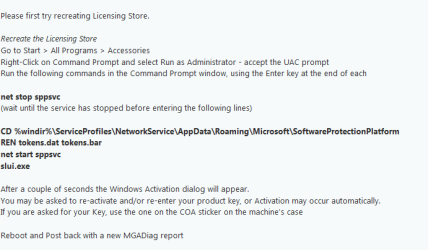
Lets recreate the licencing store

Roy
 

Attachments

  • licence store new.PNG
    licence store new.PNG
    10.5 KB · Views: 24

My Computer

Computer type
PC/Desktop
Computer Manufacturer/Model Number
medionl/Aspire 6930G/acer x55a
OS
W7 home premium 32bit/W7HP 64bit/w10 tp insider ring
CPU
E5300 dual core
Motherboard
medion MS7366
Memory
3gb
Graphics Card(s)
Nvidia Geforce 7100 Nforce 630i
Monitor(s) Displays
avixc
Internet Speed
n (isp resticted to 72)
Antivirus
mse/pands
Browser
palemoon
Other Info
Belkin Fd7050 n USB using Railink RT2870 drivers, more upto date

My Computer

Computer type
PC/Desktop
Computer Manufacturer/Model Number
medionl/Aspire 6930G/acer x55a
OS
W7 home premium 32bit/W7HP 64bit/w10 tp insider ring
CPU
E5300 dual core
Motherboard
medion MS7366
Memory
3gb
Graphics Card(s)
Nvidia Geforce 7100 Nforce 630i
Monitor(s) Displays
avixc
Internet Speed
n (isp resticted to 72)
Antivirus
mse/pands
Browser
palemoon
Other Info
Belkin Fd7050 n USB using Railink RT2870 drivers, more upto date
Screw this... This whole fiasco has reminded me how much I prefer Linux and how easy Linux it is to fix when something goes south. It simply does what you tell it to do reliably and doesn't have a mind of it's own like Windoz

I'm going to start all over and reinstall this POS OS with critical software and create a repair image in case I have to undo these eggs that keep popping up. I'm frankly terrified what Windowz 10 is like.

Thanks for the help. It was much appreciated.
 

My Computer

Computer type
PC/Desktop
Computer Manufacturer/Model Number
HP P6000
OS
Windows 7 Home Premium 64-bit SP1
CPU
AMD Athlon(tm) II X4 635 Processor, 2900 Mhz, 4 Core(s), 4 L
Motherboard
FOXCONN 2AB1 (CPU 1)
Memory
8.00GB Dual-Channel DDR3 @ 666MHz (9-9-9-24)
Graphics Card(s)
ASUS VS247 (1920x1080@60Hz) 1023MB NVIDIA GeForce GT 610
Hard Drives
WDC WD10 01FAES-60Z2A0 SATA Disk Device
ST350063 0AS SATA Disk Device
WDC WD12 00BEVS-60LAT0 SATA Disk Device
ST4000DM000-1F2168 ATA Device
Antivirus
Malwarebytes
Browser
Firefox
Back
Top