Keyboard is acting weird

borgqueenx

New member
Member
VIP
Local time
2:57 AM
Messages
111
my windows seven ultimate keyboard is acting weird.
there is almost no stop to pressing ctrl+shift to reset the keyboard to normal.
once i press ctrl+shift the keyboard only function normal for about 1~2 minutes and then it starts getting weird again.
how can i fix this?
 

My Computer

Computer type
PC/Desktop
Computer Manufacturer/Model Number
Custom
OS
Windows Seven
CPU
Intel Core i5
Motherboard
ASROCK
Memory
8GB ddR3 @ 1333mhz.
Graphics Card(s)
Nvidia GTX 970
Sound Card
external usb sound card CSL
Monitor(s) Displays
generic korea 27"
Screen Resolution
1440p
Hard Drives
128gb ssd, 1tb hdd
Internet Speed
150mb/s
Antivirus
avg
Hey there! Ok, first, I don't want to be rude or playing a smart a** here, but I think you didn't get any answer 'couse there is nothing to be answered on. Your post states, hey guys, I have a problem. That's it. Maybe I will not be able to help you, but someone else will, if you are more specific with your problem. Define weird can help a lot. I'm not familiar with ctrl+shift keyboard shortcut, except holding that two keys while dragging a file, it will create a shortcut of that file. Did you meant alt+shift?
More information provided, faster (hopefully) the problem will be solved:)
cheers
 

My Computer

Computer Manufacturer/Model Number
Micro-Star International/MS-7529
OS
Windows 7 Ultimate x32
CPU
DualCore Intel Pentium E2200, 2218 MHz (11 x 202)
Motherboard
MSI G31M3 V2 (MS-7529) (2 PCI, 1 PCI-E x16,2 DDR2 DIMM)
Memory
2 GB DDR2-800 DDR2 SDRAM
Graphics Card(s)
nVIDIA GeForce 9500GT 1GB
Sound Card
Realtek ALC888/1200 @ Intel 82801GB ICH7
Monitor(s) Displays
Samsung SyncMaster 2253BW (Digital) 22'' LCD
Screen Resolution
1680x1050
Hard Drives
SAMSUNG HD322IJ ATA Device (298 GB , IDE)
ctrl+shift resets the keyboard to normal...i dont know why its acting so weirdly.
for example there is the "2" button. When i press it, the 2 appears on screen. Now when i press shift+2 a @ should appear. but usally a " character appears.
I have to press that damn ctrl+shift so many times to let the keyboard act normal again...
 

My Computer

Computer type
PC/Desktop
Computer Manufacturer/Model Number
Custom
OS
Windows Seven
CPU
Intel Core i5
Motherboard
ASROCK
Memory
8GB ddR3 @ 1333mhz.
Graphics Card(s)
Nvidia GTX 970
Sound Card
external usb sound card CSL
Monitor(s) Displays
generic korea 27"
Screen Resolution
1440p
Hard Drives
128gb ssd, 1tb hdd
Internet Speed
150mb/s
Antivirus
avg
When I have Capture.PNG , pressing shift+2 will result with @
when I'm using Capture1.PNG , pressing shift+2 will result with „
pressing alt+shift will change the language that you are using, if you have second one.
In my case, I have English and Macedonian, switching between them by pressing alt+shift or clicking on EN or MK on the taskbar.
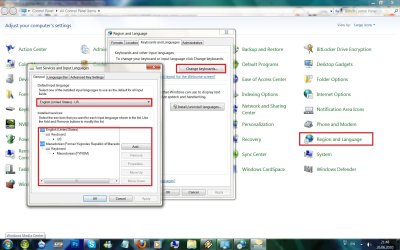
in control panel, region and language I've set english as default input language
Untitled.jpg
There isn't any keyboard shortcut as ctrl+shift that will change how shift+2 will react (At least there isn't any that I'm familiar with). alt+shift will change the language, and that will change the character (@ or „).
 

My Computer

Computer Manufacturer/Model Number
Micro-Star International/MS-7529
OS
Windows 7 Ultimate x32
CPU
DualCore Intel Pentium E2200, 2218 MHz (11 x 202)
Motherboard
MSI G31M3 V2 (MS-7529) (2 PCI, 1 PCI-E x16,2 DDR2 DIMM)
Memory
2 GB DDR2-800 DDR2 SDRAM
Graphics Card(s)
nVIDIA GeForce 9500GT 1GB
Sound Card
Realtek ALC888/1200 @ Intel 82801GB ICH7
Monitor(s) Displays
Samsung SyncMaster 2253BW (Digital) 22'' LCD
Screen Resolution
1680x1050
Hard Drives
SAMSUNG HD322IJ ATA Device (298 GB , IDE)
Actually, the shortcut for switching between keyboards is customizable. By default Alt+Shift switches between languages, and Ctrl+Shift switches between layouts of the same language (if there is more than one).

This can be changed when you go to the last tab "Avdanced Key Settings", and click "Change Key Sequence".

Edit: BTW, every application (or rather, every thread) has its own current keyboard layout. So when you go from one application to another you may have to pick your language again.
 

My Computer

Computer Manufacturer/Model Number
Me :) I build all my PCs
OS
Windows 7 Home 64, Vista Ultimate 64
Back
Top