
Solved Keyboard not working on newly installed HanStar Motherboard

sheffieldyorky

New member
Member
VIP
Local time
9:51 PM
Messages
106
Hi there
I have recently installed a HanStar motherboard into a HP Pavilion G6 notebook 64 bit
These number might help you;
Serial number: CNF1159TXY
Product number: LF157UA#ABA
After I booted it up and went into the BIOS for the settings etc. I pressed F10 saved and exited.
I then booted it up and arrived at the desktop only to find that the Keyboard does not work.
So I switched it off and disconnected the battery unscrewed the retaining screw for the keyboard and re-seated the ribbon cable closed it all up and booted back up again.
Still no keyboard.
The question is do you know anywhere I can download the drivers for this motherboard.
This is the detail from the seller
Top quality , For HP laptop mainboard 638856-001 G4 G6 G7 laptop motherboard.
Everything else is working fine including the touchpad.
Please help.
Kind regards
Tony
 

My Computer My Computer

At a glance

Windows 7 64bit Service Pack 1Intel Core 2 Quad Q8300 @ 2.50GHz8.00GB Dual-Channel DDR3 @ 666MHzV223W (1680x1050@59Hz) 1023MB NVIDIA GeForce ...
Computer type
PC/Desktop
Computer Manufacturer/Model Number
Custom build
OS
Windows 7 64bit Service Pack 1
CPU
Intel Core 2 Quad Q8300 @ 2.50GHz
Motherboard
ASUSTeK Computer INC. P5E3 Premium (LGA775)
Memory
8.00GB Dual-Channel DDR3 @ 666MHz
Graphics Card(s)
V223W (1680x1050@59Hz) 1023MB NVIDIA GeForce GT 430 (NVIDIA)
Sound Card
NVIDIA Virtual Audio Device (Wave Extensible) (WDM)
Monitor(s) Displays
Acer 22"
Screen Resolution
X193HQL (Analog)
Hard Drives
Seagate 2.0TB
ST2000DL003-9VT166 ATA Device
PSU
700W
Cooling
Akassa heatsink and two coolingfansg
Keyboard
Logitech
Antivirus
Kaspersky Internet Security 2019
Browser
IE 11
Other Info
Will be undertaking a total upgrade from the case upwards next year.
Case, motherboard, ram, cpu and last but not least a 2TB SSD, but before I do that everything will be backed up to the cloud
Hi sheffieldyorky,

If you can, run MS_Info32_Find_Problem_Devices.bat [Option [2] from here => BATCH PROGRAMS [Standalone] and then upload the results using the tutorial at the bottom of the above link [Upload to SevenForums . . .]. It might helptie down any errors!

I hope this helps!
 

My Computer My Computer

At a glance

Win 7 HP SP1 64-bit Vista HB SP2 32-bit Linux...Intel(R) Pentium(R) CPU P6200 @ 2.13GHz4.00 GBIntel(R) Graphics Media Accelerator HD
Computer type
Laptop
Computer Manufacturer/Model Number
Fujitsu LIFEBOOK
OS
Win 7 HP SP1 64-bit Vista HB SP2 32-bit Linux Mint 18.3
CPU
Intel(R) Pentium(R) CPU P6200 @ 2.13GHz
Motherboard
FUJITSU FJNBB06
Memory
4.00 GB
Graphics Card(s)
Intel(R) Graphics Media Accelerator HD
Sound Card
[1] Realtek High Definition Audio [2] Intel(R) Display Audio
Screen Resolution
1366 x 768 x 32 bits (4294967296 colors) @ 59 Hz
Hard Drives
TOSHIBA MK5076GSX
Antivirus
AVG FREE
Hi there
Thanks for that
I will transfer this page to the HP and run it
The next will be the results
 

My Computer My Computer

At a glance

Windows 7 64bit Service Pack 1Intel Core 2 Quad Q8300 @ 2.50GHz8.00GB Dual-Channel DDR3 @ 666MHzV223W (1680x1050@59Hz) 1023MB NVIDIA GeForce ...
Computer type
PC/Desktop
Computer Manufacturer/Model Number
Custom build
OS
Windows 7 64bit Service Pack 1
CPU
Intel Core 2 Quad Q8300 @ 2.50GHz
Motherboard
ASUSTeK Computer INC. P5E3 Premium (LGA775)
Memory
8.00GB Dual-Channel DDR3 @ 666MHz
Graphics Card(s)
V223W (1680x1050@59Hz) 1023MB NVIDIA GeForce GT 430 (NVIDIA)
Sound Card
NVIDIA Virtual Audio Device (Wave Extensible) (WDM)
Monitor(s) Displays
Acer 22"
Screen Resolution
X193HQL (Analog)
Hard Drives
Seagate 2.0TB
ST2000DL003-9VT166 ATA Device
PSU
700W
Cooling
Akassa heatsink and two coolingfansg
Keyboard
Logitech
Antivirus
Kaspersky Internet Security 2019
Browser
IE 11
Other Info
Will be undertaking a total upgrade from the case upwards next year.
Case, motherboard, ram, cpu and last but not least a 2TB SSD, but before I do that everything will be backed up to the cloud
Hi Paul
"Smart screen filter" is stopping me.
I found a way round it ! ! !
I ran [ CHKDSK > SCAN.LOG ]
But it flashed up on the screen to quick for me to grab it.
I then found a thread on another Forum
Create batch file to log chkdsk results

Using his advice I inputted the following;

CHKDSK > SCAN.10072019.LOG

Nothing, I must be doing something wrong
 
Last edited:

My Computer My Computer

At a glance

Windows 7 64bit Service Pack 1Intel Core 2 Quad Q8300 @ 2.50GHz8.00GB Dual-Channel DDR3 @ 666MHzV223W (1680x1050@59Hz) 1023MB NVIDIA GeForce ...
Computer type
PC/Desktop
Computer Manufacturer/Model Number
Custom build
OS
Windows 7 64bit Service Pack 1
CPU
Intel Core 2 Quad Q8300 @ 2.50GHz
Motherboard
ASUSTeK Computer INC. P5E3 Premium (LGA775)
Memory
8.00GB Dual-Channel DDR3 @ 666MHz
Graphics Card(s)
V223W (1680x1050@59Hz) 1023MB NVIDIA GeForce GT 430 (NVIDIA)
Sound Card
NVIDIA Virtual Audio Device (Wave Extensible) (WDM)
Monitor(s) Displays
Acer 22"
Screen Resolution
X193HQL (Analog)
Hard Drives
Seagate 2.0TB
ST2000DL003-9VT166 ATA Device
PSU
700W
Cooling
Akassa heatsink and two coolingfansg
Keyboard
Logitech
Antivirus
Kaspersky Internet Security 2019
Browser
IE 11
Other Info
Will be undertaking a total upgrade from the case upwards next year.
Case, motherboard, ram, cpu and last but not least a 2TB SSD, but before I do that everything will be backed up to the cloud
Hi sheffieldyorky,

"Smart screen filter" is stopping me!

[1] Try using Google Chrome [if you have it installed].
[2] Disable SmartScreen filter temporarily in I.E.

Open I.E. => Tools => SmartScreen filter => Turn off SmartScreen filter => follow prompt.

To turn it back on after, reverse the above.

I hope this helps!
 

My Computer My Computer

At a glance

Win 7 HP SP1 64-bit Vista HB SP2 32-bit Linux...Intel(R) Pentium(R) CPU P6200 @ 2.13GHz4.00 GBIntel(R) Graphics Media Accelerator HD
Computer type
Laptop
Computer Manufacturer/Model Number
Fujitsu LIFEBOOK
OS
Win 7 HP SP1 64-bit Vista HB SP2 32-bit Linux Mint 18.3
CPU
Intel(R) Pentium(R) CPU P6200 @ 2.13GHz
Motherboard
FUJITSU FJNBB06
Memory
4.00 GB
Graphics Card(s)
Intel(R) Graphics Media Accelerator HD
Sound Card
[1] Realtek High Definition Audio [2] Intel(R) Display Audio
Screen Resolution
1366 x 768 x 32 bits (4294967296 colors) @ 59 Hz
Hard Drives
TOSHIBA MK5076GSX
Antivirus
AVG FREE
Hi Paul
Thanks for that.
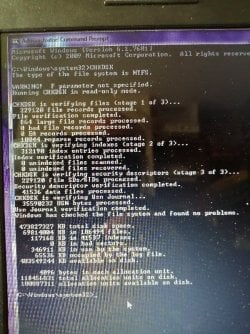
I ran "Command Prompt" as administrator and did that way.
I then took a photo please see attachment.
From what I can see there doesn't look like anything bad unless I might be wrong
P.S sorry about the lower half white-ish bit
 

Attachments

  • HP Pavilion.jpg
    HP Pavilion.jpg
    105.4 KB · Views: 0

My Computer My Computer

At a glance

Windows 7 64bit Service Pack 1Intel Core 2 Quad Q8300 @ 2.50GHz8.00GB Dual-Channel DDR3 @ 666MHzV223W (1680x1050@59Hz) 1023MB NVIDIA GeForce ...
Computer type
PC/Desktop
Computer Manufacturer/Model Number
Custom build
OS
Windows 7 64bit Service Pack 1
CPU
Intel Core 2 Quad Q8300 @ 2.50GHz
Motherboard
ASUSTeK Computer INC. P5E3 Premium (LGA775)
Memory
8.00GB Dual-Channel DDR3 @ 666MHz
Graphics Card(s)
V223W (1680x1050@59Hz) 1023MB NVIDIA GeForce GT 430 (NVIDIA)
Sound Card
NVIDIA Virtual Audio Device (Wave Extensible) (WDM)
Monitor(s) Displays
Acer 22"
Screen Resolution
X193HQL (Analog)
Hard Drives
Seagate 2.0TB
ST2000DL003-9VT166 ATA Device
PSU
700W
Cooling
Akassa heatsink and two coolingfansg
Keyboard
Logitech
Antivirus
Kaspersky Internet Security 2019
Browser
IE 11
Other Info
Will be undertaking a total upgrade from the case upwards next year.
Case, motherboard, ram, cpu and last but not least a 2TB SSD, but before I do that everything will be backed up to the cloud
Hi sheffieldyorky,

I ran "Command Prompt" as administrator and did that way.
I then took a photo please see attachment.
From what I can see there doesn't look like anything bad unless I might be wrong.
P.S sorry about the lower half white-ish bit.

That is chkdsk, which looks OK though!

That is not the batch script I asked you to run!
 

My Computer My Computer

At a glance

Win 7 HP SP1 64-bit Vista HB SP2 32-bit Linux...Intel(R) Pentium(R) CPU P6200 @ 2.13GHz4.00 GBIntel(R) Graphics Media Accelerator HD
Computer type
Laptop
Computer Manufacturer/Model Number
Fujitsu LIFEBOOK
OS
Win 7 HP SP1 64-bit Vista HB SP2 32-bit Linux Mint 18.3
CPU
Intel(R) Pentium(R) CPU P6200 @ 2.13GHz
Motherboard
FUJITSU FJNBB06
Memory
4.00 GB
Graphics Card(s)
Intel(R) Graphics Media Accelerator HD
Sound Card
[1] Realtek High Definition Audio [2] Intel(R) Display Audio
Screen Resolution
1366 x 768 x 32 bits (4294967296 colors) @ 59 Hz
Hard Drives
TOSHIBA MK5076GSX
Antivirus
AVG FREE
I now have an update or sorts;
As you are aware I have been using an external USB keyboard.
I have also been using a wireless mouse.
I had a blank text document open but the USB keyboard was not plugged in.
I somehow caught one of the keys or something like that and I got a succession of ]]]]]]]]]]]]]]
I stopped that by closing the text document and reopened it again no ]]]]]]]] so I'm thinking that the keyboard is working.
So I started off from the top and this is the results;
Pressed 1 received the following;
Windows help and support box
Pressed 2 received the following;
Libraries
Pressed 3 received the following;
Welcome to Windows Media player
Pressed 4 received the following;
User account control (and in the box) hpDST.exe
Pressed 5 received the following;
Windows Live Essentials
The following gave me the option "accept or decline"
With my mouse I navigate to "decline"
I clicked "yes"
Brings up ]]]]]]]]]]]]]]]]]]]]]]]]]]]]]]]]]]] continually
So I closed that text document
Pressed 6 received the following;
Problem loading page ( I am already online as per Wi-Fi)
Pressed 7 received the following;
Speed dial (this came via Opera)
Pressed 8 received the following;
Nothing on screen
Pressed 9 received the following;
Nothing on screen
Pressed 0 received the following;
Nothing on screen
That's where I finished
So the keyboard is working but in some haphazard way
I was wondering if it is a sticky keyboard keys i.e.
Motherboard, HDD are both ok, because I use the external keyboard and I can do everything go online etc.
The only fault goes back to the keyboard.
This machine came to me as it would not boot up and upon inspection I found what looked like fluid damage on the motherboard.
So I replaced the motherboard and processor.
Hence my thinking about sticky keyboard.
Is there any way of taking the keyboard away from the machine and testing it via the ribbon cable ?
I was thinking of using the old motherboard laid on my bench and plugging the keyboard and then with a millimetre set on Ohms tap the various keys.
What's your thoughts
 

My Computer My Computer

At a glance

Windows 7 64bit Service Pack 1Intel Core 2 Quad Q8300 @ 2.50GHz8.00GB Dual-Channel DDR3 @ 666MHzV223W (1680x1050@59Hz) 1023MB NVIDIA GeForce ...
Computer type
PC/Desktop
Computer Manufacturer/Model Number
Custom build
OS
Windows 7 64bit Service Pack 1
CPU
Intel Core 2 Quad Q8300 @ 2.50GHz
Motherboard
ASUSTeK Computer INC. P5E3 Premium (LGA775)
Memory
8.00GB Dual-Channel DDR3 @ 666MHz
Graphics Card(s)
V223W (1680x1050@59Hz) 1023MB NVIDIA GeForce GT 430 (NVIDIA)
Sound Card
NVIDIA Virtual Audio Device (Wave Extensible) (WDM)
Monitor(s) Displays
Acer 22"
Screen Resolution
X193HQL (Analog)
Hard Drives
Seagate 2.0TB
ST2000DL003-9VT166 ATA Device
PSU
700W
Cooling
Akassa heatsink and two coolingfansg
Keyboard
Logitech
Antivirus
Kaspersky Internet Security 2019
Browser
IE 11
Other Info
Will be undertaking a total upgrade from the case upwards next year.
Case, motherboard, ram, cpu and last but not least a 2TB SSD, but before I do that everything will be backed up to the cloud
I now have an update or sorts;
As you are aware I have been using an external USB keyboard.
I have also been using a wireless mouse.
I had a blank text document open but the USB keyboard was not plugged in.
I somehow caught one of the keys or something like that and I got a succession of ]]]]]]]]]]]]]]
I stopped that by closing the text document and reopened it again no ]]]]]]]] so I'm thinking that the keyboard is working.
So I started off from the top and this is the results;
Pressed 1 received the following;
Windows help and support box
Pressed 2 received the following;
Libraries
Pressed 3 received the following;
Welcome to Windows Media player
Pressed 4 received the following;
User account control (and in the box) hpDST.exe
Pressed 5 received the following;
Windows Live Essentials
The following gave me the option "accept or decline"
With my mouse I navigate to "decline"
I clicked "yes"
Brings up ]]]]]]]]]]]]]]]]]]]]]]]]]]]]]]]]]]] continually
So I closed that text document
Pressed 6 received the following;
Problem loading page ( I am already online as per Wi-Fi)
Pressed 7 received the following;
Speed dial (this came via Opera)
Pressed 8 received the following;
Nothing on screen
Pressed 9 received the following;
Nothing on screen
Pressed 0 received the following;
Nothing on screen
That's where I finished
So the keyboard is working but in some haphazard way
I was wondering if it is a sticky keyboard keys i.e.
Motherboard, HDD are both ok, because I use the external keyboard and I can do everything go online etc.
The only fault goes back to the keyboard.
This machine came to me as it would not boot up and upon inspection I found what looked like fluid damage on the motherboard.
So I replaced the motherboard and processor.
Hence my thinking about sticky keyboard.
Is there any way of taking the keyboard away from the machine and testing it via the ribbon cable ?
I was thinking of using the old motherboard laid on my bench and plugging the keyboard and then with a millimetre set on Ohms tap the various keys.
What's your thoughts

Seems to me that some keys are stick.

Open the case and detach the keyboard flat / ribbon cable.
Using an external keyboard, does all work good?
 

My Computers My Computers

  • At a glance

    Windows 7 HP 64i5 6600K - 800MHz to 4200MHz4+4G GSkill DDR4 3000IG - Intel 530
    Computer type
    PC/Desktop
    Computer Manufacturer/Model Number
    custom build
    OS
    Windows 7 HP 64
    CPU
    i5 6600K - 800MHz to 4200MHz
    Motherboard
    GA-Z170-HD3P
    Memory
    4+4G GSkill DDR4 3000
    Graphics Card(s)
    IG - Intel 530
    Monitor(s) Displays
    Samsung 226BW
    Screen Resolution
    1680x1050
    Hard Drives
    (1) -1 SM951 – 128GB M.2 AHCI PCIe SSD drive for Windows 7 and Lubuntu
    (2) -1 WD SATA 3 - 1T for Data
    (3) -1 WD SATA 3 - 1T for backup
    PSU
    Thermaltake 450W TR2 gold
    Keyboard
    Old and good Chicony mechanical keyboard
    Mouse
    Logitech mX performance - 9 buttons (had to disable some)
    Internet Speed
    500Mb/s
    Browser
    Firefox 64
    Other Info
    TinyWall firewall
  • At a glance

    Windows 7 Proi7-4500U 800MHz to 3.0GHz(4+4)G DDR3 1600IG intel 4400 + NVIDIA GeForce GT 745M
    Computer type
    Laptop
    System Manufacturer/Model Number
    Asus Q550LF
    OS
    Windows 7 Pro
    CPU
    i7-4500U 800MHz to 3.0GHz
    Motherboard
    Asus Q550LF
    Memory
    (4+4)G DDR3 1600
    Graphics Card(s)
    IG intel 4400 + NVIDIA GeForce GT 745M
    Sound Card
    Realtek
    Monitor(s) Displays
    LG Display LP156WF4-SPH1
    Screen Resolution
    1920 x 1080
    Hard Drives
    BX500 120G SSD for Windows and programs +
    1T HDD for data
    Internet Speed
    500 Mb/s
    Browser
    Firefox
    Other Info
    TinyWall firewall
Does the keyboard work on BIOS and when you boot a Win 7 installation disk?
You said that the computer was with a damaged MoBo. Where does the HDD come from? Is the same used on the failed MoBo?
Did you do a clean install after replacing the MoBo?

After installing the mobo I booted up and Regarding the BIOS the answer is "no"
So thinking that it might be a corrupt HDD I used my test HDD, just a basic OS nothing else it's on 60GB
I tried again and still nothing.
I flipped it over and re-seated the "keyboard ribbon" and booted up once again.
But it all works fine with the USB keyboard
I can only put it down to two things "Motherboard keyboard drivers" or the actual keyboard being faulty.
On one final thing once I found out that the test HDD worked fine i inserted the original HDD and that booted up a treat.


Seems to me that some keys are stick.

Open the case and detach the keyboard flat / ribbon cable.
Using an external keyboard, does all work good?


Yes using an external keyboard everything works just fine.
 

My Computer My Computer

At a glance

Windows 7 64bit Service Pack 1Intel Core 2 Quad Q8300 @ 2.50GHz8.00GB Dual-Channel DDR3 @ 666MHzV223W (1680x1050@59Hz) 1023MB NVIDIA GeForce ...
Computer type
PC/Desktop
Computer Manufacturer/Model Number
Custom build
OS
Windows 7 64bit Service Pack 1
CPU
Intel Core 2 Quad Q8300 @ 2.50GHz
Motherboard
ASUSTeK Computer INC. P5E3 Premium (LGA775)
Memory
8.00GB Dual-Channel DDR3 @ 666MHz
Graphics Card(s)
V223W (1680x1050@59Hz) 1023MB NVIDIA GeForce GT 430 (NVIDIA)
Sound Card
NVIDIA Virtual Audio Device (Wave Extensible) (WDM)
Monitor(s) Displays
Acer 22"
Screen Resolution
X193HQL (Analog)
Hard Drives
Seagate 2.0TB
ST2000DL003-9VT166 ATA Device
PSU
700W
Cooling
Akassa heatsink and two coolingfansg
Keyboard
Logitech
Antivirus
Kaspersky Internet Security 2019
Browser
IE 11
Other Info
Will be undertaking a total upgrade from the case upwards next year.
Case, motherboard, ram, cpu and last but not least a 2TB SSD, but before I do that everything will be backed up to the cloud
I would say you have a faulty keyboard.
 

My Computers My Computers

  • At a glance

    Windows 7 HP 64i5 6600K - 800MHz to 4200MHz4+4G GSkill DDR4 3000IG - Intel 530
    Computer type
    PC/Desktop
    Computer Manufacturer/Model Number
    custom build
    OS
    Windows 7 HP 64
    CPU
    i5 6600K - 800MHz to 4200MHz
    Motherboard
    GA-Z170-HD3P
    Memory
    4+4G GSkill DDR4 3000
    Graphics Card(s)
    IG - Intel 530
    Monitor(s) Displays
    Samsung 226BW
    Screen Resolution
    1680x1050
    Hard Drives
    (1) -1 SM951 – 128GB M.2 AHCI PCIe SSD drive for Windows 7 and Lubuntu
    (2) -1 WD SATA 3 - 1T for Data
    (3) -1 WD SATA 3 - 1T for backup
    PSU
    Thermaltake 450W TR2 gold
    Keyboard
    Old and good Chicony mechanical keyboard
    Mouse
    Logitech mX performance - 9 buttons (had to disable some)
    Internet Speed
    500Mb/s
    Browser
    Firefox 64
    Other Info
    TinyWall firewall
  • At a glance

    Windows 7 Proi7-4500U 800MHz to 3.0GHz(4+4)G DDR3 1600IG intel 4400 + NVIDIA GeForce GT 745M
    Computer type
    Laptop
    System Manufacturer/Model Number
    Asus Q550LF
    OS
    Windows 7 Pro
    CPU
    i7-4500U 800MHz to 3.0GHz
    Motherboard
    Asus Q550LF
    Memory
    (4+4)G DDR3 1600
    Graphics Card(s)
    IG intel 4400 + NVIDIA GeForce GT 745M
    Sound Card
    Realtek
    Monitor(s) Displays
    LG Display LP156WF4-SPH1
    Screen Resolution
    1920 x 1080
    Hard Drives
    BX500 120G SSD for Windows and programs +
    1T HDD for data
    Internet Speed
    500 Mb/s
    Browser
    Firefox
    Other Info
    TinyWall firewall

My Computer My Computer

At a glance

Windows 7 64bit Service Pack 1Intel Core 2 Quad Q8300 @ 2.50GHz8.00GB Dual-Channel DDR3 @ 666MHzV223W (1680x1050@59Hz) 1023MB NVIDIA GeForce ...
Computer type
PC/Desktop
Computer Manufacturer/Model Number
Custom build
OS
Windows 7 64bit Service Pack 1
CPU
Intel Core 2 Quad Q8300 @ 2.50GHz
Motherboard
ASUSTeK Computer INC. P5E3 Premium (LGA775)
Memory
8.00GB Dual-Channel DDR3 @ 666MHz
Graphics Card(s)
V223W (1680x1050@59Hz) 1023MB NVIDIA GeForce GT 430 (NVIDIA)
Sound Card
NVIDIA Virtual Audio Device (Wave Extensible) (WDM)
Monitor(s) Displays
Acer 22"
Screen Resolution
X193HQL (Analog)
Hard Drives
Seagate 2.0TB
ST2000DL003-9VT166 ATA Device
PSU
700W
Cooling
Akassa heatsink and two coolingfansg
Keyboard
Logitech
Antivirus
Kaspersky Internet Security 2019
Browser
IE 11
Other Info
Will be undertaking a total upgrade from the case upwards next year.
Case, motherboard, ram, cpu and last but not least a 2TB SSD, but before I do that everything will be backed up to the cloud
Thanks to all who contributed
 

My Computer My Computer

At a glance

Windows 7 64bit Service Pack 1Intel Core 2 Quad Q8300 @ 2.50GHz8.00GB Dual-Channel DDR3 @ 666MHzV223W (1680x1050@59Hz) 1023MB NVIDIA GeForce ...
Computer type
PC/Desktop
Computer Manufacturer/Model Number
Custom build
OS
Windows 7 64bit Service Pack 1
CPU
Intel Core 2 Quad Q8300 @ 2.50GHz
Motherboard
ASUSTeK Computer INC. P5E3 Premium (LGA775)
Memory
8.00GB Dual-Channel DDR3 @ 666MHz
Graphics Card(s)
V223W (1680x1050@59Hz) 1023MB NVIDIA GeForce GT 430 (NVIDIA)
Sound Card
NVIDIA Virtual Audio Device (Wave Extensible) (WDM)
Monitor(s) Displays
Acer 22"
Screen Resolution
X193HQL (Analog)
Hard Drives
Seagate 2.0TB
ST2000DL003-9VT166 ATA Device
PSU
700W
Cooling
Akassa heatsink and two coolingfansg
Keyboard
Logitech
Antivirus
Kaspersky Internet Security 2019
Browser
IE 11
Other Info
Will be undertaking a total upgrade from the case upwards next year.
Case, motherboard, ram, cpu and last but not least a 2TB SSD, but before I do that everything will be backed up to the cloud
Now my NEW keyboard has arrived I now stuck with BSOD see other thread
 

My Computer My Computer

At a glance

Windows 7 64bit Service Pack 1Intel Core 2 Quad Q8300 @ 2.50GHz8.00GB Dual-Channel DDR3 @ 666MHzV223W (1680x1050@59Hz) 1023MB NVIDIA GeForce ...
Computer type
PC/Desktop
Computer Manufacturer/Model Number
Custom build
OS
Windows 7 64bit Service Pack 1
CPU
Intel Core 2 Quad Q8300 @ 2.50GHz
Motherboard
ASUSTeK Computer INC. P5E3 Premium (LGA775)
Memory
8.00GB Dual-Channel DDR3 @ 666MHz
Graphics Card(s)
V223W (1680x1050@59Hz) 1023MB NVIDIA GeForce GT 430 (NVIDIA)
Sound Card
NVIDIA Virtual Audio Device (Wave Extensible) (WDM)
Monitor(s) Displays
Acer 22"
Screen Resolution
X193HQL (Analog)
Hard Drives
Seagate 2.0TB
ST2000DL003-9VT166 ATA Device
PSU
700W
Cooling
Akassa heatsink and two coolingfansg
Keyboard
Logitech
Antivirus
Kaspersky Internet Security 2019
Browser
IE 11
Other Info
Will be undertaking a total upgrade from the case upwards next year.
Case, motherboard, ram, cpu and last but not least a 2TB SSD, but before I do that everything will be backed up to the cloud

My Computer My Computer

At a glance

Win 7 HP SP1 64-bit Vista HB SP2 32-bit Linux...Intel(R) Pentium(R) CPU P6200 @ 2.13GHz4.00 GBIntel(R) Graphics Media Accelerator HD
Computer type
Laptop
Computer Manufacturer/Model Number
Fujitsu LIFEBOOK
OS
Win 7 HP SP1 64-bit Vista HB SP2 32-bit Linux Mint 18.3
CPU
Intel(R) Pentium(R) CPU P6200 @ 2.13GHz
Motherboard
FUJITSU FJNBB06
Memory
4.00 GB
Graphics Card(s)
Intel(R) Graphics Media Accelerator HD
Sound Card
[1] Realtek High Definition Audio [2] Intel(R) Display Audio
Screen Resolution
1366 x 768 x 32 bits (4294967296 colors) @ 59 Hz
Hard Drives
TOSHIBA MK5076GSX
Antivirus
AVG FREE
Back
Top