Keyboard not working

fansgirl

New member
Member
Local time
11:43 AM
Messages
42
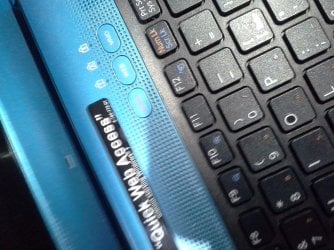
Hello I want to ask for e few days my laptop has been weird, when I turn my laptop on the keyboard always not working even after I clicking it, but after I push the vaio button on picture a few times the keyboard work again but a few minutes later it not working again or randomly typing something and always opening vaio media gallery program even I have close it .

I have tried to scan it with superantispyware but always get error after scanning for about a few minutes, I try malwarebytes but when I tried to installing update for malwarebytes it stuck on install windows

I don't know what happen with my laptop because I have been lent it to my friend and recently I got it back, but when I want to use it for work this happen.

Sorry for my bad English, and if I put this post in wrong discussion
 

Attachments
  • 20190413_075410.jpg
    20190413_075410.jpg
    530.8 KB · Views: 2

My Computer

Computer type
Laptop
Computer Manufacturer/Model Number
Sony Vaio/ VPCEA36FG
OS
Windows 7 home premium 64bit
CPU
Intel(R) Core (TM) i5CPU M 560 @2.67GHz
Motherboard
Sony Corporation VAIO
Memory
4gb
Graphics Card(s)
ATI Mobility Radeon HD 5650
Sound Card
(1) ATI HDMI Audio(2) Bluetooth Hands-free Audio(3) Realtek
Hard Drives
Hitachi HTS545050B9SA00 (500GB)
Browser
Mozila Firefox, IE
Hi Fansgirl-

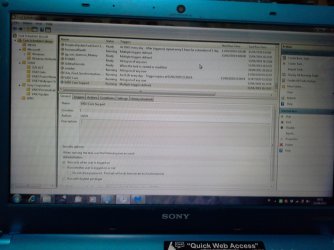
Go to Control Panel, Adminstrative Tools, Task Scheduler. Double click on Task Scheduler (Local) and select Task Scheduler Library.

Is there a Vaio or Key Strokes folder?
 

My Computer

Computer type
Laptop
Computer Manufacturer/Model Number
Dell M6500 Precision Work Station
OS
Windows 7 Pro SP1 64 bit
Memory
8 GB
Screen Resolution
1920x
Internet Speed
30 Mbps
Antivirus
Norton Security
Browser
IE 11
Sorry if my picture blurry
 

Attachments

  • 20190413_165116.jpg
    20190413_165116.jpg
    327 KB · Views: 3

My Computer

Computer type
Laptop
Computer Manufacturer/Model Number
Sony Vaio/ VPCEA36FG
OS
Windows 7 home premium 64bit
CPU
Intel(R) Core (TM) i5CPU M 560 @2.67GHz
Motherboard
Sony Corporation VAIO
Memory
4gb
Graphics Card(s)
ATI Mobility Radeon HD 5650
Sound Card
(1) ATI HDMI Audio(2) Bluetooth Hands-free Audio(3) Realtek
Hard Drives
Hitachi HTS545050B9SA00 (500GB)
Browser
Mozila Firefox, IE
I don't know why all those Sony tasks are scheduled. I also don't see the Keyboard task but it might be in one of the Sony Corporation folders. You might look for it there.

You can handle it a couple of ways. Either delete both of those Sony folders or click on each task listed in those folders and disable it. If you do the latter, you can always re-enable if you find that you need one of those tasks to run. Just looking at the ones in your screen shot, I don't know why you need any of them but Sony must be similar to HP in that they have all these utilities that are installed on every computer. On the one HP system I have, I don't use any of them.

Of course, I don't know if that will fix your problem.
 

My Computer

Computer type
Laptop
Computer Manufacturer/Model Number
Dell M6500 Precision Work Station
OS
Windows 7 Pro SP1 64 bit
Memory
8 GB
Screen Resolution
1920x
Internet Speed
30 Mbps
Antivirus
Norton Security
Browser
IE 11
It's not working, I don't know what wrong with my laptop weirdly if I want to unistall malwarebytes it would crash, and when I starting up my laptop windows booting manager always appear even I only have 1 OS and when I need to choose between windows memory diagnostic or my OS, I have to push Vaio button so my keyboard can working
 

My Computer

Computer type
Laptop
Computer Manufacturer/Model Number
Sony Vaio/ VPCEA36FG
OS
Windows 7 home premium 64bit
CPU
Intel(R) Core (TM) i5CPU M 560 @2.67GHz
Motherboard
Sony Corporation VAIO
Memory
4gb
Graphics Card(s)
ATI Mobility Radeon HD 5650
Sound Card
(1) ATI HDMI Audio(2) Bluetooth Hands-free Audio(3) Realtek
Hard Drives
Hitachi HTS545050B9SA00 (500GB)
Browser
Mozila Firefox, IE
Did you do anything in regards to what I said in my last post?
 

My Computer

Computer type
Laptop
Computer Manufacturer/Model Number
Dell M6500 Precision Work Station
OS
Windows 7 Pro SP1 64 bit
Memory
8 GB
Screen Resolution
1920x
Internet Speed
30 Mbps
Antivirus
Norton Security
Browser
IE 11
I disabled all in sony folder
 

My Computer

Computer type
Laptop
Computer Manufacturer/Model Number
Sony Vaio/ VPCEA36FG
OS
Windows 7 home premium 64bit
CPU
Intel(R) Core (TM) i5CPU M 560 @2.67GHz
Motherboard
Sony Corporation VAIO
Memory
4gb
Graphics Card(s)
ATI Mobility Radeon HD 5650
Sound Card
(1) ATI HDMI Audio(2) Bluetooth Hands-free Audio(3) Realtek
Hard Drives
Hitachi HTS545050B9SA00 (500GB)
Browser
Mozila Firefox, IE
Did you look in the folders under Sony Corporation for anything Keyboard related?
 

My Computer

Computer type
Laptop
Computer Manufacturer/Model Number
Dell M6500 Precision Work Station
OS
Windows 7 Pro SP1 64 bit
Memory
8 GB
Screen Resolution
1920x
Internet Speed
30 Mbps
Antivirus
Norton Security
Browser
IE 11
There nothing keyboard related on that folder
 

My Computer

Computer type
Laptop
Computer Manufacturer/Model Number
Sony Vaio/ VPCEA36FG
OS
Windows 7 home premium 64bit
CPU
Intel(R) Core (TM) i5CPU M 560 @2.67GHz
Motherboard
Sony Corporation VAIO
Memory
4gb
Graphics Card(s)
ATI Mobility Radeon HD 5650
Sound Card
(1) ATI HDMI Audio(2) Bluetooth Hands-free Audio(3) Realtek
Hard Drives
Hitachi HTS545050B9SA00 (500GB)
Browser
Mozila Firefox, IE
Since disabling those items in task scheduler, you could go ahead and re-enable them.

Since I don't have a VAIO, I have to rely on looking on the internet.

When you see the Vaio logo during startup, press F10. That should take you to the recovery partition where you can choose to do a hardware diagnostic. Run that (don't run the restore unless you want to lose all your personal files, installed software, etc. and set the laptop back to factory settings.).
 

My Computer

Computer type
Laptop
Computer Manufacturer/Model Number
Dell M6500 Precision Work Station
OS
Windows 7 Pro SP1 64 bit
Memory
8 GB
Screen Resolution
1920x
Internet Speed
30 Mbps
Antivirus
Norton Security
Browser
IE 11
On VAIO hardware diagnostics there no error
 

My Computer

Computer type
Laptop
Computer Manufacturer/Model Number
Sony Vaio/ VPCEA36FG
OS
Windows 7 home premium 64bit
CPU
Intel(R) Core (TM) i5CPU M 560 @2.67GHz
Motherboard
Sony Corporation VAIO
Memory
4gb
Graphics Card(s)
ATI Mobility Radeon HD 5650
Sound Card
(1) ATI HDMI Audio(2) Bluetooth Hands-free Audio(3) Realtek
Hard Drives
Hitachi HTS545050B9SA00 (500GB)
Browser
Mozila Firefox, IE
Good morning fansgirl-

I can only surmise that your friend did something with the fn keys that's causing the behavior such as starting the VAIO gallery.

If you go to Control Panel, Keyboard, is there an option for setting your keyboard to the defaults?

I was going to suggest that you download/install a driver from Sony but they no longer have drivers for your system. The only thing they have is updates for VAIO Care and VAIO Creations.

I did find a Synaptics touch pad driver here-

Sony VPCEA36FM Drivers Download for Windows 10, 8.1, 7, Vista, XP

If none of that helps, I suggest posting your problem at the following link-

Customer Community
 

My Computer

Computer type
Laptop
Computer Manufacturer/Model Number
Dell M6500 Precision Work Station
OS
Windows 7 Pro SP1 64 bit
Memory
8 GB
Screen Resolution
1920x
Internet Speed
30 Mbps
Antivirus
Norton Security
Browser
IE 11
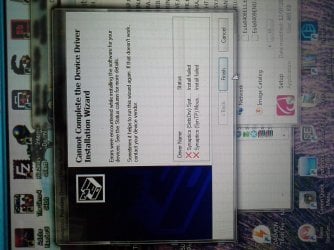
I can't install the driver, it always got error mesage
 

My Computer

Computer type
Laptop
Computer Manufacturer/Model Number
Sony Vaio/ VPCEA36FG
OS
Windows 7 home premium 64bit
CPU
Intel(R) Core (TM) i5CPU M 560 @2.67GHz
Motherboard
Sony Corporation VAIO
Memory
4gb
Graphics Card(s)
ATI Mobility Radeon HD 5650
Sound Card
(1) ATI HDMI Audio(2) Bluetooth Hands-free Audio(3) Realtek
Hard Drives
Hitachi HTS545050B9SA00 (500GB)
Browser
Mozila Firefox, IE
What was the error?

Did you look in Control Panel?
 

My Computer

Computer type
Laptop
Computer Manufacturer/Model Number
Dell M6500 Precision Work Station
OS
Windows 7 Pro SP1 64 bit
Memory
8 GB
Screen Resolution
1920x
Internet Speed
30 Mbps
Antivirus
Norton Security
Browser
IE 11
This happen
 

Attachments

  • 20190415_225402.jpg
    20190415_225402.jpg
    645.9 KB · Views: 2

My Computer

Computer type
Laptop
Computer Manufacturer/Model Number
Sony Vaio/ VPCEA36FG
OS
Windows 7 home premium 64bit
CPU
Intel(R) Core (TM) i5CPU M 560 @2.67GHz
Motherboard
Sony Corporation VAIO
Memory
4gb
Graphics Card(s)
ATI Mobility Radeon HD 5650
Sound Card
(1) ATI HDMI Audio(2) Bluetooth Hands-free Audio(3) Realtek
Hard Drives
Hitachi HTS545050B9SA00 (500GB)
Browser
Mozila Firefox, IE
Update:

When I tried power drain thing, my keyboard work again for about 30minutes then it not responding again
 

My Computer

Computer type
Laptop
Computer Manufacturer/Model Number
Sony Vaio/ VPCEA36FG
OS
Windows 7 home premium 64bit
CPU
Intel(R) Core (TM) i5CPU M 560 @2.67GHz
Motherboard
Sony Corporation VAIO
Memory
4gb
Graphics Card(s)
ATI Mobility Radeon HD 5650
Sound Card
(1) ATI HDMI Audio(2) Bluetooth Hands-free Audio(3) Realtek
Hard Drives
Hitachi HTS545050B9SA00 (500GB)
Browser
Mozila Firefox, IE
Try right clicking on one those synaptics driver updates and selecting run as administator.
 

My Computer

Computer type
Laptop
Computer Manufacturer/Model Number
Dell M6500 Precision Work Station
OS
Windows 7 Pro SP1 64 bit
Memory
8 GB
Screen Resolution
1920x
Internet Speed
30 Mbps
Antivirus
Norton Security
Browser
IE 11
Back
Top