Keyboard problem

nanc

New member
Local time
1:57 PM
Messages
1
Hi.

I have a HP Pavilion laptop which i bought a year ago. Suddenly a few keys are not working. :(
The keys which are not working are:
n b h g += ' Bksp Del & windows keys

I'm not able to find what the problem could be? Can anyone help?

Thanks in advance
 

My Computer

OS
Windows 7 Home Premium 32 bit
I would first try a different keyboard. They're pretty cheap these days, and handy to have a spare around when you need it.

James
 

My Computer

OS
Win7U 64 RTM
CPU
Q9550
Motherboard
GA-EP45-UD3R
Memory
8GB Gskill
Graphics Card(s)
ASUS|EAH4850/HTDI/1GD3/A
Sound Card
xfi Plat
Monitor(s) Displays
Dell 2405fpw
Screen Resolution
1920x1200
Hard Drives
Seagate & WD sata Drives
PSU
Antec
Case
Antec
Keyboard
MS Natural Ergonomic 4000
Mouse
Logitech MX610 USB Cordless
Try plugging in a USB keyboard to the laptop to see if you have the same issues. If you don't have one maybe you could borrow one for a test.
 

My Computers

System One System Two

  • Computer type
    PC/Desktop
    Computer Manufacturer/Model Number
    ALWAYS UNDER CONSTRUCTION
    OS
    Windows 11 Pro
    CPU
    Ryzen 9 5900X
    Motherboard
    Asus X570 Crosshair Viii Hero
    Memory
    32GB G Skill DDR4-3600
    Graphics Card(s)
    EVGA RTX 3080 FTW 3 Ultra
    Sound Card
    On Board/Sennheiser PC37X Headset
    Monitor(s) Displays
    3 X Asus 27"
    Screen Resolution
    2560x1440
    Hard Drives
    2 X 1 TB NVME drives
    PSU
    EVGA 850
    Case
    Phanteks Eclipse P400A
    Cooling
    EVGA 280 AIO
    Keyboard
    Logitech G510s/ Logitech G13
    Mouse
    Logitech G502
    Internet Speed
    24/1
    Antivirus
    ESET/MBAM Pro/SAS Pro
    Browser
    Chrome/ Firefox/ Edge
  • Computer type
    Laptop
    System Manufacturer/Model Number
    Dell 16 Plus
    OS
    Windows 11 Pro
    CPU
    Intel Ultra 9 288V
    Memory
    32 GB LPDDR5X 8533
    Monitor(s) Displays
    16" Mini-LED HDR600 Touch 90 Hz
    Screen Resolution
    2560X1600
    Hard Drives
    1 TB NVME
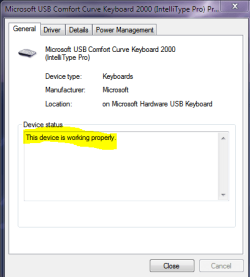
Launch device manager and click keyboards then click what ever keyboard you have and it will tell you if its working properly.
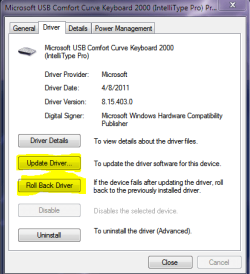
If it is then try to update the driver, if that doesn't work then try to role back the driver.

If its not working properly then follow the solutions on the page
 

Attachments

  • keyboard 2.PNG
    keyboard 2.PNG
    10 KB · Views: 3
  • keyboard.PNG
    keyboard.PNG
    21.9 KB · Views: 2
  • keyboard 3.PNG
    keyboard 3.PNG
    14.4 KB · Views: 1

My Computer

Computer type
PC/Desktop
Computer Manufacturer/Model Number
Custom Build
OS
Windows 7 Professional x64 Sp1
CPU
Intel Core i5 650 @ 3.2Ghz
Motherboard
Dell 33FF6 Motherboard
Memory
10GB
Graphics Card(s)
ASUS GTX 650Ti
Sound Card
Nvidia
Monitor(s) Displays
2 Monitors
Screen Resolution
1920 x 1080
Hard Drives
2 1TB 7200RPM
PSU
Thermaltake 600w
Keyboard
Logitech G110
Internet Speed
75Mbs
Back
Top