Keyboard shortcut for disable\enable 2nd screen?

iLoveCanada

New member
Local time
6:37 AM
Messages
2
Hey.

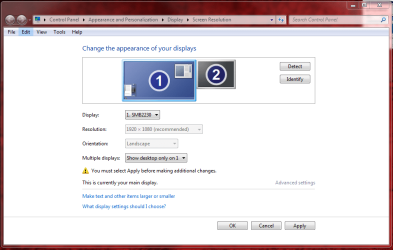
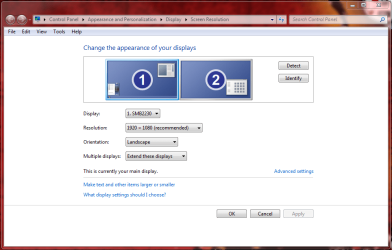
I'm using a dual monitor (you can see the configuration on the #1 attached image.)

I'm not always using the second (not main screen) screen and I wonder if there is a keyboard shortcut to disable (set mode as seen at #2 attached image) or re-enable (as seen at #1 attached image) the 2th screen.

If there is not built-in keyboard shortcut but it's possible to create it - I'd like to learn how to do so.

Thanks you very much :-)

p.s. As I try to improve my english .. Could you please tell me if the message was easy to understand or hard? thanks again
 

Attachments
  • ScreenRes.PNG
    ScreenRes.PNG
    45.9 KB · Views: 16
  • SecondAtt.PNG
    SecondAtt.PNG
    44.3 KB · Views: 11

My Computer My Computer

OS
Windows 7 Ultimate x64
I don't think it is possible with a desktop unless you physically unplug and remove the monitor cable as the computer knows it is there even if you are not using it. Windows also has a nasty habit of opening windows on the second monitor which can make it difficult to use if that monitor is disabled. The exception is laptops where you can press something like Function F4 to switch on and off the additional monitor and run the laptop display and the monitor. If you can I would just put some web pages or e mail program etc on the 2nd monitor. If running games quit programs on it and switch it off if it gets annoying.
Your English is excellent, I should know I am from England :D
 

My Computer My Computer

Computer type
PC/Desktop
Computer Manufacturer/Model Number
Bluethunder II
OS
Windows 7 x64 Ultimate and numerous virtual machines
CPU
AMD FX-8350 Vishera 32nm Technology @ 4.2 GHz default
Motherboard
ASUSTeK COMPUTER INC. SABERTOOTH 990FX R2.0 (Socket 942)
Memory
G Skill 32.0GB Dual-Channel DDR3 @ 1204MHz (11-13-13-31)
Graphics Card(s)
EVGA GeForce GTX 960 4GB Super SC ACX 2.0+ with Back Plate
Sound Card
Creative X-Fi Titanium HD Audiophile PCIe
Monitor(s) Displays
LG L227WTG x 3
Screen Resolution
1680 x 1050 16:10
Hard Drives
238GB Samsung850 PRO SATA Disk Device (SSD)
1863GB Seagate ST2000DM 001-1CH164 (SATA)
1397GB Seagate ST1500DL 003-9VT16L(SATA)
466GB Western Digital WDC WD50 03AZEX-00K1GA0 (SATA) x 2
932GB Seagate ST310005 28AS SATA Disk Device (SATA)
PSU
Enermax Revolution87+ 1000 Watts Gold Certified Power Supply
Case
Rocketfish Full Tower
Cooling
Cooler Master Hyper 212 EVO Push Pull 120mm Fans
Keyboard
Logitech K740
Mouse
Logitech G100S Laser LED + Logitech Gamepad F310
Internet Speed
500 mbs down and 30mbs up
Antivirus
Malwarebytes Pro & Avast and MSE on certain Virtual Machines
Browser
Firefox (Main) Chrome, Internet Explorer (Back Up)
Other Info
Logitech X 230 2.1 Stereo System and 5.1 Yamaha RX V2090
B&W DM6 Monitor Speakers + Center and Surround Speakers
Using Mouse Without Borders (Google it)
I know this is an old thread, but just in case someone else is wondering how to do this, here's the answer: Hold the windows key, and tap P.

This will bring up the 'projector' menu that you commonly see on laptops. With this menu you can switch between four different modes:

  • Computer only (disables the secondary monitor)
  • Duplicate (both monitors enabled, but showing the same content)
  • Extend (both monitors enabled, different content on each)
  • Projector only (enable secondary monitor only)
 

My Computer My Computer

Computer type
PC/Desktop
OS
Windows 7 Ultimate x64
Wonderful

Thanks so much, that's exactly what I was looking for too! Some times I enjoy the extended monitor but when I need to switch to just one, well let's say I was taking the long route. So thank you!
 

My Computer My Computer

Computer Manufacturer/Model Number
HP Slimline
OS
Windows 7 64Bit
CPU
AMD Athlon II x2 240 Processor 2.80 GHz
Motherboard
HP
Memory
4g
Graphics Card(s)
Geoforce
Sound Card
Generic
Monitor(s) Displays
Dynex 22" tv/dvd combo
Hard Drives
240gig
PSU
generic
Case
generic
Cooling
generic

My Computers My Computers

System One System Two

  • Computer type
    PC/Desktop
    Computer Manufacturer/Model Number
    ALWAYS UNDER CONSTRUCTION
    OS
    Windows 11 Pro
    CPU
    Ryzen 9 5900X
    Motherboard
    Asus X570 Crosshair Viii Hero
    Memory
    32GB G Skill DDR4-3600
    Graphics Card(s)
    EVGA RTX 3080 FTW 3 Ultra
    Sound Card
    On Board/Sennheiser PC37X Headset
    Monitor(s) Displays
    3 X Asus 27"
    Screen Resolution
    2560x1440
    Hard Drives
    2 X 1 TB NVME drives
    PSU
    EVGA 850
    Case
    Phanteks Eclipse P400A
    Cooling
    EVGA 280 AIO
    Keyboard
    Logitech G510s/ Logitech G13
    Mouse
    Logitech G502
    Internet Speed
    24/1
    Antivirus
    ESET/MBAM Pro/SAS Pro
    Browser
    Chrome/ Firefox/ Edge
  • Computer type
    Laptop
    System Manufacturer/Model Number
    Dell 16 Plus
    OS
    Windows 11 Pro
    CPU
    Intel Ultra 9 288V
    Memory
    32 GB LPDDR5X 8533
    Monitor(s) Displays
    16" Mini-LED HDR600 Touch 90 Hz
    Screen Resolution
    2560X1600
    Hard Drives
    1 TB NVME
Back
Top