Solved Kingston SSD gone raw

frncs83

New member
Local time
5:38 AM
Messages
3
Location
Hungary
Greetings. Help needed.

My 500G Kingston SSD went raw and has become unformatted. It was an internal drive (PC) when the accident happened, now I can only attach it to my laptop with a SATA to USB interface.

Before I found this forum, I tried EaseUS Data Recovery Wizard, which had listed all the data but the recovery process was unsuccessful, it stopped and froze at 1%.

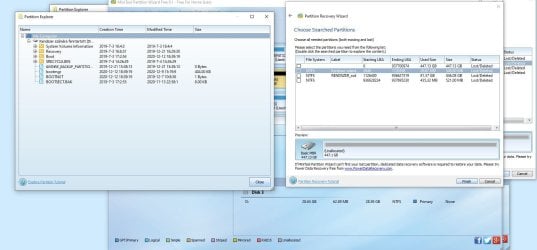
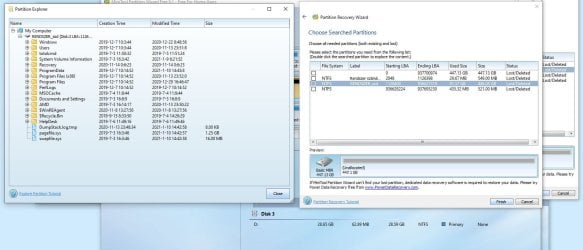
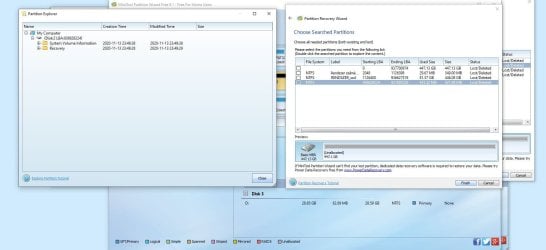
I've attached screenshots from PW Free 9.1.

Could anyone help me to solve the issue?

Thanks!
 

Attachments

  • 01_MTPW91_Partition list.JPG
    01_MTPW91_Partition list.JPG
    152.6 KB · Views: 3
  • 01_MTPW91_Partition1.JPG
    01_MTPW91_Partition1.JPG
    120.8 KB · Views: 1
  • 01_MTPW91_Partition2.JPG
    01_MTPW91_Partition2.JPG
    127.7 KB · Views: 2
  • 01_MTPW91_Partition3.JPG
    01_MTPW91_Partition3.JPG
    102.4 KB · Views: 0

My Computer

Computer type
Laptop
OS
Win10 Pro 64 bit
Greetings. Help needed.

My 500G Kingston SSD went raw and has become unformatted. It was an internal drive (PC) when the accident happened, now I can only attach it to my laptop with a SATA to USB interface.

Before I found this forum, I tried EaseUS Data Recovery Wizard, which had listed all the data but the recovery process was unsuccessful, it stopped and froze at 1%.

I've attached screenshots from PW Free 9.1.

Could anyone help me to solve the issue?

Thanks!

You refer to an accident. What happened?
Can you read your data on the laptop using a SATA to USB interface?
 

My Computers

System One System Two

  • Computer type
    PC/Desktop
    Computer Manufacturer/Model Number
    custom build
    OS
    Windows 7 HP 64
    CPU
    i5 6600K - 800MHz to 4200MHz
    Motherboard
    GA-Z170-HD3P
    Memory
    4+4G GSkill DDR4 3000
    Graphics Card(s)
    IG - Intel 530
    Monitor(s) Displays
    Samsung 226BW
    Screen Resolution
    1680x1050
    Hard Drives
    (1) -1 SM951 – 128GB M.2 AHCI PCIe SSD drive for Windows 7 and Lubuntu
    (2) -1 WD SATA 3 - 1T for Data
    (3) -1 WD SATA 3 - 1T for backup
    PSU
    Thermaltake 450W TR2 gold
    Keyboard
    Old and good Chicony mechanical keyboard
    Mouse
    Logitech mX performance - 9 buttons (had to disable some)
    Internet Speed
    500Mb/s
    Browser
    Firefox 64
    Other Info
    TinyWall firewall
  • Computer type
    Laptop
    System Manufacturer/Model Number
    Asus Q550LF
    OS
    Windows 7 Pro
    CPU
    i7-4500U 800MHz to 3.0GHz
    Motherboard
    Asus Q550LF
    Memory
    (4+4)G DDR3 1600
    Graphics Card(s)
    IG intel 4400 + NVIDIA GeForce GT 745M
    Sound Card
    Realtek
    Monitor(s) Displays
    LG Display LP156WF4-SPH1
    Screen Resolution
    1920 x 1080
    Hard Drives
    BX500 120G SSD for Windows and programs +
    1T HDD for data
    Internet Speed
    500 Mb/s
    Browser
    Firefox
    Other Info
    TinyWall firewall
My mother used the PC when she got an error message and after a reboot there was a system disk error and couldn't boot anymore.

The SSD went to uninitialized, but with Testdisk I can access now to the lost partitions and see the files and folders, and fortunately I can copy the most important ones to my laptop one-by-one (MS Outlook files and some documents).

More or less it was a system disk, but the Outlook PST files was only on it, so it should have to be restored.

With Testdisk I can see the partitions too, so the main question is, that can be the disk reinitialized with the lost partitions to the original state or I have to download the most important files with the Testdisk and when it's done, I should reinstall the system.
 

My Computer

Computer type
Laptop
OS
Win10 Pro 64 bit
Raw simply means its lost the parition if you recover the partitions all files will be there trying to recover files instead of parition can screw it up.
 

My Computer

Computer type
PC/Desktop
OS
win 8 32 bit
Back
Top