Solved Korean language pack causes problems with Outlook email width

MetroBOS

New member
Local time
2:10 AM
Messages
23
This has been an ongoing problem for me for some time now and I'm hoping someone can provide a resolution to it.

I had to install a Korean language pack in order to read Korean Word documents. The problem is that after installing this language pack, it causes some of my emails to appear a lot wider than they should and wider than they appear for others receiving the same email.

There seems to be a trend in that it happens with emails that contain Chinese or Japanese languages.

I uninstalled the language pack and the problem went away. Then recently I reinstalled the language pack and the problem returned.

Does anyone know why this would happen and if there is any way to fix it without having to uninstall the Korean language pack?
 

My Computer My Computer

Computer type
PC/Desktop
OS
Windows 7
Hello MetroBOS, welcome to the Seven forums.

Are you talking about Windows 7 Language Pack or Microsoft Office Language Pack? Usually you do not need a language pack to be able to read documents in other languages, more important is that the input language (keyboard layout) is installed in that language. Also installing Office Proofing Tools in the language you need is a good idea.

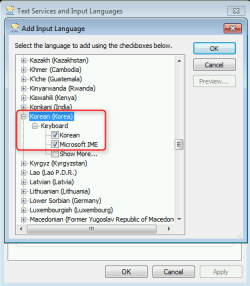
See here how to add keyboard layouts: http://www.sevenforums.com/tutorials/86204-keyboard-input-language-add-remove.html. In case of Korean, you need to select both Korean and Microsoft IME:

2014-06-05_15h54_57.png

See this post about adding Korean Proofing Tools to Microsoft Office: http://www.sevenforums.com/microsoft-office/331575-language-packs.html#post2776337. Post is a response for someone needing Spanish but the procedure is the same in any language.

Kari
 

My Computer My Computer

Computer type
Laptop
Computer Manufacturer/Model Number
HP ENVY 17-1150eg
OS
Windows 10 Pro x64 EN-GB
CPU
1.6 GHz Intel Core i7-720QM Processor
Memory
6 GB
Graphics Card(s)
ATI Mobility Radeon HD 5850 Graphics
Sound Card
Beats sound system with integrated subwoofer
Monitor(s) Displays
17" laptop display, 22" LED and 32" Full HD TV through HDMI
Screen Resolution
1600*900 (1), 1920*1080 (2&3)
Hard Drives
Internal: 2 x 500 GB SATA Hard Disk Drive 7200 rpm
External: 2TB for backups, 3TB USB3 network drive for media
Cooling
As Envy runs a bit warm, I have it on a Cooler Master pad
Keyboard
Logitech diNovo Media Desktop Laser (bluetooth)
Mouse
Logitech Performance Mouse MX
Internet Speed
50/10 Mbps VDSL
Antivirus
Windows Defender 4.3.9431.0
Browser
Maxthon 3.5.2., IE11
I'm not sure which language pack it was.

On the far right side of my taskbar, it says "EN" and if I click on it, it allows me to switch between EN and KO.

Based on that, can you tell if it's the Windows 7 Language Pack or the Microsoft Office Language Pack?

I don't really need to be able to type in any other languages, just open documents that contain other languages. The strange thing is that if I open the file in WordPad, it looks fine. But if I open it in Microsoft Word, all of the foreign characters just appear as boxes.
 

My Computer My Computer

Computer type
PC/Desktop
OS
Windows 7
I'm not sure which language pack it was.

On the far right side of my taskbar, it says "EN" and if I click on it, it allows me to switch between EN and KO.

Based on that, can you tell if it's the Windows 7 Language Pack or the Microsoft Office Language Pack?

It is neither, it is the Input Language (keyboard layout) selector for Windows, as this on my Windows 7 desktop:

2014-06-05_16h15_23.png

See my previous post for links, check that you have enabled both Korean and Microsoft IME input methods as shown in the screenshot, and add Korean Proofing Tools to your Office applications.

Notice that you only need to add Korean to one Office application, for instance Word; the Office tools are then shared with all Office apps like Excel, Outlook and so on.

Kari
 

My Computer My Computer

Computer type
Laptop
Computer Manufacturer/Model Number
HP ENVY 17-1150eg
OS
Windows 10 Pro x64 EN-GB
CPU
1.6 GHz Intel Core i7-720QM Processor
Memory
6 GB
Graphics Card(s)
ATI Mobility Radeon HD 5850 Graphics
Sound Card
Beats sound system with integrated subwoofer
Monitor(s) Displays
17" laptop display, 22" LED and 32" Full HD TV through HDMI
Screen Resolution
1600*900 (1), 1920*1080 (2&3)
Hard Drives
Internal: 2 x 500 GB SATA Hard Disk Drive 7200 rpm
External: 2TB for backups, 3TB USB3 network drive for media
Cooling
As Envy runs a bit warm, I have it on a Cooler Master pad
Keyboard
Logitech diNovo Media Desktop Laser (bluetooth)
Mouse
Logitech Performance Mouse MX
Internet Speed
50/10 Mbps VDSL
Antivirus
Windows Defender 4.3.9431.0
Browser
Maxthon 3.5.2., IE11
So...the good news is that this seems to have resolved my issue with being able to display Korean text in Microsoft Word.

The bad news is that the emails in Chinese and Japanese are still appearing about twice as wide as they should be in Microsoft Outlook.

It's not all emails, just the ones in Chinese and Japanese so that must have something to do with it, but I have no idea what.

:(
 

My Computer My Computer

Computer type
PC/Desktop
OS
Windows 7
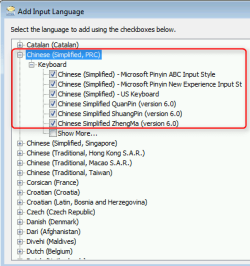
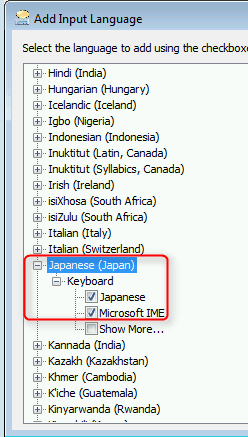
Add Chinese and Japanese Proofing Tools to Office, then Chinese and Japanese Input Languages to Windows.

In case of Simplified Chinese, select the following:

2014-06-05_16h52_08.png

And Japanese, add following:

2014-06-05_16h51_18.png

Kari
 

My Computer My Computer

Computer type
Laptop
Computer Manufacturer/Model Number
HP ENVY 17-1150eg
OS
Windows 10 Pro x64 EN-GB
CPU
1.6 GHz Intel Core i7-720QM Processor
Memory
6 GB
Graphics Card(s)
ATI Mobility Radeon HD 5850 Graphics
Sound Card
Beats sound system with integrated subwoofer
Monitor(s) Displays
17" laptop display, 22" LED and 32" Full HD TV through HDMI
Screen Resolution
1600*900 (1), 1920*1080 (2&3)
Hard Drives
Internal: 2 x 500 GB SATA Hard Disk Drive 7200 rpm
External: 2TB for backups, 3TB USB3 network drive for media
Cooling
As Envy runs a bit warm, I have it on a Cooler Master pad
Keyboard
Logitech diNovo Media Desktop Laser (bluetooth)
Mouse
Logitech Performance Mouse MX
Internet Speed
50/10 Mbps VDSL
Antivirus
Windows Defender 4.3.9431.0
Browser
Maxthon 3.5.2., IE11
Thank you so much! That did it! You have no idea how much I appreciate your help with this.

This has been an ongoing problem for months and something that even my IT department was not able to resolve.
 

My Computer My Computer

Computer type
PC/Desktop
OS
Windows 7
You are welcome :).
 

My Computer My Computer

Computer type
Laptop
Computer Manufacturer/Model Number
HP ENVY 17-1150eg
OS
Windows 10 Pro x64 EN-GB
CPU
1.6 GHz Intel Core i7-720QM Processor
Memory
6 GB
Graphics Card(s)
ATI Mobility Radeon HD 5850 Graphics
Sound Card
Beats sound system with integrated subwoofer
Monitor(s) Displays
17" laptop display, 22" LED and 32" Full HD TV through HDMI
Screen Resolution
1600*900 (1), 1920*1080 (2&3)
Hard Drives
Internal: 2 x 500 GB SATA Hard Disk Drive 7200 rpm
External: 2TB for backups, 3TB USB3 network drive for media
Cooling
As Envy runs a bit warm, I have it on a Cooler Master pad
Keyboard
Logitech diNovo Media Desktop Laser (bluetooth)
Mouse
Logitech Performance Mouse MX
Internet Speed
50/10 Mbps VDSL
Antivirus
Windows Defender 4.3.9431.0
Browser
Maxthon 3.5.2., IE11
Back
Top