Solved LAN network connection error

Millo

New member
Local time
6:06 PM
Messages
11
i can connect to internet wirelessly but when i try to use LAN i keep getting "Unidentified network (no internet access)" and under 'view your active networks' it shows the connection is public instead of home and i dont know how to change that, i thought its a driver problem so i updated the driver but the problem still exist. use the troubleshoot and it gives this message:
"Local Area Connection doesn't have a valid IP configuration" i turned off and on the router still nothing change.

LAN Network adapter: Realtek PCIe FE Family Controller
 

My Computer

OS
Windows 7 Home Premium 32bit
i can connect to internet wirelessly but when i try to use LAN i keep getting "Unidentified network (no internet access)" and under 'view your active networks' it shows the connection is public instead of home and i dont know how to change that, i thought its a driver problem so i updated the driver but the problem still exist. use the troubleshoot and it gives this message:
"Local Area Connection doesn't have a valid IP configuration" i turned off and on the router still nothing change.

LAN Network adapter: Realtek PCIe FE Family Controller

Welcome to the windows 7 forums Millo.

1. Is the wireless internet service your connected to yours? or another individuals or companies?
2. Can we assume that your wireless configuration is set to use DHCP, which means that it picks up an IP and DNS listing from the wireless access point or router?

You might have to go into network configuration and check the status of your network for wireless.

Rich
 

My Computer

Computer type
Laptop
Computer Manufacturer/Model Number
Toshiba Laptop Qosimo X870
OS
Windows 7 Pro x64 SP1
CPU
Intel Core I7
Motherboard
Toshiba Qosmio
Memory
16 Gigs
Graphics Card(s)
NVIDIA GeForce GTX 670M
Monitor(s) Displays
17.7" laptop
Screen Resolution
1600 x 900
Hard Drives
256 Gig SanDisk SSD for C
256 Gig Intel SSD for D
Internet Speed
50/25 FIOS
Antivirus
Vipre (all you can eat for 10 machines)
Browser
IE and FF
Other Info
I have dos 6.22, wfwg 3.11, win98, 2000 and xp VHD's available for testing. MS's Virtual PC works great.
Welcome to Windows Seven Forums.

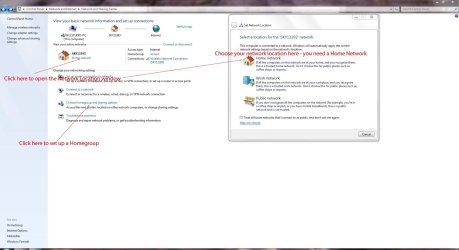
Check the screenshot below on choosing a home network.

PrintHG.JPG

To try and resolve the unidentified network issue, try this:

Click Start and type cmd in the Search field.

Right-click cmd under the Programs list and choose Run as Administrator.

Click Yes if prompted by UAC.

Type: netsh int ip reset C:\netsh.log.txt

Press Enter

Type netsh winsock reset

Press Enter

Type Exit

Press Enter

Restart your computer and check your LAN.
 

My Computer

Computer Manufacturer/Model Number
HP Pavilion Elite 495UK
OS
Windows 7 Ultimate SP1 64-Bit
CPU
Intel Core i7 870 @ 2.93GHz
Motherboard
MSI 2A9C (CPU1)
Memory
8Gb Dual-Channel DDR3 @ 664MHz
Graphics Card(s)
nVidia GeForce GTX 460 1024MB dedicated RAM
Sound Card
Realtek HD Audio
Monitor(s) Displays
HP2310i
Screen Resolution
1920 x 1080
Hard Drives
1x1954GB Hitachi HDS22020ALA 330 (RAID), 1x1954GB Hitachi External for backup and storage
PSU
460W
Case
HP Elite
Cooling
Air cooled
Keyboard
Logitech K750 solar-powered keyboard
Mouse
Logitech Wireless M180 mouse
Internet Speed
2Mb
Other Info
Pure Avanti Flow Internet Radio with iPod Dock, 64Gb iPod, HP USB Speakers, Sony MDR-V500 Headphones, Sony Vaio F-Series Laptop
Welcome to the windows 7 forums Millo.

1. Is the wireless internet service your connected to yours? or another individuals or companies?
2. Can we assume that your wireless configuration is set to use DHCP, which means that it picks up an IP and DNS listing from the wireless access point or router?

You might have to go into network configuration and check the status of your network for wireless.

Rich
yes its my network the one im connecting to wirelessly and yes the wifi is set to use DHCP.
 

My Computer

OS
Windows 7 Home Premium 32bit
Welcome to Windows Seven Forums.
To try and resolve the unidentified network issue, try this:

Click Start and type cmd in the Search field.

Right-click cmd under the Programs list and choose Run as Administrator.

Click Yes if prompted by UAC.

Type: netsh int ip reset C:\netsh.log.txt

Press Enter

Type netsh winsock reset

Press Enter

Type Exit

Press Enter

Restart your computer and check your LAN.
alright, i'll try those.
 

My Computer

OS
Windows 7 Home Premium 32bit
OK, please let us know how you get on.
 

My Computer

Computer Manufacturer/Model Number
HP Pavilion Elite 495UK
OS
Windows 7 Ultimate SP1 64-Bit
CPU
Intel Core i7 870 @ 2.93GHz
Motherboard
MSI 2A9C (CPU1)
Memory
8Gb Dual-Channel DDR3 @ 664MHz
Graphics Card(s)
nVidia GeForce GTX 460 1024MB dedicated RAM
Sound Card
Realtek HD Audio
Monitor(s) Displays
HP2310i
Screen Resolution
1920 x 1080
Hard Drives
1x1954GB Hitachi HDS22020ALA 330 (RAID), 1x1954GB Hitachi External for backup and storage
PSU
460W
Case
HP Elite
Cooling
Air cooled
Keyboard
Logitech K750 solar-powered keyboard
Mouse
Logitech Wireless M180 mouse
Internet Speed
2Mb
Other Info
Pure Avanti Flow Internet Radio with iPod Dock, 64Gb iPod, HP USB Speakers, Sony MDR-V500 Headphones, Sony Vaio F-Series Laptop
It could be the "Mac Address Clone" that you need to look into on your Router. Going over Wifi is dictacted by your wifi network but if you plug your pc into the router's ports it may be blocked by the ISP due to MAC address.

"MAC Address Clone: Some ISP will require you to register your MAC address. If you do not wish to re-register your MAC address, you can have the router clone the MAC address that is registered with your ISP."
 

My Computer

Computer Manufacturer/Model Number
Lenovo ThinkPad T60
OS
Windows 7 Ultimate 64Bit
CPU
GenuineIntel Intel(R) Core(TM) DuoCore T2400 @ 1.83GHz
Motherboard
Intel(R) 82801G (ICH7 Family)
Memory
2.00 GB
Graphics Card(s)
Mobile Intel(R) 945 Express Chipset
Sound Card
SoundMAX Integrated Digital HD Audio
Monitor(s) Displays
ThinkPad Display
Screen Resolution
1400x1050
Hard Drives
100Gb SATA
Keyboard
Standard Keyboard
Mouse
HID-compliant Mouse
Internet Speed
Cable Broadband - 54Mbps
Other Info
Intel(R) PRO/1000 PL Network Connection
11a/b/g Wireless LAN Mini PCI Express Adapter
@aem
i don't get it, what am i supposed to look at in my router settings?

@seavixen32
the solution that you give doesn't work and the connection still unidentified :(
 
Last edited:

My Computer

OS
Windows 7 Home Premium 32bit
Looking at your screenshot you need to look under Unidentified Network and change from a Public Network to a Home Network as I showed you in the screenshot I originally posted.

Next, click Connect to a network if need be, but I think changing to a Home Network may be enough.

If not, click Change Adapter Settings in the Network & Sharing Center and disable the network adapter then enable it again.
 

My Computer

Computer Manufacturer/Model Number
HP Pavilion Elite 495UK
OS
Windows 7 Ultimate SP1 64-Bit
CPU
Intel Core i7 870 @ 2.93GHz
Motherboard
MSI 2A9C (CPU1)
Memory
8Gb Dual-Channel DDR3 @ 664MHz
Graphics Card(s)
nVidia GeForce GTX 460 1024MB dedicated RAM
Sound Card
Realtek HD Audio
Monitor(s) Displays
HP2310i
Screen Resolution
1920 x 1080
Hard Drives
1x1954GB Hitachi HDS22020ALA 330 (RAID), 1x1954GB Hitachi External for backup and storage
PSU
460W
Case
HP Elite
Cooling
Air cooled
Keyboard
Logitech K750 solar-powered keyboard
Mouse
Logitech Wireless M180 mouse
Internet Speed
2Mb
Other Info
Pure Avanti Flow Internet Radio with iPod Dock, 64Gb iPod, HP USB Speakers, Sony MDR-V500 Headphones, Sony Vaio F-Series Laptop
@seavixen32 i cant click on the unidentified network to change it from public to home.
i try disable and enable the adapter many times before and the problem still exist.
 

My Computer

OS
Windows 7 Home Premium 32bit
Having just had a look at your ipconfig.text document, you don't appear to even have a wireless or ethernet internet connection. Also, the yellow question mark to the left of unidentified network confirms you don't have an internet connection.

Is your wireless router switched on? When you tried to reset it, did you try both the reset button AND power it down then restart it?

Right-click your taskbar and click Toolbars followed by Address to open the Address bar.

Now click in the address field and type 192.168.0.1 then press Enter, which should get you into your router settings, from where you can check your wireless settings.
 

My Computer

Computer Manufacturer/Model Number
HP Pavilion Elite 495UK
OS
Windows 7 Ultimate SP1 64-Bit
CPU
Intel Core i7 870 @ 2.93GHz
Motherboard
MSI 2A9C (CPU1)
Memory
8Gb Dual-Channel DDR3 @ 664MHz
Graphics Card(s)
nVidia GeForce GTX 460 1024MB dedicated RAM
Sound Card
Realtek HD Audio
Monitor(s) Displays
HP2310i
Screen Resolution
1920 x 1080
Hard Drives
1x1954GB Hitachi HDS22020ALA 330 (RAID), 1x1954GB Hitachi External for backup and storage
PSU
460W
Case
HP Elite
Cooling
Air cooled
Keyboard
Logitech K750 solar-powered keyboard
Mouse
Logitech Wireless M180 mouse
Internet Speed
2Mb
Other Info
Pure Avanti Flow Internet Radio with iPod Dock, 64Gb iPod, HP USB Speakers, Sony MDR-V500 Headphones, Sony Vaio F-Series Laptop
@seavixen32 that time i disconnected from my wifi network
but here is it:
 
Last edited:

My Computer

OS
Windows 7 Home Premium 32bit
As previously mentioned when you connect directly to the Router, the router needs to learn that there is a new MAC address trying access the network. What is the brand of the router?
 

My Computer

Computer Manufacturer/Model Number
Lenovo ThinkPad T60
OS
Windows 7 Ultimate 64Bit
CPU
GenuineIntel Intel(R) Core(TM) DuoCore T2400 @ 1.83GHz
Motherboard
Intel(R) 82801G (ICH7 Family)
Memory
2.00 GB
Graphics Card(s)
Mobile Intel(R) 945 Express Chipset
Sound Card
SoundMAX Integrated Digital HD Audio
Monitor(s) Displays
ThinkPad Display
Screen Resolution
1400x1050
Hard Drives
100Gb SATA
Keyboard
Standard Keyboard
Mouse
HID-compliant Mouse
Internet Speed
Cable Broadband - 54Mbps
Other Info
Intel(R) PRO/1000 PL Network Connection
11a/b/g Wireless LAN Mini PCI Express Adapter
I had a similar situation. Suddenly I had an "unidentified network" and when I did a troubleshoot, it kept telling me I had no LAN cable.
I was pulling my hair out until eventually it was suggested that I turn off the computer and remove the mains plug . Wait 10 minutes, during which time I should push the "on" button for a few seconds, a few times. This drains all the residual power in the machine.
After 10 minutes, plug the machine in to the mains and switch on. I know it sounds daft, but its a lot easier than messing around with re-installs and registry entries.
Let me know how you got on.
 

My Computer

OS
windows 7 Ultimate 32bit
As previously mentioned when you connect directly to the Router, the router needs to learn that there is a new MAC address trying access the network. What is the brand of the router?
DLink DIR-615

I had a similar situation. Suddenly I had an "unidentified network" and when I did a troubleshoot, it kept telling me I had no LAN cable.
I was pulling my hair out until eventually it was suggested that I turn off the computer and remove the mains plug . Wait 10 minutes, during which time I should push the "on" button for a few seconds, a few times. This drains all the residual power in the machine.
After 10 minutes, plug the machine in to the mains and switch on. I know it sounds daft, but its a lot easier than messing around with re-installs and registry entries.
Let me know how you got on.
im using laptop :confused:
 

My Computer

OS
Windows 7 Home Premium 32bit
I wonder what would happen if you removed power pack/batteries and then left it and pressing on button etc.? It cannot do any harm.
 

My Computer

OS
windows 7 Ultimate 32bit
I wonder what would happen if you removed power pack/batteries and then left it and pressing on button etc.? It cannot do any harm.
removing battery cells but just using the ac adapter? i tried that still it didnt help :(
 

My Computer

OS
Windows 7 Home Premium 32bit
Did you check your router settings?
 

My Computer

Computer Manufacturer/Model Number
HP Pavilion Elite 495UK
OS
Windows 7 Ultimate SP1 64-Bit
CPU
Intel Core i7 870 @ 2.93GHz
Motherboard
MSI 2A9C (CPU1)
Memory
8Gb Dual-Channel DDR3 @ 664MHz
Graphics Card(s)
nVidia GeForce GTX 460 1024MB dedicated RAM
Sound Card
Realtek HD Audio
Monitor(s) Displays
HP2310i
Screen Resolution
1920 x 1080
Hard Drives
1x1954GB Hitachi HDS22020ALA 330 (RAID), 1x1954GB Hitachi External for backup and storage
PSU
460W
Case
HP Elite
Cooling
Air cooled
Keyboard
Logitech K750 solar-powered keyboard
Mouse
Logitech Wireless M180 mouse
Internet Speed
2Mb
Other Info
Pure Avanti Flow Internet Radio with iPod Dock, 64Gb iPod, HP USB Speakers, Sony MDR-V500 Headphones, Sony Vaio F-Series Laptop

My Computer

Computer Manufacturer/Model Number
Lenovo ThinkPad T60
OS
Windows 7 Ultimate 64Bit
CPU
GenuineIntel Intel(R) Core(TM) DuoCore T2400 @ 1.83GHz
Motherboard
Intel(R) 82801G (ICH7 Family)
Memory
2.00 GB
Graphics Card(s)
Mobile Intel(R) 945 Express Chipset
Sound Card
SoundMAX Integrated Digital HD Audio
Monitor(s) Displays
ThinkPad Display
Screen Resolution
1400x1050
Hard Drives
100Gb SATA
Keyboard
Standard Keyboard
Mouse
HID-compliant Mouse
Internet Speed
Cable Broadband - 54Mbps
Other Info
Intel(R) PRO/1000 PL Network Connection
11a/b/g Wireless LAN Mini PCI Express Adapter
Back
Top