
LAN on Public Network

onyx

New member
Local time
9:55 AM
Messages
20
Hi,

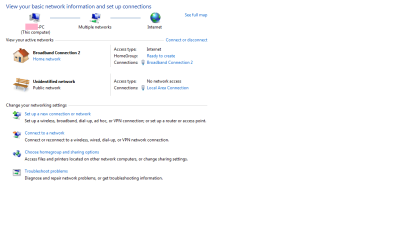
My LAN (local area connection) is automatically on a Public network, I'm not sure why or if its always been like this. My Broadband is on home. I cant change the LAN to home. A message popped up and said something along the lines of "this network has too many internet connections".

I'm wondering what it means if my unidentified network is public and if there is anyway to change it to home?

Thanks =)
 

Attachments
  • network.png
    network.png
    54.8 KB · Views: 327

My Computer

OS
Windows 7
My understanding is that any network with Internet access is, by definition, a public network.
 

My Computer

Computer Manufacturer/Model Number
Hewlett-Packard Compaq Presario/CQ5218F
OS
Windows 7
CPU
AMD Athlon(tm) II x2 215
Memory
3.00 GB (2.75 GB usable)
Other Info
64-bit Operating System
Oh ok i thought that but i wasnt sure bc of the message that came up. Tyvm pgordon =)
 

My Computer

OS
Windows 7
The difference between Home, Work and Public has to do with file and printer sharing, firewall settings, network discovery, etc.

Just because a PC has internet access doesn't automatically make it public. If you're connected to the internet through a home router, the network should be set as "home" because you *trust* the other computers on that network.

It looks like you may have more than one network connection. Can you describe your setup there?
 

My Computer

Computer Manufacturer/Model Number
Dell C521
OS
W7 Ultimate 64bit W7 Premium 64bit W7 Premium 32bit WXP Home 32bit
CPU
Athlon 64X2 5000+
Motherboard
Dell
Memory
4GB
Graphics Card(s)
ATI X1300
Sound Card
On Board
Monitor(s) Displays
Dell 19" Flat
Screen Resolution
1280x1024
Hard Drives
500GB Western Digital Caviar Green
Mouse
Microsoft Wireless Intellimouse Explorer 2.0
Internet Speed
SBC DSL - 6Mbps
Hey ty for the reply....I have one desktop and one connection? i think..
 

My Computer

OS
Windows 7
How are you connected to the broadband modem? It appears you are directly connected to it. The bottom connection is public because it cannot identify what it is connected to. If it is even connected to anything in the first place.
 

My Computer

Computer type
PC/Desktop
Computer Manufacturer/Model Number
Alienware Aurora ALX R4
OS
Windows 10 Pro (x64)
CPU
Intel Core i7-3930K (3.2GHz - 4.5GHz)
Motherboard
Alienware Aurora-R4 x79
Memory
4x Samsung 4GB PC3-12800 DDR3 (16GB 1600MHz)
Graphics Card(s)
Nvidia Geforce GTX 690
Sound Card
SteelSeries Siberia Elite
Monitor(s) Displays
Dell UltraSharp U3011
Screen Resolution
2560x1600
Hard Drives
Samsung 850 Pro 256 GB, Seagate 1TB Desktop Hybrid HDD, 2x Western Digital 4TB Green HDD
PSU
875W Some Dell PSU <.<
Case
Alienware Aurora ALX
Cooling
Custom Liquid Cooling (EK CPU & GPU blocks) dual EK 480RAD
Keyboard
Logitech G710+ Mechanical
Mouse
Logitech G700s
Internet Speed
Verizon Fios (50 mbps average)
Other Info
Server: Intel NUC D54250WYK: i5-4250U, 16GB, 256 GB mSATA, Windows Server 2012 R2
Hi,

Its an ADSL modem. Thanks!
 

My Computer

OS
Windows 7
How is your desktop connected *to* the ADSL modem? USB or ethernet?

You have one desktop, but the desktop has two network connections. As soon as we can get a good idea of how everything is connected we can get you all fixed up.
 

My Computer

Computer Manufacturer/Model Number
Dell C521
OS
W7 Ultimate 64bit W7 Premium 64bit W7 Premium 32bit WXP Home 32bit
CPU
Athlon 64X2 5000+
Motherboard
Dell
Memory
4GB
Graphics Card(s)
ATI X1300
Sound Card
On Board
Monitor(s) Displays
Dell 19" Flat
Screen Resolution
1280x1024
Hard Drives
500GB Western Digital Caviar Green
Mouse
Microsoft Wireless Intellimouse Explorer 2.0
Internet Speed
SBC DSL - 6Mbps
Its ethernet....sorry about that =)
 

My Computer

OS
Windows 7
OK, ethernet for the internet connection. What about the other connection, the one showing up as Public. Is that one ethernet as well?
 

My Computer

Computer Manufacturer/Model Number
Dell C521
OS
W7 Ultimate 64bit W7 Premium 64bit W7 Premium 32bit WXP Home 32bit
CPU
Athlon 64X2 5000+
Motherboard
Dell
Memory
4GB
Graphics Card(s)
ATI X1300
Sound Card
On Board
Monitor(s) Displays
Dell 19" Flat
Screen Resolution
1280x1024
Hard Drives
500GB Western Digital Caviar Green
Mouse
Microsoft Wireless Intellimouse Explorer 2.0
Internet Speed
SBC DSL - 6Mbps
Ok, So you have one machine with two ethernet ports. One connects to the ADSL modem and the other connects to the second PC.

That's a little different than what you'd normally find. The typical configuration is the ADSL modem connected to a router. Then both PC's connect to the router as well. It's a lot easier and a usually a safer way to go.

Have you considered using a router? There are quite a few inexpensive routers out there that work quite well.

Can the second PC get to the internet at all?
 

My Computer

Computer Manufacturer/Model Number
Dell C521
OS
W7 Ultimate 64bit W7 Premium 64bit W7 Premium 32bit WXP Home 32bit
CPU
Athlon 64X2 5000+
Motherboard
Dell
Memory
4GB
Graphics Card(s)
ATI X1300
Sound Card
On Board
Monitor(s) Displays
Dell 19" Flat
Screen Resolution
1280x1024
Hard Drives
500GB Western Digital Caviar Green
Mouse
Microsoft Wireless Intellimouse Explorer 2.0
Internet Speed
SBC DSL - 6Mbps
Im a little lost bc i do not have a second computer.....i just have the one and the (LAN) local area connection i just need that to connect to my broadband connection....so i really only have one connection to the internet? is that right? sry im not good with internet connection stuff. I know if i didnt have my LAN connection i could not connect to the internet at all is that just from my service provider?
 

My Computer

OS
Windows 7
Your setup is fine. You are not part of a network so it won't make a bit of difference.
You do have working internet of course, right? Thats all you need to worry about.
 

My Computer

Computer type
PC/Desktop
Computer Manufacturer/Model Number
Alienware Aurora ALX R4
OS
Windows 10 Pro (x64)
CPU
Intel Core i7-3930K (3.2GHz - 4.5GHz)
Motherboard
Alienware Aurora-R4 x79
Memory
4x Samsung 4GB PC3-12800 DDR3 (16GB 1600MHz)
Graphics Card(s)
Nvidia Geforce GTX 690
Sound Card
SteelSeries Siberia Elite
Monitor(s) Displays
Dell UltraSharp U3011
Screen Resolution
2560x1600
Hard Drives
Samsung 850 Pro 256 GB, Seagate 1TB Desktop Hybrid HDD, 2x Western Digital 4TB Green HDD
PSU
875W Some Dell PSU <.<
Case
Alienware Aurora ALX
Cooling
Custom Liquid Cooling (EK CPU & GPU blocks) dual EK 480RAD
Keyboard
Logitech G710+ Mechanical
Mouse
Logitech G700s
Internet Speed
Verizon Fios (50 mbps average)
Other Info
Server: Intel NUC D54250WYK: i5-4250U, 16GB, 256 GB mSATA, Windows Server 2012 R2
Im a little lost bc i do not have a second computer.....i just have the one and the (LAN) local area connection i just need that to connect to my broadband connection....so i really only have one connection to the internet? is that right? sry im not good with internet connection stuff. I know if i didnt have my LAN connection i could not connect to the internet at all is that just from my service provider?

If there's nothing connected to the second ethernet you can just disable it. The main connection to your ADSL modem is already set correctly.

Logicearth is right, as long as you have a working internet connection you're good to go.
 

My Computer

Computer Manufacturer/Model Number
Dell C521
OS
W7 Ultimate 64bit W7 Premium 64bit W7 Premium 32bit WXP Home 32bit
CPU
Athlon 64X2 5000+
Motherboard
Dell
Memory
4GB
Graphics Card(s)
ATI X1300
Sound Card
On Board
Monitor(s) Displays
Dell 19" Flat
Screen Resolution
1280x1024
Hard Drives
500GB Western Digital Caviar Green
Mouse
Microsoft Wireless Intellimouse Explorer 2.0
Internet Speed
SBC DSL - 6Mbps
Ohhh ok! thank you so much for helping me out :) Happy New year =)
 

My Computer

OS
Windows 7
Glad to help. If we've helped you a rep would be nice!
 

My Computer

Computer Manufacturer/Model Number
Dell C521
OS
W7 Ultimate 64bit W7 Premium 64bit W7 Premium 32bit WXP Home 32bit
CPU
Athlon 64X2 5000+
Motherboard
Dell
Memory
4GB
Graphics Card(s)
ATI X1300
Sound Card
On Board
Monitor(s) Displays
Dell 19" Flat
Screen Resolution
1280x1024
Hard Drives
500GB Western Digital Caviar Green
Mouse
Microsoft Wireless Intellimouse Explorer 2.0
Internet Speed
SBC DSL - 6Mbps
Back
Top