Laptop a Liar?

amigo max

New member
Local time
2:14 AM
Messages
53
Location
In my house
Hey guys,:D

My laptop very often gets hanged by overheating, and just before that, like 4-5 mins earlier... It shows CPU like 90C :hot: , I don't think thats the temp a CPU can be alive at? Is it that my laptop is showing it incorrect or is it truly that hot? BTW I am Using HWmonitor.
 

My Computer

Computer Manufacturer/Model Number
Self built, # Acer aspire 4920g
OS
Windows 7 Ultimate x64, # Windows Vista Home Premium 32bit
CPU
Intel Core 2 duo E8400 @ 4.00GHz, # Intel Core 2 DuoT7500
Motherboard
Gigabyte P35-DS3L, #Some Intel Mobo
Memory
4GB @ 1068MHz, # 2GB @ 800MHz
Graphics Card(s)
XFX 9600GT 1GB, # ATI HD 2400XT Mobility
Sound Card
Onboard realtek 5.1, # 2.1
Monitor(s) Displays
Acer v223w, # Inbuilt
Screen Resolution
1680x1050, # 1280x800
Hard Drives
500GB & 640GB, # 160GB
PSU
600W,
Case
Coolermaster HAF 932
Cooling
OCZ waterblock, Thermaltake for RAM, Arctic cooling for GPU
Keyboard
LG
Mouse
LG
Internet Speed
8mbps down, 1mbps up
Hey guys,:D

My laptop very often gets hanged by overheating, and just before that, like 4-5 mins earlier... It shows CPU like 90C :hot: , I don't think thats the temp a CPU can be alive at? Is it that my laptop is showing it incorrect or is it truly that hot? BTW I am Using HWmonitor.

Most Laptop CPU's CAN survive 90C, though you should really consider getting a cooling mat for it as overheating that much many times can cause damage to not only the CPU but likely other hardware as well.
 

My Computer

Computer Manufacturer/Model Number
Custom | Whitebox
OS
Windows 7 Ultimate, OS X 10.7, Ubuntu 11.04
CPU
Intel E6750 @ 3.80GHz
Motherboard
Gigabyte GA-EP45-UD3L (Revision 1.1)
Memory
2x2GB & 2x1GB (6GB) OCZ Reaper 1066MHz @ 1080MHz
Graphics Card(s)
EVGA nVidia GTX 260 896mb (216 Core) FTW Edition
Sound Card
Realtek ALC888
Monitor(s) Displays
21" VIZIO TV
Screen Resolution
1680x1050 @ 60Hz
Hard Drives
Western Digital WD6401AALS - 640GB
Hitachi HDP725016GLA380 - 160GB
PSU
Corsair 750W
Case
NZXT Nemesis Elite
Cooling
Thermaltake SpinQ
Keyboard
Logitech Wireless S520
Mouse
Logitech Wireless S520 - Microsoft Wireless Arc Mouse
Internet Speed
Download: 20mbps, Upload: 3mbps
It quite well could be, but obviously that is not healthy for the CPU. A good cleaning may be in order, a cooling mat would be a good start too. A Guy
 

My Computer

Computer type
PC/Desktop
OS
Windows 10 Home x64
CPU
INTEL Core i5-750 Quad-Core 3.37GHz
Motherboard
ASUS P7P55D
Memory
HyperX Fury Black Series 8GB (2 x 4GB) 1866Mhz
Graphics Card(s)
EVGA GeForce GTX 750 Superclocked 1GB 128-Bit GDDR5
Monitor(s) Displays
LG 32MA68HY 32" IPS
Screen Resolution
1920 x 1080
Hard Drives
Samsung 840 Evo 120GB, SEAGATE 500GB Barracuda® 7200.12, SATA 3 Gb/s, 7200 RPM, 16MB cache
PSU
ANTEC TruePower New TP-550, 80 PLUS, 550W
Case
ANTEC Three Hundred Illusion
Cooling
COOLER MASTER Hyper 212 Plus, 4 x 120mm 1 x 140mm Noctua's
Internet Speed
85 + Mbps
Antivirus
Avast
Browser
Vivaldi
Hmm, I know that a cooling mat helps a lot, i do have it, but to keep it on our lap a cooling mat wouldn't be very convenient. And is there a safe way i can remove my CPU heat sink on the laptop to re-put new thermal paste? Well, anyway thanks.
 

My Computer

Computer Manufacturer/Model Number
Self built, # Acer aspire 4920g
OS
Windows 7 Ultimate x64, # Windows Vista Home Premium 32bit
CPU
Intel Core 2 duo E8400 @ 4.00GHz, # Intel Core 2 DuoT7500
Motherboard
Gigabyte P35-DS3L, #Some Intel Mobo
Memory
4GB @ 1068MHz, # 2GB @ 800MHz
Graphics Card(s)
XFX 9600GT 1GB, # ATI HD 2400XT Mobility
Sound Card
Onboard realtek 5.1, # 2.1
Monitor(s) Displays
Acer v223w, # Inbuilt
Screen Resolution
1680x1050, # 1280x800
Hard Drives
500GB & 640GB, # 160GB
PSU
600W,
Case
Coolermaster HAF 932
Cooling
OCZ waterblock, Thermaltake for RAM, Arctic cooling for GPU
Keyboard
LG
Mouse
LG
Internet Speed
8mbps down, 1mbps up
When you have your laptop on your lap, are you blocking the fan intake with your leg?
 

My Computer

Computer Manufacturer/Model Number
Toshiba P300
OS
Windows 8 Pro
CPU
Intel Centrino Dual Core P7450 2.13GHz
Memory
4gb
Graphics Card(s)
ATI Mobility Raedon HD3650
Hard Drives
Toshiba MK3252GSX ATA
Internet Speed
Wish it were faster
Hmm, I know that a cooling mat helps a lot, i do have it, but to keep it on our lap a cooling mat wouldn't be very convenient. And is there a safe way i can remove my CPU heat sink on the laptop to re-put new thermal paste? Well, anyway thanks.

You can, but I wouldn't do so if its still in warranty.

I did that with my laptop, kept it a LOT cooler. (they had some bad clay like thermal.. paste?)
 

My Computer

Computer Manufacturer/Model Number
Custom | Whitebox
OS
Windows 7 Ultimate, OS X 10.7, Ubuntu 11.04
CPU
Intel E6750 @ 3.80GHz
Motherboard
Gigabyte GA-EP45-UD3L (Revision 1.1)
Memory
2x2GB & 2x1GB (6GB) OCZ Reaper 1066MHz @ 1080MHz
Graphics Card(s)
EVGA nVidia GTX 260 896mb (216 Core) FTW Edition
Sound Card
Realtek ALC888
Monitor(s) Displays
21" VIZIO TV
Screen Resolution
1680x1050 @ 60Hz
Hard Drives
Western Digital WD6401AALS - 640GB
Hitachi HDP725016GLA380 - 160GB
PSU
Corsair 750W
Case
NZXT Nemesis Elite
Cooling
Thermaltake SpinQ
Keyboard
Logitech Wireless S520
Mouse
Logitech Wireless S520 - Microsoft Wireless Arc Mouse
Internet Speed
Download: 20mbps, Upload: 3mbps
Your chosen thread title, "Laptop a Liar?", is mostly not true, but the name itself we use when talking about these portable computers is at least misleading, if not a lie; the worst place to keep a laptop is on your lap.

To keep it cool, use compressed air to clean the air vents, place it on a cooling pad or at least on a level surface to let air circulate underneath. I keep a wine bottle cork cut in two half's in my laptop case, to put under the rear corners when using on the road.

Avoid simultaneous use of programs that need a lot CPU / GPU power, put laptop to sleep or hibernate it when not needed instead of leaving it running.

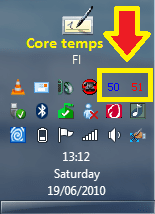
Doing all this, my dual core temps stay between 40° and 60° Celsius (104° and 140° Fahrenheit), even though the laptop is almost always on and I use it constantly.

Kari

core_temps.png
 
Last edited:

My Computer

Computer type
Laptop
Computer Manufacturer/Model Number
HP ENVY 17-1150eg
OS
Windows 10 Pro x64 EN-GB
CPU
1.6 GHz Intel Core i7-720QM Processor
Memory
6 GB
Graphics Card(s)
ATI Mobility Radeon HD 5850 Graphics
Sound Card
Beats sound system with integrated subwoofer
Monitor(s) Displays
17" laptop display, 22" LED and 32" Full HD TV through HDMI
Screen Resolution
1600*900 (1), 1920*1080 (2&3)
Hard Drives
Internal: 2 x 500 GB SATA Hard Disk Drive 7200 rpm
External: 2TB for backups, 3TB USB3 network drive for media
Cooling
As Envy runs a bit warm, I have it on a Cooler Master pad
Keyboard
Logitech diNovo Media Desktop Laser (bluetooth)
Mouse
Logitech Performance Mouse MX
Internet Speed
50/10 Mbps VDSL
Antivirus
Windows Defender 4.3.9431.0
Browser
Maxthon 3.5.2., IE11
if its a Dell laptop download " I8kfangui" or any other make download "speedfan" do a google search for the appropriate one, install the app and use it to control your lappys fans ;) that should help cool it a little
 

My Computer

Computer type
PC/Desktop
Computer Manufacturer/Model Number
self build
OS
win 7 ultimate32bit, Win8.1pro wmc 32bit
CPU
amd phenom x4 9600
Motherboard
asus m2n32-sli deluxe
Memory
corsair twinxs 2x2gb
Graphics Card(s)
2x nvidia 1gb 8500gt
Sound Card
onboard
Monitor(s) Displays
23" PB Viseo 233d
Screen Resolution
1920x1080
Hard Drives
maxtor sata 500gb
maxtor sata 320gb
fujitsu sata200gb
PSU
oryxx tornado 750w
Case
thermaltake xaser lll
Cooling
artic freezer64 pro + 7 case fans
Umm, @Kari, sorry for that title, thats the best i could think at that moment. And BTW my laptop is now about to be 3 years old, warranty is over like 2 years ago.. I thought of changing the thermal paste but i don't know yet if its a good idea, i don't want to spoil the laptop. My laptop is an Acer Aspire 4920g.. and i will check with those fan controlling s/w's . It would be helpful if you guys tell me a fan controlling s/w for my laptop which is able to control the fans speed, because i don't think i can, I've tried this earlier with some s/w but it wouldn't let me control it.
 

My Computer

Computer Manufacturer/Model Number
Self built, # Acer aspire 4920g
OS
Windows 7 Ultimate x64, # Windows Vista Home Premium 32bit
CPU
Intel Core 2 duo E8400 @ 4.00GHz, # Intel Core 2 DuoT7500
Motherboard
Gigabyte P35-DS3L, #Some Intel Mobo
Memory
4GB @ 1068MHz, # 2GB @ 800MHz
Graphics Card(s)
XFX 9600GT 1GB, # ATI HD 2400XT Mobility
Sound Card
Onboard realtek 5.1, # 2.1
Monitor(s) Displays
Acer v223w, # Inbuilt
Screen Resolution
1680x1050, # 1280x800
Hard Drives
500GB & 640GB, # 160GB
PSU
600W,
Case
Coolermaster HAF 932
Cooling
OCZ waterblock, Thermaltake for RAM, Arctic cooling for GPU
Keyboard
LG
Mouse
LG
Internet Speed
8mbps down, 1mbps up
Umm, I do have a notebook cooler..
 

My Computer

Computer Manufacturer/Model Number
Self built, # Acer aspire 4920g
OS
Windows 7 Ultimate x64, # Windows Vista Home Premium 32bit
CPU
Intel Core 2 duo E8400 @ 4.00GHz, # Intel Core 2 DuoT7500
Motherboard
Gigabyte P35-DS3L, #Some Intel Mobo
Memory
4GB @ 1068MHz, # 2GB @ 800MHz
Graphics Card(s)
XFX 9600GT 1GB, # ATI HD 2400XT Mobility
Sound Card
Onboard realtek 5.1, # 2.1
Monitor(s) Displays
Acer v223w, # Inbuilt
Screen Resolution
1680x1050, # 1280x800
Hard Drives
500GB & 640GB, # 160GB
PSU
600W,
Case
Coolermaster HAF 932
Cooling
OCZ waterblock, Thermaltake for RAM, Arctic cooling for GPU
Keyboard
LG
Mouse
LG
Internet Speed
8mbps down, 1mbps up
I have had the same issues with very high temps in my HP laptop. I have had to take it apart twice to clean dust stuck in the heat fins. I did this just this AM and where the copper pipe comes into the fins was totally clogged and no matter how much canned air I could have used it had to be pulled out with tweezers and then I had to clean between each fin.

I wouldn't do this unless your confident that you can pull it off. Also try finding a video or detailed pictures of someone else taking apart the same make and model if possible.

I am a smoker so when dust and stuff gets into my computers so does sticky stuff from smoking and that just makes matters worse for my poor computers and means I have to clean them 2-3 times more often then a non smoker. Having built about 20 personal rigs I know how bad smoking around a computer is for the fans and heat sinks and now that i have a wife who also smokes I am seriously thinking about banning smoking around the computers cause the idle temp of my laptop was 85 cel. and now that its cleaned 52. If I had played any movies or games I think I would have damaged something.

I will say that ribbon cables and their connectors can be very fragile in a laptop as I broke the connector to my power and wi fi buttons thankfully I was able to hold it down with small piece of plastic and the keyboard holds that nicely in place but I know I can't keep taking it apart before I lose the ability to make the connection at all.
 

My Computer

Computer Manufacturer/Model Number
Alienware M17x R3
OS
Windows 7 Ultimate x64
CPU
Intel Core i7 2670QM 2.2GHz 3.3GHz Turbo Mode
Memory
12GB Dual Channel DDR3 at 1333MHz
Graphics Card(s)
2GB GDDR5 AMD Radeon 6990M
Sound Card
Audio Powered by Klipsch
Monitor(s) Displays
17.3-inch WideFHD 1920 x 1080 60Hz WLED
Screen Resolution
1920x1080
Hard Drives
120GB SSD slot 1
1TB HDD slot 2
Case
alienware laptop case
Cooling
Dual heatsink and fans
Keyboard
Alienware multi color keyboard
Mouse
logitech G300 gaming mouse
Other Info
Intel® Centrino Advanced-N 6230 2x2 agn+ Bluetooth

finally got it!!!
For sure you should take compressed air and clean all vent openings, as well take back plates off carefully for some additional inspection for dust build up and hit with compressed air..........gently don't get stupid here. Turn unit over and gently shake all the little bits out of the keyboard and hit that with air. The take a look at this bad boy which could enhance your laptop on lap experience a ton.

Logitech® Speaker Lapdesk N700
 

My Computer

Computer type
PC/Desktop
Computer Manufacturer/Model Number
A blend of brains, brawn and dumb luck.
OS
Windows 7 Ultimate 64
CPU
i7 3770k OC'd 4.6 @ 1.17v, also FX 8120 & i5 miniITX
Motherboard
MSI P67A-GD80 b3
Memory
32 gb G.Skill Sniper DDR3 10-12-12-31 @ 2133
Graphics Card(s)
XFX Radeon 7870 2GB DDR5
Sound Card
Sound Blaster Z Series Card
Monitor(s) Displays
(2) LG LED 23" 1920 x 1080 2ms Monitors via mini d-port
Screen Resolution
1680 X 1050 p
Hard Drives
Samsung 256 gb 830 SSD sata III
(1) 1 tb WD Black
(2) 1 tb Hitachi deskmates/sata II
(2) 1 tb WD green/sata II
(2) 3 tb Seagate Barracuda
(1) 120 gb OCZ Vertex SS
(1) Drobo 5N w/5 Seagate 3tb
PSU
EVGA modular 1000G2 80% gold rating & APC 1200 RS
Case
CoolerMaster Storm Styker
Cooling
7 case fans 140mm & 120mm, NZXT Kraken X60
Keyboard
(2) Logitech Illuminated Keyboards (1) usb (1) wireless
Mouse
Logitech G700 & T-BC21 - nano nx for the laptop
Internet Speed
Basic 120mbps down
Antivirus
Trend Micro Titanium Max Security & Malwarebytes Premium
Browser
Chrome and IE 10
Other Info
5 Noctua case fans + 3 Noctua in p/p on NZXT cooler
Integrated hot swap drive bays for 2.5" Drives
(2) Lite-on dvd/cd/Blu Ray optical 22X
Integrated fan controller and led on/off
HP Officejet Pro 8630 all-n-one
Hot-swappable 3.5" hard drive bay
Netgear Nighthawk router
Asus USB 3 & sata 6 PCIe card
Vantec IDE to sata adptr./Ultra sata adptr
Lenovo L420 i5 lappy with m sata
Drobo 5N advanced NAS
Well, Thanks for recomending the logitech lapdesk, but its kind of costly for me, i got my cooler cheap, or i would'nt buy one... I am currently out of town so when i im back with my lappy ill flush it with air...
Thanks
 

My Computer

Computer Manufacturer/Model Number
Self built, # Acer aspire 4920g
OS
Windows 7 Ultimate x64, # Windows Vista Home Premium 32bit
CPU
Intel Core 2 duo E8400 @ 4.00GHz, # Intel Core 2 DuoT7500
Motherboard
Gigabyte P35-DS3L, #Some Intel Mobo
Memory
4GB @ 1068MHz, # 2GB @ 800MHz
Graphics Card(s)
XFX 9600GT 1GB, # ATI HD 2400XT Mobility
Sound Card
Onboard realtek 5.1, # 2.1
Monitor(s) Displays
Acer v223w, # Inbuilt
Screen Resolution
1680x1050, # 1280x800
Hard Drives
500GB & 640GB, # 160GB
PSU
600W,
Case
Coolermaster HAF 932
Cooling
OCZ waterblock, Thermaltake for RAM, Arctic cooling for GPU
Keyboard
LG
Mouse
LG
Internet Speed
8mbps down, 1mbps up
Please post back and let us know how the cleaning it out with air goes. If you have consitantly used your laptop on your lap you will be surprised at how much lent it will pick up. Thanks. Fabe
 

My Computer

Computer Manufacturer/Model Number
Self Built
OS
Windows 7 ultimate 64 bit / XP Home sp3
CPU
intel Core 2 Duo E8400 3.0ghz
Motherboard
Asus P5ND bios 1401
Memory
8 gigs 1066 OCZ Fata1ty
Graphics Card(s)
EVGA GTX 580 Call of Duty Black Ops Edition
Sound Card
Creative Soundblaster Audigy 2zs
Monitor(s) Displays
Asus 24in LCD's 2MS X2
Screen Resolution
1920x1080p @60Hz
Hard Drives
WD Caviar 500 Black/ WD Caviar 200 Blue
PSU
OCZ 700W GameXtreme
Case
NZXT Apollo
Cooling
Corsair H50 CPU/120mm x3 /60mm x2 /Corsair Dominator Ram
Keyboard
Logitech Bluetooth Wireless MX5000
Mouse
Logitech Bluetooth Wireless MX1000
Internet Speed
Download 19.83 Upload 0.97
Other Info
Logitech Z2300 Speakers/ Bose Noise Cancelling Headphones/Avermedia PCI-e Hybrid TV Bravo/Epson NX415 all in one/ 4 Port Powered USB Hub/ LG 10x Bluray Burner /TSST Corp DVDRW External
Overclocking a laptop, what a concept. :D
(fair game since posted in an overclocking forum ;p)
 

My Computer

Computer type
PC/Desktop
Computer Manufacturer/Model Number
Self Built Custom
OS
Windows 7 Ultimate Retail Box (64-bit installed) + Service Pack 1
CPU
AMD FX-8350 CPU v1.15 (or 1.0F) BIOS was required!
Motherboard
MSI 890FXA-GD70
Memory
8G CAS-7 G-Skill DDR3 @1333 (2 fours) [mobo nonOC max rec'd]
Graphics Card(s)
Radeon HD 7950 [3 gigs of GDDR5] MSI Twin Frozr model
Sound Card
Realtek High Definition Audio (onboard mobo, ALC-889 chip)
Monitor(s) Displays
2 WS LED Monitors: One LG One Viewsonic
Screen Resolution
1920 by 1080
Hard Drives
SSD for OS: Samsung 840 Pro
SSD for VM and utilities: Adata SX900
7200 RPM SATA HDs for the rest: Hitachi and Seagate
PSU
Corsair TX850 - 850W max, in service since August 2010.
Case
Thermaltake Armor A90
Cooling
Thermaltake Spin Q CPU Cooler, in service since August 2010
Keyboard
Logitech G11
Mouse
Logitech M310 Wireless
Internet Speed
100 Megabit broadband supposedly upgraded from 50 (Cable)
Antivirus
Bitdefender Internet Security 2014 suite
Browser
Pale Moon 64-bit main, also IceDragon, Opera, and Maxthon.
Other Info
CompTIA A+ certified (220-800 series) in July 2013.
Back
Top