Solved Laptop boots up in safe mode and shuts down automatically

cmnunis

New member
Local time
7:08 AM
Messages
9
Hi guys,

I'm new here and so, a big hello to all you "veterans" on this site. :) I hope to learn from you guys as I go along.

So here is my problem:-

My laptop started up in safe mode randomly and just went along. I tried to do a System Restore but then it shut down suddenly. I booted it up again and this time, the laptop lasted shorter than usual. I have also tried other options, like "Last Known Good Configuration" and "Startup Repair".

When I click on "Startup Windows Normally", it still goes into safe mode. I've tried doing a few things in safe mode and even that does not work. I tried going into Device Manager etc and there is no time to do anything as the laptop just dies off.

Methinks that it could be a hardware problem but has anyone had this problem before? If so, how did you guys get around to solving it?

All help will be much appreciated. Thanks for your time guys. :)
 

My Computer My Computer

At a glance

Windows 7 Professional 32bitIntel Centrino Core 2 Duo4GB RAM
Computer Manufacturer/Model Number
Dell Inspiron 1545
OS
Windows 7 Professional 32bit
CPU
Intel Centrino Core 2 Duo
Memory
4GB RAM
On battery, main power, or both?
 

My Computer My Computer

At a glance

Vista and now 7 in 32 and 64 bit.
Computer Manufacturer/Model Number
Three desktops and one laptop with good specs..
OS
Vista and now 7 in 32 and 64 bit.

My Computer My Computer

At a glance

Windows 7 Professional 32bitIntel Centrino Core 2 Duo4GB RAM
Computer Manufacturer/Model Number
Dell Inspiron 1545
OS
Windows 7 Professional 32bit
CPU
Intel Centrino Core 2 Duo
Memory
4GB RAM
Hi guys,

I'm new here and so, a big hello to all you "veterans" on this site. :) I hope to learn from you guys as I go along.

So here is my problem:-

My laptop started up in safe mode randomly and just went along. I tried to do a System Restore but then it shut down suddenly. I booted it up again and this time, the laptop lasted shorter than usual. I have also tried other options, like "Last Known Good Configuration" and "Startup Repair".

When I click on "Startup Windows Normally", it still goes into safe mode. I've tried doing a few things in safe mode and even that does not work. I tried going into Device Manager etc and there is no time to do anything as the laptop just dies off.

Methinks that it could be a hardware problem but has anyone had this problem before? If so, how did you guys get around to solving it?

All help will be much appreciated. Thanks for your time guys. :)

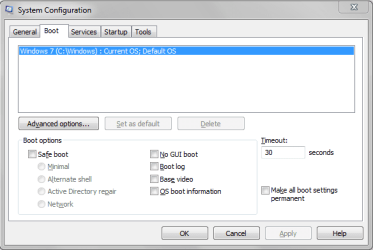
See if your computer is somehow set to boot in safe mode.....

Start > in the search box, type msconfig > press Enter key > click Boot tab at the top > under Boot options, make sure there is no check mark in front of Safe Boot > in fact, make sure there are no checkmarks anywhere > click OK when done.

see screenshot :
Boot Options.png
 

My Computer My Computer

At a glance

Windows 7 Home Premium 64-bit, SP1Intel Pentium P6200, Cores 2, 2.13 GHz4 GBIntel HD
Computer Manufacturer/Model Number
Acer Aspire 7741Z
OS
Windows 7 Home Premium 64-bit, SP1
CPU
Intel Pentium P6200, Cores 2, 2.13 GHz
Memory
4 GB
Graphics Card(s)
Intel HD
Sound Card
unknown
Monitor(s) Displays
17.3 inches
Screen Resolution
1600 x 900
Hard Drives
640 GB, 5400 PRM
Press F8 during the boot up process and when you get the long menu of options, choose the one that says "Disable Automatic Restart.........."

Now you'll be able to see the blue screen error that is happening when the system restarts and possibly use the information to correct the problem.
 

My Computer My Computer

At a glance

Windows 7 Ultimate RTM (Technet)3.00 gigahertz Intel Core2 Duo E84004GBATI Radeon X1950 Pro
Computer Manufacturer/Model Number
Custom
OS
Windows 7 Ultimate RTM (Technet)
CPU
3.00 gigahertz Intel Core2 Duo E8400
Motherboard
ASUSTeK Computer INC. P5K/EPU Rev 1.xx
Memory
4GB
Graphics Card(s)
ATI Radeon X1950 Pro
Sound Card
Built in HD Audio
Monitor(s) Displays
22" Gateway LCD
Screen Resolution
1920 x 1200
Hard Drives
ST3160023A [Hard drive] (160.04 GB) -- drive 0, rev 8.01, ST3500630AS [Hard drive] (500.11 GB) -- drive 2, rev 3.AAK
ST3500630AS [Hard drive] (500.11 GB) -- drive 1, rev 3.AAK
Keyboard
Logitech G11
Mouse
Microsoft Wireless Laser Mouse 5000
Internet Speed
13.44 Mbps
Hi guys,

thanks so much for the assistance. I've already fixed the problem. Thanks again. :)
 

My Computer My Computer

At a glance

Windows 7 Professional 32bitIntel Centrino Core 2 Duo4GB RAM
Computer Manufacturer/Model Number
Dell Inspiron 1545
OS
Windows 7 Professional 32bit
CPU
Intel Centrino Core 2 Duo
Memory
4GB RAM
Please make a post showing how it was fixed so that others can benefit from it and also mark the thread as solved. Otherwise people will continue to respond to it.
 

My Computer My Computer

At a glance

Windows 7 Ultimate RTM (Technet)3.00 gigahertz Intel Core2 Duo E84004GBATI Radeon X1950 Pro
Computer Manufacturer/Model Number
Custom
OS
Windows 7 Ultimate RTM (Technet)
CPU
3.00 gigahertz Intel Core2 Duo E8400
Motherboard
ASUSTeK Computer INC. P5K/EPU Rev 1.xx
Memory
4GB
Graphics Card(s)
ATI Radeon X1950 Pro
Sound Card
Built in HD Audio
Monitor(s) Displays
22" Gateway LCD
Screen Resolution
1920 x 1200
Hard Drives
ST3160023A [Hard drive] (160.04 GB) -- drive 0, rev 8.01, ST3500630AS [Hard drive] (500.11 GB) -- drive 2, rev 3.AAK
ST3500630AS [Hard drive] (500.11 GB) -- drive 1, rev 3.AAK
Keyboard
Logitech G11
Mouse
Microsoft Wireless Laser Mouse 5000
Internet Speed
13.44 Mbps
Ok, so what happened was, I did what Dave (see 4th post) suggested. Once that happened, I restarted the laptop and it started working fine.

I did a virus scan shortly after and guess what, there were 2 backdoors in my system that allowed for remote access. I cleared those 2 and now, its working well.

So, thanks again. :)
 

My Computer My Computer

At a glance

Windows 7 Professional 32bitIntel Centrino Core 2 Duo4GB RAM
Computer Manufacturer/Model Number
Dell Inspiron 1545
OS
Windows 7 Professional 32bit
CPU
Intel Centrino Core 2 Duo
Memory
4GB RAM

My Computer My Computer

At a glance

Win 7 Pro 64-bitIntel i5 2.4 Ghz8GB DDR3Intel HD 3000
Computer type
Laptop
Computer Manufacturer/Model Number
Sony Vaio VPCEB47GM Laptop
OS
Win 7 Pro 64-bit
CPU
Intel i5 2.4 Ghz
Memory
8GB DDR3
Graphics Card(s)
Intel HD 3000
Sound Card
IDT High Definition
Monitor(s) Displays
15.6 WGXA Anti-Glare LED
Screen Resolution
1280x800
Hard Drives
640Gb 7200rpm
Antivirus
MSE
Browser
Opera (primary) with IE9 backup
Hi guys, it looks like its happening again. This time, it doesn't go beyond the "Starting Microsoft" screen. It shows that screen and then it just dies off.

It all started with the disk check. I had wanted to do a disk check, and I ticked on both options. How do I get in to undo that now? :S
 

My Computer My Computer

At a glance

Windows 7 Professional 32bitIntel Centrino Core 2 Duo4GB RAM
Computer Manufacturer/Model Number
Dell Inspiron 1545
OS
Windows 7 Professional 32bit
CPU
Intel Centrino Core 2 Duo
Memory
4GB RAM
With both options ticked, disc check could take well over an hour to run. Did you see any kind of progress bar during the scan? (There are 5 parts to the scan.)

When you start your computer can you boot into Safe Mode? If yes you could try scanning for more malware or attempt a System File Checker scan. You may have some damaged or corrupt system files.

http://www.sevenforums.com/tutorials/69585-safe-mode.html

http://www.sevenforums.com/tutorials/1538-sfc-scannow-command-system-file-checker.html
 

My Computer My Computer

At a glance

Win 7 Pro 64-bitIntel i5 2.4 Ghz8GB DDR3Intel HD 3000
Computer type
Laptop
Computer Manufacturer/Model Number
Sony Vaio VPCEB47GM Laptop
OS
Win 7 Pro 64-bit
CPU
Intel i5 2.4 Ghz
Memory
8GB DDR3
Graphics Card(s)
Intel HD 3000
Sound Card
IDT High Definition
Monitor(s) Displays
15.6 WGXA Anti-Glare LED
Screen Resolution
1280x800
Hard Drives
640Gb 7200rpm
Antivirus
MSE
Browser
Opera (primary) with IE9 backup
Hi Marsmimar,

here's how it works now:-

1. It went straight into the disk check after the Dell and "Starting Windows" screen. After a few seconds, the laptop just collapsed. Yes there were 5 steps, but it didn't complete the first one.

2. I switched it on again and this time, I pressed F8. I tried to go into Safe Mode but as the files were loading, it collapsed again. I tried "Last Known Good Configuration" but all of that didn't work as the laptop kept collapsing.

3. Right now, it doesn't go beyond the Dell logo. It dies off after a few seconds.
 

My Computer My Computer

At a glance

Windows 7 Professional 32bitIntel Centrino Core 2 Duo4GB RAM
Computer Manufacturer/Model Number
Dell Inspiron 1545
OS
Windows 7 Professional 32bit
CPU
Intel Centrino Core 2 Duo
Memory
4GB RAM

My Computer My Computer

At a glance

Windows 7 Ultimate X64 SP1Intel i5-2550K, Differing ~4.4-4.8GHz No buil...16GB G.Skill Sniper 1866MHz @ 2133MHz 2x8GBASUS GTX650TIB-DC2OC-2GD5, (650TI Boost)
Computer type
PC/Desktop
Computer Manufacturer/Model Number
Home Built Desktop By DataTech
OS
Windows 7 Ultimate X64 SP1
CPU
Intel i5-2550K, Differing ~4.4-4.8GHz No built in GPU
Motherboard
ASUS P8Z68-V PRO/GEN3
Memory
16GB G.Skill Sniper 1866MHz @ 2133MHz 2x8GB
Graphics Card(s)
ASUS GTX650TIB-DC2OC-2GD5, (650TI Boost)
Sound Card
Onboard Realtek 5-1
Monitor(s) Displays
Samsung P2570HD
Screen Resolution
1920x1080
Hard Drives
Samsung 840 Pro 256GB SSD for OS, 500GB Seagate Constellation (Enterprise drive) for Data
PSU
Corsair HX650W
Case
Inwin Dragon Rider
Cooling
Hyper 212 EVO w/two Noctua fans, push-pull, @1300 RPM
Keyboard
E-Z Eyes, bright yellow keys with large characters
Mouse
steelseries SENSEI Laser Pro Gaming
Internet Speed
48-51Mbs Mbs down, 11 Mbs up Xfinity Cable
Antivirus
Norton Internet Security 2013
Browser
IE 10, Opera, Pale Moon if needed
Other Info
4 case fans, LG BluRay-RE, ASUS DVD-RW, Mr. Fusion power supply, 1.21 gigawatts.
By any chance, did you make a system repair disc?

http://www.sevenforums.com/tutorials/2083-system-repair-disc-create.html

Do you know if your Dell has a hidden recovery partition on the hard drive? Since you know the machine was infected previously, it might be better to bite the bullet and return the machine to factory specs and reinstall everything. Yes, a PITA but pretty much guaranteed to give you a clean hard drive to work from.
 

My Computer My Computer

At a glance

Win 7 Pro 64-bitIntel i5 2.4 Ghz8GB DDR3Intel HD 3000
Computer type
Laptop
Computer Manufacturer/Model Number
Sony Vaio VPCEB47GM Laptop
OS
Win 7 Pro 64-bit
CPU
Intel i5 2.4 Ghz
Memory
8GB DDR3
Graphics Card(s)
Intel HD 3000
Sound Card
IDT High Definition
Monitor(s) Displays
15.6 WGXA Anti-Glare LED
Screen Resolution
1280x800
Hard Drives
640Gb 7200rpm
Antivirus
MSE
Browser
Opera (primary) with IE9 backup
I've got a spare laptop. Working on it now. Thanks for the tip. Will update you guys once its done.
 

My Computer My Computer

At a glance

Windows 7 Professional 32bitIntel Centrino Core 2 Duo4GB RAM
Computer Manufacturer/Model Number
Dell Inspiron 1545
OS
Windows 7 Professional 32bit
CPU
Intel Centrino Core 2 Duo
Memory
4GB RAM
I just created a system repair disc.
 

My Computer My Computer

At a glance

Windows 7 Professional 32bitIntel Centrino Core 2 Duo4GB RAM
Computer Manufacturer/Model Number
Dell Inspiron 1545
OS
Windows 7 Professional 32bit
CPU
Intel Centrino Core 2 Duo
Memory
4GB RAM

My Computer My Computer

At a glance

Win 7 Pro 64-bitIntel i5 2.4 Ghz8GB DDR3Intel HD 3000
Computer type
Laptop
Computer Manufacturer/Model Number
Sony Vaio VPCEB47GM Laptop
OS
Win 7 Pro 64-bit
CPU
Intel i5 2.4 Ghz
Memory
8GB DDR3
Graphics Card(s)
Intel HD 3000
Sound Card
IDT High Definition
Monitor(s) Displays
15.6 WGXA Anti-Glare LED
Screen Resolution
1280x800
Hard Drives
640Gb 7200rpm
Antivirus
MSE
Browser
Opera (primary) with IE9 backup
Hi guys,

UPDATE: I got in to do a diagnostics test, and the PC lasted long enough to tell me that my HDD was failing. I then switched it off and booted it again, and managed to go into Windows. I did a PC Checkup and yes, it confirmed that my HDD was failing. With that said, I've just purchased a new HDD thats on its way as we speak and that solves the problem. Thank you for your assistance. :)
 

My Computer My Computer

At a glance

Windows 7 Professional 32bitIntel Centrino Core 2 Duo4GB RAM
Computer Manufacturer/Model Number
Dell Inspiron 1545
OS
Windows 7 Professional 32bit
CPU
Intel Centrino Core 2 Duo
Memory
4GB RAM
Good catch, glad you figured it out bud.:)
 

My Computer My Computer

At a glance

Windows 7 Ultimate X64 SP1Intel i5-2550K, Differing ~4.4-4.8GHz No buil...16GB G.Skill Sniper 1866MHz @ 2133MHz 2x8GBASUS GTX650TIB-DC2OC-2GD5, (650TI Boost)
Computer type
PC/Desktop
Computer Manufacturer/Model Number
Home Built Desktop By DataTech
OS
Windows 7 Ultimate X64 SP1
CPU
Intel i5-2550K, Differing ~4.4-4.8GHz No built in GPU
Motherboard
ASUS P8Z68-V PRO/GEN3
Memory
16GB G.Skill Sniper 1866MHz @ 2133MHz 2x8GB
Graphics Card(s)
ASUS GTX650TIB-DC2OC-2GD5, (650TI Boost)
Sound Card
Onboard Realtek 5-1
Monitor(s) Displays
Samsung P2570HD
Screen Resolution
1920x1080
Hard Drives
Samsung 840 Pro 256GB SSD for OS, 500GB Seagate Constellation (Enterprise drive) for Data
PSU
Corsair HX650W
Case
Inwin Dragon Rider
Cooling
Hyper 212 EVO w/two Noctua fans, push-pull, @1300 RPM
Keyboard
E-Z Eyes, bright yellow keys with large characters
Mouse
steelseries SENSEI Laser Pro Gaming
Internet Speed
48-51Mbs Mbs down, 11 Mbs up Xfinity Cable
Antivirus
Norton Internet Security 2013
Browser
IE 10, Opera, Pale Moon if needed
Other Info
4 case fans, LG BluRay-RE, ASUS DVD-RW, Mr. Fusion power supply, 1.21 gigawatts.
Hi guys,

UPDATE: I got in to do a diagnostics test, and the PC lasted long enough to tell me that my HDD was failing. I then switched it off and booted it again, and managed to go into Windows. I did a PC Checkup and yes, it confirmed that my HDD was failing. With that said, I've just purchased a new HDD thats on its way as we speak and that solves the problem. Thank you for your assistance. :)

Glad to hear you were able to isolate the problem. Thanks for posting back to let us know. :thumbsup:
 

My Computer My Computer

At a glance

Win 7 Pro 64-bitIntel i5 2.4 Ghz8GB DDR3Intel HD 3000
Computer type
Laptop
Computer Manufacturer/Model Number
Sony Vaio VPCEB47GM Laptop
OS
Win 7 Pro 64-bit
CPU
Intel i5 2.4 Ghz
Memory
8GB DDR3
Graphics Card(s)
Intel HD 3000
Sound Card
IDT High Definition
Monitor(s) Displays
15.6 WGXA Anti-Glare LED
Screen Resolution
1280x800
Hard Drives
640Gb 7200rpm
Antivirus
MSE
Browser
Opera (primary) with IE9 backup
Back
Top