Solved Laptop Can't Connect to HomeGroup? WorkGroup?

chamlin

New member
Local time
3:05 PM
Messages
97
In my home, I had my Windows 7 Professional PC and Laptop networked by someone a year ago who at the time said he was setting up a WorkGroup instead of a HomeGroup. Over time, that stopped working for some reason.

Then another guy came out and re-did the network. Said he preferred HomeGroup. I have no idea how this is actually configured at this point due to my limited experience with networks.

BIG Issue: After the revised setup, my desktop SSD takes much longer to boot up than the original configuration. And now, 4 weeks later, my laptop can't connect again.

Can you help?

1. This a wired network. Wireless is intentionally disabled (I hope.)
2. ISP is AT&T Uverse.
3. Cable connection
4. Router: 2Wire i38HG
5. Emsisoft Internet Security

Network Path to Laptop not found message
Advanced Sharing Settings
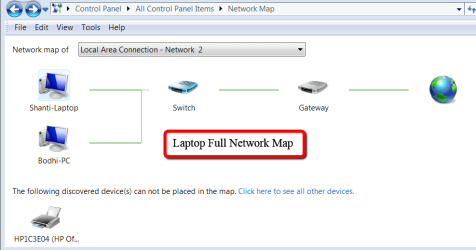
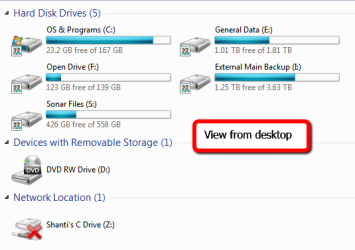
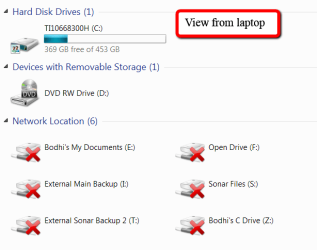
Basic Drives and Network Image

If my ipConfig is needed, please let me know. (And is that safe to provide?)
 
Last edited:

My Computer My Computer

At a glance

Windows 7 Professional 64-bitIntel Core i5-4670K Haswell 3.4GHz Quad-Core ...16GB (2 x 8GB) Kingston DDR3 1600FANLESS ASUS Radeon HD 6450 1GB
Computer type
PC/Desktop
Computer Manufacturer/Model Number
Custom Build
OS
Windows 7 Professional 64-bit
CPU
Intel Core i5-4670K Haswell 3.4GHz Quad-Core 84w CPU
Motherboard
ASUS Z87 Deluxe 1150 Intel Z87 Motherboard
Memory
16GB (2 x 8GB) Kingston DDR3 1600
Graphics Card(s)
FANLESS ASUS Radeon HD 6450 1GB
Hard Drives
c: SSD Intel 520 Series 180GB SATA III (for OS/programs)
e: WD 2TB Green (general data)
f: WD 600 GB Velociraptor (audio recording data)
g: WD 150 GB Velociraptor (open)
Antivirus
Emsisoft Internet Security (AV/Firewall)
Browser
Firefox
Detective work: I can tell this started on Nov. 28 at around 7:00pm, because that's when my local backup to an external drive stopped working.

Looked in the Event Viewer and found too much stuff. Here's what I thought might be relevant:
Event Viewer Dhpc-Client Errors
jjCfn9u3


Numerous DNS Client Event warnings:

  • Name resolution for the name isatap.gateway.2wire.net timed out after none of the configured DNS servers responded.
  • Name resolution for the name Bodhi-pc.gateway.2wire.net timed out after none of the configured DNS servers responded.
 

My Computer My Computer

At a glance

Windows 7 Professional 64-bitIntel Core i5-4670K Haswell 3.4GHz Quad-Core ...16GB (2 x 8GB) Kingston DDR3 1600FANLESS ASUS Radeon HD 6450 1GB
Computer type
PC/Desktop
Computer Manufacturer/Model Number
Custom Build
OS
Windows 7 Professional 64-bit
CPU
Intel Core i5-4670K Haswell 3.4GHz Quad-Core 84w CPU
Motherboard
ASUS Z87 Deluxe 1150 Intel Z87 Motherboard
Memory
16GB (2 x 8GB) Kingston DDR3 1600
Graphics Card(s)
FANLESS ASUS Radeon HD 6450 1GB
Hard Drives
c: SSD Intel 520 Series 180GB SATA III (for OS/programs)
e: WD 2TB Green (general data)
f: WD 600 GB Velociraptor (audio recording data)
g: WD 150 GB Velociraptor (open)
Antivirus
Emsisoft Internet Security (AV/Firewall)
Browser
Firefox
I'd like to try and help, but before getting to aggressive I need some info. (and I personally NEVER use "homegroup", being a "workgroup" person forever).

Forget about dealing with the laptop networking with the desktop for the moment. Let's focus on just being able to get to the Internet from each machine individually to ensure that part of your setup is working properly or not.

Can the desktop connect to the Internet? Can you please post screenshots showing IPCONFIG (do NOT need IPCONFIG /ALL), and also Network and Sharing Center. You're going through a router, so your externally visible IP address will not be shown (i.e. it is safe to post the screenshot).

Same with the laptop, and the same pair of screenshots please.
 

My Computer My Computer

At a glance

Windows 7 Pro x64 (1), Win7 Pro X64 (2)i5-3350p 3.1Ghz/6MB-cache (1); E8400 3.0Ghz/6...8GB PC3-12800 DDR3 (1); 4GB PC3-10600 DDR3 (2)ATI HD7750 (1), (see TV cards); ATI R7 250 (2)
Computer type
PC/Desktop
Computer Manufacturer/Model Number
Home-built, two systems (1) and (2)
OS
Windows 7 Pro x64 (1), Win7 Pro X64 (2)
CPU
i5-3350p 3.1Ghz/6MB-cache (1); E8400 3.0Ghz/6MB-cache (2)
Motherboard
ASUS P8Z77-V Pro (1); ASUS P5Q3 (2)
Memory
8GB PC3-12800 DDR3 (1); 4GB PC3-10600 DDR3 (2)
Graphics Card(s)
ATI HD7750 (1), (see TV cards); ATI R7 250 (2)
Sound Card
Realtek ALC892 HD Audio (1); Realtek ALC1200 HD Audio (2)
Monitor(s) Displays
Eizo HD2441W LCD, Eizo S2433W (1); Eizo 24" S2433W (2)
Screen Resolution
1920x1200, 1920x1200 (1); 1920x1200 (2)
Hard Drives
(1) 1TB SATA-II (7200RPM), 2x2TB SATA-III (7200RPM), 250GB SATA-III (10000RPM) for OS; 2x2TB external USB 3.0

(2) 320GB SATA-II (7200RPM), 750GB SATA-II (7200RPM), 150GB SATA-II (10000RPM) for OS; 2TB external USB 3.0
PSU
Nesteq ECS-6001 600W (1); Nesteq ECS-5001 500W (2)
Case
Acousti-Case 360 (1) and (2)
Cooling
Noctua NH-U12P SE2 for CPU, 2x120mm case fans (1) and (2)
Keyboard
IBM PS/2 (1) and (2)
Mouse
Logitech MX Revolution wireless (1); Microsoft wired (2)
Internet Speed
100mbps down / 10mbps up
Antivirus
Microsoft Security Essentials; Malwarebyte Anti-Malware Pro
Browser
Firefox
Other Info
Ceton InfiniTV 4-tuner cablecard-enabled TV card as well as Hauppauge HVR-2250 OTA/ATSC 2-tuner TV card in (1), running under Win7 WMC
Thanks!
1. Yes, internet connections work fine from both desktop and laptop.

I'll go do the IP Config for the Laptop now. Here's the desktop.

IP Config: DESKTOP
Windows IP Configuration

Host Name . . . . . . . . . . . . : Bodhi-PC
Primary Dns Suffix . . . . . . . :
Node Type . . . . . . . . . . . . : Hybrid
IP Routing Enabled. . . . . . . . : No
WINS Proxy Enabled. . . . . . . . : No
DNS Suffix Search List. . . . . . : gateway.2wire.net

Ethernet adapter Local Area Connection 2:

Media State . . . . . . . . . . . : Media disconnected
Connection-specific DNS Suffix . :
Description . . . . . . . . . . . : Intel(R) Ethernet Connection I217-V
Physical Address. . . . . . . . . : 74-D0-2B-2B-32-ED
DHCP Enabled. . . . . . . . . . . : Yes
Autoconfiguration Enabled . . . . : Yes

Ethernet adapter Local Area Connection:

Connection-specific DNS Suffix . : gateway.2wire.net
Description . . . . . . . . . . . : Realtek PCIe GBE Family Controller
Physical Address. . . . . . . . . : 74-D0-2B-2B-3B-46
DHCP Enabled. . . . . . . . . . . : Yes
Autoconfiguration Enabled . . . . : Yes
Link-local IPv6 Address . . . . . : fe80::f8e5:81d0:4278:dce9%11(Preferred)
IPv4 Address. . . . . . . . . . . : 192.168.1.74(Preferred)
Subnet Mask . . . . . . . . . . . : 255.255.255.0
Lease Obtained. . . . . . . . . . : Friday, December 12, 2014 11:07:53 AM
Lease Expires . . . . . . . . . . : Saturday, December 13, 2014 11:07:52 AM
Default Gateway . . . . . . . . . : 192.168.1.254
DHCP Server . . . . . . . . . . . : 192.168.1.254
DHCPv6 IAID . . . . . . . . . . . : 242536491
DHCPv6 Client DUID. . . . . . . . : 00-01-00-01-19-7E-F3-72-74-D0-2B-2B-3B-46
DNS Servers . . . . . . . . . . . : 192.168.1.254
NetBIOS over Tcpip. . . . . . . . : Enabled

Ethernet adapter VMware Network Adapter VMnet1:

Connection-specific DNS Suffix . :
Description . . . . . . . . . . . : VMware Virtual Ethernet Adapter for VMnet1
Physical Address. . . . . . . . . : 00-50-56-C0-00-01
DHCP Enabled. . . . . . . . . . . : No
Autoconfiguration Enabled . . . . : Yes
Link-local IPv6 Address . . . . . : fe80::b5d3:deb:3268:ed70%20(Preferred)
Autoconfiguration IPv4 Address. . : 169.254.237.112(Preferred)
Subnet Mask . . . . . . . . . . . : 255.255.0.0
Default Gateway . . . . . . . . . :
DHCPv6 IAID . . . . . . . . . . . : 385896534
DHCPv6 Client DUID. . . . . . . . : 00-01-00-01-19-7E-F3-72-74-D0-2B-2B-3B-46
DNS Servers . . . . . . . . . . . : fec0:0:0:ffff::1%1
fec0:0:0:ffff::2%1
fec0:0:0:ffff::3%1
NetBIOS over Tcpip. . . . . . . . : Enabled

Ethernet adapter VMware Network Adapter VMnet8:

Connection-specific DNS Suffix . :
Description . . . . . . . . . . . : VMware Virtual Ethernet Adapter for VMnet8
Physical Address. . . . . . . . . : 00-50-56-C0-00-08
DHCP Enabled. . . . . . . . . . . : No
Autoconfiguration Enabled . . . . : Yes
Link-local IPv6 Address . . . . . : fe80::41ac:3f7e:2642:25be%21(Preferred)
IPv4 Address. . . . . . . . . . . : 192.168.91.1(Preferred)
Subnet Mask . . . . . . . . . . . : 255.255.255.0
Default Gateway . . . . . . . . . :
DHCPv6 IAID . . . . . . . . . . . : 419450966
DHCPv6 Client DUID. . . . . . . . : 00-01-00-01-19-7E-F3-72-74-D0-2B-2B-3B-46
DNS Servers . . . . . . . . . . . : fec0:0:0:ffff::1%1
fec0:0:0:ffff::2%1
fec0:0:0:ffff::3%1
NetBIOS over Tcpip. . . . . . . . : Enabled

Tunnel adapter isatap.{00329F13-D416-4EED-A05B-38EFD1E625BB}:

Media State . . . . . . . . . . . : Media disconnected
Connection-specific DNS Suffix . :
Description . . . . . . . . . . . : Microsoft ISATAP Adapter
Physical Address. . . . . . . . . : 00-00-00-00-00-00-00-E0
DHCP Enabled. . . . . . . . . . . : No
Autoconfiguration Enabled . . . . : Yes

Tunnel adapter Local Area Connection* 13:

Media State . . . . . . . . . . . : Media disconnected
Connection-specific DNS Suffix . :
Description . . . . . . . . . . . : Teredo Tunneling Pseudo-Interface
Physical Address. . . . . . . . . : 00-00-00-00-00-00-00-E0
DHCP Enabled. . . . . . . . . . . : No
Autoconfiguration Enabled . . . . : Yes

Tunnel adapter isatap.{4AE71146-AF1F-45A7-A750-59E5CBC392E6}:

Media State . . . . . . . . . . . : Media disconnected
Connection-specific DNS Suffix . :
Description . . . . . . . . . . . : Microsoft ISATAP Adapter #2
Physical Address. . . . . . . . . : 00-00-00-00-00-00-00-E0
DHCP Enabled. . . . . . . . . . . : No
Autoconfiguration Enabled . . . . : Yes

Tunnel adapter isatap.{CA449F9A-CECD-4E3C-AD61-2F162C5D5D80}:

Media State . . . . . . . . . . . : Media disconnected
Connection-specific DNS Suffix . :
Description . . . . . . . . . . . : Microsoft ISATAP Adapter #3
Physical Address. . . . . . . . . : 00-00-00-00-00-00-00-E0
DHCP Enabled. . . . . . . . . . . : No
Autoconfiguration Enabled . . . . : Yes

Tunnel adapter isatap.gateway.2wire.net:

Media State . . . . . . . . . . . : Media disconnected
Connection-specific DNS Suffix . : gateway.2wire.net
Description . . . . . . . . . . . : Microsoft ISATAP Adapter #5
Physical Address. . . . . . . . . : 00-00-00-00-00-00-00-E0
DHCP Enabled. . . . . . . . . . . : No
Autoconfiguration Enabled . . . . : Yes
 

My Computer My Computer

At a glance

Windows 7 Professional 64-bitIntel Core i5-4670K Haswell 3.4GHz Quad-Core ...16GB (2 x 8GB) Kingston DDR3 1600FANLESS ASUS Radeon HD 6450 1GB
Computer type
PC/Desktop
Computer Manufacturer/Model Number
Custom Build
OS
Windows 7 Professional 64-bit
CPU
Intel Core i5-4670K Haswell 3.4GHz Quad-Core 84w CPU
Motherboard
ASUS Z87 Deluxe 1150 Intel Z87 Motherboard
Memory
16GB (2 x 8GB) Kingston DDR3 1600
Graphics Card(s)
FANLESS ASUS Radeon HD 6450 1GB
Hard Drives
c: SSD Intel 520 Series 180GB SATA III (for OS/programs)
e: WD 2TB Green (general data)
f: WD 600 GB Velociraptor (audio recording data)
g: WD 150 GB Velociraptor (open)
Antivirus
Emsisoft Internet Security (AV/Firewall)
Browser
Firefox
Laptop's IP Config

Windows IP Configuration

Host Name . . . . . . . . . . . . : Shanti-Laptop
Primary Dns Suffix . . . . . . . :
Node Type . . . . . . . . . . . . : Hybrid
IP Routing Enabled. . . . . . . . : No
WINS Proxy Enabled. . . . . . . . : No
DNS Suffix Search List. . . . . . : gateway.2wire.net

Wireless LAN adapter Wireless Network Connection:

Media State . . . . . . . . . . . : Media disconnected
Connection-specific DNS Suffix . :
Description . . . . . . . . . . . : Realtek RTL8188E Wireless LAN 802.11n PCI-E NIC
Physical Address. . . . . . . . . : 64-5A-04-A6-B1-6D
DHCP Enabled. . . . . . . . . . . : Yes
Autoconfiguration Enabled . . . . : Yes

Ethernet adapter Local Area Connection:

Connection-specific DNS Suffix . : gateway.2wire.net
Description . . . . . . . . . . . : Qualcomm Atheros AR8171/8175 PCI-E Gigabit Ethernet Controller (NDIS 6.20)
Physical Address. . . . . . . . . : 0C-54-A5-11-EC-76
DHCP Enabled. . . . . . . . . . . : Yes
Autoconfiguration Enabled . . . . : Yes
Link-local IPv6 Address . . . . . : fe80::1a8:91fc:a933:a5a%11(Preferred)
IPv4 Address. . . . . . . . . . . : 192.168.1.73(Preferred)
Subnet Mask . . . . . . . . . . . : 255.255.255.0
Lease Obtained. . . . . . . . . . : Friday, December 12, 2014 4:43:10 PM
Lease Expires . . . . . . . . . . : Saturday, December 13, 2014 4:43:10 PM
Default Gateway . . . . . . . . . : 192.168.1.254
DHCP Server . . . . . . . . . . . : 192.168.1.254
DHCPv6 IAID . . . . . . . . . . . : 235689125
DHCPv6 Client DUID. . . . . . . . : 00-01-00-01-1A-31-22-A6-0C-54-A5-11-EC-76
DNS Servers . . . . . . . . . . . : 192.168.1.254
NetBIOS over Tcpip. . . . . . . . : Enabled

Ethernet adapter VMware Network Adapter VMnet1:

Connection-specific DNS Suffix . :
Description . . . . . . . . . . . : VMware Virtual Ethernet Adapter for VMnet1
Physical Address. . . . . . . . . : 00-50-56-C0-00-01
DHCP Enabled. . . . . . . . . . . : No
Autoconfiguration Enabled . . . . : Yes
Link-local IPv6 Address . . . . . : fe80::4144:7bdf:70b2:9c40%15(Preferred)
IPv4 Address. . . . . . . . . . . : 192.168.108.1(Preferred)
Subnet Mask . . . . . . . . . . . : 255.255.255.0
Default Gateway . . . . . . . . . :
DHCPv6 IAID . . . . . . . . . . . : 553668694
DHCPv6 Client DUID. . . . . . . . : 00-01-00-01-1A-31-22-A6-0C-54-A5-11-EC-76
DNS Servers . . . . . . . . . . . : fec0:0:0:ffff::1%1
fec0:0:0:ffff::2%1
fec0:0:0:ffff::3%1
NetBIOS over Tcpip. . . . . . . . : Enabled

Ethernet adapter VMware Network Adapter VMnet8:

Connection-specific DNS Suffix . :
Description . . . . . . . . . . . : VMware Virtual Ethernet Adapter for VMnet8
Physical Address. . . . . . . . . : 00-50-56-C0-00-08
DHCP Enabled. . . . . . . . . . . : No
Autoconfiguration Enabled . . . . : Yes
Link-local IPv6 Address . . . . . : fe80::4cb0:a31e:92b9:d105%16(Preferred)
IPv4 Address. . . . . . . . . . . : 192.168.3.1(Preferred)
Subnet Mask . . . . . . . . . . . : 255.255.255.0
Default Gateway . . . . . . . . . :
DHCPv6 IAID . . . . . . . . . . . : 570445910
DHCPv6 Client DUID. . . . . . . . : 00-01-00-01-1A-31-22-A6-0C-54-A5-11-EC-76
DNS Servers . . . . . . . . . . . : fec0:0:0:ffff::1%1
fec0:0:0:ffff::2%1
fec0:0:0:ffff::3%1
NetBIOS over Tcpip. . . . . . . . : Enabled

Tunnel adapter isatap.{48BC66A8-8CEA-4AF4-AF66-0EFB08744A14}:

Media State . . . . . . . . . . . : Media disconnected
Connection-specific DNS Suffix . :
Description . . . . . . . . . . . : Microsoft ISATAP Adapter
Physical Address. . . . . . . . . : 00-00-00-00-00-00-00-E0
DHCP Enabled. . . . . . . . . . . : No
Autoconfiguration Enabled . . . . : Yes

Tunnel adapter isatap.gateway.2wire.net:

Media State . . . . . . . . . . . : Media disconnected
Connection-specific DNS Suffix . : gateway.2wire.net
Description . . . . . . . . . . . : Microsoft ISATAP Adapter #3
Physical Address. . . . . . . . . : 00-00-00-00-00-00-00-E0
DHCP Enabled. . . . . . . . . . . : No
Autoconfiguration Enabled . . . . : Yes

Tunnel adapter Teredo Tunneling Pseudo-Interface:

Media State . . . . . . . . . . . : Media disconnected
Connection-specific DNS Suffix . :
Description . . . . . . . . . . . : Teredo Tunneling Pseudo-Interface
Physical Address. . . . . . . . . : 00-00-00-00-00-00-00-E0
DHCP Enabled. . . . . . . . . . . : No
Autoconfiguration Enabled . . . . : Yes

Tunnel adapter isatap.{24FA2D3D-BE15-48D8-B03B-F1EE5F302055}:

Media State . . . . . . . . . . . : Media disconnected
Connection-specific DNS Suffix . :
Description . . . . . . . . . . . : Microsoft ISATAP Adapter #4
Physical Address. . . . . . . . . : 00-00-00-00-00-00-00-E0
DHCP Enabled. . . . . . . . . . . : No
Autoconfiguration Enabled . . . . : Yes

Tunnel adapter isatap.{90F359EA-E516-49AF-90A3-BB6A69A014FA}:

Media State . . . . . . . . . . . : Media disconnected
Connection-specific DNS Suffix . :
Description . . . . . . . . . . . : Microsoft ISATAP Adapter #5
Physical Address. . . . . . . . . : 00-00-00-00-00-00-00-E0
DHCP Enabled. . . . . . . . . . . : No
Autoconfiguration Enabled . . . . : Yes
 

My Computer My Computer

At a glance

Windows 7 Professional 64-bitIntel Core i5-4670K Haswell 3.4GHz Quad-Core ...16GB (2 x 8GB) Kingston DDR3 1600FANLESS ASUS Radeon HD 6450 1GB
Computer type
PC/Desktop
Computer Manufacturer/Model Number
Custom Build
OS
Windows 7 Professional 64-bit
CPU
Intel Core i5-4670K Haswell 3.4GHz Quad-Core 84w CPU
Motherboard
ASUS Z87 Deluxe 1150 Intel Z87 Motherboard
Memory
16GB (2 x 8GB) Kingston DDR3 1600
Graphics Card(s)
FANLESS ASUS Radeon HD 6450 1GB
Hard Drives
c: SSD Intel 520 Series 180GB SATA III (for OS/programs)
e: WD 2TB Green (general data)
f: WD 600 GB Velociraptor (audio recording data)
g: WD 150 GB Velociraptor (open)
Antivirus
Emsisoft Internet Security (AV/Firewall)
Browser
Firefox
Well, I know nothing about your VMWare adapters, and what they're for and how they're used, and whether or not their presence is relevant to your difficulties or not.

And I'm still waiting for your screenshot of "Network and Sharing Center" for both machines, just to get that visible.

But as far as the IPCONFIG straightforward normal "ethernet adapter local area connection" details, looks perfectly fine. The router is consistently addressed by 192.168.1.254 as the default gateway, DHCP server, and DNS server to both machines. This is good.

And the desktop is 192.168.1.74, with the laptop 192.168.1.73. Seems fine as well. And both machines CAN get to the Internet, which is also good news.

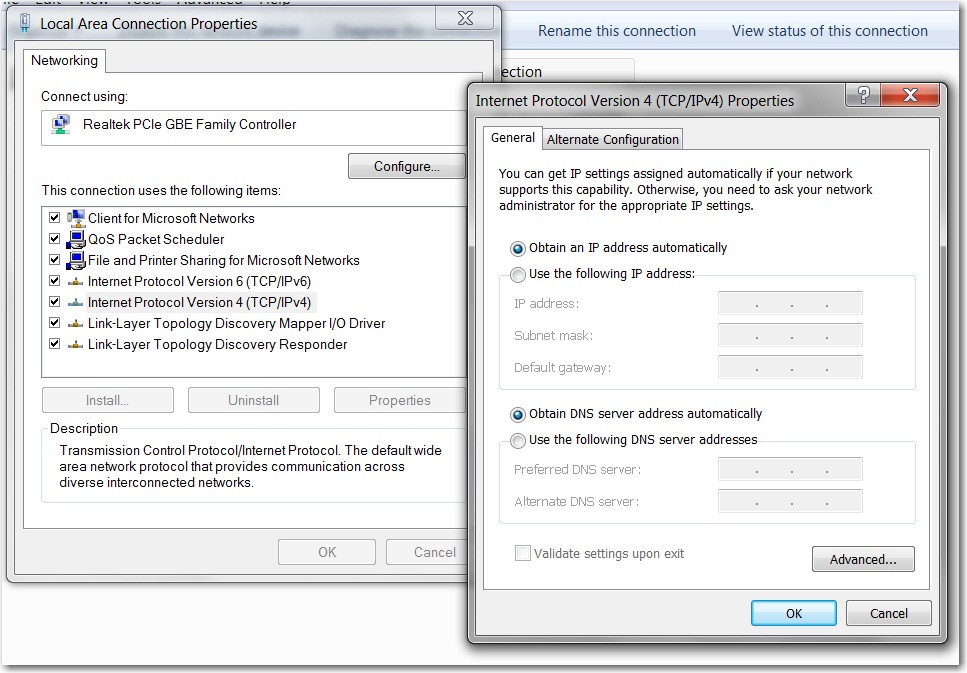
But I don't know if you manually set these addresses on each machine (which seems unlikely), or whether they were assigned automatically by DHCP (which seems most likely). Can you please confirm that the TCPIP IPv4 Properties for each wired network adapter in each machine shows "obtain addresses automatically".

Click on the network icon in the system tray and select "Open network and sharing center". Then select the ethernet local area network object, and right-click, and select Properties, and select the "Internet Protocol Version 4" item, and push the Properties button to get the Properties dialog window. I'd like to confirm both the IP address and DNS address radio buttons for "obtain address automatically" are checked.

4tiwQL.jpg
 

My Computer My Computer

At a glance

Windows 7 Pro x64 (1), Win7 Pro X64 (2)i5-3350p 3.1Ghz/6MB-cache (1); E8400 3.0Ghz/6...8GB PC3-12800 DDR3 (1); 4GB PC3-10600 DDR3 (2)ATI HD7750 (1), (see TV cards); ATI R7 250 (2)
Computer type
PC/Desktop
Computer Manufacturer/Model Number
Home-built, two systems (1) and (2)
OS
Windows 7 Pro x64 (1), Win7 Pro X64 (2)
CPU
i5-3350p 3.1Ghz/6MB-cache (1); E8400 3.0Ghz/6MB-cache (2)
Motherboard
ASUS P8Z77-V Pro (1); ASUS P5Q3 (2)
Memory
8GB PC3-12800 DDR3 (1); 4GB PC3-10600 DDR3 (2)
Graphics Card(s)
ATI HD7750 (1), (see TV cards); ATI R7 250 (2)
Sound Card
Realtek ALC892 HD Audio (1); Realtek ALC1200 HD Audio (2)
Monitor(s) Displays
Eizo HD2441W LCD, Eizo S2433W (1); Eizo 24" S2433W (2)
Screen Resolution
1920x1200, 1920x1200 (1); 1920x1200 (2)
Hard Drives
(1) 1TB SATA-II (7200RPM), 2x2TB SATA-III (7200RPM), 250GB SATA-III (10000RPM) for OS; 2x2TB external USB 3.0

(2) 320GB SATA-II (7200RPM), 750GB SATA-II (7200RPM), 150GB SATA-II (10000RPM) for OS; 2TB external USB 3.0
PSU
Nesteq ECS-6001 600W (1); Nesteq ECS-5001 500W (2)
Case
Acousti-Case 360 (1) and (2)
Cooling
Noctua NH-U12P SE2 for CPU, 2x120mm case fans (1) and (2)
Keyboard
IBM PS/2 (1) and (2)
Mouse
Logitech MX Revolution wireless (1); Microsoft wired (2)
Internet Speed
100mbps down / 10mbps up
Antivirus
Microsoft Security Essentials; Malwarebyte Anti-Malware Pro
Browser
Firefox
Other Info
Ceton InfiniTV 4-tuner cablecard-enabled TV card as well as Hauppauge HVR-2250 OTA/ATSC 2-tuner TV card in (1), running under Win7 WMC
Moving on... (although I still would like that screenshot of Network and Sharing Center)

I'd like to see what your right-click on Computer -> Properties shows, for both machines. I'm particularly interested in the computer name and workgroup settings area.

K5sHJU.jpg


You want to have your WORKGROUP name the same for both machines. So if they're not the same, you need to click on the "change settings" link on the right. Then you'll be presented with a dialog for you to enter the computer name, full computer name, computer description, and workgroup name. There's a "change" button on that dialog as well.

You should specify a meaningful and intuitive and helpful and useful value for "computer description", just because it's user-friendly to see it. Pick some name for your WORKGROUP that you feel satisfied with. Doesn't really matter what these values are, and you can always change them again later if you want.

WORKGROUP should be set the same in both machines, and computer name and description should obviously be different and unique in both machines.


Also, I have assumed you have a password defined for both machines that you enter when you boot Windows to the Welcome screen.

It doesn't matter if you use the same user name and even password for the administrator / boot account on both machines for your Welcome screen login to Windows. But you DO want a user name, and you do want a password, as when you first connect from one machine to the other there will be a popup that's actually a login from one machine to the other, and user name and password are required. You'll be able to check "remember my credentials" so you'll not need to do that again, but the first time you must enter a user name and password.

Some people just want Windows to boot immediately, without logging in. Or, an administrative user appears but with no password so you just have to click on that thumbnail but don't have to enter a password. This type of setup is not what you want. You want a user name and password.
 

My Computer My Computer

At a glance

Windows 7 Pro x64 (1), Win7 Pro X64 (2)i5-3350p 3.1Ghz/6MB-cache (1); E8400 3.0Ghz/6...8GB PC3-12800 DDR3 (1); 4GB PC3-10600 DDR3 (2)ATI HD7750 (1), (see TV cards); ATI R7 250 (2)
Computer type
PC/Desktop
Computer Manufacturer/Model Number
Home-built, two systems (1) and (2)
OS
Windows 7 Pro x64 (1), Win7 Pro X64 (2)
CPU
i5-3350p 3.1Ghz/6MB-cache (1); E8400 3.0Ghz/6MB-cache (2)
Motherboard
ASUS P8Z77-V Pro (1); ASUS P5Q3 (2)
Memory
8GB PC3-12800 DDR3 (1); 4GB PC3-10600 DDR3 (2)
Graphics Card(s)
ATI HD7750 (1), (see TV cards); ATI R7 250 (2)
Sound Card
Realtek ALC892 HD Audio (1); Realtek ALC1200 HD Audio (2)
Monitor(s) Displays
Eizo HD2441W LCD, Eizo S2433W (1); Eizo 24" S2433W (2)
Screen Resolution
1920x1200, 1920x1200 (1); 1920x1200 (2)
Hard Drives
(1) 1TB SATA-II (7200RPM), 2x2TB SATA-III (7200RPM), 250GB SATA-III (10000RPM) for OS; 2x2TB external USB 3.0

(2) 320GB SATA-II (7200RPM), 750GB SATA-II (7200RPM), 150GB SATA-II (10000RPM) for OS; 2TB external USB 3.0
PSU
Nesteq ECS-6001 600W (1); Nesteq ECS-5001 500W (2)
Case
Acousti-Case 360 (1) and (2)
Cooling
Noctua NH-U12P SE2 for CPU, 2x120mm case fans (1) and (2)
Keyboard
IBM PS/2 (1) and (2)
Mouse
Logitech MX Revolution wireless (1); Microsoft wired (2)
Internet Speed
100mbps down / 10mbps up
Antivirus
Microsoft Security Essentials; Malwarebyte Anti-Malware Pro
Browser
Firefox
Other Info
Ceton InfiniTV 4-tuner cablecard-enabled TV card as well as Hauppauge HVR-2250 OTA/ATSC 2-tuner TV card in (1), running under Win7 WMC
D, in the original post there are a few screenshots, one has the network sharing for the desktop. Here is the laptop's: 2014-12-12_1720 - chamlin's library.

Working on the rest.
 

My Computer My Computer

At a glance

Windows 7 Professional 64-bitIntel Core i5-4670K Haswell 3.4GHz Quad-Core ...16GB (2 x 8GB) Kingston DDR3 1600FANLESS ASUS Radeon HD 6450 1GB
Computer type
PC/Desktop
Computer Manufacturer/Model Number
Custom Build
OS
Windows 7 Professional 64-bit
CPU
Intel Core i5-4670K Haswell 3.4GHz Quad-Core 84w CPU
Motherboard
ASUS Z87 Deluxe 1150 Intel Z87 Motherboard
Memory
16GB (2 x 8GB) Kingston DDR3 1600
Graphics Card(s)
FANLESS ASUS Radeon HD 6450 1GB
Hard Drives
c: SSD Intel 520 Series 180GB SATA III (for OS/programs)
e: WD 2TB Green (general data)
f: WD 600 GB Velociraptor (audio recording data)
g: WD 150 GB Velociraptor (open)
Antivirus
Emsisoft Internet Security (AV/Firewall)
Browser
Firefox

My Computer My Computer

At a glance

Windows 7 Professional 64-bitIntel Core i5-4670K Haswell 3.4GHz Quad-Core ...16GB (2 x 8GB) Kingston DDR3 1600FANLESS ASUS Radeon HD 6450 1GB
Computer type
PC/Desktop
Computer Manufacturer/Model Number
Custom Build
OS
Windows 7 Professional 64-bit
CPU
Intel Core i5-4670K Haswell 3.4GHz Quad-Core 84w CPU
Motherboard
ASUS Z87 Deluxe 1150 Intel Z87 Motherboard
Memory
16GB (2 x 8GB) Kingston DDR3 1600
Graphics Card(s)
FANLESS ASUS Radeon HD 6450 1GB
Hard Drives
c: SSD Intel 520 Series 180GB SATA III (for OS/programs)
e: WD 2TB Green (general data)
f: WD 600 GB Velociraptor (audio recording data)
g: WD 150 GB Velociraptor (open)
Antivirus
Emsisoft Internet Security (AV/Firewall)
Browser
Firefox
Also, I have assumed you have a password defined for both machines that you enter when you boot Windows to the Welcome screen.

It doesn't matter if you use the same user name and even password for the administrator / boot account on both machines for your Welcome screen login to Windows. But you DO want a user name, and you do want a password, as when you first connect from one machine to the other there will be a popup that's actually a login from one machine to the other, and user name and password are required. You'll be able to check "remember my credentials" so you'll not need to do that again, but the first time you must enter a user name and password.

Some people just want Windows to boot immediately, without logging in. Or, an administrative user appears but with no password so you just have to click on that thumbnail but don't have to enter a password. This type of setup is not what you want. You want a user name and password.

Hmmm...not sure. I know that for both computers, we do not have to currently enter a username or password. Pretty sure I remember that we had to check the "remember my credentials" box, but...is there a way to check this?

The network was working fine, it's just this recent hiccup.
 

My Computer My Computer

At a glance

Windows 7 Professional 64-bitIntel Core i5-4670K Haswell 3.4GHz Quad-Core ...16GB (2 x 8GB) Kingston DDR3 1600FANLESS ASUS Radeon HD 6450 1GB
Computer type
PC/Desktop
Computer Manufacturer/Model Number
Custom Build
OS
Windows 7 Professional 64-bit
CPU
Intel Core i5-4670K Haswell 3.4GHz Quad-Core 84w CPU
Motherboard
ASUS Z87 Deluxe 1150 Intel Z87 Motherboard
Memory
16GB (2 x 8GB) Kingston DDR3 1600
Graphics Card(s)
FANLESS ASUS Radeon HD 6450 1GB
Hard Drives
c: SSD Intel 520 Series 180GB SATA III (for OS/programs)
e: WD 2TB Green (general data)
f: WD 600 GB Velociraptor (audio recording data)
g: WD 150 GB Velociraptor (open)
Antivirus
Emsisoft Internet Security (AV/Firewall)
Browser
Firefox
Hmmm...not sure. I know that for both computers, we do not have to currently enter a username or password.
You mean at Windows boot, you don't have a user account thumbnail that appears and that you click on to then enter your Windows password? You don't have a password to start Windows? Or do you?


Pretty sure I remember that we had to check the "remember my credentials" box, but...is there a way to check this?
We'll get to this.

But what's curious is that you have those two VMWare network adapters showing as "public network", and it's on both machines. Do you know what these are or where they came from? Do you have outside connectivity that you do from both machines? Something outside your house that you connect to, maybe for work? I honestly am not familiar with these or what they're all about. Are you running VMWare??

What's also odd is that your home network shows as "work network", when I'd imagine it would have been a "home network". We can change that.

I do see that the "Shanti's C drive" on the laptop (which you appear to have mapped as Z on your desktop machine) has a red X next to it. That doesn't look good. So if this thread is because you can't get to the drives of the laptop from the desktop (and vice versa??), this looks like an interesting clue.


The WORKGROUP for both machines is good.

I'd like to get you to have a "home network", and also to be sure we have user name and password credentials entered correctly (by deleting whatever is currently in place), and also to be sure you've set up drive sharing correctly on each machine to support proper access from the other machine.
 

My Computer My Computer

At a glance

Windows 7 Pro x64 (1), Win7 Pro X64 (2)i5-3350p 3.1Ghz/6MB-cache (1); E8400 3.0Ghz/6...8GB PC3-12800 DDR3 (1); 4GB PC3-10600 DDR3 (2)ATI HD7750 (1), (see TV cards); ATI R7 250 (2)
Computer type
PC/Desktop
Computer Manufacturer/Model Number
Home-built, two systems (1) and (2)
OS
Windows 7 Pro x64 (1), Win7 Pro X64 (2)
CPU
i5-3350p 3.1Ghz/6MB-cache (1); E8400 3.0Ghz/6MB-cache (2)
Motherboard
ASUS P8Z77-V Pro (1); ASUS P5Q3 (2)
Memory
8GB PC3-12800 DDR3 (1); 4GB PC3-10600 DDR3 (2)
Graphics Card(s)
ATI HD7750 (1), (see TV cards); ATI R7 250 (2)
Sound Card
Realtek ALC892 HD Audio (1); Realtek ALC1200 HD Audio (2)
Monitor(s) Displays
Eizo HD2441W LCD, Eizo S2433W (1); Eizo 24" S2433W (2)
Screen Resolution
1920x1200, 1920x1200 (1); 1920x1200 (2)
Hard Drives
(1) 1TB SATA-II (7200RPM), 2x2TB SATA-III (7200RPM), 250GB SATA-III (10000RPM) for OS; 2x2TB external USB 3.0

(2) 320GB SATA-II (7200RPM), 750GB SATA-II (7200RPM), 150GB SATA-II (10000RPM) for OS; 2TB external USB 3.0
PSU
Nesteq ECS-6001 600W (1); Nesteq ECS-5001 500W (2)
Case
Acousti-Case 360 (1) and (2)
Cooling
Noctua NH-U12P SE2 for CPU, 2x120mm case fans (1) and (2)
Keyboard
IBM PS/2 (1) and (2)
Mouse
Logitech MX Revolution wireless (1); Microsoft wired (2)
Internet Speed
100mbps down / 10mbps up
Antivirus
Microsoft Security Essentials; Malwarebyte Anti-Malware Pro
Browser
Firefox
Other Info
Ceton InfiniTV 4-tuner cablecard-enabled TV card as well as Hauppauge HVR-2250 OTA/ATSC 2-tuner TV card in (1), running under Win7 WMC
One more screenshot needed, again for both machines...

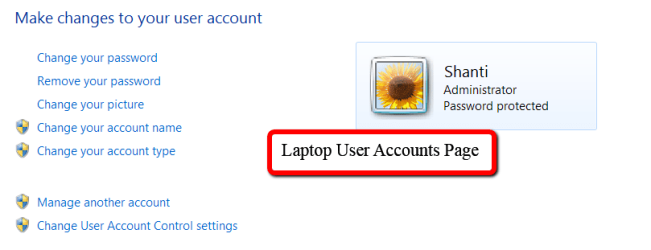
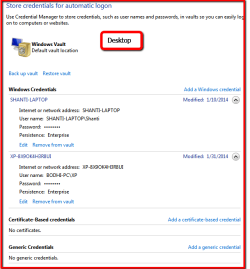
Control Panel -> User accounts and family safety -> Credential manager
 

My Computer My Computer

At a glance

Windows 7 Pro x64 (1), Win7 Pro X64 (2)i5-3350p 3.1Ghz/6MB-cache (1); E8400 3.0Ghz/6...8GB PC3-12800 DDR3 (1); 4GB PC3-10600 DDR3 (2)ATI HD7750 (1), (see TV cards); ATI R7 250 (2)
Computer type
PC/Desktop
Computer Manufacturer/Model Number
Home-built, two systems (1) and (2)
OS
Windows 7 Pro x64 (1), Win7 Pro X64 (2)
CPU
i5-3350p 3.1Ghz/6MB-cache (1); E8400 3.0Ghz/6MB-cache (2)
Motherboard
ASUS P8Z77-V Pro (1); ASUS P5Q3 (2)
Memory
8GB PC3-12800 DDR3 (1); 4GB PC3-10600 DDR3 (2)
Graphics Card(s)
ATI HD7750 (1), (see TV cards); ATI R7 250 (2)
Sound Card
Realtek ALC892 HD Audio (1); Realtek ALC1200 HD Audio (2)
Monitor(s) Displays
Eizo HD2441W LCD, Eizo S2433W (1); Eizo 24" S2433W (2)
Screen Resolution
1920x1200, 1920x1200 (1); 1920x1200 (2)
Hard Drives
(1) 1TB SATA-II (7200RPM), 2x2TB SATA-III (7200RPM), 250GB SATA-III (10000RPM) for OS; 2x2TB external USB 3.0

(2) 320GB SATA-II (7200RPM), 750GB SATA-II (7200RPM), 150GB SATA-II (10000RPM) for OS; 2TB external USB 3.0
PSU
Nesteq ECS-6001 600W (1); Nesteq ECS-5001 500W (2)
Case
Acousti-Case 360 (1) and (2)
Cooling
Noctua NH-U12P SE2 for CPU, 2x120mm case fans (1) and (2)
Keyboard
IBM PS/2 (1) and (2)
Mouse
Logitech MX Revolution wireless (1); Microsoft wired (2)
Internet Speed
100mbps down / 10mbps up
Antivirus
Microsoft Security Essentials; Malwarebyte Anti-Malware Pro
Browser
Firefox
Other Info
Ceton InfiniTV 4-tuner cablecard-enabled TV card as well as Hauppauge HVR-2250 OTA/ATSC 2-tuner TV card in (1), running under Win7 WMC
And one more pair of screenshots (one from each machine)...

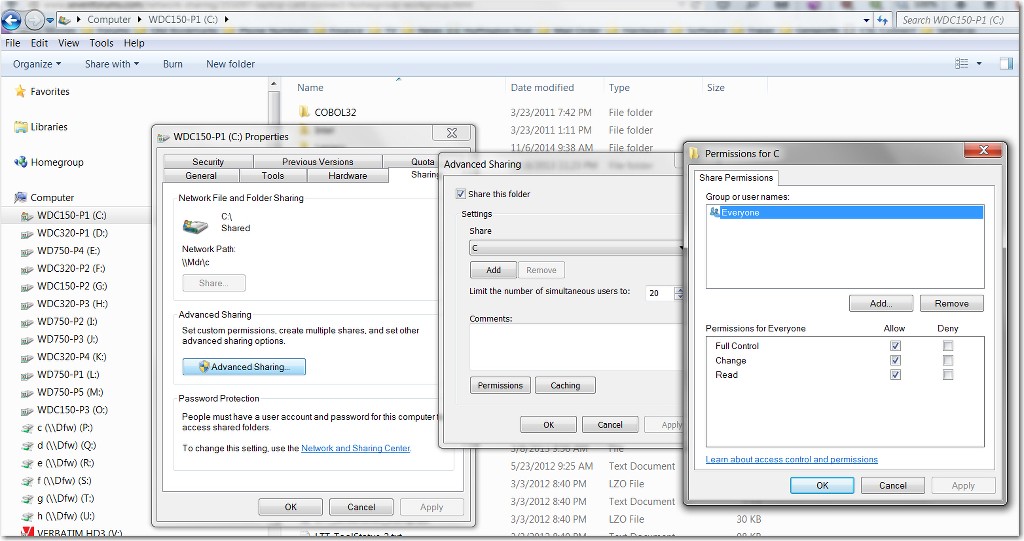
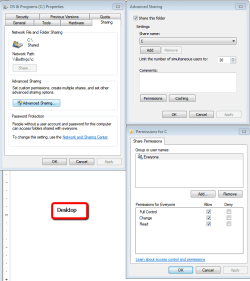
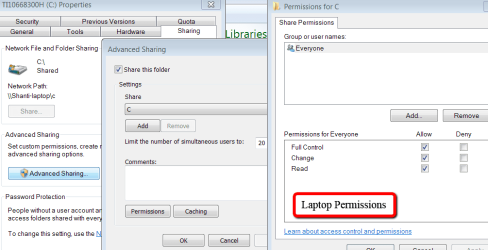
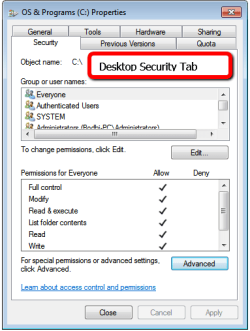
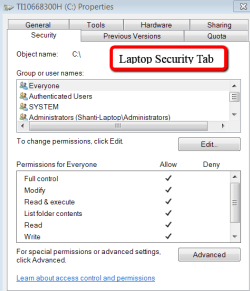
I don't know if you want to share (i.e. make accessible to the other machine) EVERY partition on each machine, but whichever partitions you do want to make accessible you must define through "advanced sharing". And of course if you want to allow WRITE as well as READ from the other machine, you must specify "full control" in the sharing permissions, for "everyone" (which is convenient in a home LAN setup).

So, looking just at C on each machine to begin with, open Explorer, right-click on C and select "Share with" -> advanced sharing, to begin opening the Properties dialog window. Then push the "Advanced sharing" button to get the Advanced Sharing dialog window. Then push the Permissions button to get the Permissions window.

Spread the windows out so that you can take one screenshot of the whole area as one picture.

WwDkj3.jpg
 

My Computer My Computer

At a glance

Windows 7 Pro x64 (1), Win7 Pro X64 (2)i5-3350p 3.1Ghz/6MB-cache (1); E8400 3.0Ghz/6...8GB PC3-12800 DDR3 (1); 4GB PC3-10600 DDR3 (2)ATI HD7750 (1), (see TV cards); ATI R7 250 (2)
Computer type
PC/Desktop
Computer Manufacturer/Model Number
Home-built, two systems (1) and (2)
OS
Windows 7 Pro x64 (1), Win7 Pro X64 (2)
CPU
i5-3350p 3.1Ghz/6MB-cache (1); E8400 3.0Ghz/6MB-cache (2)
Motherboard
ASUS P8Z77-V Pro (1); ASUS P5Q3 (2)
Memory
8GB PC3-12800 DDR3 (1); 4GB PC3-10600 DDR3 (2)
Graphics Card(s)
ATI HD7750 (1), (see TV cards); ATI R7 250 (2)
Sound Card
Realtek ALC892 HD Audio (1); Realtek ALC1200 HD Audio (2)
Monitor(s) Displays
Eizo HD2441W LCD, Eizo S2433W (1); Eizo 24" S2433W (2)
Screen Resolution
1920x1200, 1920x1200 (1); 1920x1200 (2)
Hard Drives
(1) 1TB SATA-II (7200RPM), 2x2TB SATA-III (7200RPM), 250GB SATA-III (10000RPM) for OS; 2x2TB external USB 3.0

(2) 320GB SATA-II (7200RPM), 750GB SATA-II (7200RPM), 150GB SATA-II (10000RPM) for OS; 2TB external USB 3.0
PSU
Nesteq ECS-6001 600W (1); Nesteq ECS-5001 500W (2)
Case
Acousti-Case 360 (1) and (2)
Cooling
Noctua NH-U12P SE2 for CPU, 2x120mm case fans (1) and (2)
Keyboard
IBM PS/2 (1) and (2)
Mouse
Logitech MX Revolution wireless (1); Microsoft wired (2)
Internet Speed
100mbps down / 10mbps up
Antivirus
Microsoft Security Essentials; Malwarebyte Anti-Malware Pro
Browser
Firefox
Other Info
Ceton InfiniTV 4-tuner cablecard-enabled TV card as well as Hauppauge HVR-2250 OTA/ATSC 2-tuner TV card in (1), running under Win7 WMC
Got it. Working on all of this. Very grateful for your assistance!
 

My Computer My Computer

At a glance

Windows 7 Professional 64-bitIntel Core i5-4670K Haswell 3.4GHz Quad-Core ...16GB (2 x 8GB) Kingston DDR3 1600FANLESS ASUS Radeon HD 6450 1GB
Computer type
PC/Desktop
Computer Manufacturer/Model Number
Custom Build
OS
Windows 7 Professional 64-bit
CPU
Intel Core i5-4670K Haswell 3.4GHz Quad-Core 84w CPU
Motherboard
ASUS Z87 Deluxe 1150 Intel Z87 Motherboard
Memory
16GB (2 x 8GB) Kingston DDR3 1600
Graphics Card(s)
FANLESS ASUS Radeon HD 6450 1GB
Hard Drives
c: SSD Intel 520 Series 180GB SATA III (for OS/programs)
e: WD 2TB Green (general data)
f: WD 600 GB Velociraptor (audio recording data)
g: WD 150 GB Velociraptor (open)
Antivirus
Emsisoft Internet Security (AV/Firewall)
Browser
Firefox
Dinner break. After, I'll bring the laptop up to the desktop and go through all of this and catch up so I am clear on what to do and questions to ask.

Thanks!
 

My Computer My Computer

At a glance

Windows 7 Professional 64-bitIntel Core i5-4670K Haswell 3.4GHz Quad-Core ...16GB (2 x 8GB) Kingston DDR3 1600FANLESS ASUS Radeon HD 6450 1GB
Computer type
PC/Desktop
Computer Manufacturer/Model Number
Custom Build
OS
Windows 7 Professional 64-bit
CPU
Intel Core i5-4670K Haswell 3.4GHz Quad-Core 84w CPU
Motherboard
ASUS Z87 Deluxe 1150 Intel Z87 Motherboard
Memory
16GB (2 x 8GB) Kingston DDR3 1600
Graphics Card(s)
FANLESS ASUS Radeon HD 6450 1GB
Hard Drives
c: SSD Intel 520 Series 180GB SATA III (for OS/programs)
e: WD 2TB Green (general data)
f: WD 600 GB Velociraptor (audio recording data)
g: WD 150 GB Velociraptor (open)
Antivirus
Emsisoft Internet Security (AV/Firewall)
Browser
Firefox
Okay, reality struck. Midnight. Will do this better in the morning. Really, very much appreciating the help.
Chamlin
 

My Computer My Computer

At a glance

Windows 7 Professional 64-bitIntel Core i5-4670K Haswell 3.4GHz Quad-Core ...16GB (2 x 8GB) Kingston DDR3 1600FANLESS ASUS Radeon HD 6450 1GB
Computer type
PC/Desktop
Computer Manufacturer/Model Number
Custom Build
OS
Windows 7 Professional 64-bit
CPU
Intel Core i5-4670K Haswell 3.4GHz Quad-Core 84w CPU
Motherboard
ASUS Z87 Deluxe 1150 Intel Z87 Motherboard
Memory
16GB (2 x 8GB) Kingston DDR3 1600
Graphics Card(s)
FANLESS ASUS Radeon HD 6450 1GB
Hard Drives
c: SSD Intel 520 Series 180GB SATA III (for OS/programs)
e: WD 2TB Green (general data)
f: WD 600 GB Velociraptor (audio recording data)
g: WD 150 GB Velociraptor (open)
Antivirus
Emsisoft Internet Security (AV/Firewall)
Browser
Firefox
Yes, I use VMware Player on both systems. The network stuff was how VM sets itself up. VM has been there a long time so it wasn't a new wild card messing things up.
 

My Computer My Computer

At a glance

Windows 7 Professional 64-bitIntel Core i5-4670K Haswell 3.4GHz Quad-Core ...16GB (2 x 8GB) Kingston DDR3 1600FANLESS ASUS Radeon HD 6450 1GB
Computer type
PC/Desktop
Computer Manufacturer/Model Number
Custom Build
OS
Windows 7 Professional 64-bit
CPU
Intel Core i5-4670K Haswell 3.4GHz Quad-Core 84w CPU
Motherboard
ASUS Z87 Deluxe 1150 Intel Z87 Motherboard
Memory
16GB (2 x 8GB) Kingston DDR3 1600
Graphics Card(s)
FANLESS ASUS Radeon HD 6450 1GB
Hard Drives
c: SSD Intel 520 Series 180GB SATA III (for OS/programs)
e: WD 2TB Green (general data)
f: WD 600 GB Velociraptor (audio recording data)
g: WD 150 GB Velociraptor (open)
Antivirus
Emsisoft Internet Security (AV/Firewall)
Browser
Firefox
I do see that the "Shanti's C drive" on the laptop (which you appear to have mapped as Z on your desktop machine) has a red X next to it. That doesn't look good. So if this thread is because you can't get to the drives of the laptop from the desktop (and vice versa??), this looks like an interesting clue.
I'd like to get you to have a "home network", and also to be sure we have user name and password credentials entered correctly (by deleting whatever is currently in place), and also to be sure you've set up drive sharing correctly on each machine to support proper access from the other machine.
HISTORY:

  • It was all set up correctly in January 2014. It worked fine for the first 9 months, then I lost connectivity to the laptop.
  • Then the 2nd network guy came out, made changes, fixing the laptop back in to connectivity. But it also resulted in much longer boot up times (have another thread right now trying to resolve the long SSD boot time). :(
  • 7 weeks later, laptop connectivity is lost again.
Really important to me is that we do NOT have to enter usernames or passwords on a daily basis. I know that originally there were usernames/passwords entered and it worked fine. When the 2nd guy fixed the network, he first said we'd have to use the usernames/passwords daily, but after much begging and uncontrollable :cry:, he relented and found a way to make it work. Don't know how...and I'm a bit concerned that I am not certain that what I have written down for passwords are the passwords.

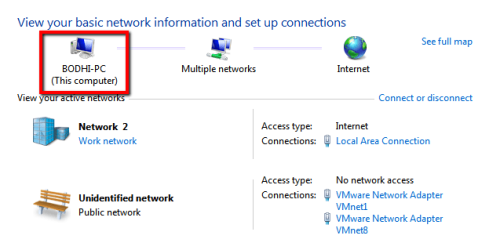
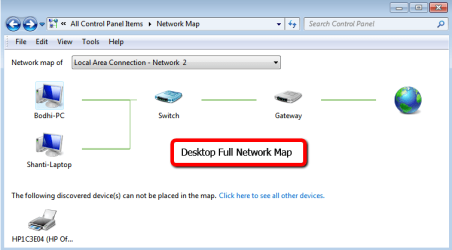
Yes, the major issue is laptop (Shanti) connectivity to the network. The desktop (Bodhi), with it's internal drives (C:, E:, F:, S:) and external drives (I:, T:) and networked printer (HP) are all functioning properly. Images below.

The laptop (Shanti) cannot connect with any of the above drives or printer. The desktop (Bodhi), cannot access the laptop, (mapped on the desktop as drive Z:).

What's also odd is that your home network shows as "work network", when I'd imagine it would have been a "home network". We can change that.
Is there a functional difference? Or just languaging?

The WORKGROUP for both machines is good.
Yes, I thought the original network was set up as a WORKGROUP, but in early October, the 2nd networking guy said he thought it should be a HOMEGROUP and made changes. I thought there was supposed to be a lot more flexibility with the WORKGROUP. How can you tell which it is???

But what's curious is that you have those two VMWare network adapters showing as "public network", and it's on both machines. Do you know what these are or where they came from? Do you have outside connectivity that you do from both machines? Something outside your house that you connect to, maybe for work? I honestly am not familiar with these or what they're all about. Are you running VMWare??
The VMware Player we use is to run, in home only, not outside the home, legacy XP programs that won't install in Windows 7. And it is able to, at times, get through the network to grab the documents it needs, but there's something not fully right with it's ability to do that. And the Desktop can't seem to access what's inside the VMware thing.
 

Attachments

  • Desktop_Basic_Network.png
    Desktop_Basic_Network.png
    12.2 KB · Views: 11
  • Laptop_Basic_Network.png
    Laptop_Basic_Network.png
    16 KB · Views: 0
  • Desktop_Full_Network_Map.png
    Desktop_Full_Network_Map.png
    16.6 KB · Views: 0
  • Laptop_Full_Network_Map.png
    Laptop_Full_Network_Map.png
    20 KB · Views: 0
  • Desktop_view_of_network.png
    Desktop_view_of_network.png
    12 KB · Views: 11
  • Laptop_view_of_network.png
    Laptop_view_of_network.png
    15 KB · Views: 11

My Computer My Computer

At a glance

Windows 7 Professional 64-bitIntel Core i5-4670K Haswell 3.4GHz Quad-Core ...16GB (2 x 8GB) Kingston DDR3 1600FANLESS ASUS Radeon HD 6450 1GB
Computer type
PC/Desktop
Computer Manufacturer/Model Number
Custom Build
OS
Windows 7 Professional 64-bit
CPU
Intel Core i5-4670K Haswell 3.4GHz Quad-Core 84w CPU
Motherboard
ASUS Z87 Deluxe 1150 Intel Z87 Motherboard
Memory
16GB (2 x 8GB) Kingston DDR3 1600
Graphics Card(s)
FANLESS ASUS Radeon HD 6450 1GB
Hard Drives
c: SSD Intel 520 Series 180GB SATA III (for OS/programs)
e: WD 2TB Green (general data)
f: WD 600 GB Velociraptor (audio recording data)
g: WD 150 GB Velociraptor (open)
Antivirus
Emsisoft Internet Security (AV/Firewall)
Browser
Firefox
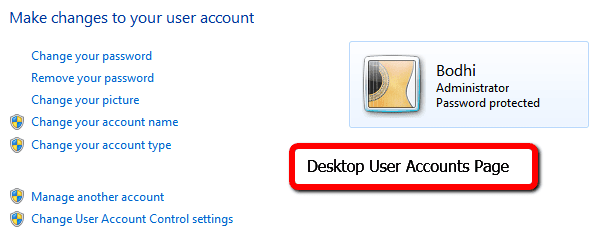
One more screenshot needed, again for both machines...

Control Panel -> User accounts and family safety -> Credential manager

Here ya' go.
 

Attachments

  • Laptop_Credentials.png
    Laptop_Credentials.png
    13 KB · Views: 0
  • Laptop_User_Accounts_Page.png
    Laptop_User_Accounts_Page.png
    12 KB · Views: 0
  • Desktop_Credentials.png
    Desktop_Credentials.png
    14.5 KB · Views: 11
  • Desktop_User_Accounts_Page.png
    Desktop_User_Accounts_Page.png
    7.7 KB · Views: 11

My Computer My Computer

At a glance

Windows 7 Professional 64-bitIntel Core i5-4670K Haswell 3.4GHz Quad-Core ...16GB (2 x 8GB) Kingston DDR3 1600FANLESS ASUS Radeon HD 6450 1GB
Computer type
PC/Desktop
Computer Manufacturer/Model Number
Custom Build
OS
Windows 7 Professional 64-bit
CPU
Intel Core i5-4670K Haswell 3.4GHz Quad-Core 84w CPU
Motherboard
ASUS Z87 Deluxe 1150 Intel Z87 Motherboard
Memory
16GB (2 x 8GB) Kingston DDR3 1600
Graphics Card(s)
FANLESS ASUS Radeon HD 6450 1GB
Hard Drives
c: SSD Intel 520 Series 180GB SATA III (for OS/programs)
e: WD 2TB Green (general data)
f: WD 600 GB Velociraptor (audio recording data)
g: WD 150 GB Velociraptor (open)
Antivirus
Emsisoft Internet Security (AV/Firewall)
Browser
Firefox
I don't know if you want to share (i.e. make accessible to the other machine) EVERY partition on each machine, but whichever partitions you do want to make accessible you must define through "advanced sharing". And of course if you want to allow WRITE as well as READ from the other machine, you must specify "full control" in the sharing permissions, for "everyone" (which is convenient in a home LAN setup).
Yes, I want full control in all directions for all drives.
 

Attachments

  • Desktop_C__Advanced_Sharing_Permissions.png
    Desktop_C__Advanced_Sharing_Permissions.png
    22.2 KB · Views: 0
  • Laptop_Permissions.png
    Laptop_Permissions.png
    23.2 KB · Views: 0
  • Desktop_Security_Tab.png
    Desktop_Security_Tab.png
    12.2 KB · Views: 11
  • Laptop_Security_Tab.png
    Laptop_Security_Tab.png
    13.4 KB · Views: 11

My Computer My Computer

At a glance

Windows 7 Professional 64-bitIntel Core i5-4670K Haswell 3.4GHz Quad-Core ...16GB (2 x 8GB) Kingston DDR3 1600FANLESS ASUS Radeon HD 6450 1GB
Computer type
PC/Desktop
Computer Manufacturer/Model Number
Custom Build
OS
Windows 7 Professional 64-bit
CPU
Intel Core i5-4670K Haswell 3.4GHz Quad-Core 84w CPU
Motherboard
ASUS Z87 Deluxe 1150 Intel Z87 Motherboard
Memory
16GB (2 x 8GB) Kingston DDR3 1600
Graphics Card(s)
FANLESS ASUS Radeon HD 6450 1GB
Hard Drives
c: SSD Intel 520 Series 180GB SATA III (for OS/programs)
e: WD 2TB Green (general data)
f: WD 600 GB Velociraptor (audio recording data)
g: WD 150 GB Velociraptor (open)
Antivirus
Emsisoft Internet Security (AV/Firewall)
Browser
Firefox
Back
Top