Solved Laptop can't read External HD

jxl3

New member
Local time
7:55 AM
Messages
12
Location
Phils.
I'm having a problem with my laptop (MSI GX640). I have a Buffalo 500 GB external HD that was working just fine yesterday afternoon but stopped working last night for reasons unknown to me. Some specifics:

1) Other computers can read the external HD just fine
2) I have another external HD, a Freecom this time but also at 500 GB, that my laptop can't read either
3) In both instances, though the hard drives don't show up on the "Computer" screen, connecting either one will cause the "Safely Remove Hardware" icon to appear, and when you click the icon you are able to select the drives even though no letter is assigned to them. The laptop will also try to boot from the HD if it is connected at startup. However, other than those instances, the laptop does not detect my ext. HD in any way.
4) Event Viewer logged Event 24620, BitLocker-Driver whenever I tried to connect a HDD. I don't know what to make of that though; near as I can tell I've never used BitLocker, and none of my hard drives have any encrypted data.

I suspected that this could be a driver issue but I've tried updating drivers of devices that I thought would be pertinent (USB controllers, etc.) to no effect. As far as I know my drivers are up-to-date, but I'd love to hear suggestions regarding what drivers to look out for. Otherwise, is there some other way to fix this issue? Thanks, all.
 

My Computer My Computer

Computer Manufacturer/Model Number
MSI GX640
OS
Windows 7 Home Premium 64-bit
CPU
Intel Core i5-430M
Memory
DDR3 2GBx2
Graphics Card(s)
ATI Radeon HD 5850
Screen Resolution
1680x1050
Hard Drives
SATA 500 GB
With the Buffalo 500 GB external HD connected to the MSI GX640 laptop, open Disk Management. Maximize the Disk Management screen and post a screenshot. Now "Safely Remove" the Buffalo and connect the Freecom. Open Disk Management again, maximize the screen and post another screenshot for the Freecom. Disk Management may give a clue why both drives aren't being recognized.

How To Access Disk Management in Windows 7

http://www.sevenforums.com/tutorials/9733-screenshots-files-upload-post-seven-forums.html
 

My Computer My Computer

Computer type
Laptop
Computer Manufacturer/Model Number
Sony Vaio VPCEB47GM Laptop
OS
Win 7 Pro 64-bit
CPU
Intel i5 2.4 Ghz
Memory
8GB DDR3
Graphics Card(s)
Intel HD 3000
Sound Card
IDT High Definition
Monitor(s) Displays
15.6 WGXA Anti-Glare LED
Screen Resolution
1280x800
Hard Drives
640Gb 7200rpm
Antivirus
MSE
Browser
Opera (primary) with IE9 backup
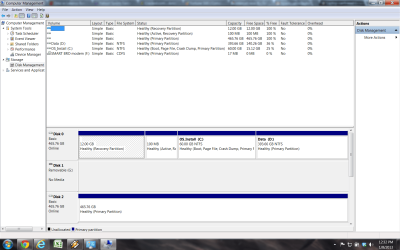
marsmimar, thank you for replying. Here is the screenshot of my DM screen with the Buffalo HD attached; I'll skip it for the Freecom HD as that particular hard drive doesn't get along too well with my laptop and contains few files besides.
 

Attachments

  • BuffaloDM.png
    BuffaloDM.png
    73.6 KB · Views: 11

My Computer My Computer

Computer Manufacturer/Model Number
MSI GX640
OS
Windows 7 Home Premium 64-bit
CPU
Intel Core i5-430M
Memory
DDR3 2GBx2
Graphics Card(s)
ATI Radeon HD 5850
Screen Resolution
1680x1050
Hard Drives
SATA 500 GB
According to the screenshot, Disk 2 (the 500GB external) doesn't have a drive letter assigned. That's probably why it's not working properly and why you can't access it. Try assigning a drive letter to it and see what happens. I'd suggest using a letter between N - Z because the letters E, F, G, etc may already be assigned to, or were used by, other USB devices (camera, flash drive, card reader, etc.)

http://www.sevenforums.com/tutorials/82994-drive-letter-add-change-remove-windows-7-a.html

As to why it no longer gets a drive letter assigned by Windows 7, I don't know for sure. If you continue to have issues you might look into this free utility called USB Drive Letter Manager. In addition to helping with drive letters it has a lot more info about drive letter problems.

USB Drive Letter Manager - USBDLM
 

My Computer My Computer

Computer type
Laptop
Computer Manufacturer/Model Number
Sony Vaio VPCEB47GM Laptop
OS
Win 7 Pro 64-bit
CPU
Intel i5 2.4 Ghz
Memory
8GB DDR3
Graphics Card(s)
Intel HD 3000
Sound Card
IDT High Definition
Monitor(s) Displays
15.6 WGXA Anti-Glare LED
Screen Resolution
1280x800
Hard Drives
640Gb 7200rpm
Antivirus
MSE
Browser
Opera (primary) with IE9 backup
Thank you marsmimar, I earlier assigned a letter to the hard drive. I still can't access it (attempting to do so results only in an error message stating access is denied) but now I'm able to use Check Disk, which is running atm. Hopefully this will fix the issue. And yeah I'm at a loss myself as to why this problem occurred; perhaps we should just chalk it up to wear and tear.

Anyway, I will update the thread as necessary. Thanks again for your help so far :)
 

My Computer My Computer

Computer Manufacturer/Model Number
MSI GX640
OS
Windows 7 Home Premium 64-bit
CPU
Intel Core i5-430M
Memory
DDR3 2GBx2
Graphics Card(s)
ATI Radeon HD 5850
Screen Resolution
1680x1050
Hard Drives
SATA 500 GB
So the disk check did the trick, it turns out. Or maybe it was just assigning a letter to the drive, really, because disk check failed to find any problems. Anyway, though I'm still uncertain as to what caused the issue, at least for now the external hd is back to good working order.
 

My Computer My Computer

Computer Manufacturer/Model Number
MSI GX640
OS
Windows 7 Home Premium 64-bit
CPU
Intel Core i5-430M
Memory
DDR3 2GBx2
Graphics Card(s)
ATI Radeon HD 5850
Screen Resolution
1680x1050
Hard Drives
SATA 500 GB
Glad to hear things got sorted out. Thanks for posting back. :thumbsup:
 

My Computer My Computer

Computer type
Laptop
Computer Manufacturer/Model Number
Sony Vaio VPCEB47GM Laptop
OS
Win 7 Pro 64-bit
CPU
Intel i5 2.4 Ghz
Memory
8GB DDR3
Graphics Card(s)
Intel HD 3000
Sound Card
IDT High Definition
Monitor(s) Displays
15.6 WGXA Anti-Glare LED
Screen Resolution
1280x800
Hard Drives
640Gb 7200rpm
Antivirus
MSE
Browser
Opera (primary) with IE9 backup
Thank you for the advice, marsmimar :D you really helped me out
 

My Computer My Computer

Computer Manufacturer/Model Number
MSI GX640
OS
Windows 7 Home Premium 64-bit
CPU
Intel Core i5-430M
Memory
DDR3 2GBx2
Graphics Card(s)
ATI Radeon HD 5850
Screen Resolution
1680x1050
Hard Drives
SATA 500 GB
Back
Top