

My Toshiba (2012-C665) laptop's CD/DVD drive will randomly not read a data disc and will never burn a disc with default Toshiba software.
Using 3rd party software, (authorised) Portable InfraRecorder on the Toshiba I burnt a data disc to DVD.
With the disc reinserted, to play, the Toshiba drive assumes I want to burn a CD/USB media
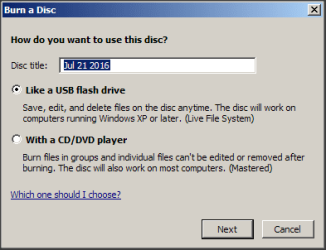
Other PCs read the disc perfectly
I have found Microsoft's own Fix problems with CD or DVD drives that can’t read or write media but my Win10 radar has a hair trigger, last thing I need is a Win10 invasion.

Would a quick solution be to substitute third party software (to replace Toshiba's) ?
- but I don't know how to do that nor what software (driver?) to substitute ?
- several of my rigs have Nero but from experience it is not brilliant and Nero locks out many other 3rd party burners
- and Nero's GUI looks like a xmas tree .. ugly and way oversized (especially for a laptop monitor)
- InfraRecorder has a perfect GUI (that suits me)
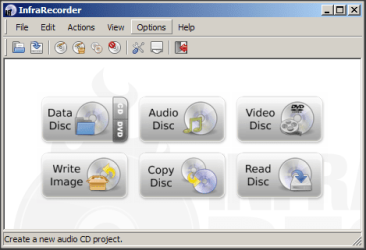
I guess this is a Toshiba problem and not MS (I think?) ... I am hoping someone on this forum might be able to shed some light on what I could/should do.
Thank you
-------------
EDIT
I use VLC to play video DVD but the Toshiba does not always play
Using 3rd party software, (authorised) Portable InfraRecorder on the Toshiba I burnt a data disc to DVD.
With the disc reinserted, to play, the Toshiba drive assumes I want to burn a CD/USB media
Other PCs read the disc perfectly
I have found Microsoft's own Fix problems with CD or DVD drives that can’t read or write media but my Win10 radar has a hair trigger, last thing I need is a Win10 invasion.
Would a quick solution be to substitute third party software (to replace Toshiba's) ?
- but I don't know how to do that nor what software (driver?) to substitute ?
- several of my rigs have Nero but from experience it is not brilliant and Nero locks out many other 3rd party burners
- and Nero's GUI looks like a xmas tree .. ugly and way oversized (especially for a laptop monitor)
- InfraRecorder has a perfect GUI (that suits me)
I guess this is a Toshiba problem and not MS (I think?) ... I am hoping someone on this forum might be able to shed some light on what I could/should do.
Thank you
-------------
EDIT
I use VLC to play video DVD but the Toshiba does not always play
Last edited:
My Computer
At a glance
XP Pro (x86) | 7 HP (x86) & (x64) | 7 Pro (x64)
- Computer type
- PC/Desktop
- Computer Manufacturer/Model Number
- Toshiba, Lenovo (laptops) + 4 rigs
- OS
- XP Pro (x86) | 7 HP (x86) & (x64) | 7 Pro (x64)


