Laptop disconnects from Internet randomly

killadragon

New member
Local time
3:34 AM
Messages
8
Hi,

I've been having this problem for the last couple of weeks now. I'm running Windows 7 and my laptop disconnects from the Internet every couple of hours but in the wireless network connection's window it says that I'm connected and a little yellow triangle with a black exclamation mark appears on the signal strength icon. In order to re-connect I have to right click my connection and hit disconnect, then click my connection and connect again. There are 3 other laptops connected to my home network and none of them face this problem so i don't think it's a router/isp problem.

sometimes a little red x would appear on the signal strength icon and my network adapter would disappear from the device manager and the only way to fix that is to shut the computer off and start it again, then the red x icon would disappear and i'd be able to connect for a couple of hours again until the little yellow triangle appears again, i've unchecked the save power box in the driver properties but still doesn't help, also all drivers are up to date.

any help would be much appreciated
thanks
 

My Computer My Computer

At a glance

Windows 7 Ultimate 32 bit
OS
Windows 7 Ultimate 32 bit
Hi,

I've been having this problem for the last couple of weeks now. I'm running Windows 7 and my laptop disconnects from the Internet every couple of hours but in the wireless network connection's window it says that I'm connected and a little yellow triangle with a black exclamation mark appears on the signal strength icon. In order to re-connect I have to right click my connection and hit disconnect, then click my connection and connect again. There are 3 other laptops connected to my home network and none of them face this problem so i don't think it's a router/isp problem.

sometimes a little red x would appear on the signal strength icon and my network adapter would disappear from the device manager and the only way to fix that is to shut the computer off and start it again, then the red x icon would disappear and i'd be able to connect for a couple of hours again until the little yellow triangle appears again, i've unchecked the save power box in the driver properties but still doesn't help, also all drivers are up to date.

any help would be much appreciated
thanks


Are you by chance using "homegroup" and are the other machines older OS'es?

win 7 uses IPv6 in homegroup. That really is only meant to be used with win 7 machine and not older machines or routers. they are meant to run workgroup and use IPv4.


Ken J
 

My Computer My Computer

At a glance

Win 8 Release candidate 8400[email protected]4 gigsNvidia 9600M
Computer Manufacturer/Model Number
HP Pavillion dv-7 1005 Tx
OS
Win 8 Release candidate 8400
CPU
[email protected]
Memory
4 gigs
Graphics Card(s)
Nvidia 9600M
Sound Card
HD built-in
Monitor(s) Displays
17" Wxga
Screen Resolution
1440x900
Cooling
none
Internet Speed
45Mb down 5Mb up
hi, thanks for the reply

2 laptops are using windows 7 and the third one is using windows vista, and they have no problems when they connect to the internet, also i'm not using homegroup
 

My Computer My Computer

At a glance

Windows 7 Ultimate 32 bit
OS
Windows 7 Ultimate 32 bit
Hi,

I've been having this problem for the last couple of weeks now. I'm running Windows 7 and my laptop disconnects from the Internet every couple of hours but in the wireless network connection's window it says that I'm connected and a little yellow triangle with a black exclamation mark appears on the signal strength icon. In order to re-connect I have to right click my connection and hit disconnect, then click my connection and connect again. There are 3 other laptops connected to my home network and none of them face this problem so i don't think it's a router/isp problem.

sometimes a little red x would appear on the signal strength icon and my network adapter would disappear from the device manager and the only way to fix that is to shut the computer off and start it again, then the red x icon would disappear and i'd be able to connect for a couple of hours again until the little yellow triangle appears again, i've unchecked the save power box in the driver properties but still doesn't help, also all drivers are up to date.

any help would be much appreciated
thanks

For this type of problem you should first check to make sure that you are using a clear channel for your wireless connection. Try the Xirrus wifi inspector which you can download in the link below.

It will show you which wifi channels are being used in your area so that you can choose an unused channel for your wireless connection. You can easily change the channel in your router's control panel.

Xirrus: The Leader in High Performance Wi-Fi - Advanced IT Wi-Fi Networking Tools
 

My Computer My Computer

At a glance

Windows 7 Ult, Windows 8.1 Pro,Q9650-4.275GHz, E8600 4.5GHz, E6750-3.8GHzG.Skill PC2 9600 1200Mhz 5 5 5 15 2TGTX480
Computer type
PC/Desktop
Computer Manufacturer/Model Number
Home built
OS
Windows 7 Ult, Windows 8.1 Pro,
CPU
Q9650-4.275GHz, E8600 4.5GHz, E6750-3.8GHz
Motherboard
Evga 780i FTW
Memory
G.Skill PC2 9600 1200Mhz 5 5 5 15 2T
Graphics Card(s)
GTX480
Sound Card
Asus Xonar D2
Monitor(s) Displays
HannsG
Screen Resolution
1680X1050
Hard Drives
GSkill Phoenix Pro 120GB SSD
PSU
ThermalTake Toughpower 1000Watt modular
Case
ThermalTake XaserV
Cooling
Xigmatek S1283
Keyboard
Logitech G15
Mouse
Logitech G9
Internet Speed
T1
^^

lol, I was going to ask if they put a wireless telephone in the room with the router.
 

My Computer My Computer

At a glance

7 Pro
OS
7 Pro
^^

lol, I was going to ask if they put a wireless telephone in the room with the router.

Lets hope that isn't the case as the 2.4GHz frequency is already crowded enough, a phone station near the computer or router will wreck havoc for sure.
 

My Computer My Computer

At a glance

Windows 7 Ult, Windows 8.1 Pro,Q9650-4.275GHz, E8600 4.5GHz, E6750-3.8GHzG.Skill PC2 9600 1200Mhz 5 5 5 15 2TGTX480
Computer type
PC/Desktop
Computer Manufacturer/Model Number
Home built
OS
Windows 7 Ult, Windows 8.1 Pro,
CPU
Q9650-4.275GHz, E8600 4.5GHz, E6750-3.8GHz
Motherboard
Evga 780i FTW
Memory
G.Skill PC2 9600 1200Mhz 5 5 5 15 2T
Graphics Card(s)
GTX480
Sound Card
Asus Xonar D2
Monitor(s) Displays
HannsG
Screen Resolution
1680X1050
Hard Drives
GSkill Phoenix Pro 120GB SSD
PSU
ThermalTake Toughpower 1000Watt modular
Case
ThermalTake XaserV
Cooling
Xigmatek S1283
Keyboard
Logitech G15
Mouse
Logitech G9
Internet Speed
T1
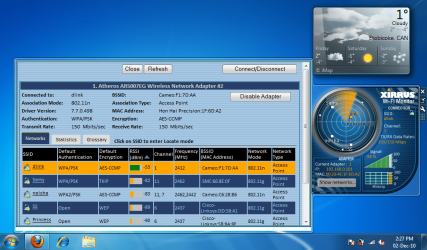
before we go any further, i just had a question about the channels for my wifi connection, if the channels weren't clear, then wudn't the rest of the laptops on my network also be experiencing the same problem? i used xirrus and i'm running on channel 1, and there is 1 other network that is using channel 1 but the signal for that is really weak, here's an image of what i'm talking about
 

Attachments

  • Untitled.png
    Untitled.png
    126.3 KB · Views: 200

My Computer My Computer

At a glance

Windows 7 Ultimate 32 bit
OS
Windows 7 Ultimate 32 bit
before we go any further, i just had a question about the channels for my wifi connection, if the channels weren't clear, then wudn't the rest of the laptops on my network also be experiencing the same problem? i used xirrus and i'm running on channel 1, and there is 1 other network that is using channel 1 but the signal for that is really weak, here's an image of what i'm talking about

Not always, it depends on many factors. I can't see the weak signal channel 1 in your screen shot but it may be worth trying a different channel that isn't on the list of used channels. It certainly won't hurt anything to try a different channel.
 

My Computer My Computer

At a glance

Windows 7 Ult, Windows 8.1 Pro,Q9650-4.275GHz, E8600 4.5GHz, E6750-3.8GHzG.Skill PC2 9600 1200Mhz 5 5 5 15 2TGTX480
Computer type
PC/Desktop
Computer Manufacturer/Model Number
Home built
OS
Windows 7 Ult, Windows 8.1 Pro,
CPU
Q9650-4.275GHz, E8600 4.5GHz, E6750-3.8GHz
Motherboard
Evga 780i FTW
Memory
G.Skill PC2 9600 1200Mhz 5 5 5 15 2T
Graphics Card(s)
GTX480
Sound Card
Asus Xonar D2
Monitor(s) Displays
HannsG
Screen Resolution
1680X1050
Hard Drives
GSkill Phoenix Pro 120GB SSD
PSU
ThermalTake Toughpower 1000Watt modular
Case
ThermalTake XaserV
Cooling
Xigmatek S1283
Keyboard
Logitech G15
Mouse
Logitech G9
Internet Speed
T1
how would i go about doing that?
 

My Computer My Computer

At a glance

Windows 7 Ultimate 32 bit
OS
Windows 7 Ultimate 32 bit
how would i go about doing that?

Depending on your routers default gateway you would type the gateway of the router into the URL of your browser to access the routers set up page. I'm not sure what router you have?

Looking at your Xirrus info the default gateway is probably 192.168.1.1, while your in there it would be best to set the router to use WPA2 and AES encryption.

Giving you exact directions to find the place where you change channels is a bit different for all routers, you may need to look around a bit to find the place where you can change channels.

This can also be a problem with your wireless adaptors drivers.
 

My Computer My Computer

At a glance

Windows 7 Ult, Windows 8.1 Pro,Q9650-4.275GHz, E8600 4.5GHz, E6750-3.8GHzG.Skill PC2 9600 1200Mhz 5 5 5 15 2TGTX480
Computer type
PC/Desktop
Computer Manufacturer/Model Number
Home built
OS
Windows 7 Ult, Windows 8.1 Pro,
CPU
Q9650-4.275GHz, E8600 4.5GHz, E6750-3.8GHz
Motherboard
Evga 780i FTW
Memory
G.Skill PC2 9600 1200Mhz 5 5 5 15 2T
Graphics Card(s)
GTX480
Sound Card
Asus Xonar D2
Monitor(s) Displays
HannsG
Screen Resolution
1680X1050
Hard Drives
GSkill Phoenix Pro 120GB SSD
PSU
ThermalTake Toughpower 1000Watt modular
Case
ThermalTake XaserV
Cooling
Xigmatek S1283
Keyboard
Logitech G15
Mouse
Logitech G9
Internet Speed
T1
i have the dlink dir-655 router, i had a question about changing any of the settings on my router, if i change any of the settings, would it change it for all the computers that are using it to connect to my network? because i don't wanna mess anything up for the other 3 laptops that are using this network, there connection is perfectly fine and i don't wanna mess that up because of my messed up computer, that's why i'm kinda hesitant to change any of the router settings

also, i don't know why, but i think it has to do with my network adapter, the atheros 5007eg
 

My Computer My Computer

At a glance

Windows 7 Ultimate 32 bit
OS
Windows 7 Ultimate 32 bit
I have the exact same router, yes if you change the connection method it would need to be updated on the other machines by going into the wireless connection manager and changing the settings "this only takes a few seconds if you know what your doing". Changing the channel won't make a difference with the connection settings.

Being afraid to go into the routers settings and make adjustments just doesn't make any sense to me. It's standard procedure for me, and I could care less about the other machines because the adjustments would make them all work better. People like using the auto settings but they don't always work so well.

The default gateway should be 192.168.0.1 for that router, should be able to access the routers set up page with that.

As a general rule you should use WPA2 and AES encryption, those are the best settings to use with Windows 7. You should also make up your own SSID and password "other than the default one" because using the default ones isn't very safe.

If you think it's the adaptor then about all you can do is google around for a better driver or try a different adaptor. Although if this has only been going on a couple weeks it would tend to point to a channel problem or a router problem. I think I would have tried most every driver by now if I was you.

Resetting these routers works wonders but I always make a save file for the routers settings then just navigate to that file after a reset. Thats how these routers are supposed to work. If you look in the settings you will see there is a place to save the routers settings to a file which makes resetting the router much easier.

Anyway, good luck with this problem, if you aren't willing to make any adjustments to the actual router there isn't much I can do to help.
 
Last edited:

My Computer My Computer

At a glance

Windows 7 Ult, Windows 8.1 Pro,Q9650-4.275GHz, E8600 4.5GHz, E6750-3.8GHzG.Skill PC2 9600 1200Mhz 5 5 5 15 2TGTX480
Computer type
PC/Desktop
Computer Manufacturer/Model Number
Home built
OS
Windows 7 Ult, Windows 8.1 Pro,
CPU
Q9650-4.275GHz, E8600 4.5GHz, E6750-3.8GHz
Motherboard
Evga 780i FTW
Memory
G.Skill PC2 9600 1200Mhz 5 5 5 15 2T
Graphics Card(s)
GTX480
Sound Card
Asus Xonar D2
Monitor(s) Displays
HannsG
Screen Resolution
1680X1050
Hard Drives
GSkill Phoenix Pro 120GB SSD
PSU
ThermalTake Toughpower 1000Watt modular
Case
ThermalTake XaserV
Cooling
Xigmatek S1283
Keyboard
Logitech G15
Mouse
Logitech G9
Internet Speed
T1
how do i change the channel on my router and use WPA2 and AES encryption?
 

My Computer My Computer

At a glance

Windows 7 Ultimate 32 bit
OS
Windows 7 Ultimate 32 bit
i found out how to change the settings, i changed it to WPA2 and AES encryption and changed the channel to 3
 

My Computer My Computer

At a glance

Windows 7 Ultimate 32 bit
OS
Windows 7 Ultimate 32 bit
i found out how to change the settings, i changed it to WPA2 and AES encryption and changed the channel to 3

I knew you could figure that out once you got into the routers settings. I was about to post a screen shot from my router if you were having any problems.


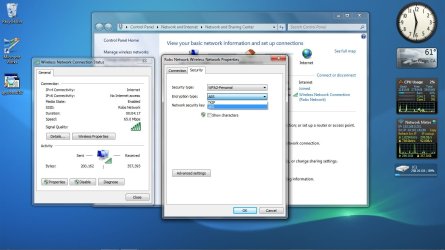
The only changes you should need to make to the wireless manager on the other machines is to change the security to WPA2 because it looked like you were using just WPA before. The picture below shows you where.

Of course now you need to wait and see if the connection drops out again. If it's a weak signal that will cause problems with dropped connections also.
 

Attachments

  • wireless security change.jpg
    wireless security change.jpg
    103.7 KB · Views: 58

My Computer My Computer

At a glance

Windows 7 Ult, Windows 8.1 Pro,Q9650-4.275GHz, E8600 4.5GHz, E6750-3.8GHzG.Skill PC2 9600 1200Mhz 5 5 5 15 2TGTX480
Computer type
PC/Desktop
Computer Manufacturer/Model Number
Home built
OS
Windows 7 Ult, Windows 8.1 Pro,
CPU
Q9650-4.275GHz, E8600 4.5GHz, E6750-3.8GHz
Motherboard
Evga 780i FTW
Memory
G.Skill PC2 9600 1200Mhz 5 5 5 15 2T
Graphics Card(s)
GTX480
Sound Card
Asus Xonar D2
Monitor(s) Displays
HannsG
Screen Resolution
1680X1050
Hard Drives
GSkill Phoenix Pro 120GB SSD
PSU
ThermalTake Toughpower 1000Watt modular
Case
ThermalTake XaserV
Cooling
Xigmatek S1283
Keyboard
Logitech G15
Mouse
Logitech G9
Internet Speed
T1
unfortunately the problem hasn't been solved, the internet still disconnects :cry:
 

My Computer My Computer

At a glance

Windows 7 Ultimate 32 bit
OS
Windows 7 Ultimate 32 bit
Back
Top