Laptop fan on full at startup for 5 minutes

richc72

New member
Local time
2:42 AM
Messages
7
Location
Eastbourne
I have recently upgraded my HP Pavilion dv6799ea laptop from Vista to Windows 7 (32-bit). Everything works fine except one thing. On startup, when entering Windows, the fan comes on at full power. It remains on full power for 5 minutes, regardless of what the computer is doing during this time. The CPU and hard disk may be idle, it makes no difference. After exactly 5 minutes, the fan suddenly stops blowing at full power and reduces to its normal low level for the remainder of the time the computer is on.

When resuming from sleep or hibernation, the fan does exactly the same thing, again staying at full power for exactly 5 minutes before reducing. Needless to say, it did not do this in Vista, only since upgrading to Windows 7.

Any suggestions about this would be welcome.
 

My Computer My Computer

At a glance

Windows 7 Home Premium 32-bitIntel Core 2 Duo T81002GBNVIDIA GeForce 8400M GS
Computer type
Laptop
Computer Manufacturer/Model Number
HP Pavilion dv6799ea
OS
Windows 7 Home Premium 32-bit
CPU
Intel Core 2 Duo T8100
Motherboard
Quanta 30D2
Memory
2GB
Graphics Card(s)
NVIDIA GeForce 8400M GS
Hi richc72 welcome to the forum :)

My Toshiba laptop (15 months old) has been doing the same thing for about 4 to 6 months, without any OS changes.
I know it needs a clean, my keyboard is always dusty. I am led to believe some air intakes are through the keyboard spaces (?)

Recently cleaned my Acer-Vista laptop which had a fan-on-a-lot problem. Its back to acceptable operation levels.

How long since you cleaned the internals of your originally Vista lappy?

Not suggesting it is not the upgrade, but dust is an enemy of CPUs ... the fan.
Be warned don't use a household vacuum on your lappy, blowing or sucking. It can cause damage.

There are some excellent step by step YouTubes on how to clean lappies, even brand specific.
It takes a bit of trawling through the weak videos to find good tutes.

Hope this helps :)
 
Last edited:

My Computer My Computer

At a glance

XP Pro (x86) | 7 HP (x86) & (x64) | 7 Pro (x64)
Computer type
PC/Desktop
Computer Manufacturer/Model Number
Toshiba, Lenovo (laptops) + 4 rigs
OS
XP Pro (x86) | 7 HP (x86) & (x64) | 7 Pro (x64)
It may be a BIOS setting? Fans can generally be configured in the BIOS, whether it be enabling/disabling them to setting the RPM of each one. Hope this helps!
 

My Computer My Computer

At a glance

Windows 7 Professional x64Centrino vPro 2.0 Ghz Dual Core3GBIntel 965 Chipset
Computer type
Laptop
Computer Manufacturer/Model Number
Lenovo X61
OS
Windows 7 Professional x64
CPU
Centrino vPro 2.0 Ghz Dual Core
Motherboard
Lenovo 7674GS3
Memory
3GB
Graphics Card(s)
Intel 965 Chipset
Sound Card
Intel 965 Chipset
Monitor(s) Displays
ThinkPad Display
Screen Resolution
1024x768
Hard Drives
128GB Corsair GTX SSD
Mouse
Lenovo TrackPad
Internet Speed
Fast...
Antivirus
AVG
Browser
Chrome
I always clean my cpu fan with a little brush (not too large, not too small an about 5 cm length brush) you can either use a humide cotton cloth (NOT WET). Use your brush to clean the metal heat conductor of your Fan and the humide cloth for the palms of the fan itself.

But I believe that dust might not be the only problem. Some process at the boot up stage may require more cpu power hence affecting the cpu fan speed. If that's the case you don't need to worry that's usually normal procedure.

Furthermore, don't touch the BIOS fan configuration! If the BIOS detects an increase cpu heat it will automatically adjust the speed of the fan else your cpu may overheat.
 

My Computer My Computer

At a glance

Windows 7 Ultimate SP1 32bitIntel Pentium 4 2.80 Ghz, PrescottDDR 1GB KingstoneNVIDIA Geforce 6200 A-LE
Computer type
PC/Desktop
Computer Manufacturer/Model Number
custom build
OS
Windows 7 Ultimate SP1 32bit
CPU
Intel Pentium 4 2.80 Ghz, Prescott
Motherboard
Asus P4S800-MX
Memory
DDR 1GB Kingstone
Graphics Card(s)
NVIDIA Geforce 6200 A-LE
Sound Card
SoundMax
I would look at the BIOS, most LT's control the fan with BIOS. Some new LT's may have a program for cleaning the fan. It runs the fan at full rpm for several minutes, then slows it down to normal speeds.
 

My Computer My Computer

At a glance

Win8/8.1,Win7-U64, Vista U64, uncounted Linux...AMD and Intell, 9590, 8350, i5 3570kCorsair G SkillCrossfired Sapphire HD 7950 Vapor-X, ASUS R9 ...
Computer type
PC/Desktop
Computer Manufacturer/Model Number
Custom, Dell and Lenono LT's
OS
Win8/8.1,Win7-U64, Vista U64, uncounted Linux distor's
CPU
AMD and Intell, 9590, 8350, i5 3570k
Motherboard
CFVFZ, GA990FXA, Z77e-itx
Memory
Corsair G Skill
Graphics Card(s)
Crossfired Sapphire HD 7950 Vapor-X, ASUS R9 280X TOP
Sound Card
Realtek ALC889
Monitor(s) Displays
ViewSonic VX2770SMH 27" / ViewSonic VX2433 LCD 24"
Screen Resolution
1080i HD
Hard Drives
Samsung SSD 840 Pro
OCZ Agility 3's
OCZ Vector's
WD's Blue, red, green, Velociraptors
Seagate USB3 & Hybrid's
ASUS Blu-Ray
ASUS DVD
PSU
Corsair AX1200i, Seasonice 850 Gold
Case
Cooler Master HAF 922 & HAF 932, Lian Li Train case.
Cooling
Air, Glacer 240L expanded, custom EK loop with duel D5's
Keyboard
Microsoft SideWinder X4 USB Keyboard / Logitech 250 PS2
Mouse
Logitech G500 / MS wireless 5000
Internet Speed
Best of 5ms / 75+ dn / 12+ up More or less.
Antivirus
MS esentials-MalwareBytes
Browser
Firefox Chromebook
The only time my HP dv6 blows at full speed is when I apply a BIOS update.
Your machine might think there's a pending BIOS update and it tries to apply it every time.

The 'current' BIOS v F.58 A for your machine is for Vista, what version is the BIOS on your machine?
 

My Computer My Computer

At a glance

x64 (6.3.9600) Win8.1 Pro & soon dual boot x6...AMD A6-3420M APU with Radeon(tm) HD Graphics6.00 GBAMD Radeon(TM) HD 6520G
Computer type
Laptop
Computer Manufacturer/Model Number
HP Pavilion dv6-6c10us
OS
x64 (6.3.9600) Win8.1 Pro & soon dual boot x64 (6.1.7601) Win7_SP1 HomePrem
CPU
AMD A6-3420M APU with Radeon(tm) HD Graphics
Motherboard
Hewlett-Packard 1805
Memory
6.00 GB
Graphics Card(s)
AMD Radeon(TM) HD 6520G
Sound Card
(1) AMD High Definition Audio Device (2) IDT High Definiti
Monitor(s) Displays
HP W2072a 20" LCD (1600 x 900) @ 60 Hz
Screen Resolution
1366 x 768 x 32 bits (4294967296 colors) @ 60 Hz
Hard Drives
ST640LM0 00 HM641JI SATA Disk Device
Keyboard
Logitech k520 wireless KB
Mouse
Logitech m320 wireless mouse (bundled with KB)
Internet Speed
15/5 | 54 MB Wireless 'n'
Antivirus
Realtime: Defender or Avast | On-demand: Malwarebytes, ESET
Browser
IE 11 on Win8, IE 10 on win 7
Other Info
Media: [Gimp, Audacity, VLC] || Comm: [WEmail 2012, Skype] || Productivity: [OpenOffice,| Textpad] || Utils: [Sysinternals, cCleaner, Speccy, Defraggler]
Thanks for your suggestions.

I keep the laptop very clean and have cleaned the fan vents recently. There doesn't seem to be any build up of dust which would be causing this. After the initial 5 minutes, the fan calms down do a very low level and stays there, even when the CPU is working quite hard.

The BIOS is quite basic, it just allows the running of a few system checks, changing the boot order etc. There are no fan settings.

The BIOS I have installed is F.59, which was an HP authorised update a few years ago. I am wondering whether to try going back to the F.58 BIOS to see if that makes any difference.
 

My Computer My Computer

At a glance

Windows 7 Home Premium 32-bitIntel Core 2 Duo T81002GBNVIDIA GeForce 8400M GS
Computer type
Laptop
Computer Manufacturer/Model Number
HP Pavilion dv6799ea
OS
Windows 7 Home Premium 32-bit
CPU
Intel Core 2 Duo T8100
Motherboard
Quanta 30D2
Memory
2GB
Graphics Card(s)
NVIDIA GeForce 8400M GS
Make sure that I found your machine: Software & driver downloads HP Pavilion dv6799ea Special Edition Entertainment Notebook PC | HP® Support

I don't see an F.59 under BIOS.

The other thing about my machine that is cooling related is CoolSense. I removed that HP utility and my laptop actually ran cooler - go figure.

If CoolSense is on you machine, you might consider uninstalling it. I had some strange things occur when I tried to put it back on using an updated version - I don't recall the specifics.. but it wouldn't install, it would install, after fiddling, it wouldn't start.... just a flakey experience. So needless to say, it's not on my machine and I'm running a consistent 10 degrees cooler with no spikes in temps.

I'd try them one at a time and see. BIOS first - yep I'd roll it back.

both of these are suggestions - it's always your call.

your mileage might vary....

Bill
.
 

My Computer My Computer

At a glance

x64 (6.3.9600) Win8.1 Pro & soon dual boot x6...AMD A6-3420M APU with Radeon(tm) HD Graphics6.00 GBAMD Radeon(TM) HD 6520G
Computer type
Laptop
Computer Manufacturer/Model Number
HP Pavilion dv6-6c10us
OS
x64 (6.3.9600) Win8.1 Pro & soon dual boot x64 (6.1.7601) Win7_SP1 HomePrem
CPU
AMD A6-3420M APU with Radeon(tm) HD Graphics
Motherboard
Hewlett-Packard 1805
Memory
6.00 GB
Graphics Card(s)
AMD Radeon(TM) HD 6520G
Sound Card
(1) AMD High Definition Audio Device (2) IDT High Definiti
Monitor(s) Displays
HP W2072a 20" LCD (1600 x 900) @ 60 Hz
Screen Resolution
1366 x 768 x 32 bits (4294967296 colors) @ 60 Hz
Hard Drives
ST640LM0 00 HM641JI SATA Disk Device
Keyboard
Logitech k520 wireless KB
Mouse
Logitech m320 wireless mouse (bundled with KB)
Internet Speed
15/5 | 54 MB Wireless 'n'
Antivirus
Realtime: Defender or Avast | On-demand: Malwarebytes, ESET
Browser
IE 11 on Win8, IE 10 on win 7
Other Info
Media: [Gimp, Audacity, VLC] || Comm: [WEmail 2012, Skype] || Productivity: [OpenOffice,| Textpad] || Utils: [Sysinternals, cCleaner, Speccy, Defraggler]
Yes, that is my computer.

I have rolled the BIOS back to F.58 A but unfortunately that hasn't made any difference. I don't have CoolSense on this machine so that's not a problem. Thanks for the suggestions though.
 

My Computer My Computer

At a glance

Windows 7 Home Premium 32-bitIntel Core 2 Duo T81002GBNVIDIA GeForce 8400M GS
Computer type
Laptop
Computer Manufacturer/Model Number
HP Pavilion dv6799ea
OS
Windows 7 Home Premium 32-bit
CPU
Intel Core 2 Duo T8100
Motherboard
Quanta 30D2
Memory
2GB
Graphics Card(s)
NVIDIA GeForce 8400M GS
You might try setting BIOS to defaults, if you haven't already.

Check your power plan advanced options
Processor power management -> Cooling policy

Is it active or Passive? -> mine is active for both AC and DC
 

My Computer My Computer

At a glance

x64 (6.3.9600) Win8.1 Pro & soon dual boot x6...AMD A6-3420M APU with Radeon(tm) HD Graphics6.00 GBAMD Radeon(TM) HD 6520G
Computer type
Laptop
Computer Manufacturer/Model Number
HP Pavilion dv6-6c10us
OS
x64 (6.3.9600) Win8.1 Pro & soon dual boot x64 (6.1.7601) Win7_SP1 HomePrem
CPU
AMD A6-3420M APU with Radeon(tm) HD Graphics
Motherboard
Hewlett-Packard 1805
Memory
6.00 GB
Graphics Card(s)
AMD Radeon(TM) HD 6520G
Sound Card
(1) AMD High Definition Audio Device (2) IDT High Definiti
Monitor(s) Displays
HP W2072a 20" LCD (1600 x 900) @ 60 Hz
Screen Resolution
1366 x 768 x 32 bits (4294967296 colors) @ 60 Hz
Hard Drives
ST640LM0 00 HM641JI SATA Disk Device
Keyboard
Logitech k520 wireless KB
Mouse
Logitech m320 wireless mouse (bundled with KB)
Internet Speed
15/5 | 54 MB Wireless 'n'
Antivirus
Realtime: Defender or Avast | On-demand: Malwarebytes, ESET
Browser
IE 11 on Win8, IE 10 on win 7
Other Info
Media: [Gimp, Audacity, VLC] || Comm: [WEmail 2012, Skype] || Productivity: [OpenOffice,| Textpad] || Utils: [Sysinternals, cCleaner, Speccy, Defraggler]
My fan runs even in "Sleep" mode

I am sure the CPU fan on this laptop needs cleaning, but as Toshiba it is not a simple take the cover off the back and clean the CPU+fan. Toshiba access is done from the top, not the back
The screen and keyboard must come out plus several other components. My Acer laptop is dead easy through a plate on the underside of the body.

Slartybart said:
Check your power plan advanced options
Processor power management -> Cooling policy

Is it active or Passive? -> mine is active for both AC and DC

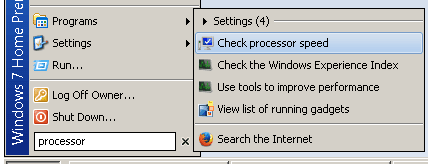
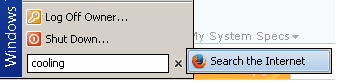
I cannot find "Processor power management" NOR "Cooling policy" NOR "fan"

no processor.png
no cooling.png

What is the CP path to Cooling policy ?

Thank you :)

Toshiba Satellite C665 Laptop
Win7 Home Premium 32-bit
 

My Computer My Computer

At a glance

XP Pro (x86) | 7 HP (x86) & (x64) | 7 Pro (x64)
Computer type
PC/Desktop
Computer Manufacturer/Model Number
Toshiba, Lenovo (laptops) + 4 rigs
OS
XP Pro (x86) | 7 HP (x86) & (x64) | 7 Pro (x64)
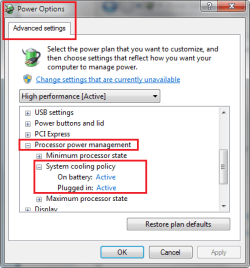
It's in your power plan:
Control Panel\All Control Panel Items\Power Options

Active: limits the processor after speeding up the fan
Passive: limits the processor before speeding up the fan

Try toggling whatever the value is to the other value on both AC and DC settings.

Have you restored the BIOS settings to defaults?

Bill
.
 

Attachments

  • Cooling pol.png
    Cooling pol.png
    14.8 KB · Views: 19

My Computer My Computer

At a glance

x64 (6.3.9600) Win8.1 Pro & soon dual boot x6...AMD A6-3420M APU with Radeon(tm) HD Graphics6.00 GBAMD Radeon(TM) HD 6520G
Computer type
Laptop
Computer Manufacturer/Model Number
HP Pavilion dv6-6c10us
OS
x64 (6.3.9600) Win8.1 Pro & soon dual boot x64 (6.1.7601) Win7_SP1 HomePrem
CPU
AMD A6-3420M APU with Radeon(tm) HD Graphics
Motherboard
Hewlett-Packard 1805
Memory
6.00 GB
Graphics Card(s)
AMD Radeon(TM) HD 6520G
Sound Card
(1) AMD High Definition Audio Device (2) IDT High Definiti
Monitor(s) Displays
HP W2072a 20" LCD (1600 x 900) @ 60 Hz
Screen Resolution
1366 x 768 x 32 bits (4294967296 colors) @ 60 Hz
Hard Drives
ST640LM0 00 HM641JI SATA Disk Device
Keyboard
Logitech k520 wireless KB
Mouse
Logitech m320 wireless mouse (bundled with KB)
Internet Speed
15/5 | 54 MB Wireless 'n'
Antivirus
Realtime: Defender or Avast | On-demand: Malwarebytes, ESET
Browser
IE 11 on Win8, IE 10 on win 7
Other Info
Media: [Gimp, Audacity, VLC] || Comm: [WEmail 2012, Skype] || Productivity: [OpenOffice,| Textpad] || Utils: [Sysinternals, cCleaner, Speccy, Defraggler]
Thanks Slartybart :)

I have never touched BIOS, nor do I know how to.

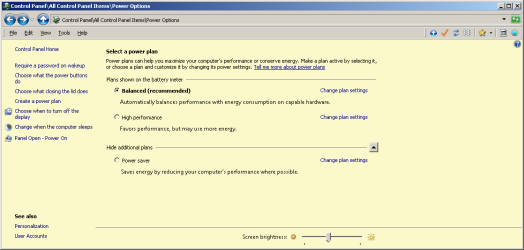
This is my "Power Options" windows. Where to next ?

power options.png
 

My Computer My Computer

At a glance

XP Pro (x86) | 7 HP (x86) & (x64) | 7 Pro (x64)
Computer type
PC/Desktop
Computer Manufacturer/Model Number
Toshiba, Lenovo (laptops) + 4 rigs
OS
XP Pro (x86) | 7 HP (x86) & (x64) | 7 Pro (x64)
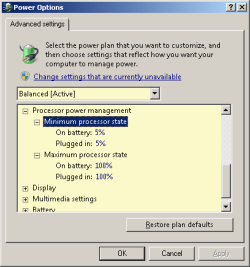
On the balanced plan (radio button dotted) - click
Change plan settings
then on the next window, click
Change Advanced power settings
then scroll down to the option shown in the image in post# 12

Restart might be overkill, but go ahead and restart
 

My Computer My Computer

At a glance

x64 (6.3.9600) Win8.1 Pro & soon dual boot x6...AMD A6-3420M APU with Radeon(tm) HD Graphics6.00 GBAMD Radeon(TM) HD 6520G
Computer type
Laptop
Computer Manufacturer/Model Number
HP Pavilion dv6-6c10us
OS
x64 (6.3.9600) Win8.1 Pro & soon dual boot x64 (6.1.7601) Win7_SP1 HomePrem
CPU
AMD A6-3420M APU with Radeon(tm) HD Graphics
Motherboard
Hewlett-Packard 1805
Memory
6.00 GB
Graphics Card(s)
AMD Radeon(TM) HD 6520G
Sound Card
(1) AMD High Definition Audio Device (2) IDT High Definiti
Monitor(s) Displays
HP W2072a 20" LCD (1600 x 900) @ 60 Hz
Screen Resolution
1366 x 768 x 32 bits (4294967296 colors) @ 60 Hz
Hard Drives
ST640LM0 00 HM641JI SATA Disk Device
Keyboard
Logitech k520 wireless KB
Mouse
Logitech m320 wireless mouse (bundled with KB)
Internet Speed
15/5 | 54 MB Wireless 'n'
Antivirus
Realtime: Defender or Avast | On-demand: Malwarebytes, ESET
Browser
IE 11 on Win8, IE 10 on win 7
Other Info
Media: [Gimp, Audacity, VLC] || Comm: [WEmail 2012, Skype] || Productivity: [OpenOffice,| Textpad] || Utils: [Sysinternals, cCleaner, Speccy, Defraggler]
Please add your SF Systems Specs: SystemInfo See Your System Specs
  • In the System Manufacturer/Model Number field, manually type Desktop or Laptop adding it to the information already in the field.
  • Specify Custom Build as the manufacturer if it is not an OEM machine.
  • The tool does not fill in this information but it is very important if someone has to research drivers or hardware for your machine.
Log on to Sevenforums (SF) and let the tool fill in you System specs on your SF profile.
Your System Specs here.

It's a simple process and it makes that information readily available on your posts. You don't have to retype the information in any thread.

Click on My System Specs in the lower left of this post to see what is presented about my machine.

Full instructions are in the tutorial.

I can then better advise you on BIOS.

.
 

My Computer My Computer

At a glance

x64 (6.3.9600) Win8.1 Pro & soon dual boot x6...AMD A6-3420M APU with Radeon(tm) HD Graphics6.00 GBAMD Radeon(TM) HD 6520G
Computer type
Laptop
Computer Manufacturer/Model Number
HP Pavilion dv6-6c10us
OS
x64 (6.3.9600) Win8.1 Pro & soon dual boot x64 (6.1.7601) Win7_SP1 HomePrem
CPU
AMD A6-3420M APU with Radeon(tm) HD Graphics
Motherboard
Hewlett-Packard 1805
Memory
6.00 GB
Graphics Card(s)
AMD Radeon(TM) HD 6520G
Sound Card
(1) AMD High Definition Audio Device (2) IDT High Definiti
Monitor(s) Displays
HP W2072a 20" LCD (1600 x 900) @ 60 Hz
Screen Resolution
1366 x 768 x 32 bits (4294967296 colors) @ 60 Hz
Hard Drives
ST640LM0 00 HM641JI SATA Disk Device
Keyboard
Logitech k520 wireless KB
Mouse
Logitech m320 wireless mouse (bundled with KB)
Internet Speed
15/5 | 54 MB Wireless 'n'
Antivirus
Realtime: Defender or Avast | On-demand: Malwarebytes, ESET
Browser
IE 11 on Win8, IE 10 on win 7
Other Info
Media: [Gimp, Audacity, VLC] || Comm: [WEmail 2012, Skype] || Productivity: [OpenOffice,| Textpad] || Utils: [Sysinternals, cCleaner, Speccy, Defraggler]
Thanks Slartybart :)

advanced settings.png


I have 7 computers, pointless making one of them System Specs, makes all my other threads irrelevant.
SYSTEM SPECS for this thread
Computer Type:= Laptop
Manufacturer:= Toshiba Satellite C665
OS:= Windows 7 Home Premium (32-bit), sp1 (Build 7601)
CPU:= Intel(R) Core(TM) i5-2410M CPU @ 2.30GHz
. . . Cores: 2
. . . ID: BFEBFBFF000206A7
. . . Description: x64 Family 6 Model 42 Stepping 7
Motherboard:= TOSHIBA Portable PC
Memory:= 2,806 MB
Graphics:= NVIDIA GeForce 315M *
Sound Card:= Speakers (Conexant SmartAudio H |
Monitors:= x1, Generic PnP
Screen Resolution:= 1366 X 768 - 32 bit
Hard Drives:= C: 585.4GB
PSU:=
Case:= Toshiba Satellite
Cooling:= default fan
Keyboard:= default + Logitech K260
Mouse:= default pad + Logitech M210
Internet Speed:= ADSL2
Antivirus:= Bitdefender Internet Security 2013
Browser:= IE-9.10, PaleMoon, Firefox 20.0
Others:= USB Safely Remove, Metapad, ClipX,
7Zip, Classic Shell Start, Explorer++, FileSearchEX, KeyboardLEDS, CapsLock,
MalwareBytes, MyDefrag, PostBox, ClipX
 

My Computer My Computer

At a glance

XP Pro (x86) | 7 HP (x86) & (x64) | 7 Pro (x64)
Computer type
PC/Desktop
Computer Manufacturer/Model Number
Toshiba, Lenovo (laptops) + 4 rigs
OS
XP Pro (x86) | 7 HP (x86) & (x64) | 7 Pro (x64)
@grayghost2: I don't know why your power plan doesn't show cooling policy... hmmmm that was my last suggestion before heading out to google the issue.
Soooo, I was searchng for an idea and came across this: http://www.sevenforums.com/pc-custo...7-my-toshiba-satellite-c665-over-heating.html

Is this the same machine?

I got sidetracked from richc72's issue on his thread. I appreciate the help you gave early on, but now I've confused the thread by answering your inquiries.

I'll try to refocus on rich72c's HP Pavilion dv6799ea cooling issue. I recommended to richc72 that he reset BIOS in post# 10, so that's where I'll refocus the thread:
You might try setting BIOS to defaults, if you haven't already.

Check your power plan advanced options
Processor power management -> Cooling policy

Is it active or Passive? -> mine is active for both AC and DC
 

My Computer My Computer

At a glance

x64 (6.3.9600) Win8.1 Pro & soon dual boot x6...AMD A6-3420M APU with Radeon(tm) HD Graphics6.00 GBAMD Radeon(TM) HD 6520G
Computer type
Laptop
Computer Manufacturer/Model Number
HP Pavilion dv6-6c10us
OS
x64 (6.3.9600) Win8.1 Pro & soon dual boot x64 (6.1.7601) Win7_SP1 HomePrem
CPU
AMD A6-3420M APU with Radeon(tm) HD Graphics
Motherboard
Hewlett-Packard 1805
Memory
6.00 GB
Graphics Card(s)
AMD Radeon(TM) HD 6520G
Sound Card
(1) AMD High Definition Audio Device (2) IDT High Definiti
Monitor(s) Displays
HP W2072a 20" LCD (1600 x 900) @ 60 Hz
Screen Resolution
1366 x 768 x 32 bits (4294967296 colors) @ 60 Hz
Hard Drives
ST640LM0 00 HM641JI SATA Disk Device
Keyboard
Logitech k520 wireless KB
Mouse
Logitech m320 wireless mouse (bundled with KB)
Internet Speed
15/5 | 54 MB Wireless 'n'
Antivirus
Realtime: Defender or Avast | On-demand: Malwarebytes, ESET
Browser
IE 11 on Win8, IE 10 on win 7
Other Info
Media: [Gimp, Audacity, VLC] || Comm: [WEmail 2012, Skype] || Productivity: [OpenOffice,| Textpad] || Utils: [Sysinternals, cCleaner, Speccy, Defraggler]
Thanks for the continued suggestions.

I have already reset the BIOS to defaults. The processor power management system cooling policy was set to Active for 'plugged in' already. I have changed the 'on battery' setting to Active. Again, neither of these has made any difference.

I have also posted this issue on the HP Support site here:

dv6799 Fan on full at startup - HP Support Forum - 3448997

Mario at HP suggests that this may be a driver conflict issue. I am thinking of installing an earlier version of the NVIDIA driver to see if this makes any difference.
 
Last edited:

My Computer My Computer

At a glance

Windows 7 Home Premium 32-bitIntel Core 2 Duo T81002GBNVIDIA GeForce 8400M GS
Computer type
Laptop
Computer Manufacturer/Model Number
HP Pavilion dv6799ea
OS
Windows 7 Home Premium 32-bit
CPU
Intel Core 2 Duo T8100
Motherboard
Quanta 30D2
Memory
2GB
Graphics Card(s)
NVIDIA GeForce 8400M GS
ok, BIOS is reset to defaults.
Cooling policy for AC & DC are now both Active (only DC was changed to test) - no change.

HP forums post: I liked the restore to Vista solution :)

HP Mario pointed you to this machine for the drivers: Software & driver downloads HP Pavilion dv6799ee Special Edition Entertainment Notebook PC | HP® Support
make sure you select Vista from the OS dropdown, not Vista 64 (per your system specs-Win7 HomePrem 32)

Please follow this tutorial to provide the current operating environment of your machine.
http://www.sevenforums.com/tutorials/311593-speccy-publish-snapshot-your-system-specs.html

This will let me "see" the driver information - I might see something that sticks out or be able to locate a better driver.

Most OEMs do not update the downloads page after a product has been replaced by a newer model. HP is no worse than many - all OEMs could do a better job in this area. There are a few that are really good at offering new drivers even past the model replacement.

There are dirvers, they just don't put them on the page - you have to look for them and match the dirver by hand to the machine.

Thanks,

Bill
.
 

My Computer My Computer

At a glance

x64 (6.3.9600) Win8.1 Pro & soon dual boot x6...AMD A6-3420M APU with Radeon(tm) HD Graphics6.00 GBAMD Radeon(TM) HD 6520G
Computer type
Laptop
Computer Manufacturer/Model Number
HP Pavilion dv6-6c10us
OS
x64 (6.3.9600) Win8.1 Pro & soon dual boot x64 (6.1.7601) Win7_SP1 HomePrem
CPU
AMD A6-3420M APU with Radeon(tm) HD Graphics
Motherboard
Hewlett-Packard 1805
Memory
6.00 GB
Graphics Card(s)
AMD Radeon(TM) HD 6520G
Sound Card
(1) AMD High Definition Audio Device (2) IDT High Definiti
Monitor(s) Displays
HP W2072a 20" LCD (1600 x 900) @ 60 Hz
Screen Resolution
1366 x 768 x 32 bits (4294967296 colors) @ 60 Hz
Hard Drives
ST640LM0 00 HM641JI SATA Disk Device
Keyboard
Logitech k520 wireless KB
Mouse
Logitech m320 wireless mouse (bundled with KB)
Internet Speed
15/5 | 54 MB Wireless 'n'
Antivirus
Realtime: Defender or Avast | On-demand: Malwarebytes, ESET
Browser
IE 11 on Win8, IE 10 on win 7
Other Info
Media: [Gimp, Audacity, VLC] || Comm: [WEmail 2012, Skype] || Productivity: [OpenOffice,| Textpad] || Utils: [Sysinternals, cCleaner, Speccy, Defraggler]
Yes, I liked the restore to Vista solution too... very inventive!

The page that Mario pointed me to was for the dv6799ee but that contains the same list of drivers as the dv6799ea, I've just checked.

The only driver from this list I installed was for the Ricoh 5-in-1 Card reader, all the other drivers were installed by Windows and all seems to work fine. The only thing I wasn't sure about was Intel Matrix Storage Manager - whether it was needed on Windows 7 or not. As the computer seems to run fine without it I haven't tried installing it.

Here's the Speccy snapshot for my machine:

http://speccy.piriform.com/results/CcuiDlTNTlAwG3Dpwxm2gGA
 

My Computer My Computer

At a glance

Windows 7 Home Premium 32-bitIntel Core 2 Duo T81002GBNVIDIA GeForce 8400M GS
Computer type
Laptop
Computer Manufacturer/Model Number
HP Pavilion dv6799ea
OS
Windows 7 Home Premium 32-bit
CPU
Intel Core 2 Duo T8100
Motherboard
Quanta 30D2
Memory
2GB
Graphics Card(s)
NVIDIA GeForce 8400M GS
Back
Top