Laptop Freezing/Stuttering Randomly During Use

Scorp91

New member
Local time
9:13 AM
Messages
4
Hi,

I'll try to keep this brief.

I purchased my HP Probook 4530s off my friend last week. Naturally, I formatted it to give a fresh install of Windows. Since then I have been having this issue:

Laptop freezing up - YouTube

Watch the video above, as you can hear the video lags/stutters as well as the sound 'buzzing'. The mouse lags across the screen and for some reason the internet disconnects during this time. The only way to fix this is to restart the laptop, although is happens again.

I have re installed Windows 3 times now and every time I get the issue.

I notice it the most under the following circumstances:

-Awaken PC from sleep mode
-Run laptop on battery power

In saying that, it is completely random. I was just in a Skype call on battery power and it was fine. I hung up and then rang someone again and it started freezing/buzzing/stuttering. The internet disconnected and I had to restart the laptop for fix it.

What on earth is causing this? The laptop worked perfectly before I formatted it the first time.

Specs:

W7
HP Probook 4530s
i5 2430m 2.4GHz
8 GB RAM
HD 6490


Please and thank you for anyone who can offer any advice!
 

My Computer My Computer

Computer Manufacturer/Model Number
HP Probook
OS
Windows 7 x64
CPU
i5 2430m
Memory
8GB
Graphics Card(s)
HD 6490 (7470)
I believe I have narrowed it down to my network card.

I guess it would make sense why the internet disconnects when I get those issues, but why would it freeze up my system?

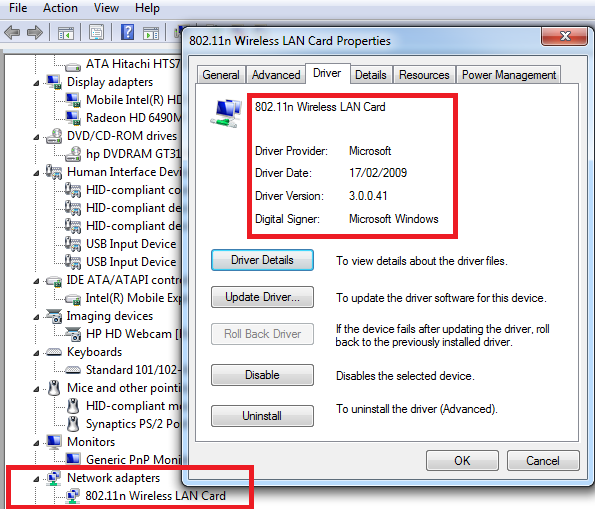
I ran the DPC latency checker, and sure enough after 5 minutes on battery, I got the issue. I disabled things in device manager 1 by 1 and found when I disable my "802.11n Wireless LAN Card" the issue INSTANTLY goes away. Re-enabling it brings the issue back again.

I've tried updating the card's drivers yet it doesn't change the driver version of the card.

Help?
 

My Computer My Computer

Computer Manufacturer/Model Number
HP Probook
OS
Windows 7 x64
CPU
i5 2430m
Memory
8GB
Graphics Card(s)
HD 6490 (7470)
You are probably lacking updated drivers or correct drivers.
HP ProBook 4500 Notebook PC series
If you know the process of installing drivers please do so. If you don't and want a walkthrough please upload a snapshot of Device Manager.

press the Win Key + R
A Run Window should appear please type
devmgmt.msc
Do you see any yellow marks ? If possible please take a snapshot of it. To take a snapshot press windows key and type snipping tool. This tool allows you to take snapshots and save it. Please upload the images to seven forums.

I am sorry to say that it is 2:25 AM here and I have work in morning unfortanatly I can not assist you until 12 hours from now.

The mouse lagging across the screen suggest to me a lack of video drivers BTW.
 

My Computer My Computer

Computer type
PC/Desktop
Computer Manufacturer/Model Number
Gateway / Slight Modifications
OS
Windows 8 64 bit PRO
CPU
AMD Phenom X4 9100e
Motherboard
Gateway RS780
Memory
2GB X2 DDR2
Graphics Card(s)
Sapphire HD 6850
Sound Card
Integrated
Monitor(s) Displays
Gateway 19" + Dell 19"
Screen Resolution
1440X900 sometimes 2880 by 900
Hard Drives
WD 80GB
WD 640GB
WD 1,000GB
PSU
Antec BP 550watts
Case
Antec 300
Cooling
Stock Cooling
Keyboard
Saitek Eclipse II
Mouse
Gigabyte GM-M6800
Internet Speed
D: 30Mbps U:4Mbps
Antivirus
Avast version 8
Browser
Internet Explorer ver 10 64 bit
Other Info
This is my work computer.
I have another laptop running Windows 7 64 bit.
Another PC running Windows 8 64 bit pro.
Total of 3
You are probably lacking updated drivers or correct drivers.
HP ProBook 4500 Notebook PC series
If you know the process of installing drivers please do so. If you don't and want a walkthrough please upload a snapshot of Device Manager.

press the Win Key + R
A Run Window should appear please type
devmgmt.msc
Do you see any yellow marks ? If possible please take a snapshot of it. To take a snapshot press windows key and type snipping tool. This tool allows you to take snapshots and save it. Please upload the images to seven forums.

I am sorry to say that it is 2:25 AM here and I have work in morning unfortanatly I can not assist you until 12 hours from now.

The mouse lagging across the screen suggest to me a lack of video drivers BTW.


I'd say I'm a fairly advanced user of Windows, if that helps.

I've tried video drivers from everywhere and haven't seen a difference. I've tried Leshcats modified mobility drivers which run better than stock ones, Windows drivers, AMDs drivers, as well as HP's drivers.

Unfortunately, as with many other laptop manufacturers, HP restricts the ability to install video adapter drivers to HP ones only. With a bit of playing around I managed to get various types working, although none work with stopping this mysterious lagging/stutter.

I am on a fresh install of W7 with the latest HP AMD drivers installed.

As I said above, after running the Latency checker, I noticed whenever I enabled/disabled my Network card, I noticed HUGE increases in latency. If it was enabled and I was on battery, it would instantly lag. As soon as I disabled the network card, ZERO lag.

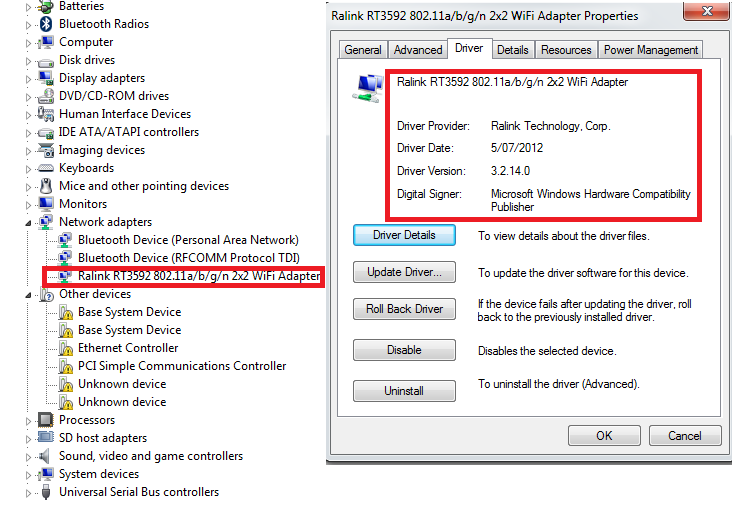
I updated the Ralink 802.11n Wireless Network Card drivers to the latest ones from HP and I am happy to report thus far no lagging under the same tests prior to updating.

However, the latency test still shows red bars (3000 uS+) latency but the mouse does not lag. Ideally I'd like this fixed, but it works for now.

Cheers for the reply, look forward to hearing from you tomorrow.


Prior to updating network card:

VhZNxD0.png


After updating network card:

A2RafgX.png
 

My Computer My Computer

Computer Manufacturer/Model Number
HP Probook
OS
Windows 7 x64
CPU
i5 2430m
Memory
8GB
Graphics Card(s)
HD 6490 (7470)
Sorry to take so long to reply, anyways I can tell right away there are drivers that need to be updated or installed. Have you done this ? ____
Spike lag has been dealth with, continuing on we now have to deal with that mouse lag? Is this only affecting mouse or entire system ?
Have you done windows updates? If not before updating any drivers please do this first.
Next we will tackle on the drivers. Please give me an update on where we are so far.
 

My Computer My Computer

Computer type
PC/Desktop
Computer Manufacturer/Model Number
Gateway / Slight Modifications
OS
Windows 8 64 bit PRO
CPU
AMD Phenom X4 9100e
Motherboard
Gateway RS780
Memory
2GB X2 DDR2
Graphics Card(s)
Sapphire HD 6850
Sound Card
Integrated
Monitor(s) Displays
Gateway 19" + Dell 19"
Screen Resolution
1440X900 sometimes 2880 by 900
Hard Drives
WD 80GB
WD 640GB
WD 1,000GB
PSU
Antec BP 550watts
Case
Antec 300
Cooling
Stock Cooling
Keyboard
Saitek Eclipse II
Mouse
Gigabyte GM-M6800
Internet Speed
D: 30Mbps U:4Mbps
Antivirus
Avast version 8
Browser
Internet Explorer ver 10 64 bit
Other Info
This is my work computer.
I have another laptop running Windows 7 64 bit.
Another PC running Windows 8 64 bit pro.
Total of 3
Sorry to take so long to reply, anyways I can tell right away there are drivers that need to be updated or installed. Have you done this ? ____
Spike lag has been dealth with, continuing on we now have to deal with that mouse lag? Is this only affecting mouse or entire system ?
Have you done windows updates? If not before updating any drivers please do this first.
Next we will tackle on the drivers. Please give me an update on where we are so far.

So far I have not noticed any more lagging since I last posted. The whole system used to lag - sound, picture, mouse etc. and after updating the network card's drivers, all of this has stopped.

As you can see in the device manager picture above, there are plenty of devices without drivers, however I am not noticing any lack of function with the laptop as a whole, so I am assuming (don't really know what they are) that they are mere extra functionality devices - SD readers etc.

I'm up to date on the important Windows updates, and I'm going to try and update my video drivers again later today. I am currently running a very old driver version and ideally would prefer the latest.
 

My Computer My Computer

Computer Manufacturer/Model Number
HP Probook
OS
Windows 7 x64
CPU
i5 2430m
Memory
8GB
Graphics Card(s)
HD 6490 (7470)
If you are interested in knowing what those unknown drivers could possibly mean you can follow these steps:
1) Get to device manager
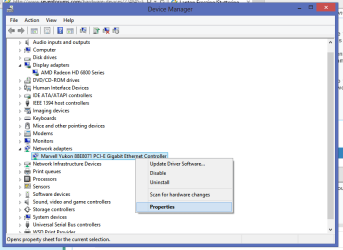
2) Right click on a Unknown Device and click properties. (IMAGE #1 DEVICE PROP)
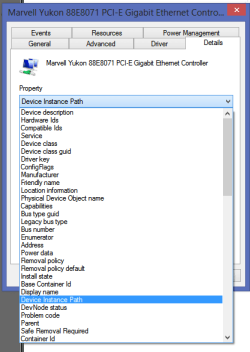
3) A window with multiple tabs will appear, some tabs may be "General, Driver, Details, Resources". Click on details tab(IMAGE 2 DEV INST PATH)
4) Go to property selection and from the drop down list find "Device Instance Path"
5)Read the Value as this is the information you will need. for Example mine is
PCI\VEN_11AB&DEV_436B&....(more mumble jumbo)
The first for characters after VEN_ are the vendor ID. the 4 characters after DEV_ are the device ID information.
PCI Vendor and Device Lists
Go to this site and do a search for your VENDOR ID. I just did and it took me to a new page with the name of Vendor, clicking on the Vendor name in my case Marvell Semiconductor leads me to another page with more information more importantly device ID information that is from this Vendor. find your matching device id from the list and you should know what this unknown device is. You should now have enough information and with your advanced PC skills should know what to do next.

If problem is solved please mark this thread as solve.
 

Attachments

  • DeviceProp.png
    DeviceProp.png
    20 KB · Views: 1
  • DeviceInstancePath.png
    DeviceInstancePath.png
    10.8 KB · Views: 3
  • VEN DEV num.png
    VEN DEV num.png
    7.6 KB · Views: 3

My Computer My Computer

Computer type
PC/Desktop
Computer Manufacturer/Model Number
Gateway / Slight Modifications
OS
Windows 8 64 bit PRO
CPU
AMD Phenom X4 9100e
Motherboard
Gateway RS780
Memory
2GB X2 DDR2
Graphics Card(s)
Sapphire HD 6850
Sound Card
Integrated
Monitor(s) Displays
Gateway 19" + Dell 19"
Screen Resolution
1440X900 sometimes 2880 by 900
Hard Drives
WD 80GB
WD 640GB
WD 1,000GB
PSU
Antec BP 550watts
Case
Antec 300
Cooling
Stock Cooling
Keyboard
Saitek Eclipse II
Mouse
Gigabyte GM-M6800
Internet Speed
D: 30Mbps U:4Mbps
Antivirus
Avast version 8
Browser
Internet Explorer ver 10 64 bit
Other Info
This is my work computer.
I have another laptop running Windows 7 64 bit.
Another PC running Windows 8 64 bit pro.
Total of 3
Back
Top