Laptop getting slow day by day

mmnouman

New member
Member
Local time
1:20 AM
Messages
60
My laptop is getting slow day by day,specs are
Dell Inspiron n5110
Core i7,4gb ram,500gb hard disk,2Gb nvidia,Win 7

It also takes 2 minutes to start and after startup performance is not as good as i7 should have,its too slow,also takes time to open software.
Please guide how to improve its performance.
 

My Computer My Computer

At a glance

Windows 7 x64DELL80GBNvidia GT525m
Computer Manufacturer/Model Number
DELL Inspiron N5110
OS
Windows 7 x64
CPU
DELL
Memory
80GB
Graphics Card(s)
Nvidia GT525m
Hard Drives
500GB
My laptop is getting slow day by day,specs are
Dell Inspiron n5110
Core i7,4gb ram,500gb hard disk,2Gb nvidia,Win 7

It also takes 2 minutes to start and after startup performance is not as good as i7 should have,its too slow,also takes time to open software.
Please guide how to improve its performance.
What anti-virus are you using?

1. First, download and install Malwarebytes Anti-Malware. Note: At the end of the install process, it will have a checkbox that says "Enable Free Trial of Malwarebytes PRO." Uncheck this. Run a full scan after the virus definitions update completes. If it finds anything, look over what it found and remove everything (unless you know something it found is ok.) Once you have removed the things it found, reboot your computer.

2. Go to start, type in msconfig, and press enter. Go to the startup tap and disable everything except your antivirus. Click Apply and reboot your computer.

3. If the first two things didn't work, try using System Restore to restore your computer to a time before this started occurring. http://www.sevenforums.com/tutorials/700-system-restore.html

If none of the above worked, try doing what this tutorial says: http://www.sevenforums.com/tutorials/11728-optimize-windows-7-a.html
 

My Computer My Computer

At a glance

Windows 7 Professional x64 Service Pack 1AMD Athlon X4 6456GB DDR3 1066Sapphire Radeon HD 5670 512MB GDDR5
Computer type
PC/Desktop
Computer Manufacturer/Model Number
HP Pavilion P7-1010
OS
Windows 7 Professional x64 Service Pack 1
CPU
AMD Athlon X4 645
Motherboard
Foxxcon N-Alvorix RS880
Memory
6GB DDR3 1066
Graphics Card(s)
Sapphire Radeon HD 5670 512MB GDDR5
Sound Card
Realtek Integrated Audio
Monitor(s) Displays
HP 2011x
Screen Resolution
1600x900
Hard Drives
1. Crucial M4 128GB SSD
2. 1TB Seagate Barracuda 7200.12 RPM
3. 1TB Western Digital Caviar Green 5400RPM
PSU
Seasonic S12 II Bronze 380 Watt
Case
HP OEM
Cooling
Coolermaster Heatsink, AVC Case Fan
Keyboard
HP OEM- Made by Chicony
Mouse
HP OEM- Made by Logitech
Internet Speed
20MBit Down/4 Up
Antivirus
Microsoft Security Essentials
Browser
Internet Explorer 10
Hi mmnouman,

Apart from the steps recommended by 'windude99', you may also try running the 'Hardware Diagnostics' to verify the 'Hardware functionality'. To initiate diagnostics, you may follow these steps: Restart the notebook > Repeatedly tap 'F12 key' at 'Dell splash screen' > Highlight 'Diagnostics' option by tapping the 'arrow key' > Tap 'Enter' > Capture and share error, if any. Alternatively, you may hold down the 'function key' and power on the notebook to start diagnostics: Run Built-In Diagnostics for Your System

Would also like to know more about the time, when the system gets slow. Apart from the long 'Boot time', are there any other applications/programs that cause the system to slow down? Please share the observations.


My Computer My Computer

At a glance

Windows 7 64bit
OS
Windows 7 64bit
I was using Mcafee which expired 2 months ago, now I am using MSE and I run full scan but there was no virus detected.
Secondly, I disabled some services from msconfig but there was no effect on performance.
 

My Computer My Computer

At a glance

Windows 7 x64DELL80GBNvidia GT525m
Computer Manufacturer/Model Number
DELL Inspiron N5110
OS
Windows 7 x64
CPU
DELL
Memory
80GB
Graphics Card(s)
Nvidia GT525m
Hard Drives
500GB
Hi mmnouman,

Did you remove expired 'Mcafee' program from the system before installing 'Microsoft Security Essentials'? You may run the 'Mcafee uninstaller'; may help you eliminate the application residues, if any: http://mcpr.notlong.com

Also share if you tried running 'Hardware Diagnostics'? System may go slow due to failure / under-performance of 'hardware components'. 'Diagnostics' will help use to isolate that possibility.

Would also like to know some more details about the system running slow:
- Does it take longer than normal to 'start up'? Or does it stay slow even in 'Windows'?
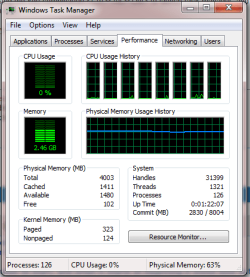
- Try using the key combination <Ctrl><Alt><Del> to launch task manager; and check if any process / application is consuming large system resources.

Do reply with the findings; would be glad to assist.


My Computer My Computer

At a glance

Windows 7 64bit
OS
Windows 7 64bit
tsk.pngYes I removed mcafee before installing MSE.
Yes I run Dell support for hardware, that was alright.

Yes it takes about 3 minutes to start, and when it starts at beginning it works slow but gradually speed increase but not ass good as i7 should with my such specs.

On start up up it also gives "server is busy" and not closes even on cancelling/try again/switch user.
 

My Computer My Computer

At a glance

Windows 7 x64DELL80GBNvidia GT525m
Computer Manufacturer/Model Number
DELL Inspiron N5110
OS
Windows 7 x64
CPU
DELL
Memory
80GB
Graphics Card(s)
Nvidia GT525m
Hard Drives
500GB
Disable your start up items. Open RUN and type msconfig to open System Utility Manager. There you can disable the start up items which are unnecessary.
 

My Computer My Computer

At a glance

Windows 7 Home PremiumIntel4GB
OS
Windows 7 Home Premium
CPU
Intel
Motherboard
Intel
Memory
4GB
Monitor(s) Displays
15"6
Screen Resolution
1366x768
Hard Drives
320GB
Mouse
DELL
Back
Top