Laptop is getting stuck on windows welcome screen..

Gene24

New member
Member
Local time
11:49 AM
Messages
65
Hello, I have a Levona G570 laptop. Windows is getting stuck on the welcome screen and also when I try booting in safe mode all I get is the safe mode in all 4 corners with a black screen, i can see the cursor also.
I tried doing a startup repair and the first couple times I tried would just keep going for over 5-6 hours, finally it did it again and gave me this error message along with it saying something along the lines of "Windows cannot automattically fix this"

Problem Signature

Problem Event Name" Startup Repair Offline

Problem Signature 01: 6.1.7600.16385

Problem Sig. 02: 6.1.7600.16385

Problem Sig. 03: Unknown

Problem Sig. 04: -1

Problem Sig. 05: System Disk

Problem Sig. 06: 1

Problem Sig. 07: No OS Installed

OS version: 6.1.7601.2.1.0.256.1

Local ID: 1033


Computer was working fine yesterday, shut it down then this happened out of nowhere? Laptop did not come with any Install Disc at all. Thanks for any help.
 

My Computer My Computer

At a glance

Windows 7 home premium
OS
Windows 7 home premium
Welcome aboard, Gene :)
First, boot into http://www.sevenforums.com/tutorials/666-advanced-boot-options.html , and try "Last Known Good Configuration (Advanced)" let us know it it worked.

Do you have a Repair disk, or installer disk ? How have you run the startup repair ? Automatic startup repair cannot recover it sometimes .

If not, download repair disk for your appropriate bits (32 bit or 64 bit)from the link specified in the first post of the thread http://www.sevenforums.com/installation-setup/182947-win7-repair-disk-download.html#post1550905 , Burn the downloaded .iso file to a blank CD, boot from the CD, and run http://www.sevenforums.com/tutorials/681-startup-repair.html , at least three times, with restarts after each single run. ( http://www.sevenforums.com/tutorials/105541-startup-repair-run-3-separate-times.html).

Let us know it it is not booting still now.
 

My Computer My Computer

At a glance

Microsoft Windows 10 Pro Insider Preview 64-bitIntel(R) Core(TM) i3-4130 CPU @ 3.40GHzCorsair Vengence 4GB x2 (8.00GB Dual-Channel ...2047MB GeForce GTS 450 (ZOTAC International)
Computer type
PC/Desktop
Computer Manufacturer/Model Number
Self Assembled
OS
Microsoft Windows 10 Pro Insider Preview 64-bit
CPU
Intel(R) Core(TM) i3-4130 CPU @ 3.40GHz
Motherboard
Gigabyte Technology Co., Ltd. B85M-D3H
Memory
Corsair Vengence 4GB x2 (8.00GB Dual-Channel DDR3 @ 798MHz)
Graphics Card(s)
2047MB GeForce GTS 450 (ZOTAC International)
Sound Card
Onboard (Realtek High Definition Audio)
Monitor(s) Displays
LG Flatron E2040T
Screen Resolution
1600x900
Hard Drives
Western Digital 1 TB
Seagate 500 GB
PSU
Corsair VS550
Case
Cooler Master K380
Cooling
Cooler Master Seidon 120V Plus
Keyboard
Logitech MK260r
Mouse
Logitech MK260r
Internet Speed
PMPL Broadband
Antivirus
Windows Defender + MBAM
Browser
Firefox
Other Info
Dell Studio 15" Laptop
Hello, thank you. First.. no discs at all.

Just tried to boot into last known good configuration and it takes me right back to the system recovery options with options to run startup repair, system restore (which says there is no restore point but I know I created one), system image recovery, windows memory diag. and command prompt. Which I have tried all options and nothing.
 

My Computer My Computer

At a glance

Windows 7 home premium
OS
Windows 7 home premium
Also I do not know how to run startup repair or know if I even have tried it yet, don't know much about computers
 

My Computer My Computer

At a glance

Windows 7 home premium
OS
Windows 7 home premium
I can use any computer to burn this disc correct? The one I am on now is running XP, does that matter?
 

My Computer My Computer

At a glance

Windows 7 home premium
OS
Windows 7 home premium
Nat a matter, burn the iso in XP . Then boot from the CD, and , to know how to run startup repair,
Click :ar: Startup Repair .
 

My Computer My Computer

At a glance

Microsoft Windows 10 Pro Insider Preview 64-bitIntel(R) Core(TM) i3-4130 CPU @ 3.40GHzCorsair Vengence 4GB x2 (8.00GB Dual-Channel ...2047MB GeForce GTS 450 (ZOTAC International)
Computer type
PC/Desktop
Computer Manufacturer/Model Number
Self Assembled
OS
Microsoft Windows 10 Pro Insider Preview 64-bit
CPU
Intel(R) Core(TM) i3-4130 CPU @ 3.40GHz
Motherboard
Gigabyte Technology Co., Ltd. B85M-D3H
Memory
Corsair Vengence 4GB x2 (8.00GB Dual-Channel DDR3 @ 798MHz)
Graphics Card(s)
2047MB GeForce GTS 450 (ZOTAC International)
Sound Card
Onboard (Realtek High Definition Audio)
Monitor(s) Displays
LG Flatron E2040T
Screen Resolution
1600x900
Hard Drives
Western Digital 1 TB
Seagate 500 GB
PSU
Corsair VS550
Case
Cooler Master K380
Cooling
Cooler Master Seidon 120V Plus
Keyboard
Logitech MK260r
Mouse
Logitech MK260r
Internet Speed
PMPL Broadband
Antivirus
Windows Defender + MBAM
Browser
Firefox
Other Info
Dell Studio 15" Laptop
Ok I am an idiot, I do not see anywhere 64 or 32 bit?
 

My Computer My Computer

At a glance

Windows 7 home premium
OS
Windows 7 home premium

My Computer My Computer

At a glance

Microsoft Windows 10 Pro Insider Preview 64-bitIntel(R) Core(TM) i3-4130 CPU @ 3.40GHzCorsair Vengence 4GB x2 (8.00GB Dual-Channel ...2047MB GeForce GTS 450 (ZOTAC International)
Computer type
PC/Desktop
Computer Manufacturer/Model Number
Self Assembled
OS
Microsoft Windows 10 Pro Insider Preview 64-bit
CPU
Intel(R) Core(TM) i3-4130 CPU @ 3.40GHz
Motherboard
Gigabyte Technology Co., Ltd. B85M-D3H
Memory
Corsair Vengence 4GB x2 (8.00GB Dual-Channel DDR3 @ 798MHz)
Graphics Card(s)
2047MB GeForce GTS 450 (ZOTAC International)
Sound Card
Onboard (Realtek High Definition Audio)
Monitor(s) Displays
LG Flatron E2040T
Screen Resolution
1600x900
Hard Drives
Western Digital 1 TB
Seagate 500 GB
PSU
Corsair VS550
Case
Cooler Master K380
Cooling
Cooler Master Seidon 120V Plus
Keyboard
Logitech MK260r
Mouse
Logitech MK260r
Internet Speed
PMPL Broadband
Antivirus
Windows Defender + MBAM
Browser
Firefox
Other Info
Dell Studio 15" Laptop
??But if I could get to my start menu i would not be here
 

My Computer My Computer

At a glance

Windows 7 home premium
OS
Windows 7 home premium
Nevermind, its 64, went to the site I bought it
 

My Computer My Computer

At a glance

Windows 7 home premium
OS
Windows 7 home premium
Ok, let me just get this right before I do since I never burned an .iso...

Just click the link like I would regularly but instead of saving to my computer I save to the drive the blank disc is in correct? Once done just eject the disc, don't play it or anything like that?
 

My Computer My Computer

At a glance

Windows 7 home premium
OS
Windows 7 home premium
It's ok ! Let us know if it worked or not.
 

My Computer My Computer

At a glance

Microsoft Windows 10 Pro Insider Preview 64-bitIntel(R) Core(TM) i3-4130 CPU @ 3.40GHzCorsair Vengence 4GB x2 (8.00GB Dual-Channel ...2047MB GeForce GTS 450 (ZOTAC International)
Computer type
PC/Desktop
Computer Manufacturer/Model Number
Self Assembled
OS
Microsoft Windows 10 Pro Insider Preview 64-bit
CPU
Intel(R) Core(TM) i3-4130 CPU @ 3.40GHz
Motherboard
Gigabyte Technology Co., Ltd. B85M-D3H
Memory
Corsair Vengence 4GB x2 (8.00GB Dual-Channel DDR3 @ 798MHz)
Graphics Card(s)
2047MB GeForce GTS 450 (ZOTAC International)
Sound Card
Onboard (Realtek High Definition Audio)
Monitor(s) Displays
LG Flatron E2040T
Screen Resolution
1600x900
Hard Drives
Western Digital 1 TB
Seagate 500 GB
PSU
Corsair VS550
Case
Cooler Master K380
Cooling
Cooler Master Seidon 120V Plus
Keyboard
Logitech MK260r
Mouse
Logitech MK260r
Internet Speed
PMPL Broadband
Antivirus
Windows Defender + MBAM
Browser
Firefox
Other Info
Dell Studio 15" Laptop
Ok, it's burning now. Hope I did it right, like I said never burned iso. Just did it like I explained in the post before. Clicked the link for 64 bit you sent me then clicked save to the cd drive and not actual computer?
 

My Computer My Computer

At a glance

Windows 7 home premium
OS
Windows 7 home premium
ok nevermind now i see, once it was done DL a box popped up saying files were ready to be burned. lol told you i am new to this
 

My Computer My Computer

At a glance

Windows 7 home premium
OS
Windows 7 home premium
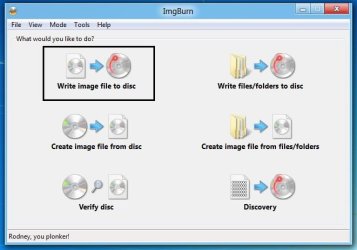
The best iso burning utility is ImgBurn . Download and install it.
When done, run it. Click on "Write image file to disk"
Untitled.jpg
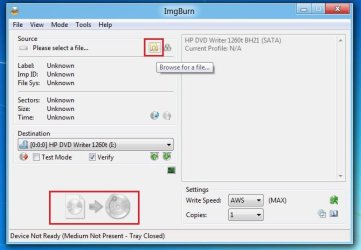
Next, click on "browse for a file", and browse to the downloaded iso. and finally click the bottom pointed below, and wait a few minutes to get it burned.
2.jpg
 

My Computer My Computer

At a glance

Microsoft Windows 10 Pro Insider Preview 64-bitIntel(R) Core(TM) i3-4130 CPU @ 3.40GHzCorsair Vengence 4GB x2 (8.00GB Dual-Channel ...2047MB GeForce GTS 450 (ZOTAC International)
Computer type
PC/Desktop
Computer Manufacturer/Model Number
Self Assembled
OS
Microsoft Windows 10 Pro Insider Preview 64-bit
CPU
Intel(R) Core(TM) i3-4130 CPU @ 3.40GHz
Motherboard
Gigabyte Technology Co., Ltd. B85M-D3H
Memory
Corsair Vengence 4GB x2 (8.00GB Dual-Channel DDR3 @ 798MHz)
Graphics Card(s)
2047MB GeForce GTS 450 (ZOTAC International)
Sound Card
Onboard (Realtek High Definition Audio)
Monitor(s) Displays
LG Flatron E2040T
Screen Resolution
1600x900
Hard Drives
Western Digital 1 TB
Seagate 500 GB
PSU
Corsair VS550
Case
Cooler Master K380
Cooling
Cooler Master Seidon 120V Plus
Keyboard
Logitech MK260r
Mouse
Logitech MK260r
Internet Speed
PMPL Broadband
Antivirus
Windows Defender + MBAM
Browser
Firefox
Other Info
Dell Studio 15" Laptop
I hit f12 to boot from disc and heard it start to run but nothing eventually took me back to the startup repair screen i explained before
 

My Computer My Computer

At a glance

Windows 7 home premium
OS
Windows 7 home premium
I will try again, am I able to try and reburn it to the same disc or should i try another disc? Now to start all over and use Imgburn this time please tell me if I miss a step or what to do..

I go to the link your provided and click download, where do I save it, my computer and just do not open it?

Then put in the disc and go from there just open up imgburn and i'm guessing click the "write files/folders to a disc" option
 

My Computer My Computer

At a glance

Windows 7 home premium
OS
Windows 7 home premium
I hit f12 to boot from disc and heard it start to run but nothing eventually took me back to the startup repair screen i explained before
What does it exactly say ? Does it goes to system recovery options ?
 

My Computer My Computer

At a glance

Microsoft Windows 10 Pro Insider Preview 64-bitIntel(R) Core(TM) i3-4130 CPU @ 3.40GHzCorsair Vengence 4GB x2 (8.00GB Dual-Channel ...2047MB GeForce GTS 450 (ZOTAC International)
Computer type
PC/Desktop
Computer Manufacturer/Model Number
Self Assembled
OS
Microsoft Windows 10 Pro Insider Preview 64-bit
CPU
Intel(R) Core(TM) i3-4130 CPU @ 3.40GHz
Motherboard
Gigabyte Technology Co., Ltd. B85M-D3H
Memory
Corsair Vengence 4GB x2 (8.00GB Dual-Channel DDR3 @ 798MHz)
Graphics Card(s)
2047MB GeForce GTS 450 (ZOTAC International)
Sound Card
Onboard (Realtek High Definition Audio)
Monitor(s) Displays
LG Flatron E2040T
Screen Resolution
1600x900
Hard Drives
Western Digital 1 TB
Seagate 500 GB
PSU
Corsair VS550
Case
Cooler Master K380
Cooling
Cooler Master Seidon 120V Plus
Keyboard
Logitech MK260r
Mouse
Logitech MK260r
Internet Speed
PMPL Broadband
Antivirus
Windows Defender + MBAM
Browser
Firefox
Other Info
Dell Studio 15" Laptop
Yes, it goes to the system recovery options like before, with the options of

startup repair

system restore

system image recovery

windows memory diag.

command prompt

same exact box i go to before I even downloaded the disc and put it in.
 

My Computer My Computer

At a glance

Windows 7 home premium
OS
Windows 7 home premium
This screen is the same, but if you select the "Startup repair" option here, it will first search for installed windows, then check for any problem in the bootloader section and will fix it automatically. If needed, it will check for system file integration violations, too. Running startup repair from a repair disk or installation disk is always powerful than running from itself.

Run it at lease three times, with restarts after every single run .
 

My Computer My Computer

At a glance

Microsoft Windows 10 Pro Insider Preview 64-bitIntel(R) Core(TM) i3-4130 CPU @ 3.40GHzCorsair Vengence 4GB x2 (8.00GB Dual-Channel ...2047MB GeForce GTS 450 (ZOTAC International)
Computer type
PC/Desktop
Computer Manufacturer/Model Number
Self Assembled
OS
Microsoft Windows 10 Pro Insider Preview 64-bit
CPU
Intel(R) Core(TM) i3-4130 CPU @ 3.40GHz
Motherboard
Gigabyte Technology Co., Ltd. B85M-D3H
Memory
Corsair Vengence 4GB x2 (8.00GB Dual-Channel DDR3 @ 798MHz)
Graphics Card(s)
2047MB GeForce GTS 450 (ZOTAC International)
Sound Card
Onboard (Realtek High Definition Audio)
Monitor(s) Displays
LG Flatron E2040T
Screen Resolution
1600x900
Hard Drives
Western Digital 1 TB
Seagate 500 GB
PSU
Corsair VS550
Case
Cooler Master K380
Cooling
Cooler Master Seidon 120V Plus
Keyboard
Logitech MK260r
Mouse
Logitech MK260r
Internet Speed
PMPL Broadband
Antivirus
Windows Defender + MBAM
Browser
Firefox
Other Info
Dell Studio 15" Laptop
Back
Top