Laptop not detecting a working battery

slizza786

New member
Local time
10:27 PM
Messages
5
Hi

Me and my sister have the same laptop with windows 7 ultimate 32bit running on each one. The problem is my sisters laptop is not detecting the laptop battery charger when inserted. Her battery and charger works fine as I tested them on my laptop and both fully functional and even my own battery and charger does not work on her laptop.

When the charger is plugged in no message or charging icon comes up, just the normal battery icon. I'm pretty sure there is something wrong with the laptop.

any help please?

Thanks
 

My Computer My Computer

OS
windows 7 ultimate 32bit
Hello slizza and welcome to Seven Forums.

Could you post some additional information about the laptop like make and model? Sometimes a computer manufacturer installs their own software that controls how a machine will work. Just as an example, on a Sony Vaio they have what's called Vaio Care. This software can override the built in Windows 7 power plan settings.

In the meantime, you could compare the power plan settings on your laptop to the settings on your sister's laptop and make sure they're the same. You could also run a power diagnostics efficienty report to see if your sister's machine is showing any issues.

http://www.sevenforums.com/tutorials/778-power-plan-settings-change.html

http://www.sevenforums.com/tutorials/4569-power-efficiency-diagnostics-report.html

You could also open Device Manager and see if there are any warning symbols for the battery. This could indicate a driver issue.
 

My Computer My Computer

Computer type
Laptop
Computer Manufacturer/Model Number
Sony Vaio VPCEB47GM Laptop
OS
Win 7 Pro 64-bit
CPU
Intel i5 2.4 Ghz
Memory
8GB DDR3
Graphics Card(s)
Intel HD 3000
Sound Card
IDT High Definition
Monitor(s) Displays
15.6 WGXA Anti-Glare LED
Screen Resolution
1280x800
Hard Drives
640Gb 7200rpm
Antivirus
MSE
Browser
Opera (primary) with IE9 backup
Hi Marsmimar

Thank you for the warm welcome and great advice.

The model of both laptops are Packard Bell EasyNote MZ35 which were pre-installed with windows vista but upgraded years later to W7 Ultimate 32b.

I compared both power setting of the laptops and both are the same and also ran the energy test with the following results and both seem to be fairly similar.
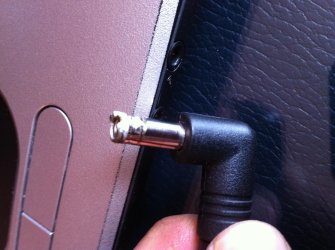
What I also did was remove the battery pack from my sister's laptop with the AC adapter still plugged in but it still failed to turn on, giving me even more suspicion its something to do with the laptop itself. Furthermore I inspected the AC adapter of my sister's laptop and saw that the adapter may have fried partially (yet still working) which may have caused some damage to the laptops AC adapter socket. Also attached is a picture of the adapter.
 

Attachments

  • photo.jpg
    photo.jpg
    554.2 KB · Views: 20

My Computer My Computer

OS
windows 7 ultimate 32bit
Hey! welcome to the forums.
I had this problem a while ago...
If its not either the battery or the external jack it could be the BIOS or the internal adapter. Usually on the manufacturer's site their will be a download for updating (also known as flashing) the BIOS. HEED ANY WARNINGS ON THE SITE REGARDING THE BIOS. This is one of the most important pieces of software, make sure you know what you are doing. As for the internal jack... I'm not *really* sure how your model is configured, but you should be able to replace it. The pic you attached make me think that maybe it got fried by whatever fried the plug. Again, just look around on the internet, somebody has got to be selling one of those somewhere.
Hope this helps.
-slizz_
 

My Computer My Computer

Computer Manufacturer/Model Number
Dell Studio 17
OS
Windows 7 Ultimate x64
CPU
Intel i7 1st gen
Motherboard
Studio 17
Memory
4gb ddr3
Graphics Card(s)
AMD Radeon 5650
Sound Card
some JBL thing
Monitor(s) Displays
flippin' gigantic thing
Screen Resolution
1600-900
Hard Drives
scorpio blue - 200 gb
Case
minifridge racks
Cooling
a minifridge
Keyboard
homemade cardboard thing
Mouse
i use a cat
Internet Speed
not fast enough
Other Info
whats left of a Studio 17, stuck into my fridge. not kidding.
Hi Marsmimar

Thank you for the warm welcome and great advice.

The model of both laptops are Packard Bell EasyNote MZ35 which were pre-installed with windows vista but upgraded years later to W7 Ultimate 32b.

I compared both power setting of the laptops and both are the same and also ran the energy test with the following results and both seem to be fairly similar.
What I also did was remove the battery pack from my sister's laptop with the AC adapter still plugged in but it still failed to turn on, giving me even more suspicion its something to do with the laptop itself. Furthermore I inspected the AC adapter of my sister's laptop and saw that the adapter may have fried partially (yet still working) which may have caused some damage to the laptops AC adapter socket. Also attached is a picture of the adapter.

From the looks of the adapter plug, some serious electrical current must have gone through it to cause that damage. A power surge like that could have easily damaged the delicate electronics inside the computer.
 

My Computer My Computer

Computer type
Laptop
Computer Manufacturer/Model Number
Sony Vaio VPCEB47GM Laptop
OS
Win 7 Pro 64-bit
CPU
Intel i5 2.4 Ghz
Memory
8GB DDR3
Graphics Card(s)
Intel HD 3000
Sound Card
IDT High Definition
Monitor(s) Displays
15.6 WGXA Anti-Glare LED
Screen Resolution
1280x800
Hard Drives
640Gb 7200rpm
Antivirus
MSE
Browser
Opera (primary) with IE9 backup
Back
Top