Solved Laptop running very slow, too many startup programs?

SpottedCow88

New member
Local time
1:12 PM
Messages
4
Hello everyone,

first of all I want to thank everyone very much for taking their time to help me and everyone else through these forums, I've received a lot of useful information and I truly appreciate it. I've recently been going on my computer more and noticed how slow it's been running. I've attempted to perform the "Windows Fix-It" program offered and it's telling me I have too many start-up programs and I just don't know what to do and what programs aren't necessary. This is my first time starting a thread and I hope I do this right, I'll attempt to upload a file to show my start-up programs. Thank you again.
 

Attachments

Last edited:

My Computer My Computer

Computer type
Laptop
Computer Manufacturer/Model Number
HP
OS
Windows 7 Professional 64 Bit
CPU
Intel(R) Core(TM) i3-2310M CPU @ 2.10Ghz
Motherboard
HP ProBook 4530s
Antivirus
Norton Internet Security
Hello SpottedCow and welcome to Seven Forums.

This tutorial (particularly Item # 9 for startup programs) shows how to optimize Windows 7.

http://www.sevenforums.com/tutorials/11728-optimize-windows-7-a.html

A lot of the Forum experts suggest stopping everything except your anti-virus program from running at startup. Item # 9 links you to another tutorial that shows a few different ways to disable or remove programs you do not want to have start when Windows 7 starts. Take a look at Method Three (using system configuration.)
 

My Computer My Computer

Computer type
Laptop
Computer Manufacturer/Model Number
Sony Vaio VPCEB47GM Laptop
OS
Win 7 Pro 64-bit
CPU
Intel i5 2.4 Ghz
Memory
8GB DDR3
Graphics Card(s)
Intel HD 3000
Sound Card
IDT High Definition
Monitor(s) Displays
15.6 WGXA Anti-Glare LED
Screen Resolution
1280x800
Hard Drives
640Gb 7200rpm
Antivirus
MSE
Browser
Opera (primary) with IE9 backup
Hello Marsmimar,

I just received your message and I'm going to look into this right away. Thank you for the quick reply, I'll message back as soon as I follow the steps provided. Thanks again.
 

My Computer My Computer

Computer type
Laptop
Computer Manufacturer/Model Number
HP
OS
Windows 7 Professional 64 Bit
CPU
Intel(R) Core(TM) i3-2310M CPU @ 2.10Ghz
Motherboard
HP ProBook 4530s
Antivirus
Norton Internet Security
You're welcome. Hope it helps. :)
 

My Computer My Computer

Computer type
Laptop
Computer Manufacturer/Model Number
Sony Vaio VPCEB47GM Laptop
OS
Win 7 Pro 64-bit
CPU
Intel i5 2.4 Ghz
Memory
8GB DDR3
Graphics Card(s)
Intel HD 3000
Sound Card
IDT High Definition
Monitor(s) Displays
15.6 WGXA Anti-Glare LED
Screen Resolution
1280x800
Hard Drives
640Gb 7200rpm
Antivirus
MSE
Browser
Opera (primary) with IE9 backup
Hello Marsmimar,

After looking over a lot of these optimization procedures I noticed I was coming across the same issues I was having before, I don't know what "programs/files" are safe to disable. I'm able to navigate to where I need to be but I just don't know what I should disable or what programs exactly I can uninstall. From your previous post, what you said other experts on this forum do as far as stopping everything from running at startup but your antivirus, would that be OK? Where it shows my programs that startup, my antivirus isn't in that list. I work first shift so I won't be on for about 9 hours but I'll be sure to check back. Thanks.
 

My Computer My Computer

Computer type
Laptop
Computer Manufacturer/Model Number
HP
OS
Windows 7 Professional 64 Bit
CPU
Intel(R) Core(TM) i3-2310M CPU @ 2.10Ghz
Motherboard
HP ProBook 4530s
Antivirus
Norton Internet Security
Hello Marsmimar,

After looking over a lot of these optimization procedures I noticed I was coming across the same issues I was having before, I don't know what "programs/files" are safe to disable. I'm able to navigate to where I need to be but I just don't know what I should disable or what programs exactly I can uninstall. From your previous post, what you said other experts on this forum do as far as stopping everything from running at startup but your antivirus, would that be OK? Where it shows my programs that startup, my antivirus isn't in that list. I work first shift so I won't be on for about 9 hours but I'll be sure to check back. Thanks.

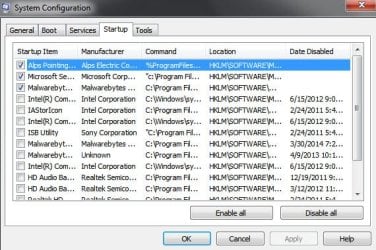
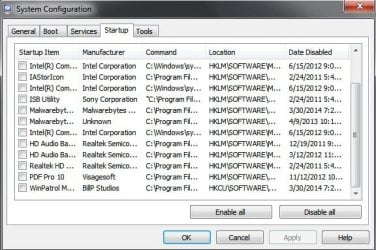
I can understand your confusion. Just as an example, on my computer I went into msconfig<dot>exe. I disabled everything at startup except for my touchpad (Alps), and my two primary anti-malware programs Microsoft Security Essentials (Microsoft Se...) and Malwarebytes (Malwarebyt...). I simply unchecked (disabled) all other items in msconfig except for those three startup items. Once the computer boots and I begin my session, I can manually access any of the startup programs on an "as needed" basis.

system config.jpg msconfig 2.jpg
 

My Computer My Computer

Computer type
Laptop
Computer Manufacturer/Model Number
Sony Vaio VPCEB47GM Laptop
OS
Win 7 Pro 64-bit
CPU
Intel i5 2.4 Ghz
Memory
8GB DDR3
Graphics Card(s)
Intel HD 3000
Sound Card
IDT High Definition
Monitor(s) Displays
15.6 WGXA Anti-Glare LED
Screen Resolution
1280x800
Hard Drives
640Gb 7200rpm
Antivirus
MSE
Browser
Opera (primary) with IE9 backup
Marsmimar,

After going through the tutorial to optimize Windows 7, I've improved the performance of my start up drastically. Thank you very much for your help. :D
 

My Computer My Computer

Computer type
Laptop
Computer Manufacturer/Model Number
HP
OS
Windows 7 Professional 64 Bit
CPU
Intel(R) Core(TM) i3-2310M CPU @ 2.10Ghz
Motherboard
HP ProBook 4530s
Antivirus
Norton Internet Security
That's great news! Thanks for posting back. :thumbsup:
 

My Computer My Computer

Computer type
Laptop
Computer Manufacturer/Model Number
Sony Vaio VPCEB47GM Laptop
OS
Win 7 Pro 64-bit
CPU
Intel i5 2.4 Ghz
Memory
8GB DDR3
Graphics Card(s)
Intel HD 3000
Sound Card
IDT High Definition
Monitor(s) Displays
15.6 WGXA Anti-Glare LED
Screen Resolution
1280x800
Hard Drives
640Gb 7200rpm
Antivirus
MSE
Browser
Opera (primary) with IE9 backup
Back
Top