Laptop runs slow after a while

georgio17

New member
Local time
4:51 PM
Messages
14
I have a Dell Studio laptop with corei3 processor 3 GB ram ATI Radeon 4570.Recently I have a problem that whenever I play games it works smooth for about 20 minutes that it works really slow it has been only 3 months that I have purchased the laptop and this problem was not happening about a month ago.If i restart the game after 5 minutes it works smoothly for about 10 minutes:mad:. Could you please help me please as i cannot play my games
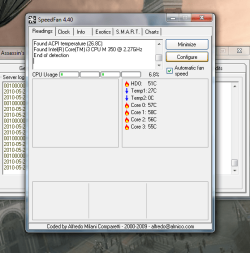
I have uploaded the system resource monitor image and the readings of speed fan temperature images
 

Attachments

  • Capture.PNG
    Capture.PNG
    40.6 KB · Views: 79
  • Capture 3.PNG
    Capture 3.PNG
    35.8 KB · Views: 76

My Computer My Computer

OS
windows 7
Motherboard
Gigabyte
Memory
3 GB
Graphics Card(s)
Nvidia 8600 GT
Monitor(s) Displays
1
Hard Drives
Western Digital 160 GB
I have a Dell Studio laptop with corei3 processor 3 GB ram ATI Radeon 4570.Recently I have a problem that whenever I play games it works smooth for about 20 minutes that it works really slow it has been only 3 months that I have purchased the laptop and this problem was not happening about a month ago.If i restart the game after 5 minutes it works smoothly for about 10 minutes:mad:. Could you please help me please as i cannot play my games
I have uploaded the system resource monitor image and the readings of speed fan temperature images

Probably a networking issue can we get some info on your network? are you using homegroup?
 

My Computer My Computer

Computer Manufacturer/Model Number
HP Pavillion dv-7 1005 Tx
OS
Win 8 Release candidate 8400
CPU
[email protected]
Memory
4 gigs
Graphics Card(s)
Nvidia 9600M
Sound Card
HD built-in
Monitor(s) Displays
17" Wxga
Screen Resolution
1440x900
Cooling
none
Internet Speed
45Mb down 5Mb up
Due to the heat created when gaming, the system needs to cool it's self. As you are on a laptop, it may be that it will throttle processor speed before using active cooling (fans), as this is a power saving device on laptops. To check this (and change it);
Go into; power options > change plan settings (For whatever power plan you are using when experiencing this) > advanced power settings. Once here go to; processor power managment > System Cooling Policy, Change it to active, if not already.
 

My Computer My Computer

Computer Manufacturer/Model Number
HP Dv3-2137tx
OS
7 Home Premium x64
CPU
Core 2 P8700 2.53ghz
Motherboard
Compaq
Memory
4gb DDR2
Graphics Card(s)
Nvidia GeForce 105M
Sound Card
Integrated
Monitor(s) Displays
13" 1366x768
Hard Drives
500gb 5400rpm
Cooling
Stock
I am not sure heat is the problem if the temps you provided (which are cool) are taken immediately before you shut down. If not convinced, do a quick search and you will find that most agree that lappy temps in the 60s, 70s, even 80s under a load are normal. Last I knew, Intel allowed for temps of 100 for mobile CPUs with an average temp of about 70. I am not familiar with the app that displays your temps but I use the free HWMonitor which shows CPU, GPU, mobo, cores, and HDD temps as well as other stuff. Could it be GPU heat? I have my doubts.

In my experience, excess heat causes the system to shut down, not slow down - but that's my experience. Have you shut down and immediately booted - before any significant cooling could take place?

Heat issues aside, I wonder about RAM.

Monk
 

My Computer My Computer

Computer Manufacturer/Model Number
Custom
OS
Dual boot XP Pro SP3x86 and Win7 Pro x64
CPU
AMD Phenom II x3 720 BE OCed to 3.3 GHz
Motherboard
Asus M3A79T Deluxe
Memory
2x2GB OCZ OCZ2RPR10664GK PC2-8500 DDR2
Graphics Card(s)
Sapphire ATi Radeon 4830 HD x2 (XFire)
Sound Card
Integrated (SoundMax)
Monitor(s) Displays
Dual: LG L227WTG/LG M237WD
Screen Resolution
1680 x 1050; 1920 x1280
Hard Drives
3 WDC WD7501AALS-00J7B0
PSU
Zalman 750HD Modular
Case
Antec 900
Cooling
4 120mm, 1 200mm fans
Keyboard
Black with lots of keys
Mouse
Razer Lachesis, Logitech RumbePad2, Logitech Marble
Internet Speed
Who counts
Other Info
7:1 SS
I have a Dell Studio laptop with corei3 processor 3 GB ram ATI Radeon 4570.Recently I have a problem that whenever I play games it works smooth for about 20 minutes that it works really slow it has been only 3 months that I have purchased the laptop and this problem was not happening about a month ago.If i restart the game after 5 minutes it works smoothly for about 10 minutes:mad:. Could you please help me please as i cannot play my games
I have uploaded the system resource monitor image and the readings of speed fan temperature images

Probably a networking issue can we get some info on your network? are you using homegroup?

Can u show me how to get some information as i do not understand
 

My Computer My Computer

OS
windows 7
Motherboard
Gigabyte
Memory
3 GB
Graphics Card(s)
Nvidia 8600 GT
Monitor(s) Displays
1
Hard Drives
Western Digital 160 GB

Attachments

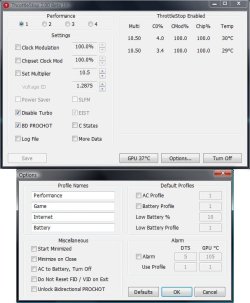
  • ThrottleStop.jpg
    ThrottleStop.jpg
    69.4 KB · Views: 151
Last edited:

My Computer My Computer

Computer type
PC/Desktop
Computer Manufacturer/Model Number
Custom Build
OS
Windows 7 Professional SP1 - x64 [Non-UEFI Boot]
CPU
Ivy Bridge Core i5 3570K (Delidded)
Motherboard
Asus P8Z77-V LE PLUS
Memory
G.Skill "Ares" DDR3 PC3-12800 - 1600MHz (16Gb)
Graphics Card(s)
Asus Dual-RX480-O4G
Sound Card
Creative Sound Blaster Z w/5.1 sound system
Monitor(s) Displays
Asus IPS 23"
Screen Resolution
16/9
Hard Drives
Internal:
500Go Sata 6Gb/s (x2)
500Go Sata 3Gb/s (x2)
SSD 60Go Sata 6Gb/s
PSU
In Win C 900W Series 80+ Platinum
Case
Thermaltake Chaser A71
Cooling
Custom Water Cooling Loop
Keyboard
Cooler Master QuickFire XTi
Mouse
Razer Imperator 2012 (4G)
Antivirus
MSE
Browser
IE 11.0.xxx Rtm
Other Info
"Raid0" with Intel Smart Response Technology (HDD/SSD)
I am not sure heat is the problem if the temps you provided (which are cool) are taken immediately before you shut down. If not convinced, do a quick search and you will find that most agree that lappy temps in the 60s, 70s, even 80s under a load are normal. Last I knew, Intel allowed for temps of 100 for mobile CPUs with an average temp of about 70. I am not familiar with the app that displays your temps but I use the free HWMonitor which shows CPU, GPU, mobo, cores, and HDD temps as well as other stuff. Could it be GPU heat? I have my doubts.

In my experience, excess heat causes the system to shut down, not slow down - but that's my experience. Have you shut down and immediately booted - before any significant cooling could take place?

Heat issues aside, I wonder about RAM.

Monk


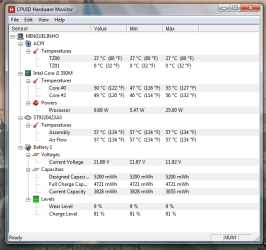
I have tried running HWMonitor without playing games and the following is shown as below, i do not think it is showing the GPU temperature and thats reminds me that my ATI catalyst control center is not opening
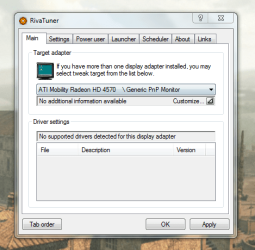
and also i have installed Riva tuner and tweaking options do not appear of the grapic card as shown below
 

Attachments

  • Capture 4.PNG
    Capture 4.PNG
    31.1 KB · Views: 47
  • Capture 5.PNG
    Capture 5.PNG
    33.8 KB · Views: 11

My Computer My Computer

OS
windows 7
Motherboard
Gigabyte
Memory
3 GB
Graphics Card(s)
Nvidia 8600 GT
Monitor(s) Displays
1
Hard Drives
Western Digital 160 GB
First off, at least by my standards/expectations, your lappy is cool. Hopefully others will pipe in with their experiences about lappy temps.

Secondly, according to RivaTuner lappy gfx is not supported: "Note: RivaTuner doesn't declare official support for mobile graphics processors and multi-GPU SLI and Crossfire configurations. Proper functionality on such systems is not guaranteed, use RivaTuner at your own risk."

While I am familiar with RivaTuner, I do not have a working knowledge of it so there is not much I can offer other than to suggest you see what users say about such use; maybe someone here can guide you on that.

Finally,
ATi's CCC often fails after driver upgrades; why, who knows but it is a recognized issue. The general approach is to uninstall/reinstall with or without driver uninstall/reinstall. You may have to experiment around.

What I would suggest is to first, uninstall your gfx driver. Why? Many issues are created when you upgrade a driver by overwriting the existing drivers. ATi points out that legacy drivers should always be uninstalled before an upgrade; legacy or not, I always uninstall ANY gfx drivers before an upgrade.

Next uninstall CCC. First go to Revo Uninstaller and read about and DL the free version. (Once installed, you can forget about Windows uninstaller). Launch Revo and uninstall CCC. The first uninstall screen that pops up gives you four uninstall levels. I always choose the most advanced and have never had a problem. Then Revo launches the app's built-in uninstaller; when that is finished, Revo takes over. However, many apps direct you to reboot after they are finished uninstalling and you will get a dialog asking if you want to do so: DO NOT REBOOT. If you reboot at this time, you kill Revo before it starts to do its thing. Simply close the reboot dialog and click next on Revo's screen; now Revo starts. First it scans the reg for leftovers; when you are presented the list of leftovers, click the <SELECT ALL> button and <DELETE>; a dialog asks you if you are sure: <YES>. then click next and Revo searches the root directory for any remaining app subdirectories (e.g., some apps even though deleted will leave a config file/subdirectory). Once competed, same thing: select and delete all. I have been using Revo since early 2008 and have never had an issue as a consequence of deleting everything it finds (the worry is deleting shared files). At times, when Revo is finished, it may tell you it could not delete various subdirectories - which will be done on a reboot. Now you reboot. As you reboot, if Windows gives you a found new hardware screen, close it. You are now running a generic gfx driver.

Next, ALWAYS follow your lappy's mfr (Dell in your case) to see if gfx drivers have been updated - rather than going to ATi. Why? Lappy mfrs are prone to tweak everything they put in their machines. If Dell directs you to ATi for a driver: great. Whatever the case, DL and install the latest driver. Reboot.

Now go to Dell and see if they have a version of CCC; my guess would be no. If not go to ATi and DL the latest version of CCC and install it. Reboot.

Results: does CCC now launch; how's the speed?

Monk


My Computer My Computer

Computer Manufacturer/Model Number
Custom
OS
Dual boot XP Pro SP3x86 and Win7 Pro x64
CPU
AMD Phenom II x3 720 BE OCed to 3.3 GHz
Motherboard
Asus M3A79T Deluxe
Memory
2x2GB OCZ OCZ2RPR10664GK PC2-8500 DDR2
Graphics Card(s)
Sapphire ATi Radeon 4830 HD x2 (XFire)
Sound Card
Integrated (SoundMax)
Monitor(s) Displays
Dual: LG L227WTG/LG M237WD
Screen Resolution
1680 x 1050; 1920 x1280
Hard Drives
3 WDC WD7501AALS-00J7B0
PSU
Zalman 750HD Modular
Case
Antec 900
Cooling
4 120mm, 1 200mm fans
Keyboard
Black with lots of keys
Mouse
Razer Lachesis, Logitech RumbePad2, Logitech Marble
Internet Speed
Who counts
Other Info
7:1 SS
First off, at least by my standards/expectations, your lappy is cool. Hopefully others will pipe in with their experiences about lappy temps.

Secondly, according to RivaTuner lappy gfx is not supported: "Note: RivaTuner doesn't declare official support for mobile graphics processors and multi-GPU SLI and Crossfire configurations. Proper functionality on such systems is not guaranteed, use RivaTuner at your own risk."

While I am familiar with RivaTuner, I do not have a working knowledge of it so there is not much I can offer other than to suggest you see what users say about such use; maybe someone here can guide you on that.

Finally,
ATi's CCC often fails after driver upgrades; why, who knows but it is a recognized issue. The general approach is to uninstall/reinstall with or without driver uninstall/reinstall. You may have to experiment around.

What I would suggest is to first, uninstall your gfx driver. Why? Many issues are created when you upgrade a driver by overwriting the existing drivers. ATi points out that legacy drivers should always be uninstalled before an upgrade; legacy or not, I always uninstall ANY gfx drivers before an upgrade.

Next uninstall CCC. First go to Revo Uninstaller and read about and DL the free version. (Once installed, you can forget about Windows uninstaller). Launch Revo and uninstall CCC. The first uninstall screen that pops up gives you four uninstall levels. I always choose the most advanced and have never had a problem. Then Revo launches the app's built-in uninstaller; when that is finished, Revo takes over. However, many apps direct you to reboot after they are finished uninstalling and you will get a dialog asking if you want to do so: DO NOT REBOOT. If you reboot at this time, you kill Revo before it starts to do its thing. Simply close the reboot dialog and click next on Revo's screen; now Revo starts. First it scans the reg for leftovers; when you are presented the list of leftovers, click the <SELECT ALL> button and <DELETE>; a dialog asks you if you are sure: <YES>. then click next and Revo searches the root directory for any remaining app subdirectories (e.g., some apps even though deleted will leave a config file/subdirectory). Once competed, same thing: select and delete all. I have been using Revo since early 2008 and have never had an issue as a consequence of deleting everything it finds (the worry is deleting shared files). At times, when Revo is finished, it may tell you it could not delete various subdirectories - which will be done on a reboot. Now you reboot. As you reboot, if Windows gives you a found new hardware screen, close it. You are now running a generic gfx driver.

Next, ALWAYS follow your lappy's mfr (Dell in your case) to see if gfx drivers have been updated - rather than going to ATi. Why? Lappy mfrs are prone to tweak everything they put in their machines. If Dell directs you to ATi for a driver: great. Whatever the case, DL and install the latest driver. Reboot.

Now go to Dell and see if they have a version of CCC; my guess would be no. If not go to ATi and DL the latest version of CCC and install it. Reboot.

Results: does CCC now launch; how's the speed?

Monk

In that case (red lines) backup the shared folder and replace the files if they do miss..

I have updated 2 days ago my Ati Card and in the shared folder (Common Files) "PX Storage" folder went empty...Lucky when right clicked on the folder i could restore it to a previous state, and all the missing files came up.
 

My Computer My Computer

Computer type
PC/Desktop
Computer Manufacturer/Model Number
Custom Build
OS
Windows 7 Professional SP1 - x64 [Non-UEFI Boot]
CPU
Ivy Bridge Core i5 3570K (Delidded)
Motherboard
Asus P8Z77-V LE PLUS
Memory
G.Skill "Ares" DDR3 PC3-12800 - 1600MHz (16Gb)
Graphics Card(s)
Asus Dual-RX480-O4G
Sound Card
Creative Sound Blaster Z w/5.1 sound system
Monitor(s) Displays
Asus IPS 23"
Screen Resolution
16/9
Hard Drives
Internal:
500Go Sata 6Gb/s (x2)
500Go Sata 3Gb/s (x2)
SSD 60Go Sata 6Gb/s
PSU
In Win C 900W Series 80+ Platinum
Case
Thermaltake Chaser A71
Cooling
Custom Water Cooling Loop
Keyboard
Cooler Master QuickFire XTi
Mouse
Razer Imperator 2012 (4G)
Antivirus
MSE
Browser
IE 11.0.xxx Rtm
Other Info
"Raid0" with Intel Smart Response Technology (HDD/SSD)
Those initial CPU temps you show with speed fan are extremely high for an i3... I believe that 60C is MAX safe operating temp for the cpu. My i5 playing a couple of 3d games only gets to about 28C or so.

I second the thought that you may be clock throttled due to poor cooling, try the others suggestions in getting your fans up to speed, they should be howling at those temps.
 

My Computer My Computer

Computer Manufacturer/Model Number
Scratch built
OS
Windows 7 x64 Ultimate
CPU
i7 960
Motherboard
Asus P6X58D
Memory
12 Gig Corsair Dominator
Graphics Card(s)
Nvidia 480
Sound Card
Maudio Delta 44 + breakout box
Monitor(s) Displays
Dell UltraSharp U2410 24in and Samsung 21 dual monitors
Screen Resolution
1920x1200 and 1280x1024
Hard Drives
Primary: Intel X-25M G2 160G SSD
Secondary: Segate baracuda 1.0 TB
HDs in AHCI mode.
PSU
Corasair TX850
Case
Cooler Master HAF
Cooling
Corsair H50
Keyboard
Logitech G15 + N52 game pad
Mouse
Logitech MX518
Internet Speed
15kbs down 4.5kbps up
Other Info
WEI 7.6
CPU & RAM 7.6
Graphics 7.9
Hard disk 7.7
I am not sure heat is the problem if the temps you provided (which are cool) are taken immediately before you shut down. If not convinced, do a quick search and you will find that most agree that lappy temps in the 60s, 70s, even 80s under a load are normal. Last I knew, Intel allowed for temps of 100 for mobile CPUs with an average temp of about 70. I am not familiar with the app that displays your temps but I use the free HWMonitor which shows CPU, GPU, mobo, cores, and HDD temps as well as other stuff. Could it be GPU heat? I have my doubts.

In my experience, excess heat causes the system to shut down, not slow down - but that's my experience. Have you shut down and immediately booted - before any significant cooling could take place?

Heat issues aside, I wonder about RAM.

Monk

Hey Monk, I see your point in regard to my suggestion, and agree that for gaming on a laptop it is fairly cool. When I'm gaming on my laptop the temps do get higher than those posted, but the fan does increase in speed when the temperature gets to around 60*c, hence my inquiry as to whether the OP had cpu throttling enabled in preference to the use of active cooling (running the fan at higher speeds), as it is around this temperature range the problems are occuring.
 

My Computer My Computer

Computer Manufacturer/Model Number
HP Dv3-2137tx
OS
7 Home Premium x64
CPU
Core 2 P8700 2.53ghz
Motherboard
Compaq
Memory
4gb DDR2
Graphics Card(s)
Nvidia GeForce 105M
Sound Card
Integrated
Monitor(s) Displays
13" 1366x768
Hard Drives
500gb 5400rpm
Cooling
Stock
@NoN: obviously a very good point. I too often assume folks have a backup ready to go in case (of anything at any time). Then again, you read the forums and find out they don't. Thanks. Also, your link to FileDen, for whatever reason goes to the homepage. Try this one which will open a DL window straight on.

@Fseal: 28 - now that's much cooler than I would have expected. Several years back I used to have a Toshiba lappy that idled in the high 40s; under a load it was in the high 60s. It never seemed to cause problems so I ignored it.

@205tim/Gorgio17: I can only guess about being clock throttled. Here is a great article dealing with throttle stop issues with the Dell Studio XPS but may apply universally.

@Georgio17: One more thing. Depending on how long you have had your machine, if you feel comfortable doing so, open that lappy and get rid of the dust, which is especially prone to pack in the CPU heat sink. I don't fool with cans of compressed whatever (quit that because some of them wreak havoc on camera mirrors). What I do is take my shopvac and attach the hose to the exhaust port and let 'er rip. I do that with my tower also. Some folks worry about doing this because it will spin the fans rather briskly. OK, back off a bit. But do check out the heat sinks for evidence of dust clogging.

Monk
 

My Computer My Computer

Computer Manufacturer/Model Number
Custom
OS
Dual boot XP Pro SP3x86 and Win7 Pro x64
CPU
AMD Phenom II x3 720 BE OCed to 3.3 GHz
Motherboard
Asus M3A79T Deluxe
Memory
2x2GB OCZ OCZ2RPR10664GK PC2-8500 DDR2
Graphics Card(s)
Sapphire ATi Radeon 4830 HD x2 (XFire)
Sound Card
Integrated (SoundMax)
Monitor(s) Displays
Dual: LG L227WTG/LG M237WD
Screen Resolution
1680 x 1050; 1920 x1280
Hard Drives
3 WDC WD7501AALS-00J7B0
PSU
Zalman 750HD Modular
Case
Antec 900
Cooling
4 120mm, 1 200mm fans
Keyboard
Black with lots of keys
Mouse
Razer Lachesis, Logitech RumbePad2, Logitech Marble
Internet Speed
Who counts
Other Info
7:1 SS
THe i3 and i5 cpus with the infinately variable speedstep run surprisingly cool. (i7's were not really made for laptops and some run pretty hot) My GPU hits close to 70C though.

I just looked it up, the i3 desktop processor (which most laptops have) has a max case temp of 72C. But I don't know what temp it starts throttling at. It could easily throttle to maintain a "safe" temp of 60 C or so.

So OP can either find a program like speed fan or something to pump up the fans, or stop the throttling but in the latter case I'd wach the temps VERY carefully.

A lot of laptops have simply lousy cooling engineering and gaming on them without watching temps will simply burn them out within a few months. :(
 

My Computer My Computer

Computer Manufacturer/Model Number
Scratch built
OS
Windows 7 x64 Ultimate
CPU
i7 960
Motherboard
Asus P6X58D
Memory
12 Gig Corsair Dominator
Graphics Card(s)
Nvidia 480
Sound Card
Maudio Delta 44 + breakout box
Monitor(s) Displays
Dell UltraSharp U2410 24in and Samsung 21 dual monitors
Screen Resolution
1920x1200 and 1280x1024
Hard Drives
Primary: Intel X-25M G2 160G SSD
Secondary: Segate baracuda 1.0 TB
HDs in AHCI mode.
PSU
Corasair TX850
Case
Cooler Master HAF
Cooling
Corsair H50
Keyboard
Logitech G15 + N52 game pad
Mouse
Logitech MX518
Internet Speed
15kbs down 4.5kbps up
Other Info
WEI 7.6
CPU & RAM 7.6
Graphics 7.9
Hard disk 7.7
Your assembly and Air Flow temps are very high for an idling PC specially when they are higher than your CPU core temps. Try running HWmonitor during gameplay and post your temps after slowdown.
 

My Computer My Computer

Computer Manufacturer/Model Number
Homemade
OS
Win 7 64 bit professional
CPU
CPU: 3930K @ 4.8 MHz Stable as a rock
Motherboard
ASUS Rampage IV Extreme LGA 2011
Memory
CORSAIR DOMINATOR GT 16GB (4 x 4GB) 240-Pin DDR3
Graphics Card(s)
EVGA SuperClocked+ GeForce GTX 680
Monitor(s) Displays
Dell 3007WFP
Screen Resolution
2560 x 1600
Hard Drives
Vector(256gb) x 2
RevoDrive 3 X2 space (240 GB)
Crucial C300 256 GB SSD
PSU
CORSAIR AX1200i 1200W Digital ATX12V v2.31 and EPS 2.92 SLI
Cooling
Water cooling EK Supremacy ELITE
Mouse
ratZ-7
Other Info
WEI-7.8
First off, at least by my standards/expectations, your lappy is cool. Hopefully others will pipe in with their experiences about lappy temps.

Secondly, according to RivaTuner lappy gfx is not supported: "Note: RivaTuner doesn't declare official support for mobile graphics processors and multi-GPU SLI and Crossfire configurations. Proper functionality on such systems is not guaranteed, use RivaTuner at your own risk."

While I am familiar with RivaTuner, I do not have a working knowledge of it so there is not much I can offer other than to suggest you see what users say about such use; maybe someone here can guide you on that.

Finally,
ATi's CCC often fails after driver upgrades; why, who knows but it is a recognized issue. The general approach is to uninstall/reinstall with or without driver uninstall/reinstall. You may have to experiment around.

What I would suggest is to first, uninstall your gfx driver. Why? Many issues are created when you upgrade a driver by overwriting the existing drivers. ATi points out that legacy drivers should always be uninstalled before an upgrade; legacy or not, I always uninstall ANY gfx drivers before an upgrade.

Next uninstall CCC. First go to Revo Uninstaller and read about and DL the free version. (Once installed, you can forget about Windows uninstaller). Launch Revo and uninstall CCC. The first uninstall screen that pops up gives you four uninstall levels. I always choose the most advanced and have never had a problem. Then Revo launches the app's built-in uninstaller; when that is finished, Revo takes over. However, many apps direct you to reboot after they are finished uninstalling and you will get a dialog asking if you want to do so: DO NOT REBOOT. If you reboot at this time, you kill Revo before it starts to do its thing. Simply close the reboot dialog and click next on Revo's screen; now Revo starts. First it scans the reg for leftovers; when you are presented the list of leftovers, click the <SELECT ALL> button and <DELETE>; a dialog asks you if you are sure: <YES>. then click next and Revo searches the root directory for any remaining app subdirectories (e.g., some apps even though deleted will leave a config file/subdirectory). Once competed, same thing: select and delete all. I have been using Revo since early 2008 and have never had an issue as a consequence of deleting everything it finds (the worry is deleting shared files). At times, when Revo is finished, it may tell you it could not delete various subdirectories - which will be done on a reboot. Now you reboot. As you reboot, if Windows gives you a found new hardware screen, close it. You are now running a generic gfx driver.

Next, ALWAYS follow your lappy's mfr (Dell in your case) to see if gfx drivers have been updated - rather than going to ATi. Why? Lappy mfrs are prone to tweak everything they put in their machines. If Dell directs you to ATi for a driver: great. Whatever the case, DL and install the latest driver. Reboot.

Now go to Dell and see if they have a version of CCC; my guess would be no. If not go to ATi and DL the latest version of CCC and install it. Reboot.

Results: does CCC now launch; how's the speed?

Monk


Nope does not change
 

My Computer My Computer

OS
windows 7
Motherboard
Gigabyte
Memory
3 GB
Graphics Card(s)
Nvidia 8600 GT
Monitor(s) Displays
1
Hard Drives
Western Digital 160 GB
I am not sure heat is the problem if the temps you provided (which are cool) are taken immediately before you shut down. If not convinced, do a quick search and you will find that most agree that lappy temps in the 60s, 70s, even 80s under a load are normal. Last I knew, Intel allowed for temps of 100 for mobile CPUs with an average temp of about 70. I am not familiar with the app that displays your temps but I use the free HWMonitor which shows CPU, GPU, mobo, cores, and HDD temps as well as other stuff. Could it be GPU heat? I have my doubts.

In my experience, excess heat causes the system to shut down, not slow down - but that's my experience. Have you shut down and immediately booted - before any significant cooling could take place?

Heat issues aside, I wonder about RAM.

Monk
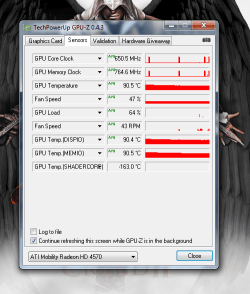
I will tomorrow give you a shot from GPU-Z as it show GPU temperature
 

My Computer My Computer

OS
windows 7
Motherboard
Gigabyte
Memory
3 GB
Graphics Card(s)
Nvidia 8600 GT
Monitor(s) Displays
1
Hard Drives
Western Digital 160 GB
I am not sure heat is the problem if the temps you provided (which are cool) are taken immediately before you shut down. If not convinced, do a quick search and you will find that most agree that lappy temps in the 60s, 70s, even 80s under a load are normal. Last I knew, Intel allowed for temps of 100 for mobile CPUs with an average temp of about 70. I am not familiar with the app that displays your temps but I use the free HWMonitor which shows CPU, GPU, mobo, cores, and HDD temps as well as other stuff. Could it be GPU heat? I have my doubts.

In my experience, excess heat causes the system to shut down, not slow down - but that's my experience. Have you shut down and immediately booted - before any significant cooling could take place?

Heat issues aside, I wonder about RAM.

Monk
i have uploaded the gpu temperature please see it.
 

Attachments

  • Capture 7.PNG
    Capture 7.PNG
    8 KB · Views: 16
  • Capture 8.PNG
    Capture 8.PNG
    35.1 KB · Views: 14
  • Capture 9.PNG
    Capture 9.PNG
    54.6 KB · Views: 10

My Computer My Computer

OS
windows 7
Motherboard
Gigabyte
Memory
3 GB
Graphics Card(s)
Nvidia 8600 GT
Monitor(s) Displays
1
Hard Drives
Western Digital 160 GB
Could anyone please tell me how to increase the fan speed of graphic card/cpu
 

My Computer My Computer

OS
windows 7
Motherboard
Gigabyte
Memory
3 GB
Graphics Card(s)
Nvidia 8600 GT
Monitor(s) Displays
1
Hard Drives
Western Digital 160 GB
Here is a thread from Dell forums on increasing fan speeds as well as other thoughts on cooling in the XPS Studio. Will it apply to the Studio . . . ? I did not read through all of the posts but speed options may be changed via the BIOS or, as is mentioned in the thread, via the Catalyst control Center (ATi Overdrive)

Monk
 

My Computer My Computer

Computer Manufacturer/Model Number
Custom
OS
Dual boot XP Pro SP3x86 and Win7 Pro x64
CPU
AMD Phenom II x3 720 BE OCed to 3.3 GHz
Motherboard
Asus M3A79T Deluxe
Memory
2x2GB OCZ OCZ2RPR10664GK PC2-8500 DDR2
Graphics Card(s)
Sapphire ATi Radeon 4830 HD x2 (XFire)
Sound Card
Integrated (SoundMax)
Monitor(s) Displays
Dual: LG L227WTG/LG M237WD
Screen Resolution
1680 x 1050; 1920 x1280
Hard Drives
3 WDC WD7501AALS-00J7B0
PSU
Zalman 750HD Modular
Case
Antec 900
Cooling
4 120mm, 1 200mm fans
Keyboard
Black with lots of keys
Mouse
Razer Lachesis, Logitech RumbePad2, Logitech Marble
Internet Speed
Who counts
Other Info
7:1 SS
Overdrive is not avaliable on my catalyst control center i tried to donload manually but it did not work either.
 

My Computer My Computer

OS
windows 7
Motherboard
Gigabyte
Memory
3 GB
Graphics Card(s)
Nvidia 8600 GT
Monitor(s) Displays
1
Hard Drives
Western Digital 160 GB
Back
Top