Laptop stuck on Starting Windows, while constantly beeping

TheGuyWithAHat

New member
Member
Local time
5:30 AM
Messages
43
Ugh. 3 Problems 1 Week.

First, a performance error, then BSODs now this?!

Anyway, the problem: While starting windows, the Starting Windows screen was stuck. Then tons of beeps. No order, just constant beeps. No key was stuck. I thought it was ram, so I took out and put back the ram, making sure it's auctually tight in the socket.


I'm starting to think the problems are connected somehow. Maybe failing ram? :cry:
 

My Computer My Computer

At a glance

Microsoft Windows 7 Home Premium 64-bitAMD Athlon(tm) Processor TF-202 1GB RAM SticksATI Radeon HD 3200 Graphics
Computer type
Laptop
Computer Manufacturer/Model Number
eMachines
OS
Microsoft Windows 7 Home Premium 64-bit
CPU
AMD Athlon(tm) Processor TF-20
Motherboard
eMachines eMachines E627
Memory
2 1GB RAM Sticks
Graphics Card(s)
ATI Radeon HD 3200 Graphics
Sound Card
(Generic USB Audio)
Monitor(s) Displays
1
Screen Resolution
1366 x 768
Hard Drives
TOSHIBA MK2555GSX ATA Device
PSU
?????
Case
?????
Cooling
?????
Keyboard
Standerd USB Keyboard
Mouse
Standerd USB Mouse
Internet Speed
?????
Antivirus
Avast
Browser
Google Chrome

My Computer My Computer

At a glance

Windows 7 Pro 32Intel(R) Core(TM) i5 CPU M 540 @ 2.53GHz4,00 GB (Usable 2,98)NVIDIA NVS 5100M
Computer type
Laptop
Computer Manufacturer/Model Number
HP Elitebook 8540p
OS
Windows 7 Pro 32
CPU
Intel(R) Core(TM) i5 CPU M 540 @ 2.53GHz
Motherboard
Hewlett-Packard 1521
Memory
4,00 GB (Usable 2,98)
Graphics Card(s)
NVIDIA NVS 5100M
Sound Card
NVIDIA High Definition Audio
Screen Resolution
1600x900
Hard Drives
INTEL SSDSA2CW120G3
Antivirus
F-Secure Internet Security
Browser
IE, Firefox, Opera
Other Info
Sandboxie,
SRP (Software Restriction Policy),
EMET (Enhanced Mitigation Experience Toolkit),
WFC (Windows Firewall Control by BiniSoft),
Malwarebytes Premium
Alright, I'll try that before I go to bed. I will report back tomorrow.
 

My Computer My Computer

At a glance

Microsoft Windows 7 Home Premium 64-bitAMD Athlon(tm) Processor TF-202 1GB RAM SticksATI Radeon HD 3200 Graphics
Computer type
Laptop
Computer Manufacturer/Model Number
eMachines
OS
Microsoft Windows 7 Home Premium 64-bit
CPU
AMD Athlon(tm) Processor TF-20
Motherboard
eMachines eMachines E627
Memory
2 1GB RAM Sticks
Graphics Card(s)
ATI Radeon HD 3200 Graphics
Sound Card
(Generic USB Audio)
Monitor(s) Displays
1
Screen Resolution
1366 x 768
Hard Drives
TOSHIBA MK2555GSX ATA Device
PSU
?????
Case
?????
Cooling
?????
Keyboard
Standerd USB Keyboard
Mouse
Standerd USB Mouse
Internet Speed
?????
Antivirus
Avast
Browser
Google Chrome
Ok.


gregrocker:

I've now done almost all the things on that list. Except SFC / SCANNOW, That's running now.

Tookari:

The Memory test finished and I can't quite find a log of it in the Event Viewer. My computer did successfully boot, although I still wonder about the BSOD issues. I'm sort of thinking it's related to memory still.
 

My Computer My Computer

At a glance

Microsoft Windows 7 Home Premium 64-bitAMD Athlon(tm) Processor TF-202 1GB RAM SticksATI Radeon HD 3200 Graphics
Computer type
Laptop
Computer Manufacturer/Model Number
eMachines
OS
Microsoft Windows 7 Home Premium 64-bit
CPU
AMD Athlon(tm) Processor TF-20
Motherboard
eMachines eMachines E627
Memory
2 1GB RAM Sticks
Graphics Card(s)
ATI Radeon HD 3200 Graphics
Sound Card
(Generic USB Audio)
Monitor(s) Displays
1
Screen Resolution
1366 x 768
Hard Drives
TOSHIBA MK2555GSX ATA Device
PSU
?????
Case
?????
Cooling
?????
Keyboard
Standerd USB Keyboard
Mouse
Standerd USB Mouse
Internet Speed
?????
Antivirus
Avast
Browser
Google Chrome
Use the RAM test in Troubleshooting steps which is must better. Run it at least 7 times or overnight to stress the RAM which is what you want.
 
Been there, done that.


The computer restarted before I could see any results. I hope this is because there was no errors but i'm not very sure. Although, it was with only 1 of the RAM sticks I use now. I will rerun the tests. Also, how do I check the results of the test without being there closely monitoring for the whole test?
 

My Computer My Computer

At a glance

Microsoft Windows 7 Home Premium 64-bitAMD Athlon(tm) Processor TF-202 1GB RAM SticksATI Radeon HD 3200 Graphics
Computer type
Laptop
Computer Manufacturer/Model Number
eMachines
OS
Microsoft Windows 7 Home Premium 64-bit
CPU
AMD Athlon(tm) Processor TF-20
Motherboard
eMachines eMachines E627
Memory
2 1GB RAM Sticks
Graphics Card(s)
ATI Radeon HD 3200 Graphics
Sound Card
(Generic USB Audio)
Monitor(s) Displays
1
Screen Resolution
1366 x 768
Hard Drives
TOSHIBA MK2555GSX ATA Device
PSU
?????
Case
?????
Cooling
?????
Keyboard
Standerd USB Keyboard
Mouse
Standerd USB Mouse
Internet Speed
?????
Antivirus
Avast
Browser
Google Chrome
Booted memtest CD stays open with results visible. Are you sure that's what you ran?

Plug in both sticks and run it overnight. Take a picture of any listed errors to post back using paper clip icon in reply box.
 
Yes, I am quite sure I was running Memtest86+. My computer just randomly turns off in the middle of the test. :confused: I'm not sure why. Im also using the bootable USB version.
 
Last edited:

My Computer My Computer

At a glance

Microsoft Windows 7 Home Premium 64-bitAMD Athlon(tm) Processor TF-202 1GB RAM SticksATI Radeon HD 3200 Graphics
Computer type
Laptop
Computer Manufacturer/Model Number
eMachines
OS
Microsoft Windows 7 Home Premium 64-bit
CPU
AMD Athlon(tm) Processor TF-20
Motherboard
eMachines eMachines E627
Memory
2 1GB RAM Sticks
Graphics Card(s)
ATI Radeon HD 3200 Graphics
Sound Card
(Generic USB Audio)
Monitor(s) Displays
1
Screen Resolution
1366 x 768
Hard Drives
TOSHIBA MK2555GSX ATA Device
PSU
?????
Case
?????
Cooling
?????
Keyboard
Standerd USB Keyboard
Mouse
Standerd USB Mouse
Internet Speed
?????
Antivirus
Avast
Browser
Google Chrome
Test one stick at a time to see if it will continue without shutting down.

Is it overheating?
 
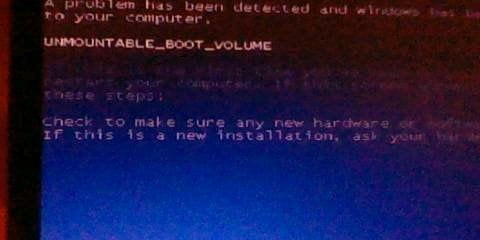
Hold on, Hold on! When booting into windows a bluescreen flashed for a few moments then restarted! O_o I found the source:

HNI_0058.JPG

Weird. Is my Hard Drive dead?


Also i'm sure it's not overheating. It was cool to a touch.

I will try one stick at a time now. I ran it expecting that if there are any errors detected on the sticks I would rerun It on both sticks repeatedly.

I've also seen some strange behavior when windows was "Working". VIDEO:
https://www.mediafire .com/?7ounlql5cuxhcg6


I've just remembered! I ran SFC / SCANNOW and it found nothing. :(

I've now got a new hard-drive and now I installed Windows 7 back on there.

My computer also shut down a little after the 1st pass on all the sticks.
 
Last edited:

My Computer My Computer

At a glance

Microsoft Windows 7 Home Premium 64-bitAMD Athlon(tm) Processor TF-202 1GB RAM SticksATI Radeon HD 3200 Graphics
Computer type
Laptop
Computer Manufacturer/Model Number
eMachines
OS
Microsoft Windows 7 Home Premium 64-bit
CPU
AMD Athlon(tm) Processor TF-20
Motherboard
eMachines eMachines E627
Memory
2 1GB RAM Sticks
Graphics Card(s)
ATI Radeon HD 3200 Graphics
Sound Card
(Generic USB Audio)
Monitor(s) Displays
1
Screen Resolution
1366 x 768
Hard Drives
TOSHIBA MK2555GSX ATA Device
PSU
?????
Case
?????
Cooling
?????
Keyboard
Standerd USB Keyboard
Mouse
Standerd USB Mouse
Internet Speed
?????
Antivirus
Avast
Browser
Google Chrome
Back
Top