Solved Laptop switching off

denwilliam

New member
Member
VIP
Local time
1:12 PM
Messages
201
My daughter has a Toshiba Satellite A200-27R laptop which will switch off without any warning even though power is still present.Is it the hard drive or something else?.
 

My Computer

Computer type
Laptop
Computer Manufacturer/Model Number
Toshiba Satellite Pro C870-1E2
OS
Windows 7 Professional 64 Bit
Could be the temperature of the system.
Will it boot the the desktop?
 

My Computer

Computer type
PC/Desktop
Computer Manufacturer/Model Number
Custom Build
OS
Windows 7 Ultimate 64-bit
CPU
Intel G3420 3.2GHZ Dual Core
Motherboard
Gigabyte H87-HD3
Memory
Kingson 8GB 1600mhz
Graphics Card(s)
MSI R7970 TF 3GD5/OC BE
Monitor(s) Displays
21" LG & "19 Vertical Samsung
Hard Drives
120GB SSD - Boot
1TB WD
350GB External
2TB External (Wireless)
PSU
Corsair CX 500 modular
Case
Zalman Z11 Plus (modified)
Cooling
Corsair H55, 2x 120mm SP Corsair, 1x 140 Coolermaster
Keyboard
Corsair K50
Mouse
CSL Gaming
Internet Speed
164Mbps
Antivirus
Avast, Malwarebytes
Browser
Google Chrome, IE, Firefox
Could be the temperature of the system.
I would say that it is much more likely to be the CPU temperature, rather than the system temperature. I'm sure that is what you meant though, so I'm simply clarifying the statement since there is usually a system temperature value in the BIOS in addition to the CPU temperature. Which is precisely where the thread starter needs to begin the diagnostics, just as you recommended. ;)

However, it could be a number of other things as well.
 

My Computer

Computer type
PC/Desktop
Computer Manufacturer/Model Number
HP Pavillion
OS
Windows 7 Enterprise SP1 x64
CPU
AMD Athlon 64x2 4200+ Dual Core Windsor 2.2GHz
Motherboard
Socket AM2: ECS MCP61PM-HM
Memory
4Gb: PNY PC2-6400 Dual Channel 2x2Gb
Graphics Card(s)
PNY NVIDIA GeForce 9800 GT
Sound Card
Creative Sound Blaster Audigy 24Bit @96000Hz
Monitor(s) Displays
HP w1907 Wide LCD 19"
Screen Resolution
1440x900
Hard Drives
1.) OS Drive: 500Gb Seagate Barracuda ST35004-18AS


2.) Storage: 1Tb Seagate Barracuda ST310005-28AS
PSU
OCZ StealthXStream OCZ500SXS 500W
Case
Hp Pavillion
Cooling
Thermaltake
Keyboard
HP
Mouse
Microsoft Wireless
Internet Speed
300Mb
Antivirus
Norton Internet Security 2014
Browser
Internet Explorer 11
Other Info
Custom Build
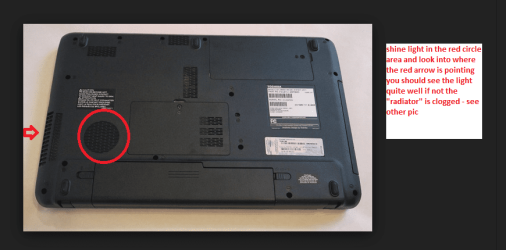
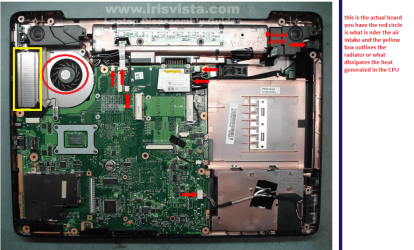
That is quite an old machine - I have one myself and I would go with what has been said already re temps. Does the fan run at full speed all the time? and how long since you checked in the air intake aperture and the "radiator" outlet grill.

So you need to first get a very bright light like a LED torch / flashlight shine it into the round air intake and then look into the rad outlet grill if you cannot see a great deal of light then it is probably clogged with dust and crud.
I did this up have a look

CLEANING LAPTOPS

Whatyou can do is to check the air intake aperture and the "rad" and todo that shine a very bright light into the fan aperture and look through fromthe outlet grill
1. You will see if there is a lot of dust in the fan intake and fan blades and2. you will see if the "rad" is blocked in any way when you lookthrough from the outside.

Now to clean you can blow the dust out using compressed air
but first make sure youinsert something into the fan blades before you do - to stop the fan fromspinningas spinning the fan with air will cause it to spin at muchhigher revs than it was designed for and can wreck the bearing.
The rad you can use those chenille wire play things to very gently clean therad from outside the machine and again blow the dust out. It is fiddly buteffective.


To see the temps run Speccy Speccy - Download download from piriform and post back the results. We are especially interested in the CPU and motherboard temps.

If you are confident enough I have the instructions on disassembly and the way to clean the machine plus renewing the thermal compound.
 

Attachments

  • TOSH BOTTOM.PNG
    TOSH BOTTOM.PNG
    76.7 KB · Views: 0
  • TOSH BOTTOM2.PNG
    TOSH BOTTOM2.PNG
    291.4 KB · Views: 0

My Computer

Computer type
PC/Desktop
Computer Manufacturer/Model Number
Own build (new) Desk1 / Asus ROG Win 7 / Desk2 1st build
OS
Desk1 7 Home Prem / Desk2 10 Pro / Main lap Asus ROG 10 Pro 2 laptop Toshiba 7 Pro Asus P2520 7 & 10
CPU
Desk1 i5 3750K / Laptop i7 GTX 860M / Desk2 i5 2500
Motherboard
Desk1 Asus P877-V / Desk2 Gigabyte H67 UD3H / Laptop ?
Memory
Desk1 8GB (1866) / Desk2 16GB (1333) / Laptop 8Gb DDR3
Graphics Card(s)
Desk 1& 2NVidia GTX 650 & Laptops on board Intel
Sound Card
Desk 1 & 2 -XONAR DG Realtek High Def audio Laptop
Monitor(s) Displays
Desk 1 Benq HD 2450 / Desk2 Philips 24" / Laptop 17.5"
Screen Resolution
1920x1080 D1 & D2 & Laptop 1
Hard Drives
Desk1 Samsung 120GB 830 SSD
Asus ROG 256GB 850 Pro SSD
Desk2 Samsung 840 256 SSD
Toshiba 120GB EVO
PSU
Desk 1 Corsair HX 1050/ Laptop ? / Desk 2 Corsair HX 650
Case
Desk 1 Cooler HAF XM ? Toshiba laptop / Desk2 Coolermaster
Cooling
Fans on all Desk1 -2 Desk2 - all Coolermasters 5 Laptop ?
Keyboard
Desk 1 MS Sidewinder X6 Desk 2 MS Sidewinder X 4
Mouse
Desk 1&2 - Gigabyte MS 900 gamer - laptop - Logitec wireless
Internet Speed
ADSL2+
Other Info
One other Desktop (tester) and spare Toshba laptop both with SSD's
Running Kaspersky 2016 ISS on all machines config'd identically
Logitec audio stereo systems on each machine (x3)
Canon MG5250MFC
Router/modem TP-Link running WPA2SK
Good advice. Once we have determined that it is indeed an overheating problem, then checking for obstructions should be the first order of business. ;)

Waiting on the OP to let us know if it is overheating before we go any further.
 

My Computer

Computer type
PC/Desktop
Computer Manufacturer/Model Number
HP Pavillion
OS
Windows 7 Enterprise SP1 x64
CPU
AMD Athlon 64x2 4200+ Dual Core Windsor 2.2GHz
Motherboard
Socket AM2: ECS MCP61PM-HM
Memory
4Gb: PNY PC2-6400 Dual Channel 2x2Gb
Graphics Card(s)
PNY NVIDIA GeForce 9800 GT
Sound Card
Creative Sound Blaster Audigy 24Bit @96000Hz
Monitor(s) Displays
HP w1907 Wide LCD 19"
Screen Resolution
1440x900
Hard Drives
1.) OS Drive: 500Gb Seagate Barracuda ST35004-18AS


2.) Storage: 1Tb Seagate Barracuda ST310005-28AS
PSU
OCZ StealthXStream OCZ500SXS 500W
Case
Hp Pavillion
Cooling
Thermaltake
Keyboard
HP
Mouse
Microsoft Wireless
Internet Speed
300Mb
Antivirus
Norton Internet Security 2014
Browser
Internet Explorer 11
Other Info
Custom Build

Yep I guess the next thing to scrutinise will be the hard drive, the RAM (both are now old specs and in usage) ,andand perhaps the powers source because if either are on their last legs the OPwill have such problems eh?

I have done a few Toshibas including my own over time and they are notgenerally hard to work on and I use a Toshiba specific fix site for what I doand if you are interested it is http://www.irisvista.com/and it is VERY important to thoroughly understand that first page before goingto the disassembly guides as the ribbon cable issue is and can be quite atricky job to perform. Mind you it doesn't list all the models - more the onesthat come here for fixing

As matter of interest it would be handy to know what power settings are onthat machine and it wouldn't be such a bad thing to run these in safe mode

http://www.sevenforums.com/tutorials/1538-sfc-scannow-command-system-file-checker.html

http://www.sevenforums.com/tutorials/433-disk-check.html

I also wonder if this is a malware thing too but it can wait till we hear back from the OP.

NB I have to say Torah and Harribo it is a treat to see members who have got their system specs listed as so many times one has to ask posters for them and it gets rather tedious. Both of you are to be commended:)
 

My Computer

Computer type
PC/Desktop
Computer Manufacturer/Model Number
Own build (new) Desk1 / Asus ROG Win 7 / Desk2 1st build
OS
Desk1 7 Home Prem / Desk2 10 Pro / Main lap Asus ROG 10 Pro 2 laptop Toshiba 7 Pro Asus P2520 7 & 10
CPU
Desk1 i5 3750K / Laptop i7 GTX 860M / Desk2 i5 2500
Motherboard
Desk1 Asus P877-V / Desk2 Gigabyte H67 UD3H / Laptop ?
Memory
Desk1 8GB (1866) / Desk2 16GB (1333) / Laptop 8Gb DDR3
Graphics Card(s)
Desk 1& 2NVidia GTX 650 & Laptops on board Intel
Sound Card
Desk 1 & 2 -XONAR DG Realtek High Def audio Laptop
Monitor(s) Displays
Desk 1 Benq HD 2450 / Desk2 Philips 24" / Laptop 17.5"
Screen Resolution
1920x1080 D1 & D2 & Laptop 1
Hard Drives
Desk1 Samsung 120GB 830 SSD
Asus ROG 256GB 850 Pro SSD
Desk2 Samsung 840 256 SSD
Toshiba 120GB EVO
PSU
Desk 1 Corsair HX 1050/ Laptop ? / Desk 2 Corsair HX 650
Case
Desk 1 Cooler HAF XM ? Toshiba laptop / Desk2 Coolermaster
Cooling
Fans on all Desk1 -2 Desk2 - all Coolermasters 5 Laptop ?
Keyboard
Desk 1 MS Sidewinder X6 Desk 2 MS Sidewinder X 4
Mouse
Desk 1&2 - Gigabyte MS 900 gamer - laptop - Logitec wireless
Internet Speed
ADSL2+
Other Info
One other Desktop (tester) and spare Toshba laptop both with SSD's
Running Kaspersky 2016 ISS on all machines config'd identically
Logitec audio stereo systems on each machine (x3)
Canon MG5250MFC
Router/modem TP-Link running WPA2SK
its going to be the cpu tempreture most likely the fan blades are cloged with dust as mentioed up top or the fan could be broken
 

My Computer

Computer type
PC/Desktop
Computer Manufacturer/Model Number
Custom Build
OS
Windows 7 Home Premium x64
CPU
Intel Core i7
Motherboard
PEGATRON
Memory
8GB DDR3 Memory
Graphics Card(s)
NVIDIA GeForce GT 520
Sound Card
Motherboard Sound
Monitor(s) Displays
HP L1706
Screen Resolution
1280x1024
Hard Drives
1TB HDD
PSU
Power Man 400Watts
Case
IN WIN C583
Cooling
Stock Cooling
Keyboard
Logitech Internet Keyboard
Mouse
Logitech M90 Mouse
Internet Speed
16Mb/s
Antivirus
Avast Antivirus
Browser
Internet Explorer 11
The situation is so bad now that when you switch on from cold it switches off before it has a chance to boot up so I am looking for directions to the nearest trash dump.Would also mention I tried another hard drive I had spare from another Toshiba and the results were the same so I would suggest that rules out the hard drive and with the fault being there when cold rules out heat.
 

My Computer

Computer type
Laptop
Computer Manufacturer/Model Number
Toshiba Satellite Pro C870-1E2
OS
Windows 7 Professional 64 Bit
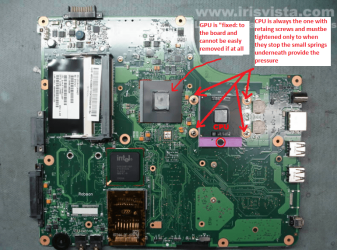
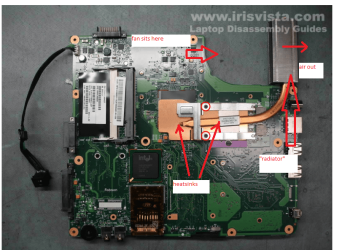
No mate the fault sounds almost certain it is the temp of the CPU. The problem being that the thermal compound on it and the GPU chip has dried out making any cooling of those chips impossible and the thermal cut out of the CPU shuts down the machine straight away.

See pics it isn't the machine we are discussing but is typical of the set up with the heatsinks in place and with them removed exposing the chips that is where the thermal compound is applied whenever a a laptop (or desktop CPU) is made - or repaired.
 

Attachments

  • CPU1.PNG
    CPU1.PNG
    259.7 KB · Views: 0
  • CPU0.PNG
    CPU0.PNG
    240.9 KB · Views: 0

My Computer

Computer type
PC/Desktop
Computer Manufacturer/Model Number
Own build (new) Desk1 / Asus ROG Win 7 / Desk2 1st build
OS
Desk1 7 Home Prem / Desk2 10 Pro / Main lap Asus ROG 10 Pro 2 laptop Toshiba 7 Pro Asus P2520 7 & 10
CPU
Desk1 i5 3750K / Laptop i7 GTX 860M / Desk2 i5 2500
Motherboard
Desk1 Asus P877-V / Desk2 Gigabyte H67 UD3H / Laptop ?
Memory
Desk1 8GB (1866) / Desk2 16GB (1333) / Laptop 8Gb DDR3
Graphics Card(s)
Desk 1& 2NVidia GTX 650 & Laptops on board Intel
Sound Card
Desk 1 & 2 -XONAR DG Realtek High Def audio Laptop
Monitor(s) Displays
Desk 1 Benq HD 2450 / Desk2 Philips 24" / Laptop 17.5"
Screen Resolution
1920x1080 D1 & D2 & Laptop 1
Hard Drives
Desk1 Samsung 120GB 830 SSD
Asus ROG 256GB 850 Pro SSD
Desk2 Samsung 840 256 SSD
Toshiba 120GB EVO
PSU
Desk 1 Corsair HX 1050/ Laptop ? / Desk 2 Corsair HX 650
Case
Desk 1 Cooler HAF XM ? Toshiba laptop / Desk2 Coolermaster
Cooling
Fans on all Desk1 -2 Desk2 - all Coolermasters 5 Laptop ?
Keyboard
Desk 1 MS Sidewinder X6 Desk 2 MS Sidewinder X 4
Mouse
Desk 1&2 - Gigabyte MS 900 gamer - laptop - Logitec wireless
Internet Speed
ADSL2+
Other Info
One other Desktop (tester) and spare Toshba laptop both with SSD's
Running Kaspersky 2016 ISS on all machines config'd identically
Logitec audio stereo systems on each machine (x3)
Canon MG5250MFC
Router/modem TP-Link running WPA2SK
The situation is so bad now that when you switch on from cold it switches off before it has a chance to boot up so I am looking for directions to the nearest trash dump.Would also mention I tried another hard drive I had spare from another Toshiba and the results were the same so I would suggest that rules out the hard drive and with the fault being there when cold rules out heat.
Yeah, if it won't even boot into Windows before it shuts down, it is NOT going to be an overheating issue. The next step would be to see if you can enter the BIOS, go to the "PC Health" [or something similar in name] section and monitor the temp just to see how hot it is at idle, and if it shuts down while your still in the BIOS. If it does shut down while your in the BIOS, your probably looking at a faulty CPU.

However, it could still be something else. Perhaps your RAM is not seated properly? Try to get into the BIOS as mentioned above, and let me know what you find. ;)
 

My Computer

Computer type
PC/Desktop
Computer Manufacturer/Model Number
HP Pavillion
OS
Windows 7 Enterprise SP1 x64
CPU
AMD Athlon 64x2 4200+ Dual Core Windsor 2.2GHz
Motherboard
Socket AM2: ECS MCP61PM-HM
Memory
4Gb: PNY PC2-6400 Dual Channel 2x2Gb
Graphics Card(s)
PNY NVIDIA GeForce 9800 GT
Sound Card
Creative Sound Blaster Audigy 24Bit @96000Hz
Monitor(s) Displays
HP w1907 Wide LCD 19"
Screen Resolution
1440x900
Hard Drives
1.) OS Drive: 500Gb Seagate Barracuda ST35004-18AS


2.) Storage: 1Tb Seagate Barracuda ST310005-28AS
PSU
OCZ StealthXStream OCZ500SXS 500W
Case
Hp Pavillion
Cooling
Thermaltake
Keyboard
HP
Mouse
Microsoft Wireless
Internet Speed
300Mb
Antivirus
Norton Internet Security 2014
Browser
Internet Explorer 11
Other Info
Custom Build
Could be the temperature of the system.
I would say that it is much more likely to be the CPU temperature, rather than the system temperature. I'm sure that is what you meant though, so I'm simply clarifying the statement since there is usually a system temperature value in the BIOS in addition to the CPU temperature. Which is precisely where the thread starter needs to begin the diagnostics, just as you recommended. ;)

However, it could be a number of other things as well.

Thank you! Good team work there ;)
 

My Computer

Computer type
PC/Desktop
Computer Manufacturer/Model Number
Custom Build
OS
Windows 7 Ultimate 64-bit
CPU
Intel G3420 3.2GHZ Dual Core
Motherboard
Gigabyte H87-HD3
Memory
Kingson 8GB 1600mhz
Graphics Card(s)
MSI R7970 TF 3GD5/OC BE
Monitor(s) Displays
21" LG & "19 Vertical Samsung
Hard Drives
120GB SSD - Boot
1TB WD
350GB External
2TB External (Wireless)
PSU
Corsair CX 500 modular
Case
Zalman Z11 Plus (modified)
Cooling
Corsair H55, 2x 120mm SP Corsair, 1x 140 Coolermaster
Keyboard
Corsair K50
Mouse
CSL Gaming
Internet Speed
164Mbps
Antivirus
Avast, Malwarebytes
Browser
Google Chrome, IE, Firefox
Well I have to disagree with that Torah insomuch that the CPU has to fire up to begin loading the RAM with instructions (OS) so if it overheats straight away then it will not get that far. In fact I suspect that even the BIOS would not be available for the same reason.

I do agree though that perhaps the RAM stick/s are bad or need reseating at least it is easily done by simply doing just that. The fact that it is an old machine it might benefit from this

SLOTCLEANING

Now as for the slots to clean them use astrip of old credit card about 1/2 inch wide nip the corners off one end - preferably round them off hold apiece of thin lint free cloth over the end dab on some form of alcohol - isopropyl alcohol (what we swab the skin with before an injection) is good and GENTLY swipe along the slots.

This can also be done for the GPU slot/s.
 

Attachments

  • STICK.PNG
    STICK.PNG
    6 KB · Views: 0

My Computer

Computer type
PC/Desktop
Computer Manufacturer/Model Number
Own build (new) Desk1 / Asus ROG Win 7 / Desk2 1st build
OS
Desk1 7 Home Prem / Desk2 10 Pro / Main lap Asus ROG 10 Pro 2 laptop Toshiba 7 Pro Asus P2520 7 & 10
CPU
Desk1 i5 3750K / Laptop i7 GTX 860M / Desk2 i5 2500
Motherboard
Desk1 Asus P877-V / Desk2 Gigabyte H67 UD3H / Laptop ?
Memory
Desk1 8GB (1866) / Desk2 16GB (1333) / Laptop 8Gb DDR3
Graphics Card(s)
Desk 1& 2NVidia GTX 650 & Laptops on board Intel
Sound Card
Desk 1 & 2 -XONAR DG Realtek High Def audio Laptop
Monitor(s) Displays
Desk 1 Benq HD 2450 / Desk2 Philips 24" / Laptop 17.5"
Screen Resolution
1920x1080 D1 & D2 & Laptop 1
Hard Drives
Desk1 Samsung 120GB 830 SSD
Asus ROG 256GB 850 Pro SSD
Desk2 Samsung 840 256 SSD
Toshiba 120GB EVO
PSU
Desk 1 Corsair HX 1050/ Laptop ? / Desk 2 Corsair HX 650
Case
Desk 1 Cooler HAF XM ? Toshiba laptop / Desk2 Coolermaster
Cooling
Fans on all Desk1 -2 Desk2 - all Coolermasters 5 Laptop ?
Keyboard
Desk 1 MS Sidewinder X6 Desk 2 MS Sidewinder X 4
Mouse
Desk 1&2 - Gigabyte MS 900 gamer - laptop - Logitec wireless
Internet Speed
ADSL2+
Other Info
One other Desktop (tester) and spare Toshba laptop both with SSD's
Running Kaspersky 2016 ISS on all machines config'd identically
Logitec audio stereo systems on each machine (x3)
Canon MG5250MFC
Router/modem TP-Link running WPA2SK
Well I have to disagree with that Torah insomuch that the CPU has to fire up to begin loading the RAM with instructions (OS) so if it overheats straight away then it will not get that far. In fact I suspect that even the BIOS would not be available for the same reason.
Which is why I suggested that he try to enter the BIOS, and check his CPU temp. If a CPU is overheating due to obstruction(s) it normally will not overheat by the time the BIOS loads. I've seen it literally hundreds of times. Your certainly entitled to your own opinion though. We'll have to wait and see what the OP has to say before jumping to any conclusions though. ;)
 

My Computer

Computer type
PC/Desktop
Computer Manufacturer/Model Number
HP Pavillion
OS
Windows 7 Enterprise SP1 x64
CPU
AMD Athlon 64x2 4200+ Dual Core Windsor 2.2GHz
Motherboard
Socket AM2: ECS MCP61PM-HM
Memory
4Gb: PNY PC2-6400 Dual Channel 2x2Gb
Graphics Card(s)
PNY NVIDIA GeForce 9800 GT
Sound Card
Creative Sound Blaster Audigy 24Bit @96000Hz
Monitor(s) Displays
HP w1907 Wide LCD 19"
Screen Resolution
1440x900
Hard Drives
1.) OS Drive: 500Gb Seagate Barracuda ST35004-18AS


2.) Storage: 1Tb Seagate Barracuda ST310005-28AS
PSU
OCZ StealthXStream OCZ500SXS 500W
Case
Hp Pavillion
Cooling
Thermaltake
Keyboard
HP
Mouse
Microsoft Wireless
Internet Speed
300Mb
Antivirus
Norton Internet Security 2014
Browser
Internet Explorer 11
Other Info
Custom Build
Yep Torah I know what you mean but I shall have to research as to whether the BIOS requires the CPU to show up. My point being that if the CPU does have to fire up to show the BIOS then if it immediately shuts down on power up then the BIOS is not going to show?
Am not trying to be pedantic more that am following all avenues of possibilities.

Well I had a look and you might be right looking at this seems like the BIOS is the first thing to fire up - so could it be that the BIOS is bad and I still cannot make out whether the CPU has to function to show the BIOS on the monitor / screen. http://www.bioscentral.com/misc/biosbasics.htm
 

My Computer

Computer type
PC/Desktop
Computer Manufacturer/Model Number
Own build (new) Desk1 / Asus ROG Win 7 / Desk2 1st build
OS
Desk1 7 Home Prem / Desk2 10 Pro / Main lap Asus ROG 10 Pro 2 laptop Toshiba 7 Pro Asus P2520 7 & 10
CPU
Desk1 i5 3750K / Laptop i7 GTX 860M / Desk2 i5 2500
Motherboard
Desk1 Asus P877-V / Desk2 Gigabyte H67 UD3H / Laptop ?
Memory
Desk1 8GB (1866) / Desk2 16GB (1333) / Laptop 8Gb DDR3
Graphics Card(s)
Desk 1& 2NVidia GTX 650 & Laptops on board Intel
Sound Card
Desk 1 & 2 -XONAR DG Realtek High Def audio Laptop
Monitor(s) Displays
Desk 1 Benq HD 2450 / Desk2 Philips 24" / Laptop 17.5"
Screen Resolution
1920x1080 D1 & D2 & Laptop 1
Hard Drives
Desk1 Samsung 120GB 830 SSD
Asus ROG 256GB 850 Pro SSD
Desk2 Samsung 840 256 SSD
Toshiba 120GB EVO
PSU
Desk 1 Corsair HX 1050/ Laptop ? / Desk 2 Corsair HX 650
Case
Desk 1 Cooler HAF XM ? Toshiba laptop / Desk2 Coolermaster
Cooling
Fans on all Desk1 -2 Desk2 - all Coolermasters 5 Laptop ?
Keyboard
Desk 1 MS Sidewinder X6 Desk 2 MS Sidewinder X 4
Mouse
Desk 1&2 - Gigabyte MS 900 gamer - laptop - Logitec wireless
Internet Speed
ADSL2+
Other Info
One other Desktop (tester) and spare Toshba laptop both with SSD's
Running Kaspersky 2016 ISS on all machines config'd identically
Logitec audio stereo systems on each machine (x3)
Canon MG5250MFC
Router/modem TP-Link running WPA2SK
Yep Torah I know what you mean but I shall have to research as to whether the BIOS requires the CPU to show up.
Well, of course it does. Haven't you ever done barebones bench tests? With no CPU you get nothing.

Well I had a look and you might be right looking at this seems like the BIOS is the first thing to fire up - so could it be that the BIOS is bad and I still cannot make out whether the CPU has to function to show the BIOS on the monitor / screen. BIOS Basics - BIOS Central
Yes, the CPU must be functioning for the BIOS to appear on the monitor. And yes, it could potentially have a corrupted BIOS. However, it is highly unlikely that is the case.
 

My Computer

Computer type
PC/Desktop
Computer Manufacturer/Model Number
HP Pavillion
OS
Windows 7 Enterprise SP1 x64
CPU
AMD Athlon 64x2 4200+ Dual Core Windsor 2.2GHz
Motherboard
Socket AM2: ECS MCP61PM-HM
Memory
4Gb: PNY PC2-6400 Dual Channel 2x2Gb
Graphics Card(s)
PNY NVIDIA GeForce 9800 GT
Sound Card
Creative Sound Blaster Audigy 24Bit @96000Hz
Monitor(s) Displays
HP w1907 Wide LCD 19"
Screen Resolution
1440x900
Hard Drives
1.) OS Drive: 500Gb Seagate Barracuda ST35004-18AS


2.) Storage: 1Tb Seagate Barracuda ST310005-28AS
PSU
OCZ StealthXStream OCZ500SXS 500W
Case
Hp Pavillion
Cooling
Thermaltake
Keyboard
HP
Mouse
Microsoft Wireless
Internet Speed
300Mb
Antivirus
Norton Internet Security 2014
Browser
Internet Explorer 11
Other Info
Custom Build
Yep Torah I know what you mean but I shall have to research as to whether the BIOS requires the CPU to show up.
Well, of course it does. Haven't you ever done barebones bench tests? With no CPU you get nothing.

Well I had a look and you might be right looking at this seems like the BIOS is the first thing to fire up - so could it be that the BIOS is bad and I still cannot make out whether the CPU has to function to show the BIOS on the monitor / screen. BIOS Basics - BIOS Central
Yes, the CPU must be functioning for the BIOS to appear on the monitor. And yes, it could potentially have a corrupted BIOS. However, it is highly unlikely that is the case.
Well Torah mate we don't know this for sure as the BIOS could have been flashed and in the worst case scenario completely fried either by the flash or just being an older machine.
Now the BIOS I have seen in the Toshiba machines is pretty well non repairable that is replaceable. Personally I think the OP is looking at replacing this machine unless by some miracle it rectifies itself as a store repair is as you know is beyond even comprehending - cost wise.
I suppose a used motherboard could be installed but it is a fair bit of work and would involve the cost of an OEM in any case.
 

My Computer

Computer type
PC/Desktop
Computer Manufacturer/Model Number
Own build (new) Desk1 / Asus ROG Win 7 / Desk2 1st build
OS
Desk1 7 Home Prem / Desk2 10 Pro / Main lap Asus ROG 10 Pro 2 laptop Toshiba 7 Pro Asus P2520 7 & 10
CPU
Desk1 i5 3750K / Laptop i7 GTX 860M / Desk2 i5 2500
Motherboard
Desk1 Asus P877-V / Desk2 Gigabyte H67 UD3H / Laptop ?
Memory
Desk1 8GB (1866) / Desk2 16GB (1333) / Laptop 8Gb DDR3
Graphics Card(s)
Desk 1& 2NVidia GTX 650 & Laptops on board Intel
Sound Card
Desk 1 & 2 -XONAR DG Realtek High Def audio Laptop
Monitor(s) Displays
Desk 1 Benq HD 2450 / Desk2 Philips 24" / Laptop 17.5"
Screen Resolution
1920x1080 D1 & D2 & Laptop 1
Hard Drives
Desk1 Samsung 120GB 830 SSD
Asus ROG 256GB 850 Pro SSD
Desk2 Samsung 840 256 SSD
Toshiba 120GB EVO
PSU
Desk 1 Corsair HX 1050/ Laptop ? / Desk 2 Corsair HX 650
Case
Desk 1 Cooler HAF XM ? Toshiba laptop / Desk2 Coolermaster
Cooling
Fans on all Desk1 -2 Desk2 - all Coolermasters 5 Laptop ?
Keyboard
Desk 1 MS Sidewinder X6 Desk 2 MS Sidewinder X 4
Mouse
Desk 1&2 - Gigabyte MS 900 gamer - laptop - Logitec wireless
Internet Speed
ADSL2+
Other Info
One other Desktop (tester) and spare Toshba laptop both with SSD's
Running Kaspersky 2016 ISS on all machines config'd identically
Logitec audio stereo systems on each machine (x3)
Canon MG5250MFC
Router/modem TP-Link running WPA2SK
Well Torah mate we don't know this for sure as the BIOS could have been flashed and in the worst case scenario completely fried either by the flash or just being an older machine.
Now the BIOS I have seen in the Toshiba machines is pretty well non repairable that is replaceable. Personally I think the OP is looking at replacing this machine unless by some miracle it rectifies itself as a store repair is as you know is beyond even comprehending - cost wise.

I suppose a used motherboard could be installed but it is a fair bit of work and would involve the cost of an OEM in any case.
No offense, ICit2lol, but I think your getting a bit ahead of yourself here, and making unnecessary assumptions according to the absolute worse case scenario. Let's wait and see if the OP can enter the BIOS first, shall we?
 

My Computer

Computer type
PC/Desktop
Computer Manufacturer/Model Number
HP Pavillion
OS
Windows 7 Enterprise SP1 x64
CPU
AMD Athlon 64x2 4200+ Dual Core Windsor 2.2GHz
Motherboard
Socket AM2: ECS MCP61PM-HM
Memory
4Gb: PNY PC2-6400 Dual Channel 2x2Gb
Graphics Card(s)
PNY NVIDIA GeForce 9800 GT
Sound Card
Creative Sound Blaster Audigy 24Bit @96000Hz
Monitor(s) Displays
HP w1907 Wide LCD 19"
Screen Resolution
1440x900
Hard Drives
1.) OS Drive: 500Gb Seagate Barracuda ST35004-18AS


2.) Storage: 1Tb Seagate Barracuda ST310005-28AS
PSU
OCZ StealthXStream OCZ500SXS 500W
Case
Hp Pavillion
Cooling
Thermaltake
Keyboard
HP
Mouse
Microsoft Wireless
Internet Speed
300Mb
Antivirus
Norton Internet Security 2014
Browser
Internet Explorer 11
Other Info
Custom Build
Well Torah mate we don't know this for sure as the BIOS could have been flashed and in the worst case scenario completely fried either by the flash or just being an older machine.
Now the BIOS I have seen in the Toshiba machines is pretty well non repairable that is replaceable. Personally I think the OP is looking at replacing this machine unless by some miracle it rectifies itself as a store repair is as you know is beyond even comprehending - cost wise.

I suppose a used motherboard could be installed but it is a fair bit of work and would involve the cost of an OEM in any case.
No offense, ICit2lol, but I think your getting a bit ahead of yourself here, and making unnecessary assumptions according to the absolute worse case scenario. Let's wait and see if the OP can enter the BIOS first, shall we?
No offense taken mate I am just being a bit pessimistic because of the age of that machine and I have to agree that some feedback from the OP would be handy;)

John
 

My Computer

Computer type
PC/Desktop
Computer Manufacturer/Model Number
Own build (new) Desk1 / Asus ROG Win 7 / Desk2 1st build
OS
Desk1 7 Home Prem / Desk2 10 Pro / Main lap Asus ROG 10 Pro 2 laptop Toshiba 7 Pro Asus P2520 7 & 10
CPU
Desk1 i5 3750K / Laptop i7 GTX 860M / Desk2 i5 2500
Motherboard
Desk1 Asus P877-V / Desk2 Gigabyte H67 UD3H / Laptop ?
Memory
Desk1 8GB (1866) / Desk2 16GB (1333) / Laptop 8Gb DDR3
Graphics Card(s)
Desk 1& 2NVidia GTX 650 & Laptops on board Intel
Sound Card
Desk 1 & 2 -XONAR DG Realtek High Def audio Laptop
Monitor(s) Displays
Desk 1 Benq HD 2450 / Desk2 Philips 24" / Laptop 17.5"
Screen Resolution
1920x1080 D1 & D2 & Laptop 1
Hard Drives
Desk1 Samsung 120GB 830 SSD
Asus ROG 256GB 850 Pro SSD
Desk2 Samsung 840 256 SSD
Toshiba 120GB EVO
PSU
Desk 1 Corsair HX 1050/ Laptop ? / Desk 2 Corsair HX 650
Case
Desk 1 Cooler HAF XM ? Toshiba laptop / Desk2 Coolermaster
Cooling
Fans on all Desk1 -2 Desk2 - all Coolermasters 5 Laptop ?
Keyboard
Desk 1 MS Sidewinder X6 Desk 2 MS Sidewinder X 4
Mouse
Desk 1&2 - Gigabyte MS 900 gamer - laptop - Logitec wireless
Internet Speed
ADSL2+
Other Info
One other Desktop (tester) and spare Toshba laptop both with SSD's
Running Kaspersky 2016 ISS on all machines config'd identically
Logitec audio stereo systems on each machine (x3)
Canon MG5250MFC
Router/modem TP-Link running WPA2SK
No offense taken mate I am just being a bit pessimistic because of the age of that machine....
Whew! Glad to see you are as layed back as I am, and did not take offense.

I try to put myself in the shoes of the OP, and I can tell you with a certainty that talk of having to replace a motherboard would take my stress level near to thoughts of suicide. If I can avoid stressing someone out like that by any means necessary, then I try to do exactly that. Especially in this economy. Just a suggestion though.
 

My Computer

Computer type
PC/Desktop
Computer Manufacturer/Model Number
HP Pavillion
OS
Windows 7 Enterprise SP1 x64
CPU
AMD Athlon 64x2 4200+ Dual Core Windsor 2.2GHz
Motherboard
Socket AM2: ECS MCP61PM-HM
Memory
4Gb: PNY PC2-6400 Dual Channel 2x2Gb
Graphics Card(s)
PNY NVIDIA GeForce 9800 GT
Sound Card
Creative Sound Blaster Audigy 24Bit @96000Hz
Monitor(s) Displays
HP w1907 Wide LCD 19"
Screen Resolution
1440x900
Hard Drives
1.) OS Drive: 500Gb Seagate Barracuda ST35004-18AS


2.) Storage: 1Tb Seagate Barracuda ST310005-28AS
PSU
OCZ StealthXStream OCZ500SXS 500W
Case
Hp Pavillion
Cooling
Thermaltake
Keyboard
HP
Mouse
Microsoft Wireless
Internet Speed
300Mb
Antivirus
Norton Internet Security 2014
Browser
Internet Explorer 11
Other Info
Custom Build
Yes mate but my philosophy is just as I use at work (am a Registered Nurse) is to give anyone the best and worst scenarios and emphasise the worst a little more than the best as it were and if it doesn't come to the worst then it's win / win. Plus I think to be forewarned is to be forearmed.

I can see we are on the same page and well two or more heads (lets not forget Harribo:)) are better than one and it would be a poor world if we all thought the same way especially when it comes to working out problems
 

My Computer

Computer type
PC/Desktop
Computer Manufacturer/Model Number
Own build (new) Desk1 / Asus ROG Win 7 / Desk2 1st build
OS
Desk1 7 Home Prem / Desk2 10 Pro / Main lap Asus ROG 10 Pro 2 laptop Toshiba 7 Pro Asus P2520 7 & 10
CPU
Desk1 i5 3750K / Laptop i7 GTX 860M / Desk2 i5 2500
Motherboard
Desk1 Asus P877-V / Desk2 Gigabyte H67 UD3H / Laptop ?
Memory
Desk1 8GB (1866) / Desk2 16GB (1333) / Laptop 8Gb DDR3
Graphics Card(s)
Desk 1& 2NVidia GTX 650 & Laptops on board Intel
Sound Card
Desk 1 & 2 -XONAR DG Realtek High Def audio Laptop
Monitor(s) Displays
Desk 1 Benq HD 2450 / Desk2 Philips 24" / Laptop 17.5"
Screen Resolution
1920x1080 D1 & D2 & Laptop 1
Hard Drives
Desk1 Samsung 120GB 830 SSD
Asus ROG 256GB 850 Pro SSD
Desk2 Samsung 840 256 SSD
Toshiba 120GB EVO
PSU
Desk 1 Corsair HX 1050/ Laptop ? / Desk 2 Corsair HX 650
Case
Desk 1 Cooler HAF XM ? Toshiba laptop / Desk2 Coolermaster
Cooling
Fans on all Desk1 -2 Desk2 - all Coolermasters 5 Laptop ?
Keyboard
Desk 1 MS Sidewinder X6 Desk 2 MS Sidewinder X 4
Mouse
Desk 1&2 - Gigabyte MS 900 gamer - laptop - Logitec wireless
Internet Speed
ADSL2+
Other Info
One other Desktop (tester) and spare Toshba laptop both with SSD's
Running Kaspersky 2016 ISS on all machines config'd identically
Logitec audio stereo systems on each machine (x3)
Canon MG5250MFC
Router/modem TP-Link running WPA2SK
Back
Top