
You are using an out of date browser. It may not display this or other websites correctly.
You should upgrade or use an alternative browser.
You should upgrade or use an alternative browser.
Laptop Toshiba 500GB crashed NTSF patitions became RAW
- Thread starter GeekEco
- Start date

- Local time
- 1:42 AM
- Messages
- 5,915
OK, we shall change tack.
Download, install the free version of Getdataback Simple https://www.runtime.org/data-recovery-software.htm Please read the how-to Guides and documentation (links on the left panel on that page)
Run it, select and scan your 500GB drive with the default 1 star level. If it shows all your partitions, click on each partition and check whether it shows all your folders/files. If it shows you can open the folders/files and preview those also.(But you cannot copy unless you buy it)
If it does not show your partitions but throws an error message, carefully note the error message and post.If possible post a screenshot.
After this we shall proceed to the next step.
Download, install the free version of Getdataback Simple https://www.runtime.org/data-recovery-software.htm Please read the how-to Guides and documentation (links on the left panel on that page)
Run it, select and scan your 500GB drive with the default 1 star level. If it shows all your partitions, click on each partition and check whether it shows all your folders/files. If it shows you can open the folders/files and preview those also.(But you cannot copy unless you buy it)
If it does not show your partitions but throws an error message, carefully note the error message and post.If possible post a screenshot.
After this we shall proceed to the next step.
My Computer
At a glance
Windows 7 Home Premium 32 bit
- OS
- Windows 7 Home Premium 32 bit
OK according to their documentation "When the final step has completed and you are ready to copy the recovered files over to the "good drive", you need to purchase a license code if you have not already done so. Do not quit GetDataBack for purchasing or entering the license code, just enter the code and continue with copying the files. It is a good idea to start with the files you need most."
If you notice any mechanical problems with the drive, such as bad sectors or unusual noise, you should stop the recovery and make a drive image first. When successfully created, you can recover from this drive image as you would recover from the original drive. A mechanically damaged drive can fail entirely every second. It must be your primary goal to pull all raw data off such a drive as fast as possible. Making an image also reduces the load on the drive because each sector is read only once. Professional data recovery companies always make an image of the drive before trying to retrieve any files
However - scanning the drive for your data takes much longer when performed through USB, The scan can be up to ten times longer, so while scanning a 100GB drive normally takes about 2 hours, it can be up to 20 hours through USB. You are scanning an external drive.
Since you don't have error checking when scanning through USB, possible errors while reading the drive are not reported to GetDataBack. It then can happen that the software is unable to read the necessary file system information and cannot collect enough information to come up with a file system entry.
This msg from GRC on their product.
SpinRite cannot help.
What you're describing is not "data recovery", it's "file system
repair". The term "Data Recovery", refers to some sort of actual
DAMAGE to the data on the hard drive which requires specific, true,
data recovery measures. This (data recovery) is what SpinRite does,
is what "it is good for" and how it has help many tens of thousands
of users through the years. File system repair is NOT in the scope
of SpinRite's repair ability.
I have heard of a couple products (in no particular order) that may help . . .
"Active@ File Recovery" made by LSoft Technologies
<http://www.file-recovery.net/>
"TestDisk", made by CG Security <http://www.cgsecurity.org/testdisk.html>
"GetDataBack", made by Runtime Software LLC <http://www.runtime.org/gdb.htm>
"EasyRecovery", made by Ontrack Data International
<http://www.ontrack.com/software>
"R-Studio", made by R-Tools Technology <http://www.r-studio.com/>
"Recuva", made by Piriform Limited <http://www.piriform.com/recuva>
"Stellar Phoenix", made by Stellar Information Systems
<http://www.stellarinfo.com/disk-recovery.htm>
** NOTE: We have NEVER used or tested either of these products . . .
so use caution.
You could also try the "Do It Yourself DataRecovery" web site
<http://www.diydatarecovery.nl>.
However, the best thing may be to contact a hard drive recovery service.
I believe at this stage that is the best alternative to contact a hard drive recovery service. Makes sense to create a drive image so that HHD is not under any stress.
So do I need to restore those partitions that I zeroed out to return it to its orginal state or does it not matter?
If you notice any mechanical problems with the drive, such as bad sectors or unusual noise, you should stop the recovery and make a drive image first. When successfully created, you can recover from this drive image as you would recover from the original drive. A mechanically damaged drive can fail entirely every second. It must be your primary goal to pull all raw data off such a drive as fast as possible. Making an image also reduces the load on the drive because each sector is read only once. Professional data recovery companies always make an image of the drive before trying to retrieve any files
However - scanning the drive for your data takes much longer when performed through USB, The scan can be up to ten times longer, so while scanning a 100GB drive normally takes about 2 hours, it can be up to 20 hours through USB. You are scanning an external drive.
Since you don't have error checking when scanning through USB, possible errors while reading the drive are not reported to GetDataBack. It then can happen that the software is unable to read the necessary file system information and cannot collect enough information to come up with a file system entry.
This msg from GRC on their product.
SpinRite cannot help.
What you're describing is not "data recovery", it's "file system
repair". The term "Data Recovery", refers to some sort of actual
DAMAGE to the data on the hard drive which requires specific, true,
data recovery measures. This (data recovery) is what SpinRite does,
is what "it is good for" and how it has help many tens of thousands
of users through the years. File system repair is NOT in the scope
of SpinRite's repair ability.
I have heard of a couple products (in no particular order) that may help . . .
"Active@ File Recovery" made by LSoft Technologies
<http://www.file-recovery.net/>
"TestDisk", made by CG Security <http://www.cgsecurity.org/testdisk.html>
"GetDataBack", made by Runtime Software LLC <http://www.runtime.org/gdb.htm>
"EasyRecovery", made by Ontrack Data International
<http://www.ontrack.com/software>
"R-Studio", made by R-Tools Technology <http://www.r-studio.com/>
"Recuva", made by Piriform Limited <http://www.piriform.com/recuva>
"Stellar Phoenix", made by Stellar Information Systems
<http://www.stellarinfo.com/disk-recovery.htm>
** NOTE: We have NEVER used or tested either of these products . . .
so use caution.
You could also try the "Do It Yourself DataRecovery" web site
<http://www.diydatarecovery.nl>.
However, the best thing may be to contact a hard drive recovery service.
I believe at this stage that is the best alternative to contact a hard drive recovery service. Makes sense to create a drive image so that HHD is not under any stress.
So do I need to restore those partitions that I zeroed out to return it to its orginal state or does it not matter?
My Computer
At a glance
Windws 7 32bit
- Computer type
- Laptop
- OS
- Windws 7 32bit
- Local time
- 1:42 AM
- Messages
- 5,915
Getdataback of course is a commercial software. But there is no bar on using the free version to check whether it can show you all the files. In fact they recommend using the free version to check it, preview the files and if you are satisfied that all files are OK , you can buy it. Buying is an option. You can close the program without buying it. It does not write anything to the drive being scanned. So it is absolutely safe and you can run it any number of times and close it. It is not imperative that you should buy it immediately if it shows all the files as you understand or misunderstand. 
Here we will only be using it to see whether it can show the files. If it shows the files then we can definitely try TestDisk (freeware) to recover the files.
http://www.sevenforums.com/software/190430-regain-lost-drive-using-test-disk-illustrated-guide.html
In few cases where the MFT ( Master File Table) is corrupted even TestDisk will fail to repair it to recover. In such cases the author of TestDisk recommends trying two commercial software. GetDataBack and Zero Assumption Recovery.
In case Getdataback does not show the files and throws an error message, then check your drive health with any one of the diagnostic tools here How To Test The Health Of Your HDD Drive
If your drive is shown as healthy, there is no need to clone the drive. We resort to cloning only when we know for sure that the drive is failing and continued use of the failing drive can only hasten the ultimate failure.
If you intend to seek Professional Data Recovery service, yes, restore all the saved sectors with bootice and give it to them stating that once the drive became unbootable, you wrongly initialised it as a GPT drive. Let them break their heads in whatever way they want.
I think I have covered all aspects of data recovery in your case.
Here we will only be using it to see whether it can show the files. If it shows the files then we can definitely try TestDisk (freeware) to recover the files.
http://www.sevenforums.com/software/190430-regain-lost-drive-using-test-disk-illustrated-guide.html
In few cases where the MFT ( Master File Table) is corrupted even TestDisk will fail to repair it to recover. In such cases the author of TestDisk recommends trying two commercial software. GetDataBack and Zero Assumption Recovery.
In case Getdataback does not show the files and throws an error message, then check your drive health with any one of the diagnostic tools here How To Test The Health Of Your HDD Drive
If your drive is shown as healthy, there is no need to clone the drive. We resort to cloning only when we know for sure that the drive is failing and continued use of the failing drive can only hasten the ultimate failure.
If you intend to seek Professional Data Recovery service, yes, restore all the saved sectors with bootice and give it to them stating that once the drive became unbootable, you wrongly initialised it as a GPT drive. Let them break their heads in whatever way they want.
I think I have covered all aspects of data recovery in your case.
My Computer
At a glance
Windows 7 Home Premium 32 bit
- OS
- Windows 7 Home Premium 32 bit
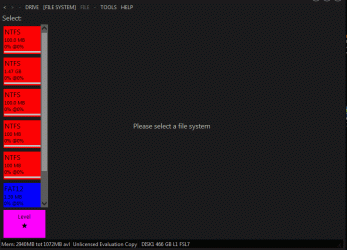
Doesn't appear to be anything there at level one. Recieved error message right off which I click on ignore. Notihing no data files....nada  Would changing from GPT to MBR mess up the raw files on there. All my files showed up under GPT but in raw file format.
Would changing from GPT to MBR mess up the raw files on there. All my files showed up under GPT but in raw file format.Attachments

My Computer
At a glance
Windws 7 32bit
- Computer type
- Laptop
- OS
- Windws 7 32bit
- Local time
- 1:42 AM
- Messages
- 5,915
Your drive indeed seems to have bad sectors. Further Getdataback does not see any partition other than the 100 MB partition at level 1.
Cloning the drive and doing the data recovery on the cloned drive may be a better proposition.
You may now restore the zeroed sectors using bootice.
Sectors to be restored. Sector 0, 1, 2, 206847, sector 976773167 (last sector n which you might have saved as BupGPTH), sector 976773135 ( n-32, which you might have saved as BupGPTT)
Go to that sector, click on Restore from file icon on the menu bar, navigate to the respective sector backup and click on Restore. Do not forget to click on "Save changes" to write it to the HDD.
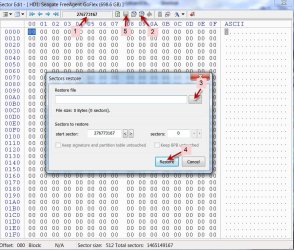
Your drive is back to the condition it was when we started with it. Your drive is again a GPT drive as wrongly initialised by you.
Now you can handover the drive to any Professional Data Recovery as contemplated by you..
If you want to you may check the health of your drive. "In case Getdataback does not show the files and throws an error message, then check your drive health with any one of the diagnostic tools here How To Test The Health Of Your HDD Drive " You may present the results to the data recovery agency.
Cloning the drive and doing the data recovery on the cloned drive may be a better proposition.
You may now restore the zeroed sectors using bootice.
Sectors to be restored. Sector 0, 1, 2, 206847, sector 976773167 (last sector n which you might have saved as BupGPTH), sector 976773135 ( n-32, which you might have saved as BupGPTT)
Go to that sector, click on Restore from file icon on the menu bar, navigate to the respective sector backup and click on Restore. Do not forget to click on "Save changes" to write it to the HDD.
Your drive is back to the condition it was when we started with it. Your drive is again a GPT drive as wrongly initialised by you.
Now you can handover the drive to any Professional Data Recovery as contemplated by you..
If you want to you may check the health of your drive. "In case Getdataback does not show the files and throws an error message, then check your drive health with any one of the diagnostic tools here How To Test The Health Of Your HDD Drive " You may present the results to the data recovery agency.
Last edited:
My Computer
At a glance
Windows 7 Home Premium 32 bit
- OS
- Windows 7 Home Premium 32 bit

And I thought that I knew a lot.... Always learning something new.
From GeekEco fist post I suspected the HDD had a hardware failure when he mentioned "I accidentally knocked the laptop to the floor" and he mentioned "At first it was making clicking sounds"
From GeekEco fist post I suspected the HDD had a hardware failure when he mentioned "I accidentally knocked the laptop to the floor" and he mentioned "At first it was making clicking sounds"
Last edited:
My Computers
-
At a glance
Windows 7 HP 64i5 6600K - 800MHz to 4200MHz4+4G GSkill DDR4 3000IG - Intel 530- Computer type
- PC/Desktop
- Computer Manufacturer/Model Number
- custom build
- OS
- Windows 7 HP 64
- CPU
- i5 6600K - 800MHz to 4200MHz
- Motherboard
- GA-Z170-HD3P
- Memory
- 4+4G GSkill DDR4 3000
- Graphics Card(s)
- IG - Intel 530
- Monitor(s) Displays
- Samsung 226BW
- Screen Resolution
- 1680x1050
- Hard Drives
- (1) -1 SM951 – 128GB M.2 AHCI PCIe SSD drive for Windows 7 and Lubuntu
(2) -1 WD SATA 3 - 1T for Data
(3) -1 WD SATA 3 - 1T for backup
- PSU
- Thermaltake 450W TR2 gold
- Keyboard
- Old and good Chicony mechanical keyboard
- Mouse
- Logitech mX performance - 9 buttons (had to disable some)
- Internet Speed
- 500Mb/s
- Browser
- Firefox 64
- Other Info
- TinyWall firewall
-
At a glance
Windows 7 Proi7-4500U 800MHz to 3.0GHz(4+4)G DDR3 1600IG intel 4400 + NVIDIA GeForce GT 745M- Computer type
- Laptop
- System Manufacturer/Model Number
- Asus Q550LF
- OS
- Windows 7 Pro
- CPU
- i7-4500U 800MHz to 3.0GHz
- Motherboard
- Asus Q550LF
- Memory
- (4+4)G DDR3 1600
- Graphics Card(s)
- IG intel 4400 + NVIDIA GeForce GT 745M
- Sound Card
- Realtek
- Monitor(s) Displays
- LG Display LP156WF4-SPH1
- Screen Resolution
- 1920 x 1080
- Hard Drives
- BX500 120G SSD for Windows and programs +
1T HDD for data
- Internet Speed
- 500 Mb/s
- Browser
- Firefox
- Other Info
- TinyWall firewall
Similar threads


- Replies
- 2
- Views
- 664

- Replies
- 1
- Views
- 851
- Replies
- 3
- Views
- 652
