Laptop was working ok, few days later it started beeping on start up

Yasmin91

New member
Local time
2:25 PM
Messages
28
Hi, i have a laptop that i was using and it was working fine a few days ago, i had turned it off for a few days and left it off, However when i turned it back on a few days later it would not start up to desktop and started beeping continuously.

I looked up online for some possibilities and the beep codes etc, but my beeping tends to just continously beep, not one long beep, but as in it beeps once, twice, three times, four times etc ( No pause ).

I am assuming it could be a Proccessor problem, or a over heating problem/dust problem. I vacumed some dust out of the vents while it was off and did it carefully, i also have had it on a laptop cooler the whole time, yet it continouse to hapen.

The thing that is confusing me is, i decided to try and re-format it to a clean device with my windows 7 which was what it has been running ever since i bought it, Now i put in the windows 7 cd and restarted.

I then started to install a new windows 7, i went away from the laptop and let it do its thing, i came back and it had come back to the black screen asking what OS to start " Windows 7 " So i clicked it, and it took me back to re-install.

So not thinking right i did it again, and walked away, i did this like 3 or 4 times ( Lol ) Not knowing that i was actually installing extra Operating Systems within the operating system..

Now i ended up taking the CD out and completeing 1 of the Windows 7 Installs, where i found i had about 4-5 windows.old folders - ( How to delete those is another question i have for this forum ).

(And yes it did finally start up to desktop with the CD inside it) I assumed it was fixed as it started to desktop, and took out the CD and did some windows updates etc, and restarted it.

When it restarted it did the same beeping and would not start to desktop, Confused i put the Windows 7 CD back in, and restarted the laptop, when it took me to the booting option ( eg. Windows 7/Vista/Windows7 etc ) i took the CD out, and clicked The same Windows 7 option i did earlier.

It again started up to desktop, Confused i thought to try again without the CD, same thing happened and now i have given up assuming it has broke again ( HP Laptop Pavillion dv6 )

Any solutions or ideas on why this could be happening, and the best way and most in-expensive way to fix this is greatly appriciated, I just put in a new HDD because the last one burnt out, and i would rather not spend $100+ On a new Proccessor as i am planning to buy a " DESKTOP " to replace this laptop.

I do however want to fix this if i can, or atleast know what the forum thinks the problems are so i can go about it either now, or later when i have the money to fix it as i still need something to use in the time being.

Thank you in advance, your information and expertise is greatly appriciated!
 

My Computer My Computer

At a glance

64bit Windows 7
OS
64bit Windows 7
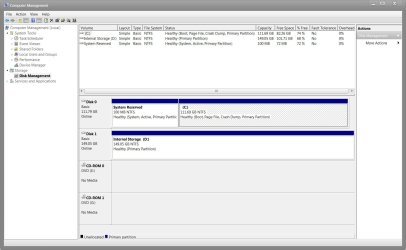
Can you post a screenshot of you 'disk management' Type 'compmgmt.msc' into the start menu search and press enter.

Click the 'disk management' on the left, Then Use the snipping tool to capture the window, save file as jpeg and upload it here.

Should look something like this:
 

Attachments

  • Disk Management.JPG
    Disk Management.JPG
    127.4 KB · Views: 4

My Computer My Computer

At a glance

MS Windows 7 Professional 64-bit SP1AMD FX(tm)-6100 Six-Core Processor Socket AM3...8.00 GB Dual-Channel DDR3 @ 802MHz (11-11-11-...NVIDIA GeForce GTX 560 Ti
Computer type
PC/Desktop
Computer Manufacturer/Model Number
Self Build
OS
MS Windows 7 Professional 64-bit SP1
CPU
AMD FX(tm)-6100 Six-Core Processor Socket AM3+ (942)
Motherboard
ASUSTeK COMPUTER INC. SABERTOOTH 990FX (AM3r2)
Memory
8.00 GB Dual-Channel DDR3 @ 802MHz (11-11-11-36) 1.5Volts
Graphics Card(s)
NVIDIA GeForce GTX 560 Ti
Sound Card
Onboard Realtek HD
Monitor(s) Displays
shimian (1920x1080@60Hz)
Screen Resolution
1920*1080
Hard Drives
OCZ-AGIL ITY3 SATA Disk Device 120GB
PSU
Corsair TX 750
Case
Corsair
Cooling
WaterCooled
Keyboard
Microsoft Wired
Mouse
Logitech USB Optical TiltWheel Mouse
Internet Speed
Realtek PCIe GBE Family Controller 20MB*1MB
Antivirus
Avast
Browser
Firefox
Other Info
150GB Internal Hard Drive for Backing Up Important Files -
Hauppauge Nova-DT Dual DVB-T Tuner Device (+IR) -
USB PC Camera with Mic (SN9C105)
I am unsure if i can actually get into desktop again on that laptop, i am using a different device to be on the internet at the moment, I can try and if i can, i will uploade the picture. Any solutions if i can't get it into desktop?
 

My Computer My Computer

At a glance

64bit Windows 7
OS
64bit Windows 7
Anthony i have been able to get onto my laptop right now with the CD in it, i am in the Computer Management, but i don't know where the snipping tool is, do i need to download one? any help is greatly appriciated.
 

My Computer My Computer

At a glance

64bit Windows 7
OS
64bit Windows 7
Its in 'all programs' > 'accessories' on the start menu
 

My Computer My Computer

At a glance

MS Windows 7 Professional 64-bit SP1AMD FX(tm)-6100 Six-Core Processor Socket AM3...8.00 GB Dual-Channel DDR3 @ 802MHz (11-11-11-...NVIDIA GeForce GTX 560 Ti
Computer type
PC/Desktop
Computer Manufacturer/Model Number
Self Build
OS
MS Windows 7 Professional 64-bit SP1
CPU
AMD FX(tm)-6100 Six-Core Processor Socket AM3+ (942)
Motherboard
ASUSTeK COMPUTER INC. SABERTOOTH 990FX (AM3r2)
Memory
8.00 GB Dual-Channel DDR3 @ 802MHz (11-11-11-36) 1.5Volts
Graphics Card(s)
NVIDIA GeForce GTX 560 Ti
Sound Card
Onboard Realtek HD
Monitor(s) Displays
shimian (1920x1080@60Hz)
Screen Resolution
1920*1080
Hard Drives
OCZ-AGIL ITY3 SATA Disk Device 120GB
PSU
Corsair TX 750
Case
Corsair
Cooling
WaterCooled
Keyboard
Microsoft Wired
Mouse
Logitech USB Optical TiltWheel Mouse
Internet Speed
Realtek PCIe GBE Family Controller 20MB*1MB
Antivirus
Avast
Browser
Firefox
Other Info
150GB Internal Hard Drive for Backing Up Important Files -
Hauppauge Nova-DT Dual DVB-T Tuner Device (+IR) -
USB PC Camera with Mic (SN9C105)
RE:

Can you post a screenshot of you 'disk management' Type 'compmgmt.msc' into the start menu search and press enter.

Click the 'disk management' on the left, Then Use the snipping tool to capture the window, save file as jpeg and upload it here.

Should look something like this:


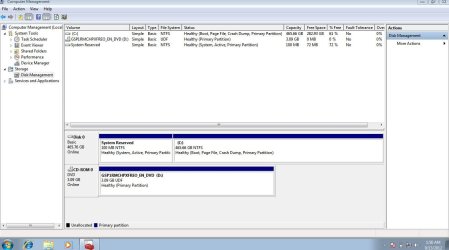
Ok so i did as you said ( thank you for your help =) ) and here is my jpeg file of the snip.
 

Attachments

  • dv6 pavillion computer management.JPG
    dv6 pavillion computer management.JPG
    89.4 KB · Views: 6

My Computer My Computer

At a glance

64bit Windows 7
OS
64bit Windows 7
Just a quick FYI - i am no longer on the laptop with the problems, but i have it next to me ( Off to conserve some battery )
 

My Computer My Computer

At a glance

64bit Windows 7
OS
64bit Windows 7
Lets deal with the beeps first, Can you open the back of the memory compartment and check that the memory is seated correctly?
 

My Computer My Computer

At a glance

MS Windows 7 Professional 64-bit SP1AMD FX(tm)-6100 Six-Core Processor Socket AM3...8.00 GB Dual-Channel DDR3 @ 802MHz (11-11-11-...NVIDIA GeForce GTX 560 Ti
Computer type
PC/Desktop
Computer Manufacturer/Model Number
Self Build
OS
MS Windows 7 Professional 64-bit SP1
CPU
AMD FX(tm)-6100 Six-Core Processor Socket AM3+ (942)
Motherboard
ASUSTeK COMPUTER INC. SABERTOOTH 990FX (AM3r2)
Memory
8.00 GB Dual-Channel DDR3 @ 802MHz (11-11-11-36) 1.5Volts
Graphics Card(s)
NVIDIA GeForce GTX 560 Ti
Sound Card
Onboard Realtek HD
Monitor(s) Displays
shimian (1920x1080@60Hz)
Screen Resolution
1920*1080
Hard Drives
OCZ-AGIL ITY3 SATA Disk Device 120GB
PSU
Corsair TX 750
Case
Corsair
Cooling
WaterCooled
Keyboard
Microsoft Wired
Mouse
Logitech USB Optical TiltWheel Mouse
Internet Speed
Realtek PCIe GBE Family Controller 20MB*1MB
Antivirus
Avast
Browser
Firefox
Other Info
150GB Internal Hard Drive for Backing Up Important Files -
Hauppauge Nova-DT Dual DVB-T Tuner Device (+IR) -
USB PC Camera with Mic (SN9C105)
I'm unsure where the memory is exactly, i have only opened up the back to replace my HDD - I am unsure on how to actually open the whole back of the laptop ( Is the memory under the HDD or elsewhere? )
 

My Computer My Computer

At a glance

64bit Windows 7
OS
64bit Windows 7
I also am un-able to find a screw driver the right size for the bottom of laptop, Is there anything i can do without opening it up first? ( Until i can find one )
 

My Computer My Computer

At a glance

64bit Windows 7
OS
64bit Windows 7
Ok, i found some screw drivers, and i have opened up the back part ( Where i did last time to replace the HDD ) and i can see the 2 Ram sticks. How exactly do i check to see if they are in right?
 

My Computer My Computer

At a glance

64bit Windows 7
OS
64bit Windows 7
Try to push them in on the edge, don't force them, also while your there check the hard drive is in correctly, Since you replaced it!!
 

My Computer My Computer

At a glance

MS Windows 7 Professional 64-bit SP1AMD FX(tm)-6100 Six-Core Processor Socket AM3...8.00 GB Dual-Channel DDR3 @ 802MHz (11-11-11-...NVIDIA GeForce GTX 560 Ti
Computer type
PC/Desktop
Computer Manufacturer/Model Number
Self Build
OS
MS Windows 7 Professional 64-bit SP1
CPU
AMD FX(tm)-6100 Six-Core Processor Socket AM3+ (942)
Motherboard
ASUSTeK COMPUTER INC. SABERTOOTH 990FX (AM3r2)
Memory
8.00 GB Dual-Channel DDR3 @ 802MHz (11-11-11-36) 1.5Volts
Graphics Card(s)
NVIDIA GeForce GTX 560 Ti
Sound Card
Onboard Realtek HD
Monitor(s) Displays
shimian (1920x1080@60Hz)
Screen Resolution
1920*1080
Hard Drives
OCZ-AGIL ITY3 SATA Disk Device 120GB
PSU
Corsair TX 750
Case
Corsair
Cooling
WaterCooled
Keyboard
Microsoft Wired
Mouse
Logitech USB Optical TiltWheel Mouse
Internet Speed
Realtek PCIe GBE Family Controller 20MB*1MB
Antivirus
Avast
Browser
Firefox
Other Info
150GB Internal Hard Drive for Backing Up Important Files -
Hauppauge Nova-DT Dual DVB-T Tuner Device (+IR) -
USB PC Camera with Mic (SN9C105)
Jump to about 2mins


My Computer My Computer

At a glance

MS Windows 7 Professional 64-bit SP1AMD FX(tm)-6100 Six-Core Processor Socket AM3...8.00 GB Dual-Channel DDR3 @ 802MHz (11-11-11-...NVIDIA GeForce GTX 560 Ti
Computer type
PC/Desktop
Computer Manufacturer/Model Number
Self Build
OS
MS Windows 7 Professional 64-bit SP1
CPU
AMD FX(tm)-6100 Six-Core Processor Socket AM3+ (942)
Motherboard
ASUSTeK COMPUTER INC. SABERTOOTH 990FX (AM3r2)
Memory
8.00 GB Dual-Channel DDR3 @ 802MHz (11-11-11-36) 1.5Volts
Graphics Card(s)
NVIDIA GeForce GTX 560 Ti
Sound Card
Onboard Realtek HD
Monitor(s) Displays
shimian (1920x1080@60Hz)
Screen Resolution
1920*1080
Hard Drives
OCZ-AGIL ITY3 SATA Disk Device 120GB
PSU
Corsair TX 750
Case
Corsair
Cooling
WaterCooled
Keyboard
Microsoft Wired
Mouse
Logitech USB Optical TiltWheel Mouse
Internet Speed
Realtek PCIe GBE Family Controller 20MB*1MB
Antivirus
Avast
Browser
Firefox
Other Info
150GB Internal Hard Drive for Backing Up Important Files -
Hauppauge Nova-DT Dual DVB-T Tuner Device (+IR) -
USB PC Camera with Mic (SN9C105)
Ok yes, they are all in properly. ( Again, my Laptop does start up to desktop while the CD is in the laptop )

What is next? ( Thank you again for your help so far )
 

My Computer My Computer

At a glance

64bit Windows 7
OS
64bit Windows 7
Right!! What do you want to do? Clean install Windows 7? If so, anything that is on your laptop is going to get deleted forever, so if there is anything on there you need, back it up!! If not we can continue.
 

My Computer My Computer

At a glance

MS Windows 7 Professional 64-bit SP1AMD FX(tm)-6100 Six-Core Processor Socket AM3...8.00 GB Dual-Channel DDR3 @ 802MHz (11-11-11-...NVIDIA GeForce GTX 560 Ti
Computer type
PC/Desktop
Computer Manufacturer/Model Number
Self Build
OS
MS Windows 7 Professional 64-bit SP1
CPU
AMD FX(tm)-6100 Six-Core Processor Socket AM3+ (942)
Motherboard
ASUSTeK COMPUTER INC. SABERTOOTH 990FX (AM3r2)
Memory
8.00 GB Dual-Channel DDR3 @ 802MHz (11-11-11-36) 1.5Volts
Graphics Card(s)
NVIDIA GeForce GTX 560 Ti
Sound Card
Onboard Realtek HD
Monitor(s) Displays
shimian (1920x1080@60Hz)
Screen Resolution
1920*1080
Hard Drives
OCZ-AGIL ITY3 SATA Disk Device 120GB
PSU
Corsair TX 750
Case
Corsair
Cooling
WaterCooled
Keyboard
Microsoft Wired
Mouse
Logitech USB Optical TiltWheel Mouse
Internet Speed
Realtek PCIe GBE Family Controller 20MB*1MB
Antivirus
Avast
Browser
Firefox
Other Info
150GB Internal Hard Drive for Backing Up Important Files -
Hauppauge Nova-DT Dual DVB-T Tuner Device (+IR) -
USB PC Camera with Mic (SN9C105)
if you think that will make the laptop start without the CD and without Beeping, i can do it ( I don't have anything important to lose ) - IF not, what else do we continue with that could be the problem?
 

My Computer My Computer

At a glance

64bit Windows 7
OS
64bit Windows 7
Update : Just turned the laptop back on, and let it beep ( Continously again ). after about 1-2min it started windows its self. ( This thing is driving my crazy ) Maybe an actual CLEAN format will fix it?


Update 2 : Started it up a second time, didn't beep at first, went to the " Starting Windows " Screen, then started beeping, and is now stuck on that screen beeping.
 
Last edited:

My Computer My Computer

At a glance

64bit Windows 7
OS
64bit Windows 7
Restart the laptop while its starting up keep pressing F10 Until you get to the bios, once in there you need to find boot options, change the boot order to HDD. Once you have done this find the save and reboot option, it should boot into Windows.

At the moment I'm guessing its set to boot from DVD, We want the HDD.
 

My Computer My Computer

At a glance

MS Windows 7 Professional 64-bit SP1AMD FX(tm)-6100 Six-Core Processor Socket AM3...8.00 GB Dual-Channel DDR3 @ 802MHz (11-11-11-...NVIDIA GeForce GTX 560 Ti
Computer type
PC/Desktop
Computer Manufacturer/Model Number
Self Build
OS
MS Windows 7 Professional 64-bit SP1
CPU
AMD FX(tm)-6100 Six-Core Processor Socket AM3+ (942)
Motherboard
ASUSTeK COMPUTER INC. SABERTOOTH 990FX (AM3r2)
Memory
8.00 GB Dual-Channel DDR3 @ 802MHz (11-11-11-36) 1.5Volts
Graphics Card(s)
NVIDIA GeForce GTX 560 Ti
Sound Card
Onboard Realtek HD
Monitor(s) Displays
shimian (1920x1080@60Hz)
Screen Resolution
1920*1080
Hard Drives
OCZ-AGIL ITY3 SATA Disk Device 120GB
PSU
Corsair TX 750
Case
Corsair
Cooling
WaterCooled
Keyboard
Microsoft Wired
Mouse
Logitech USB Optical TiltWheel Mouse
Internet Speed
Realtek PCIe GBE Family Controller 20MB*1MB
Antivirus
Avast
Browser
Firefox
Other Info
150GB Internal Hard Drive for Backing Up Important Files -
Hauppauge Nova-DT Dual DVB-T Tuner Device (+IR) -
USB PC Camera with Mic (SN9C105)
Restart the laptop while its starting up keep pressing F10 Until you get to the bios, once in there you need to find boot options, change the boot order to HDD. Once you have done this find the save and reboot option, it should boot into Windows.

At the moment I'm guessing its set to boot from DVD, We want the HDD.


Should i insert the windows 7 cd and save&exit ??
 

My Computer My Computer

At a glance

64bit Windows 7
OS
64bit Windows 7
I have the option of : Notebook Hard Drive / Internal CD/DVD Rom Drive / USB Diskette on Key\USB Hard Disk / USB CD\DVD Rom Drive / ! USB Floppy / ! Network Adapter
 

My Computer My Computer

At a glance

64bit Windows 7
OS
64bit Windows 7
Back
Top