Laptop will not shutdown

enragedflamingo

New member
Local time
12:15 PM
Messages
7
I just recently downgraded from Windows 8 to Windows 7. I went through various manufacturer's websites gathering the necessary drivers for it. Rather suddenly, it stopped shutting down and sleeping properly. The first time it happened, it was trying to sleep because of the auto-sleep timer. The screen turned off, but the fan and lights all remained on. Any time I try to hibernate, sleep, or shut down the computer, this is the result. All my drivers seem to be up to date and I cannot find any issues so far. Please help. Thanks
 

My Computer

Computer type
Laptop
Computer Manufacturer/Model Number
HP
OS
Windows 7 ultimate x64
CPU
2.40 Ghz
Memory
8 GB
Graphics Card(s)
Intel HD 4000
Hard Drives
1 TB
Browser
Google Chrome
Click on the Start button and select Control Panel. Look for Power Options and click on that. On the left side you will see several places to change options. I would turn all of the Sleep, Hibernate, etc off. See if this solves your Shutting Down problem and then you can add things back as you want.
 

My Computer

Computer type
PC/Desktop
Computer Manufacturer/Model Number
Custom Build
OS
Windows 7 Home Premium 32-Bit - Build 7600 SP1
CPU
Intel Core i3-2120 3.30Ghz
Motherboard
Asus P8Z68-V LX Intel Z68 Socket H2 ATX
Memory
Kingston 4 GB DDR3 1333 mhz
Graphics Card(s)
AMD Radeon HD6670
Sound Card
Sound Blaster Audigy SE 24-Bit
Monitor(s) Displays
Asus VE228
Screen Resolution
1440 X 900
Hard Drives
OCZ Vertex 3 120 GB Sata 3 SSD ==
Kingston SH103/S3 120 G Hyper X 120 GB SSD ==
Western Digital 500 GB Caviar Green 7200 RPM ==
PSU
Corsair CX600M == 600 Watt
Case
NZXT Apollo - Silver with Clear Side Panel
Cooling
Three 120 mm Fans
Keyboard
Microsoft Natural 4000
Mouse
Microsoft Custom Optical 3000
Internet Speed
AT&T Fiber Optic Wireless Network
Antivirus
Microsoft Security Essentials
Browser
Chrome
Other Info
120 mm Blue LED Fan -- Three Blue LED Lazer Light Sticks
I tried as you suggested and turned off all sleep and hibernate options but the problem persists.
 

My Computer

Computer type
Laptop
Computer Manufacturer/Model Number
HP
OS
Windows 7 ultimate x64
CPU
2.40 Ghz
Memory
8 GB
Graphics Card(s)
Intel HD 4000
Hard Drives
1 TB
Browser
Google Chrome

My Computer

Computer type
PC/Desktop
Computer Manufacturer/Model Number
Custom Build
OS
Windows 7 Home Premium 32-Bit - Build 7600 SP1
CPU
Intel Core i3-2120 3.30Ghz
Motherboard
Asus P8Z68-V LX Intel Z68 Socket H2 ATX
Memory
Kingston 4 GB DDR3 1333 mhz
Graphics Card(s)
AMD Radeon HD6670
Sound Card
Sound Blaster Audigy SE 24-Bit
Monitor(s) Displays
Asus VE228
Screen Resolution
1440 X 900
Hard Drives
OCZ Vertex 3 120 GB Sata 3 SSD ==
Kingston SH103/S3 120 G Hyper X 120 GB SSD ==
Western Digital 500 GB Caviar Green 7200 RPM ==
PSU
Corsair CX600M == 600 Watt
Case
NZXT Apollo - Silver with Clear Side Panel
Cooling
Three 120 mm Fans
Keyboard
Microsoft Natural 4000
Mouse
Microsoft Custom Optical 3000
Internet Speed
AT&T Fiber Optic Wireless Network
Antivirus
Microsoft Security Essentials
Browser
Chrome
Other Info
120 mm Blue LED Fan -- Three Blue LED Lazer Light Sticks
@bigmck I tried all the options in your link except the bios update because hp has not released one for my laptop. The computer still will not shutdown.

@gregrocker I reinstalled following the instructions in your link and was still missing drivers that I had to get from the manufacturers.
 

My Computer

Computer type
Laptop
Computer Manufacturer/Model Number
HP
OS
Windows 7 ultimate x64
CPU
2.40 Ghz
Memory
8 GB
Graphics Card(s)
Intel HD 4000
Hard Drives
1 TB
Browser
Google Chrome
@bigmck I tried all the options in your link except the bios update because hp has not released one for my laptop. The computer still will not shutdown.

When you say "It will not shut down", tell me exactly what you do. == Click on Start button, you see Shutdown (is there an exclamation point next to shutdown?), you click on Shutdown, then what happens?
 

My Computer

Computer type
PC/Desktop
Computer Manufacturer/Model Number
Custom Build
OS
Windows 7 Home Premium 32-Bit - Build 7600 SP1
CPU
Intel Core i3-2120 3.30Ghz
Motherboard
Asus P8Z68-V LX Intel Z68 Socket H2 ATX
Memory
Kingston 4 GB DDR3 1333 mhz
Graphics Card(s)
AMD Radeon HD6670
Sound Card
Sound Blaster Audigy SE 24-Bit
Monitor(s) Displays
Asus VE228
Screen Resolution
1440 X 900
Hard Drives
OCZ Vertex 3 120 GB Sata 3 SSD ==
Kingston SH103/S3 120 G Hyper X 120 GB SSD ==
Western Digital 500 GB Caviar Green 7200 RPM ==
PSU
Corsair CX600M == 600 Watt
Case
NZXT Apollo - Silver with Clear Side Panel
Cooling
Three 120 mm Fans
Keyboard
Microsoft Natural 4000
Mouse
Microsoft Custom Optical 3000
Internet Speed
AT&T Fiber Optic Wireless Network
Antivirus
Microsoft Security Essentials
Browser
Chrome
Other Info
120 mm Blue LED Fan -- Three Blue LED Lazer Light Sticks
Did you first install all Important and Optional Windows Updates?

This is how Win7 delivers drivers as well as critical patches to make them work.
 
Last edited:
@bigmck I click on shutdown in the start menu and the "Shutting Down" screen appears and then the screen turns off but the fan and all the lights remain on. Eventually I just hold the power button to finish the shut down as it will not finish itself. One interesting note is that when I attempt to hibernate the computer via the start menu, the results are the same and I eventually hold the power button to finish it but it does resume windows on reboot. It's like it just can't complete the shutdown of the hardware or something.

@gregrocker I did follow the tutorial. I apologize that I wasn't clear as this is what I meant by "following the instructions in your link". I installed all important and optional updates excluding the language packs. I did this until there were no more to be found by Windows Update however there were still missing drivers. Although, after I installed these drivers using packages I found on HP's website, newer versions of them did appear in Windows Update.
 

My Computer

Computer type
Laptop
Computer Manufacturer/Model Number
HP
OS
Windows 7 ultimate x64
CPU
2.40 Ghz
Memory
8 GB
Graphics Card(s)
Intel HD 4000
Hard Drives
1 TB
Browser
Google Chrome
Try turning off Hibernate and Sleep under Power Options>Advanced>Sleep. Set to never. Set power button to Shut Down only. Reboot and try Shut down.

Next disable hibernate to try again. http://www.sevenforums.com/tutorials/819-hibernate-enable-disable.html

Try Shutting down from both Start menu and then by pressing once the Power Button with it programmed to Shut Down.

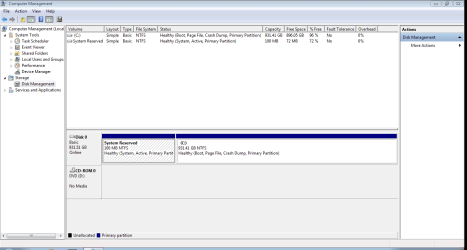
Did you delete all partitions during the reinstall rather than just format? Let us see Disk Mgmt http://www.sevenforums.com/tutorials/274797-disk-management-post-screen-capture-image.html

Run a couple Startup Repairs from Disk to check over boot files.
 
I tried all of your suggestions without success. I did delete all partitions during the original reinstall. I have uploaded the disk management screen shot as you requested though.
 

Attachments

  • Capture.PNG
    Capture.PNG
    22.6 KB · Views: 1

My Computer

Computer type
Laptop
Computer Manufacturer/Model Number
HP
OS
Windows 7 ultimate x64
CPU
2.40 Ghz
Memory
8 GB
Graphics Card(s)
Intel HD 4000
Hard Drives
1 TB
Browser
Google Chrome
I was waiting for detailed replies to each step so we could put together what the problem might be. Each step should reveal more clues.

Does it Hibernate? If you disable Hibernate and program the Power button to Shut Down what is the difference between using the Start menu's Shut Down and pressing the Power button once?

This reveals if the button itself is bad. Then you'd cross the wires to see if it functions correctly.

Boot into BIOS setup to reset it to defaults after taking note of the SATA controller setting which must be replaced.
 
When you start the Shutdown, do you ever see on the screen a notification that "Windows is waiting for X Program to close before Shutdown can complete" or something to that wording for a brief period before the screen goes blank? If so try to notice what program it is?
 

My Computer

Computer type
PC/Desktop
Computer Manufacturer/Model Number
Custom Build
OS
Windows 7 Home Premium 32-Bit - Build 7600 SP1
CPU
Intel Core i3-2120 3.30Ghz
Motherboard
Asus P8Z68-V LX Intel Z68 Socket H2 ATX
Memory
Kingston 4 GB DDR3 1333 mhz
Graphics Card(s)
AMD Radeon HD6670
Sound Card
Sound Blaster Audigy SE 24-Bit
Monitor(s) Displays
Asus VE228
Screen Resolution
1440 X 900
Hard Drives
OCZ Vertex 3 120 GB Sata 3 SSD ==
Kingston SH103/S3 120 G Hyper X 120 GB SSD ==
Western Digital 500 GB Caviar Green 7200 RPM ==
PSU
Corsair CX600M == 600 Watt
Case
NZXT Apollo - Silver with Clear Side Panel
Cooling
Three 120 mm Fans
Keyboard
Microsoft Natural 4000
Mouse
Microsoft Custom Optical 3000
Internet Speed
AT&T Fiber Optic Wireless Network
Antivirus
Microsoft Security Essentials
Browser
Chrome
Other Info
120 mm Blue LED Fan -- Three Blue LED Lazer Light Sticks

My Computer

Computer type
PC/Desktop
Computer Manufacturer/Model Number
home built
OS
Multi-Boot W7_Pro_x64 W8.1_Pro_x64 W10_Pro_x64 +Linux_VMs +Chromium_VM
CPU
AMD Athlon II x4 620
Motherboard
Gigabyte GA-MA785G-UD3H
Memory
6GB GSkill DDR2 800
Graphics Card(s)
AMD 4670 GPU + AMD 4200 IGP
Sound Card
on board Realtek ALC889A
Monitor(s) Displays
RCA 40" LCD TV, Insignia 32" LCD TV, HP 15" LCD monitor
Screen Resolution
1680 x 1050
Hard Drives
OCZ Vertex 3 120GB,
Samsung F3 1TB (3),
Several others - WD, Seagate, Hitachi, ...
PSU
Corsair 500 W
Case
Rosewill mid tower
Cooling
CM 90mm rifle
Keyboard
Gyration wireless, Logitech wireless, Dell USB wired
Mouse
Gyration wireless, Logitech wireless, V7 USB wired
Internet Speed
Spectrum - 100Mbps D / 10Mbps U
Antivirus
Avast, MBAM3, EMET, WinPatrol
Browser
Pale Moon, Firefox, IE
Other Info
2 multi-boot PC's
Mainly HTPC/Office/Gen purpose (no gaming).
Trendnet USB KVM.
LG DVD burner/Blue Ray Player.
Tray system for removable SATA backup drives.

Not currently OCd, under-volted.
I use Hybrid sleep, rarely re-boot or shutdown.

Hauppauge HD-PVR, Avermedia PCIe TV Tuner, Hauppauge PCI TV Tuner.
@gregrocker An attempt to hibernate yields the same results as a normal shutdown and the screen turns off but all of the lights and the fan remain on. When the power button is programmed to shutdown the computer on press it brings these same results. I reset the BIOS to default although I could not find a SATA controller setting. It may be noteworthy that I have a HP UEFI computer with an Insyde F.13 BIOS version. I have read online that any advanced settings are locked from the user.

@bigmck No, I have seen this occasionally if I had a program running when I shutdown but the screen quickly closed and I do not usually see it.

@DavidE I enabled the Verbose Status messages like you suggested and I can see the difference, but most of the messages scroll by rather quickly and they all seem to be normal. What exactly should I be looking for in them?

One more thing I noticed as i reinstalled Windows 1 more time in the hopes that it might resolve the problem is that before the graphics driver is installed, even the screen will not turn off when I attempt to shutdown. It just freezes on "Shutting down..." Would this suggest a missing driver at all?
 

My Computer

Computer type
Laptop
Computer Manufacturer/Model Number
HP
OS
Windows 7 ultimate x64
CPU
2.40 Ghz
Memory
8 GB
Graphics Card(s)
Intel HD 4000
Hard Drives
1 TB
Browser
Google Chrome
I was wondering/hoping if the verbose messages might show you where the shutdown process hung.
As all the messages scroll quickly, that's normal, it shows the "shutdown steps" process ok.
If you can tell me the last message you see, I'll do some testing and see what if anything I see after your last message.
Maybe it hangs before displaying the next message for you...

From what you said about the graphics driver, I wonder if that is the issue...
Look in Device Manager and see if there are any errors.
Did Windows install a graphics driver, did you install one, did Windows Update install a newer driver ... ?

What real-time security programs do you use ?
Anti-Virus, Anti-Malware, etc.
 

My Computer

Computer type
PC/Desktop
Computer Manufacturer/Model Number
home built
OS
Multi-Boot W7_Pro_x64 W8.1_Pro_x64 W10_Pro_x64 +Linux_VMs +Chromium_VM
CPU
AMD Athlon II x4 620
Motherboard
Gigabyte GA-MA785G-UD3H
Memory
6GB GSkill DDR2 800
Graphics Card(s)
AMD 4670 GPU + AMD 4200 IGP
Sound Card
on board Realtek ALC889A
Monitor(s) Displays
RCA 40" LCD TV, Insignia 32" LCD TV, HP 15" LCD monitor
Screen Resolution
1680 x 1050
Hard Drives
OCZ Vertex 3 120GB,
Samsung F3 1TB (3),
Several others - WD, Seagate, Hitachi, ...
PSU
Corsair 500 W
Case
Rosewill mid tower
Cooling
CM 90mm rifle
Keyboard
Gyration wireless, Logitech wireless, Dell USB wired
Mouse
Gyration wireless, Logitech wireless, V7 USB wired
Internet Speed
Spectrum - 100Mbps D / 10Mbps U
Antivirus
Avast, MBAM3, EMET, WinPatrol
Browser
Pale Moon, Firefox, IE
Other Info
2 multi-boot PC's
Mainly HTPC/Office/Gen purpose (no gaming).
Trendnet USB KVM.
LG DVD burner/Blue Ray Player.
Tray system for removable SATA backup drives.

Not currently OCd, under-volted.
I use Hybrid sleep, rarely re-boot or shutdown.

Hauppauge HD-PVR, Avermedia PCIe TV Tuner, Hauppauge PCI TV Tuner.
Can you also put the model # of the laptop in your specs ?
You have an HP laptop that came with Win 8, does HP support Win 7 for your laptop model ?
In post #1 you stated
I went through various manufacturer's websites gathering the necessary drivers for it.
You installed Win 7 Ultimate, where did you get the W7 install media ?
Did you follow Greg's tutorial and download the official ISO and create media from that ?
 

My Computer

Computer type
PC/Desktop
Computer Manufacturer/Model Number
home built
OS
Multi-Boot W7_Pro_x64 W8.1_Pro_x64 W10_Pro_x64 +Linux_VMs +Chromium_VM
CPU
AMD Athlon II x4 620
Motherboard
Gigabyte GA-MA785G-UD3H
Memory
6GB GSkill DDR2 800
Graphics Card(s)
AMD 4670 GPU + AMD 4200 IGP
Sound Card
on board Realtek ALC889A
Monitor(s) Displays
RCA 40" LCD TV, Insignia 32" LCD TV, HP 15" LCD monitor
Screen Resolution
1680 x 1050
Hard Drives
OCZ Vertex 3 120GB,
Samsung F3 1TB (3),
Several others - WD, Seagate, Hitachi, ...
PSU
Corsair 500 W
Case
Rosewill mid tower
Cooling
CM 90mm rifle
Keyboard
Gyration wireless, Logitech wireless, Dell USB wired
Mouse
Gyration wireless, Logitech wireless, V7 USB wired
Internet Speed
Spectrum - 100Mbps D / 10Mbps U
Antivirus
Avast, MBAM3, EMET, WinPatrol
Browser
Pale Moon, Firefox, IE
Other Info
2 multi-boot PC's
Mainly HTPC/Office/Gen purpose (no gaming).
Trendnet USB KVM.
LG DVD burner/Blue Ray Player.
Tray system for removable SATA backup drives.

Not currently OCd, under-volted.
I use Hybrid sleep, rarely re-boot or shutdown.

Hauppauge HD-PVR, Avermedia PCIe TV Tuner, Hauppauge PCI TV Tuner.
Back
Top